
1. Introduction
This manual provides essential instructions for the setup, operation, and maintenance of your Laxasfit H9 Pro Max Smart Watch. Designed for daily wear, this smartwatch combines modern technology with a user-friendly interface to help you monitor your health and stay connected. Please read this manual thoroughly before using your device to ensure proper functionality and longevity.
2. Package Contents
Verify that all items listed below are present in your product package:
- H9 Pro Max Smart Watch
- USB Charging Cable
- User Manual
- Extra Strap (Black Silicone)

An overhead view of the H9 Pro Max Smart Watch package contents, including the watch with a pink strap, an additional black strap, a USB charging cable, and the product box.
3. Getting Started
3.1. Charging the Smart Watch
Before initial use, fully charge your H9 Pro Max Smart Watch. Connect the provided USB charging cable to the charging dock and align the watch with the magnetic pins on the dock. Connect the USB end to a standard USB power adapter (not included) or a computer USB port. A full charge typically takes approximately 2 hours.
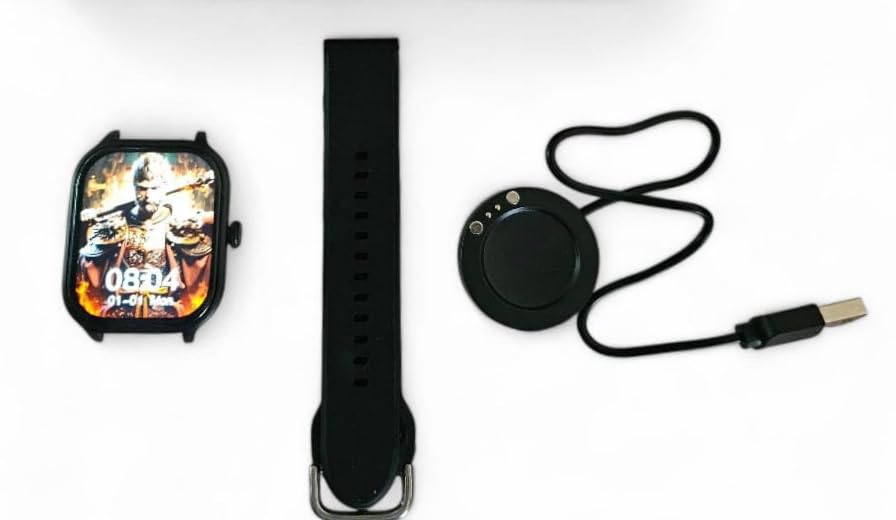
The H9 Pro Max Smart Watch face, a black silicone strap, and the circular USB charging dock laid out separately.
3.2. Powering On/Off
- To Power On: Press and hold the side button until the screen illuminates.
- To Power Off: Press and hold the side button, then select the 'Power Off' option on the screen.
3.3. Strap Installation
The H9 Pro Max Smart Watch comes with interchangeable straps. To attach or change a strap, align the spring bar with the lug holes on the watch body and gently push until it clicks into place. Ensure both ends of the spring bar are securely seated.
3.4. App Installation and Device Pairing
To unlock the full functionality of your smartwatch, download the companion application on your smartphone. The app is compatible with both Android and iOS devices.
- Scan the QR code in the user manual (if provided) or search for the official app in your smartphone's app store.
- Install the application on your smartphone.
- Enable Bluetooth on your smartphone.
- Open the app and follow the on-screen instructions to pair your H9 Pro Max Smart Watch. Ensure the watch is powered on and within Bluetooth range of your phone.
4. Operating Your Smart Watch
4.1. Basic Navigation
The H9 Pro Max Smart Watch features a responsive touchscreen display for navigation:
- Swipe Up/Down: Scroll through menus or notifications.
- Swipe Left/Right: Access different widgets or quick settings.
- Tap: Select an item or confirm an action.
- Press Side Button: Return to the home screen or activate a specific function (configurable in settings).
4.2. Customizing Watch Faces
Personalize your smartwatch by changing the watch face. You can select from various pre-installed designs or download additional options through the companion app. To change the watch face directly on the device, press and hold the current watch face, then swipe left or right to browse available options and tap to select.

A close-up view of the H9 Pro Max Smart Watch display, showing a customized watch face with time and date.
4.3. Smart Features
The H9 Pro Max Smart Watch offers several features to support your daily activities and health monitoring:
- Activity Tracker: Monitors steps taken, distance covered, and calories burned.
- Heart Rate Monitor: Provides real-time heart rate readings.
- Sleep Monitor: Tracks sleep patterns and quality.
Access these features through the watch's menu or the companion app for detailed insights and historical data.
4.4. Notifications
Once paired with your smartphone, the H9 Pro Max Smart Watch can display notifications for calls, messages, and app alerts. Ensure notification permissions are enabled in both your phone's settings and the companion app.
5. Maintenance
5.1. Cleaning
To maintain the appearance and functionality of your smartwatch:
- Wipe the screen and watch body with a soft, lint-free cloth.
- For stubborn smudges, slightly dampen the cloth with water. Avoid using harsh chemicals or abrasive materials.
- Clean the charging contacts periodically to ensure efficient charging.
5.2. Battery Care
To prolong battery life:
- Avoid extreme temperatures, as they can degrade battery performance.
- Charge the watch regularly, but avoid leaving it fully discharged for extended periods.
- If storing the watch for a long time, charge it to about 50% before storage.
6. Troubleshooting
If you encounter issues with your H9 Pro Max Smart Watch, try the following common troubleshooting steps:
- Watch not powering on: Ensure the watch is fully charged. Connect it to the charger for at least 30 minutes.
- Cannot pair with smartphone: Check that Bluetooth is enabled on your phone and the watch. Restart both devices and try pairing again. Ensure the companion app has necessary permissions.
- Inaccurate health data: Ensure the watch is worn snugly on your wrist, not too tight or too loose. Clean the sensor on the back of the watch.
- Notifications not appearing: Verify that notifications are enabled in your phone's settings and within the smartwatch companion app. Check that the watch is connected via Bluetooth.
- Screen unresponsive: Try restarting the watch by pressing and holding the side button. If unresponsive, allow the battery to fully drain and then recharge.
7. Product Specifications
| Feature | Specification |
|---|---|
| Brand | Laxasfit |
| Model | H9 Pro Max |
| Display Size | 1.9 Inches |
| Display Type | Digital |
| Operating System Compatibility | Android, iOS |
| Compatible Devices | Smartphones |
| Special Features | Activity Tracker, Heart Rate Monitor, Sleep Monitor |
| Memory Storage Capacity | 1 MB |
| Battery Type | Lithium Metal (Built-in) |
| Battery Average Life | Up to 1 Day |
| Charging Time | 2 Hours |
| Wireless Connectivity | Bluetooth |
| Connector Type | USB |
| Primary Interface | Touchscreen |
| Materials | Metal, Plastic |
| Item Weight | 85 g |
| Package Dimensions | 15 x 12 x 8.5 cm |
8. Warranty and Support
Your Laxasfit H9 Pro Max Smart Watch comes with a 3-month warranty from the date of purchase. This warranty covers manufacturing defects under normal use. Please retain your proof of purchase for warranty claims.
For technical assistance, troubleshooting beyond this manual, or warranty inquiries, please refer to the contact information provided with your purchase documentation or visit the official Laxasfit support website.


