
1. Introduction
This manual provides detailed instructions for the operation and maintenance of your THOMSON CP202T Radio Alarm Clock with Projector. Please read this manual thoroughly before using the device to ensure proper function and safety.
Safety Information
- Ensure the device is placed on a stable, flat surface.
- Do not expose the device to extreme temperatures, direct sunlight, or high humidity.
- Keep the device away from water or other liquids.
- Do not attempt to disassemble or repair the device yourself. Contact qualified service personnel.
- Use only the provided power adapter.
2. Package Contents
Verify that all items listed below are included in your package:
- THOMSON CP202T Radio Alarm Clock
- USB-A / USB-C Charging Cable
- USB-A Power Adapter
- Instruction Manual (this document)

Image: Packaging contents of the THOMSON CP202T Radio Alarm Clock, showing the device, charging cables, power adapter, and instruction manual.
3. Product Overview
Familiarize yourself with the various parts and controls of your THOMSON CP202T Radio Alarm Clock.

Image: Rear view of the THOMSON CP202T Radio Alarm Clock, highlighting its various buttons, ports, and features with corresponding numbers.
- Adjustable Clock Projector: Used to project the time onto a surface.
- Snooze, Dimming, FM Radio Off: Button for snooze function, display dimming, and turning off FM radio.
- FM Radio On, FM Radio Auto Search, Time Setting, Sleep Time Setting: Multi-function button for FM radio control and time/sleep settings.
- Clock Projector On/Off, Clock Projector Direction Adjustment: Controls the projector and its orientation.
- Value Down, Display Date, Change Temperature Unit: Decreases values, displays date, and switches between Celsius/Fahrenheit.
- Value Up, Night Display Brightness: Increases values and adjusts night display brightness.
- Alarm 1 On/Off, Alarm 1 Adjustment, Volume Down: Controls Alarm 1 and decreases volume.
- Alarm 2 On/Off, Alarm 2 Adjustment, Volume Up: Controls Alarm 2 and increases volume.
- Speaker: Audio output.
- Pigtail Antenna & Temperature Sensor: For FM radio reception and environmental temperature sensing.
- Compartment for Backup Battery (CR2032): Holds the battery for time memory during power outages.
- USB-C Output Port (5V / 1A DC): For charging external devices.
4. Setup
4.1. Power Connection
- Connect the USB-C end of the charging cable to the DC IN port on the back of the alarm clock.
- Connect the USB-A end of the charging cable to the provided USB-A power adapter.
- Plug the power adapter into a standard wall outlet. The display will light up.
4.2. Backup Battery Installation
To retain time settings during a power outage, install a CR2032 button cell battery (not included).
- Locate the backup battery compartment (11) on the back of the unit.
- Open the compartment cover.
- Insert one CR2032 battery with the positive (+) side facing up.
- Close the compartment cover securely.
4.3. Initial Time Setting
- Press and hold the Time Setting button (3) until the hour digits flash.
- Use the Value Up (6) or Value Down (5) buttons to adjust the hour.
- Press the Time Setting button (3) again to confirm the hour and move to minute setting.
- Use the Value Up (6) or Value Down (5) buttons to adjust the minutes.
- Press the Time Setting button (3) again to confirm the minutes.
- To switch between 12-hour and 24-hour format, press the Time Setting button (3) while the time is flashing.
5. Operating Instructions
5.1. Display Brightness Adjustment
The main display brightness can be adjusted to 4 levels or turned off completely.
- Press the Snooze/Dimming button (2) repeatedly to cycle through brightness levels (High, Medium, Low, Off).
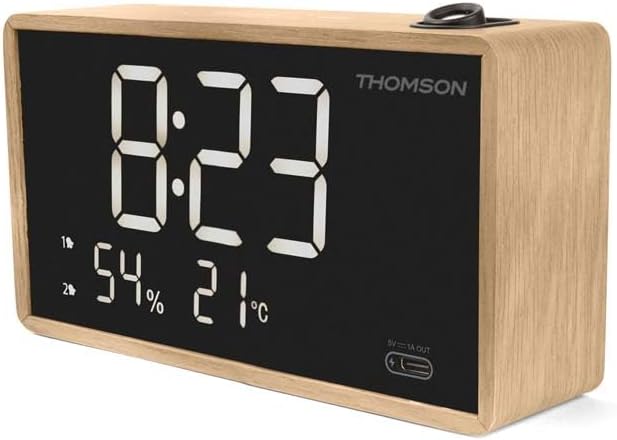
Image: Front view of the THOMSON CP202T Radio Alarm Clock, showing the digital display with time, humidity percentage, and temperature in Celsius.
5.2. Setting Alarms (Alarm 1 & Alarm 2)
The device features two independent alarms.
- Press and hold the Alarm 1 Adjustment button (7) or Alarm 2 Adjustment button (8) until the alarm hour flashes.
- Use the Value Up (6) or Value Down (5) buttons to adjust the alarm hour.
- Press the respective alarm button again to confirm the hour and move to minute setting.
- Use the Value Up (6) or Value Down (5) buttons to adjust the alarm minutes.
- Press the respective alarm button again to confirm the minutes.
- Choose alarm source: Press the alarm button again to select between FM radio or buzzer.
- Press the respective alarm button one last time to save the settings.
To activate/deactivate an alarm, briefly press the Alarm 1 On/Off button (7) or Alarm 2 On/Off button (8). An indicator icon will appear on the display when an alarm is active.
5.3. Snooze Function
When an alarm sounds, press the Snooze button (2) to temporarily silence the alarm for approximately 9 minutes. The alarm will sound again after the snooze period.
5.4. FM Radio Operation
- Turn On/Off: Press the FM Radio On button (3) to turn the radio on or off.
- Auto Search & Save Stations: When the radio is on, press and hold the FM Radio Auto Search button (3) to automatically scan and save available FM stations. The device can store up to 20 stations.
- Select Stations: Use the P- (5) and P+ (6) buttons to navigate through saved preset stations.
- Adjust Volume: Use the V- (7) and V+ (8) buttons to adjust the radio volume.
- Sleep Timer: While the radio is on, press the Sleep Time Setting button (3) repeatedly to set a sleep timer (e.g., 15, 30, 60, 90 minutes). The radio will automatically turn off after the set time.
5.5. Time Projection Feature
The alarm clock can project the time onto your ceiling or wall.
- Activate/Deactivate: Press the Clock Projector On/Off button (4) to turn the projector on or off.
- Adjust Projection Angle: Manually rotate the projector lens (1) to adjust the projection angle.
- Invert Projection: Press and hold the Clock Projector Direction Adjustment button (4) to invert the projected time by 180 degrees, ensuring it is always readable.

Image: A close-up view of the THOMSON CP202T's time projection feature, showing the digital time clearly displayed on a surface.

Image: The THOMSON CP202T Radio Alarm Clock placed on a nightstand, projecting the current time onto the ceiling in a dimly lit room.
5.6. Temperature and Humidity Display
The device displays real-time temperature and humidity.
- The temperature and humidity are displayed automatically on the main screen.
- To switch between Celsius (°C) and Fahrenheit (°F), press and hold the Value Down button (5).
5.7. USB-C Charging Port
The front-facing USB-C port (12) can be used to charge compatible devices.
- Connect your smartphone or other USB-C compatible device to the USB-C output port (12) using a suitable charging cable.
- The port provides 5V / 1A DC output.

Image: The THOMSON CP202T Radio Alarm Clock on a nightstand, with a smartphone connected and charging via the integrated USB-C port.
6. Maintenance
- Clean the device with a soft, dry cloth. Do not use abrasive cleaners or solvents.
- Ensure the ventilation openings are clear of dust and debris.
- If the device will not be used for an extended period, disconnect it from the power outlet and remove the backup battery.
7. Troubleshooting
| Problem | Possible Cause | Solution |
|---|---|---|
| Device does not power on. | Power adapter not connected or faulty outlet. | Ensure the power adapter is securely connected and the outlet is functional. Try a different outlet. |
| Time display is incorrect. | Time not set correctly or backup battery depleted. | Refer to "4.3. Initial Time Setting" to set the time. Replace the CR2032 backup battery if necessary. |
| Alarm does not sound. | Alarm not activated or volume too low. | Ensure the alarm is activated (icon visible on display). Increase alarm volume using V+ button (8). |
| FM radio reception is poor. | Antenna not extended or poor signal area. | Fully extend the pigtail antenna (10) and adjust its position for better reception. |
| Projected time is too bright or unclear. | Projector brightness is fixed, but clarity can be adjusted. | The projector brightness is not adjustable. Ensure the projector lens (1) is clean. Adjust the angle and distance to the projection surface for optimal clarity. |
| USB-C charging not working. | Device not compatible or cable faulty. | Ensure your device is compatible with 5V/1A charging. Try a different USB-C cable. |
8. Specifications
- Brand: THOMSON
- Model: CP202T
- Color: Wood and Black
- Dimensions (L x W x H): 15.5 cm x 3.81 cm x 9 cm (approx. 9 x 3.81 x 15 cm)
- Weight: 250 grams
- Material: Wood, Plastic
- Display Type: Digital
- Power Source: Electrical Cable
- USB-C Output: 5V / 1A DC
- Features: Adjustable Time Projection, Dual Programmable Alarm (Week/Weekend), Adjustable Screen Brightness (4 Levels + OFF), USB-C Charging Port, Temperature and Humidity Display, FM Radio with 20 Presets, Sleep Timer.

Image: The THOMSON CP202T Radio Alarm Clock with its dimensions (length, width, height) clearly indicated in centimeters.
9. Warranty and Support
For warranty information or technical support, please contact THOMSON customer service.
- Email Support: support@bigben.fr
- Online Manual: For the most up-to-date manual and additional resources, please visit the official product page or scan the QR code provided in the packaging. A link to the online manual is available at: https://opn.to/a/UPdoGl


