
1. Introduction
The EF EcoFlow DELTA 3 Ultra is a high-capacity portable power station designed to provide reliable power for various applications, including home backup, outdoor activities, and emergency situations. Featuring a 3072Wh LiFePO4 battery and a 3600W (7200W surge) AC output, it is capable of powering a wide range of appliances and devices.
This manual provides essential information for the safe and efficient operation, maintenance, and troubleshooting of your DELTA 3 Ultra power station. Please read it thoroughly before use and retain it for future reference.

Image 1.1: The EF EcoFlow DELTA 3 Ultra Portable Power Station, showcasing its front panel with display and various output ports.
2. Safety Instructions
To ensure safe operation, always follow these guidelines:
- Do not disassemble, repair, or modify the unit.
- Keep the unit away from heat sources, direct sunlight, and flammable materials.
- Avoid exposure to water or other liquids.
- Use only original or certified accessories.
- Ensure proper ventilation during use and charging.
- Keep out of reach of children and pets.
- Do not operate the unit if it has been damaged.
3. Product Overview
The DELTA 3 Ultra features a robust design with integrated wheels for portability. Its front panel includes a clear display and multiple output ports for diverse power needs.
3.1 Key Features
- High Capacity: 3072Wh LiFePO4 battery for extended power supply.
- Powerful Output: 3600W continuous AC output (7200W surge) to run heavy-duty appliances.
- X-Quiet 3.0 Technology: Ensures quiet operation, as low as 25dB under loads below 600W.
- Uninterruptible Power Supply (UPS): Automatic switch to battery mode in less than 10 milliseconds for critical devices.
- Multiple Charging Options: Supports wall, solar, car, and EcoFlow Smart Generator charging.
- Durable Battery: EV-grade LiFePO4 cells designed for 10 years of daily use.
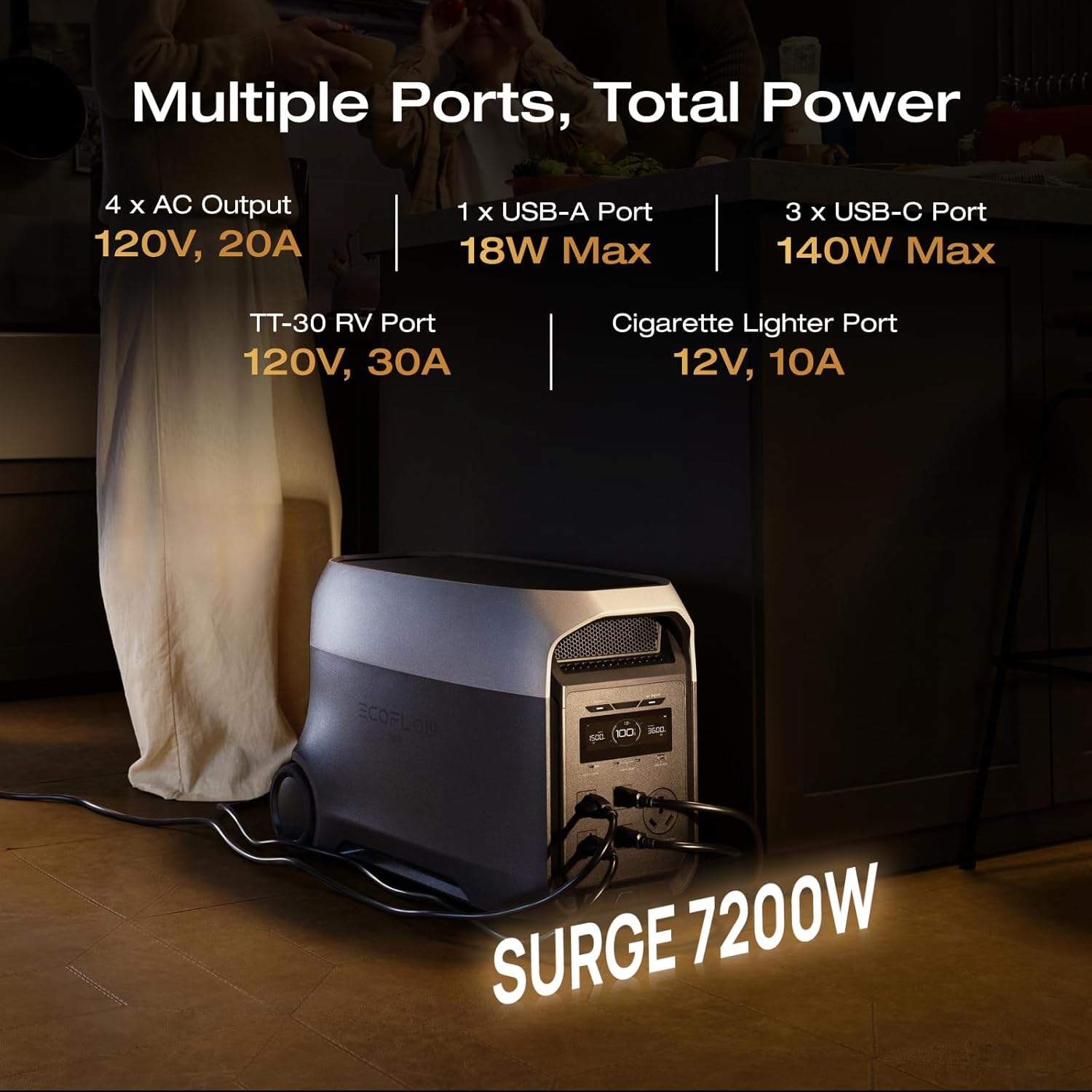
Image 3.1: The front panel of the DELTA 3 Ultra, illustrating its various output ports including AC, USB-A, USB-C, TT-30 RV, and cigarette lighter port.
3.2 Battery Technology
The DELTA 3 Ultra utilizes automotive-grade full-tab LFP (LiFePO4) cells, known for their long lifespan and enhanced safety. This EV-grade CTC (Cell-to-Chassis) structure provides drop resistance and ensures stable power delivery even in challenging environments.

Image 3.2: An illustration of the internal automotive-grade full-tab LFP cells, highlighting their robust construction for durability and reliability.
4. Charging the DELTA 3 Ultra
The DELTA 3 Ultra offers multiple charging methods to ensure you are always prepared.
4.1 Charging Methods
- Wall Charging: Connect to a standard AC wall outlet for fast charging.
- Solar Charging: Connect compatible solar panels (sold separately) for eco-friendly charging.
- Car Charging: Use the car charger to charge from your vehicle's 12V outlet.
- EcoFlow Smart Generator: Connect to an EcoFlow Smart Generator for additional charging flexibility.

Image 4.1: Visual representation of the four charging methods: wall charging, generator charging, solar charging, and alternator charging, with their respective input wattages.
5. Operating the DELTA 3 Ultra
The DELTA 3 Ultra is designed for ease of use, providing power to various devices through its multiple output ports.
5.1 Powering Devices
Connect your devices to the appropriate output ports. The DELTA 3 Ultra can power a wide range of electronics and appliances:
- AC Output: For household appliances like refrigerators, microwaves, and power tools.
- USB-A/USB-C Output: For charging smartphones, tablets, laptops, and other USB-powered devices.
- TT-30 RV Port: Specifically designed for RV power needs.
- Cigarette Lighter Port: For 12V DC devices.

Image 5.1: The DELTA 3 Ultra powering common kitchen appliances such as a microwave, refrigerator, blender, and coffee maker, with estimated runtimes.

Image 5.2: The DELTA 3 Ultra providing power to entertainment electronics like a 50" TV, PS5, speaker, and projector, with estimated runtimes.

Image 5.3: The DELTA 3 Ultra powering office equipment such as a laptop, Wi-Fi router, NAS, and PC, with estimated runtimes.

Image 5.4: The DELTA 3 Ultra connected to an RV, demonstrating its utility for mobile power needs, including powering a heated blanket, electric grill, electric kettle, and mini-fridge.

Image 5.5: The DELTA 3 Ultra powering various garage tools such as a circular saw, electric drill, cutting machine, and water pump, with estimated runtimes.
5.2 Uninterruptible Power Supply (UPS) Function
The DELTA 3 Ultra can function as an Uninterruptible Power Supply (UPS). When connected to a wall outlet and powering devices, it automatically switches to battery power in less than 10 milliseconds during a power outage, ensuring continuous operation for sensitive electronics.
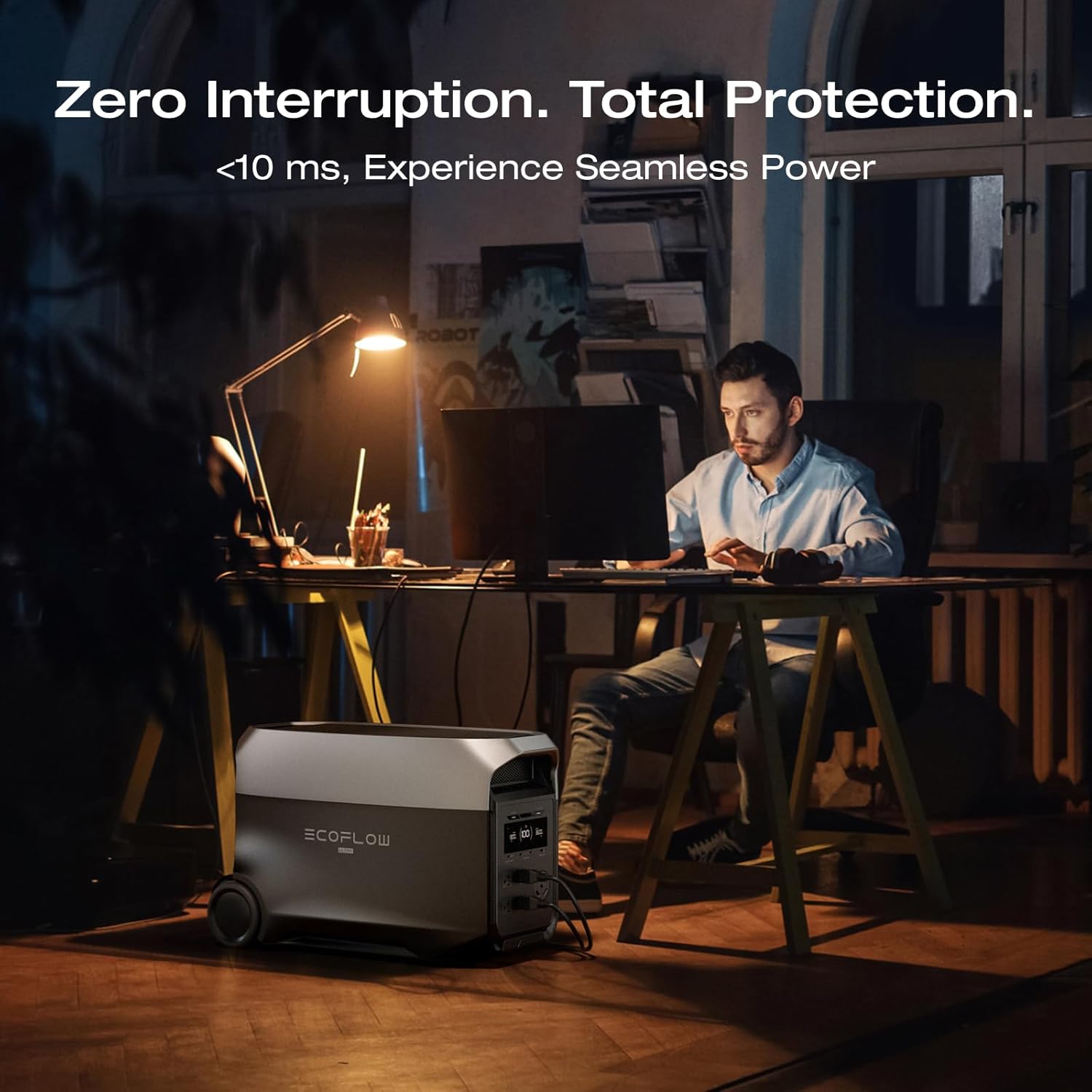
Image 5.6: A user working on a computer, with the DELTA 3 Ultra providing seamless power backup during an outage, demonstrating its <10ms UPS capability.
5.3 Quiet Operation
Thanks to X-Quiet 3.0 technology and advanced cooling, the DELTA 3 Ultra operates at a low noise level, making it suitable for indoor use, including bedrooms and quiet workspaces.

Image 5.7: The DELTA 3 Ultra operating quietly in a bedroom while a person sleeps, highlighting its 25dB whisper-quiet operation under loads below 600W.
5.4 EcoFlow App Integration
Monitor and control your DELTA 3 Ultra using the EcoFlow app. The app provides real-time data on power usage, solar generation, and allows for scheduled charging/discharging to optimize energy costs.

Image 5.8: Screenshots of the EcoFlow mobile application interface, showing output monitoring, solar generation data, and scheduled tasks for efficient power management.
6. Maintenance and Storage
Proper maintenance and storage will extend the lifespan of your DELTA 3 Ultra.
6.1 General Maintenance
- Clean the unit with a dry, soft cloth. Do not use harsh chemicals or solvents.
- Keep ventilation openings clear of dust and debris.
- Regularly check cables and connections for damage.
6.2 Battery Care and Storage
- Store the unit in a dry, well-ventilated area, away from direct sunlight and extreme temperatures.
- For long-term storage, charge the battery to approximately 50-80% every 3 months to maintain battery health.
- Avoid fully discharging the battery for extended periods.
7. Troubleshooting
If you encounter issues with your DELTA 3 Ultra, refer to the following common problems and solutions:
| Problem | Possible Cause | Solution |
|---|---|---|
| Unit does not turn on | Battery is fully discharged or unit is off. | Charge the unit. Press and hold the power button for a few seconds. |
| AC output not working | AC function is not enabled or overload protection activated. | Ensure AC button is pressed. Reduce load if overloaded. |
| Slow charging | Charging mode setting, environmental temperature, or faulty cable. | Check charging settings in the app. Ensure optimal temperature. Use original charging cables. |
| Display shows error code | Internal system error. | Refer to the EcoFlow app or contact customer support with the error code. |
For more detailed troubleshooting or issues not listed here, please consult the EcoFlow app or contact customer support.
8. Technical Specifications
Detailed specifications for the EF EcoFlow DELTA 3 Ultra Portable Power Station.
| Feature | Specification |
|---|---|
| Brand | EF ECOFLOW |
| Model Name | DELTA 3 Ultra |
| Item Model Number | EF-DL-H01-3U |
| Battery Capacity | 3072 Watt-hours (Wh) |
| Battery Type | LiFePO4 |
| AC Output | 3600W (Surge 7200W), 120V |
| Power Source | Solar Powered, Wall Outlet, Car, Smart Generator |
| Item Weight | 72.1 Pounds |
| Product Dimensions | 24.6"L x 12.9"W x 15.6"H |
| Material | ABS |
| Special Feature | Portable, UPS Function, Quiet Operation |
| UPC | 842783192042 |
9. Warranty and Support Information
For warranty details, product registration, and customer support, please visit the official EF ECOFLOW website or contact their customer service directly. Keep your purchase receipt as proof of purchase for warranty claims.
Online Resources: www.ecoflow.com


