
1. Introduction
This manual provides essential instructions for the safe and efficient operation of your EF ECOFLOW DELTA 3 Max Plus Portable Power Station. Please read this manual thoroughly before using the product to ensure proper handling and to prevent damage or injury. Keep this manual for future reference.
The DELTA 3 Max Plus is a high-capacity portable power station designed for various applications, including home backup, outdoor activities, and emergency power needs. It features a LiFePO4 battery, multiple charging options, and a robust output capacity.

Image 1.1: The EF ECOFLOW DELTA 3 Max Plus Portable Power Station, showcasing its compact design and a small power bank accessory.
2. Safety Instructions
Adhering to these safety guidelines is crucial for preventing electric shock, fire, or serious injury.
- Do not disassemble, repair, or modify the unit.
- Do not place the unit near fire or expose it to heat.
- Do not use or store the unit in a bathroom or in an area exposed to water or rain.
- Do not use the unit in an environment with strong static electricity or magnetic fields.
- Do not use non-ECOFLOW components.
- Do not block the ventilation openings.
- Do not use the unit if it is damaged or appears to be damaged.
- Keep the unit out of reach of children and pets.
- Operate the unit in a well-ventilated area.
- Ensure proper grounding when connecting to external devices.
3. Package Contents
Verify that all items are present in your package. If any items are missing or damaged, please contact customer support.
- EF ECOFLOW DELTA 3 Max Plus Portable Power Station
- AC Charging Cable
- Car Charging Cable
- Solar Charging Cable (MC4 to XT60)
- User Manual
4. Product Overview
The DELTA 3 Max Plus features a clear display and various input/output ports for versatile power management.
4.1. Front Panel
Image 4.1: Front panel of the DELTA 3 Max Plus, highlighting the display, USB-C, USB-A, and AC outlets.
- LCD Display: Shows battery level, input/output wattage, and status indicators.
- USB-C Ports: For charging compatible devices.
- USB-A Ports: For charging compatible devices.
- AC Outlets: Standard household outlets for powering appliances.
- DC Output: For DC-powered devices.
4.2. Rear Panel
The rear panel typically houses the AC input port, solar/car charging input, and ventilation. Refer to the unit for exact port locations.
5. Setup
5.1. Initial Charge
Before first use, fully charge the DELTA 3 Max Plus. Connect the AC charging cable to the unit's AC input port and then to a wall outlet. The LCD display will show the charging status. A full charge from 0% to 80% can be achieved in approximately 64 minutes using AC charging.

Image 5.1: The DELTA 3 Max Plus connected to a wall outlet for AC charging.
5.2. Powering On/Off
Press and hold the main power button for 3 seconds to turn the unit on or off. Briefly press the AC or DC power buttons to enable or disable their respective outputs.
6. Operating Instructions
6.1. Charging the DELTA 3 Max Plus
The unit supports multiple charging methods:
- AC Wall Outlet: Connect the AC charging cable. 0-80% in 64 minutes.
- Solar Panels: Connect compatible solar panels via the solar charging cable. 0-80% in approximately 96 minutes with optimal solar input.
- Car Charger: Use the car charging cable to charge from your vehicle's 12V/24V outlet.
- Smart Generator: Connect to an EcoFlow Smart Generator for rapid charging. 0-80% in 43 minutes.
- PV + Car Charging: Combine solar and car charging for faster results. 0-80% in 51 minutes.

Image 6.1: Visual representation of the five charging methods available for the DELTA 3 Max Plus.
6.2. Powering Devices
Connect your devices to the appropriate output ports (AC, USB-A, USB-C, DC). Ensure the respective output button is enabled.

Image 6.2: The power station in a kitchen setting, demonstrating its ability to power various appliances.
6.3. X-Boost Feature
The X-Boost feature allows the DELTA 3 Max Plus to power devices requiring up to 3800W, even though its rated output is 3000W. This is achieved by reducing the voltage and current to allow high-wattage devices to operate without overloading the unit. This feature is ideal for resistive loads like heaters or power tools.

Image 6.3: The power station connected to a circular saw, illustrating the X-Boost capability for high-power tools.
6.4. Uninterruptible Power Supply (UPS)
When connected to an AC wall outlet, the DELTA 3 Max Plus can function as an Uninterruptible Power Supply (UPS). In the event of a power outage, it automatically switches to battery power in under 10 milliseconds, providing seamless power to connected devices. This protects sensitive electronics like computers and medical equipment from data loss or interruption.

Image 6.4: The power station providing backup power in a kitchen, demonstrating its UPS functionality.
6.5. Smart App Control
Download the EcoFlow app to monitor and control your DELTA 3 Max Plus remotely. The app allows you to check battery levels, adjust charging/discharging settings, set output priorities, and optimize energy usage. This includes features like Smart Power Reserve to shed non-essential loads during outages.
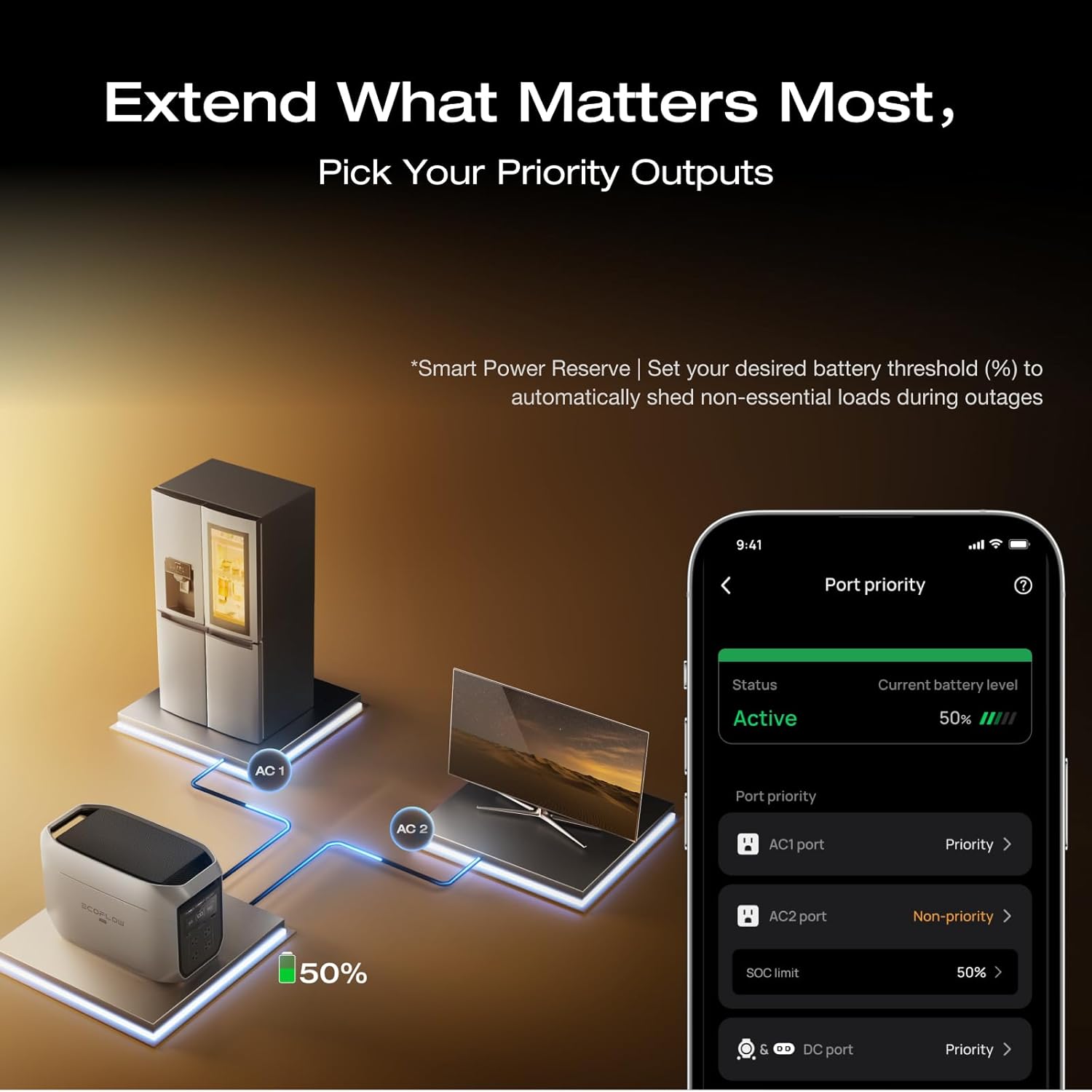
Image 6.5: A smartphone displaying the EcoFlow app, illustrating remote control and monitoring capabilities for the power station.
6.6. Expandable Capacity
The DELTA 3 Max Plus's capacity can be expanded from 2048Wh up to 10kWh by connecting additional EcoFlow Smart Extra Batteries. This allows for extended power duration for longer trips or whole-home backup.

Image 6.6: The DELTA 3 Max Plus shown with optional extra battery units, demonstrating its expandable capacity.
7. Maintenance
7.1. Storage
Store the unit in a dry, well-ventilated area, away from direct sunlight and extreme temperatures. For long-term storage, discharge the battery to 30% and recharge to 60% every 3 months to prolong battery life.
7.2. Cleaning
Use a dry, soft cloth to clean the surface of the unit. Do not use harsh chemicals or immerse the unit in water.
7.3. Battery Care
The DELTA 3 Max Plus uses a LiFePO4 battery designed for long life (10 years of daily use). Avoid fully discharging the battery frequently, as this can reduce its overall lifespan. Operate within recommended temperature ranges.
8. Troubleshooting
| Problem | Possible Cause | Solution |
|---|---|---|
| Unit does not power on. | Battery is fully discharged; Power button not pressed long enough. | Charge the unit; Press and hold the power button for 3 seconds. |
| AC outlets not working. | AC output not enabled; Overload protection activated. | Press the AC power button; Reduce connected load, then restart AC output. |
| Slow charging. | Environmental temperature too high/low; Charging cable issue; Solar input insufficient. | Charge within recommended temperature range; Check cable connections; Ensure solar panels are in direct sunlight. |
| App connection issues. | Bluetooth/Wi-Fi off; Unit too far from phone; App outdated. | Ensure Bluetooth/Wi-Fi is on; Move closer to the unit; Update the EcoFlow app. |
If the problem persists, please contact EF ECOFLOW customer support.
9. Specifications
| Feature | Detail |
|---|---|
| Brand | EF ECOFLOW |
| Model Name | EF ECOFLOW Solar Generator DELTA 3 MAX Plus Power station |
| Model Number | EF-DL3-MP |
| Battery Type | LiFePO4 |
| Capacity | 2048Wh (Expandable up to 10kWh) |
| AC Output | 3000W (Pure Sine Wave, 3800W with X-Boost) |
| AC Input | 1800W Max (X-Stream fast charging) |
| Solar Input | 1000W Max |
| Car Charging Input | 12V/24V, 8A |
| UPS Switch Time | Less than 10ms |
| Dimensions (L x W x H) | 9.52"L x 12"W x 19.44"H |
| Weight | 49 Pounds |
| Operating Noise Level | 25 dB (under 600W load) |
10. Warranty and Support
The EF ECOFLOW DELTA 3 Max Plus comes with an extended 5-year service. For detailed warranty terms and conditions, please refer to the official EF ECOFLOW website or contact customer support.
Customer Support:
For technical assistance, warranty claims, or general inquiries, please visit the official EF ECOFLOW website or contact their support team directly. Contact information can typically be found on the product packaging or the official website.
You can also visit the EF ECOFLOW Store on Amazon for more product information and support resources.


