
1. Introduction
The KINGBOLEN S608 is an advanced OBD2 diagnostic tool designed for comprehensive vehicle system analysis. It supports diagnostics for Engine Control Module (ECM), Transmission Control Module (TCM), Supplemental Restraint System (SRS), and Anti-lock Braking System (ABS). Featuring bidirectional control, 9 reset functions, and compatibility with CAN-FD and FCA protocols, the S608 provides a powerful solution for vehicle maintenance and troubleshooting.
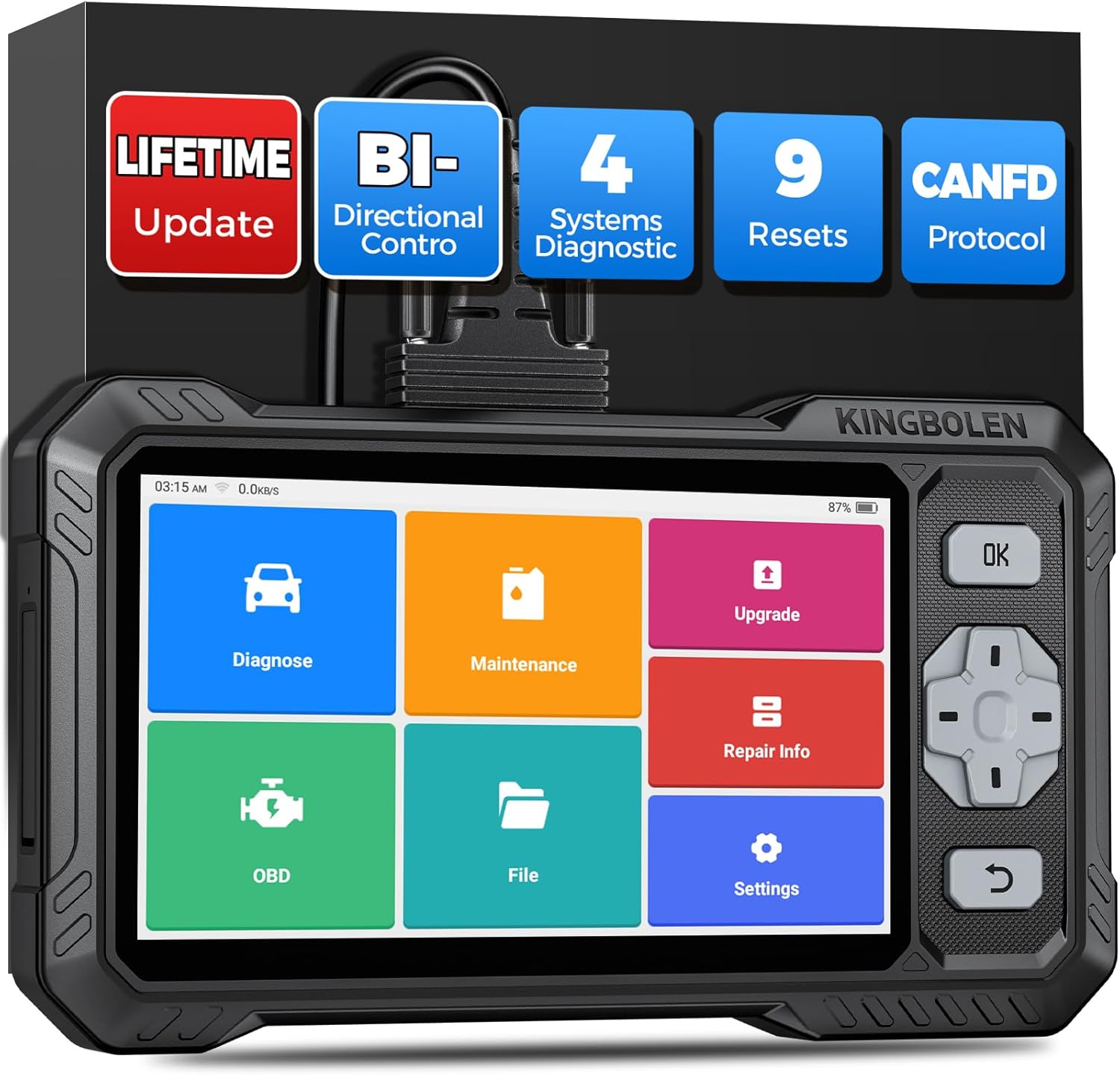
Image: The KINGBOLEN S608 diagnostic tool, showcasing its 6.2-inch display and robust design.
This manual provides detailed instructions to help you effectively use your S608 device.
2. What's in the Box
Upon opening your KINGBOLEN S608 package, you should find the following components:
- KINGBOLEN S608 Diagnostic Device
- 1.2m Diagnostic Extension Cable
- USB Type-C Cable (for charging and data transfer)
- Product Instruction Manual
3. Setup
3.1 Initial Power-On and Configuration
- Charge the Device: Connect the S608 to a power source using the provided USB Type-C cable. Ensure the device is fully charged before first use. The device features a 4150 mAh battery.
- Power On: Press and hold the power button located on the top of the device until the screen illuminates.
- Initial Setup: Follow the on-screen prompts to select your preferred language (supports 28 languages), connect to a Wi-Fi network, and set the time zone.
- Software Updates: It is recommended to perform a one-touch software update immediately after connecting to Wi-Fi to ensure you have the latest vehicle coverage and functions. Updates are free for life.

Image: Illustration of the device receiving lifetime free software updates via cloud.
3.2 Connecting to a Vehicle
- Locate the vehicle's OBD2 port, typically under the dashboard on the driver's side.
- Connect the diagnostic extension cable to the S608 device.
- Plug the other end of the diagnostic cable into the vehicle's OBD2 port.
- Turn the vehicle's ignition to the 'ON' position (engine off).
- The S608 will automatically establish communication with the vehicle.
4. Operating Instructions
The KINGBOLEN S608 features an intuitive 6.2-inch touchscreen interface. Navigate through the menus by tapping icons or using the physical buttons on the right side of the device.
4.1 4-System Diagnostics (ECM/TCM/SRS/ABS)
This function allows you to read and clear fault codes, view live data, and retrieve vehicle information for the Engine, Transmission, Airbag (SRS), and Anti-lock Braking System (ABS).
- From the main menu, select the "Diagnose" icon.
- Choose the vehicle make and model. The device supports automatic VIN detection for faster identification.
- Select "System Scan" or choose a specific system (ECM, TCM, SRS, ABS) to perform diagnostics.
- Review the displayed Diagnostic Trouble Codes (DTCs) and their descriptions.
- You can view live data streams in graphical format for detailed analysis.

Image: The S608 display showing a 4-system diagnostic scan with identified fault codes for Engine, ABS, and Transmission.
4.2 Bidirectional Control / Active Test
The bidirectional control feature allows the S608 to send commands to vehicle ECUs to perform functional tests and verify component operation without manual intervention. This helps in quickly identifying problematic components.
- Examples include turning on/off the radiator fan, modulating the throttle, and testing fuel pumps/valves.
- Access this function through the "Diagnose" menu after selecting the vehicle and system.

Image: Visual representation of bidirectional control, showing the device sending commands to vehicle components like the radiator fan and throttle.
4.3 Special Reset Functions
The S608 offers 9 commonly used reset and maintenance functions. These functions are permanently free to use and update.
- Oil Reset
- EPB (Electronic Parking Brake) Reset
- ABS Bleeding
- SAS (Steering Angle Sensor) Calibration
- DPF (Diesel Particulate Filter) Regeneration
- Injector Coding
- BMS (Battery Management System) Matching
- Throttle Adaptation
- Gear Learning
Note: Availability of specific functions may vary by vehicle make, model, and year. Always check compatibility before performing a reset function.

Image: Icons representing the 9 special reset functions available on the S608.
4.4 OBD2 Full Functions
The S608 supports all 10 OBD2 test modes for comprehensive emission-related diagnostics:
- Read/Clear DTCs
- Live Data Stream
- I/M Readiness Status
- Freeze Frame Data
- O2 Sensor Test
- On-Board Monitor Test
- EVAP System Test
- Vehicle Information
- Component Test
- DTC Lookup
4.5 Auto VIN and Compatibility
The S608 features automatic VIN detection to quickly identify vehicle information. It supports over 140 global automotive brands and more than 10,000 vehicle models, including those compatible with CAN-FD and FCA protocols.
Note: For FCA and Renault SGW protocols, a separate authorized account (e.g., AutoAuth) may be required. Please verify compatibility for your specific vehicle before purchase.

Image: A digital interface displaying the Auto VIN scan feature, showing a vehicle identification number.

Image: A map highlighting vehicle compatibility across America, Europe, and Asia, with logos of various car brands.
5. Maintenance
5.1 Software Updates
The KINGBOLEN S608 offers lifetime free software updates. Regularly updating your device ensures access to the latest vehicle models, diagnostic functions, and bug fixes. Connect the device to a stable Wi-Fi network and navigate to the "Upgrade" section on the main menu to perform updates.
5.2 Battery Care
The device is equipped with a 4150 mAh battery. To prolong battery life:
- Avoid extreme temperatures.
- Charge the device regularly, avoiding complete discharge.
- If storing for extended periods, ensure the battery is charged to approximately 50-70%.
6. Troubleshooting
6.1 Diagnostic Trouble Code (DTC) Lookup
The S608 includes an integrated DTC library. When a fault code is displayed, you can use the lookup function to get a detailed description and potential troubleshooting tips. This feature can also link to online search for more information.

Image: A screen displaying a 4-in-1 data stream, showing multiple live data parameters in graphical form for detailed analysis.
6.2 Common Issues and Solutions
- Device not powering on: Ensure the device is charged. If the issue persists, contact support.
- No communication with vehicle: Verify the OBD2 cable is securely connected to both the device and the vehicle. Ensure the vehicle's ignition is on. Check vehicle compatibility.
- Software update failure: Ensure a stable Wi-Fi connection. Restart the device and try again.
7. Specifications
| Feature | Specification |
|---|---|
| Model Number | S608 |
| Display Screen | 6.2-inch HD Touchscreen (1024*600) |
| Operating System | Android 8.1 |
| Processor | Quad-core |
| RAM | 2 GB |
| ROM (Storage) | 32 GB |
| Battery Capacity | 4150 mAh |
| Connectivity | Wi-Fi, Bluetooth 4.0 |
| Supported Protocols | OBD2, EOBD, CAN-FD, FCA, Renault SGW |
| Dimensions | 26 cm (L) x 16 cm (W) x 7 cm (H) |
| Weight | 1.02 kg |

Image: Technical diagram illustrating the 6.2-inch touchscreen dimensions of the S608 device.
8. Warranty and Support
8.1 Software Updates
The KINGBOLEN S608 comes with permanent free software updates, ensuring your device remains current with the latest vehicle data and diagnostic capabilities without additional subscription fees.
8.2 Technical Support
KINGBOLEN provides 24-hour professional technical assistance. If you encounter any issues or have questions regarding your S608, you can contact support specialists through the in-app chat function or via Amazon customer service. Our dedicated support team aims to respond to all inquiries within 24 hours.

Image: An interface showing online diagnostic feedback options, including user feedback and direct communication with engineers.


