
1. Introduction
This manual provides instructions for the ZYK universal infrared replacement remote control. This remote is designed to offer broad compatibility with various Apple TV models, providing essential control functions without the need for complex pairing. Please read this manual thoroughly to ensure proper setup and operation.
2. Compatibility
The ZYK replacement remote control is compatible with the following Apple TV models and original remotes:
2.1. Compatible Apple TV Devices
- Apple TV 4K: 1st Gen (A1842), 2nd Gen (A2169), 3rd Gen (A2737, A2843)
- Apple TV HD: 4th Gen (A1625), 5th Gen (MHY93LL/A)
- Apple TV: 1st Gen (A1218), 2nd Gen (A1378), 3rd Gen (A1427, A1469)
2.2. Compatible Original Apple TV Remotes
- Apple TV Remote (white) A1156 MA128LL/A
- Apple TV Remote (aluminum) MM4T2AM/A
- Siri Remote (1st Gen) / Apple TV Remote (1st Gen) MQGD2LL/A
- Siri Remote (2nd Gen) / Apple TV Remote (2nd Gen) MJFM3LL/A
- Siri Remote (3rd Gen) / Apple TV Remote (3rd Gen) MNC73AM/A

Figure 1: Visual representation of compatible Apple TV devices and original remotes.

Figure 2: The ZYK remote is designed to replace multiple Apple TV remote models.
3. Setup Instructions
Follow these steps to set up your ZYK replacement remote control:
- Insert Batteries: Open the battery compartment on the back of the remote. Insert two (2) AAA batteries, ensuring correct polarity (+/-). Batteries are not included with the remote.
- No Pairing Required: This is an infrared (IR) remote control and does not require any pairing procedure with your Apple TV.
- Activate Apple TV: To begin using the remote, ensure your Apple TV is powered on. You may need to change your TV's input source to the Apple TV channel or press the MENU button on the ZYK remote to activate your Apple TV.
- Important: Unlock Your Old Device (for Apple TV 1st/2nd/3rd Gen only): If you are using this remote with an Apple TV 1st, 2nd, or 3rd Generation, you must first "UNLOCK" your old Apple TV device using its original remote. Failure to do so may prevent the ZYK remote from connecting properly.
WARNING: For Apple TV (1st/2nd/3rd Gen) users, ensure your old device is UNLOCKED before using this remote. Click the "∞" button on your old remote until the "Unlocked" icon appears.

Figure 3: Remote features and battery requirement (2*AAA batteries, not included).
4. Operating Instructions
The ZYK remote control provides intuitive access to common Apple TV functions. Refer to the button layout below for specific controls:

Figure 4: ZYK Remote Control Button Layout and Functions.
- Power Button (Red): Controls TV power for compatible brands (Vizio, TCL, Hisense, Insignia, Westinghouse, Roku TVs).
- OK / Select Button: Confirms selections.
- Directional Pad (Up/Down/Left/Right): Navigates menus and content.
- Back Button (<): Returns to the previous screen or menu.
- MENU Button: Accesses the Apple TV menu.
- Play/Pause Button: Controls media playback.
- Volume Up/Down (+/-): Controls TV volume for compatible brands.
- Mute Button: Mutes TV audio for compatible brands.
- Rewind/Skip Buttons: Controls media playback (e.g., Rewind 10 Secs, Skip 10 Secs).
- TV Input Button: Changes TV input source.
- Sleep Button: Puts the TV into sleep mode.
5. Important Limitations
Please be aware of the following functional limitations of this replacement remote:
- No Siri Remote Function: This remote does not support Siri voice control.
- No Voice Control Function: Voice commands are not supported.
- No Touchpad Function: This remote does not feature a touchpad for navigation.
- Limited TV Control: The Power, Volume, and Mute buttons are specifically designed to work only with select TV brands: Vizio, TCL, Hisense, Insignia, Westinghouse, and Roku TVs. If your TV is not one of these brands, these specific buttons may not function.

Figure 5: Key functional limitations of the ZYK replacement remote.
6. Troubleshooting
If you encounter issues with your ZYK remote, please refer to the following common solutions:
- Remote Not Responding:
- Ensure batteries are inserted correctly with the correct polarity.
- Replace old batteries with new AAA alkaline batteries.
- Ensure there are no obstructions between the remote and your Apple TV.
- Confirm you are within the effective operating range (up to 50 feet).
- Power/Volume/Mute Buttons Not Working on TV:
- Verify that your TV brand is one of the supported brands: Vizio, TCL, Hisense, Insignia, Westinghouse, or Roku TVs. These buttons are not universally compatible with all TV brands.
- Remote Not Controlling Apple TV (1st/2nd/3rd Gen):
- For these older Apple TV generations, it is crucial to "UNLOCK" your old device using its original remote before attempting to use the ZYK remote. If the "Locked" icon appears, click the "∞" button on your original remote to unlock it.
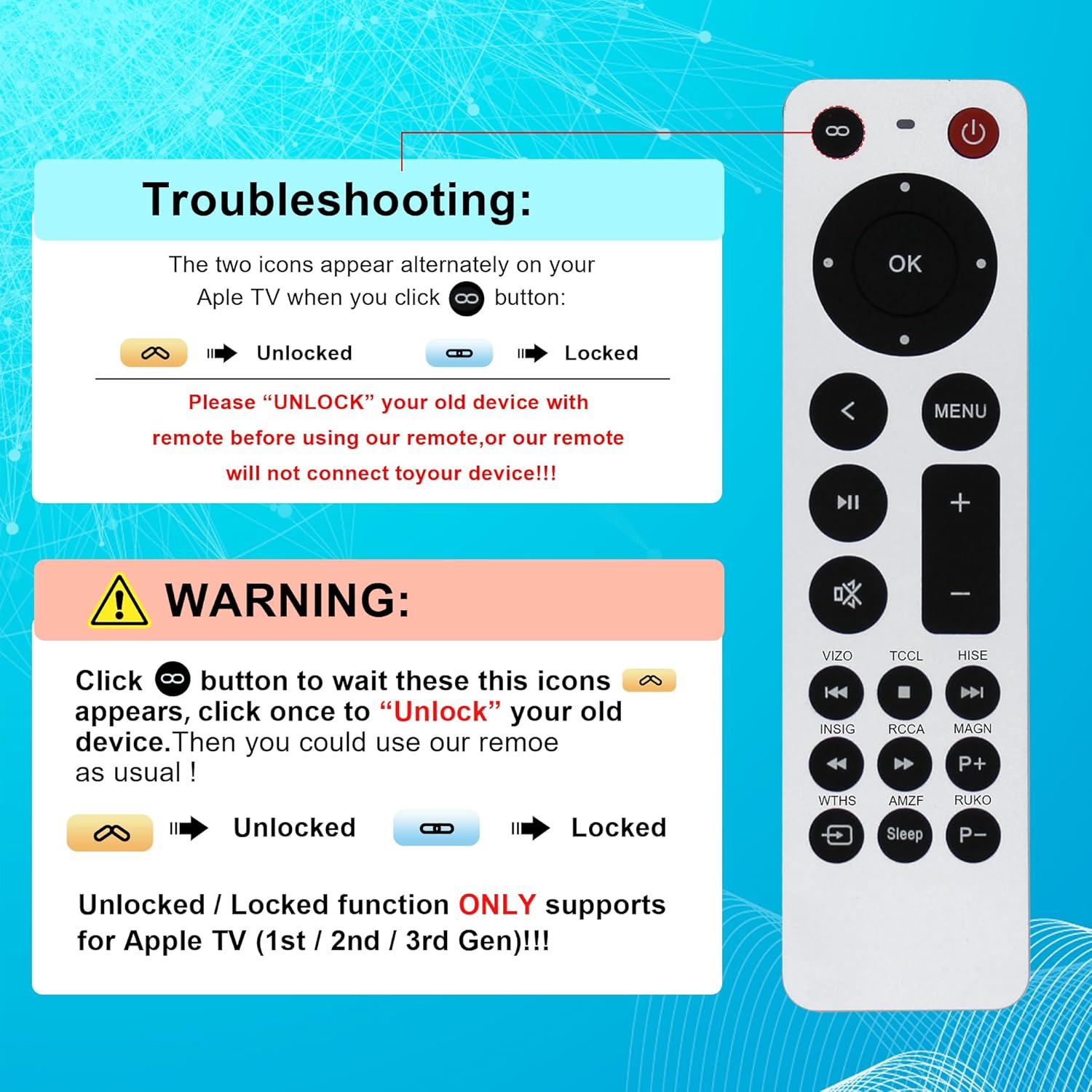
Figure 6: Troubleshooting for Apple TV (1st/2nd/3rd Gen) unlock/lock function.
- Intermittent Functionality:
- Check for strong light sources (like direct sunlight or bright fluorescent lights) that might interfere with the IR signal.
- Ensure the remote is pointed directly at the Apple TV's IR receiver.
7. Specifications
| Feature | Detail |
|---|---|
| Brand | ZYK |
| Model Number | B0FQV77K9B |
| Connectivity Technology | Infrared (IR) |
| Compatible Devices | Apple TV 4K (1st, 2nd, 3rd Gen), Apple TV HD (4th, 5th Gen), Apple TV (1st, 2nd, 3rd Gen) |
| Battery Type | 2 x AAA Alkaline Batteries (not included) |
| Maximum Range | 50 Feet |
| Material | High-quality ABS |
| Special Features | No Siri, No Voice Control, No Touchpad. TV Power/Volume/Mute compatible with Vizio, TCL, Hisense, Insignia, Westinghouse, Roku TVs. |
8. Maintenance
To ensure the longevity and optimal performance of your ZYK remote control, follow these maintenance guidelines:
- Cleaning: Wipe the remote with a soft, dry cloth. Do not use liquid cleaners or abrasive materials, as they may damage the surface or internal components.
- Battery Replacement: Replace batteries promptly when the remote's performance degrades. Remove batteries if the remote will not be used for an extended period to prevent leakage.
- Storage: Store the remote in a cool, dry place away from direct sunlight, extreme temperatures, and high humidity.
- Avoid Drops: While constructed from durable ABS material, avoid dropping the remote to prevent internal damage.

Figure 7: The remote is built with high-quality ABS for durability.

Figure 8: Ergonomic design for comfortable handling.
9. Warranty & Support
9.1. Warranty Information
ZYK products are manufactured with quality in mind. For specific warranty details regarding your replacement remote control, please refer to the documentation provided at the time of purchase or contact the seller directly. Standard warranty terms typically cover manufacturing defects for a limited period from the date of purchase.
9.2. Customer Support
If you have any questions, require assistance with setup, or encounter issues not covered in this manual, please contact ZYK customer support or the retailer from whom you purchased the product. Please have your product model number (B0FQV77K9B) and purchase information ready when contacting support.