
1. Introduction
This manual provides essential information for the safe and efficient operation of your EF ECOFLOW DELTA 3 Max Portable Power Station. Please read this manual thoroughly before using the product and retain it for future reference. The DELTA 3 Max is designed to provide reliable power for various applications, from home backup to outdoor adventures, featuring a 2048Wh LiFePO4 battery and a 3400W X-Boost output.
Key Features:
- Ultra-Fast Charging: Recharges from 0-80% in approximately 1.13 hours using X-Stream technology.
- High Power Output: Provides up to 3400W continuous output with X-Boost mode, capable of powering 99% of common appliances.
- Quiet Operation: Operates at an ultra-quiet 25dB when powering under 600W, ensuring minimal disturbance.
- Durable LiFePO4 Battery: Engineered for a 10-year lifespan with a long-lasting LiFePO4 battery and advanced Battery Management System (BMS).
- Smart App Control: Monitor energy usage, set charging/discharging schedules, and manage settings via the EcoFlow app.
- Rapid UPS Function: Features a less than 10ms transfer time for uninterrupted power to sensitive electronics during outages.

Image: The EF ECOFLOW DELTA 3 Max Portable Power Station being used by a family during a camping trip, highlighting its lightweight and portable design.
2. Safety Information
Always adhere to the following safety precautions to prevent injury or damage to the product:
- Do not disassemble, repair, or modify the unit.
- Avoid exposure to rain, moisture, or direct sunlight for extended periods.
- Keep the unit away from heat sources, open flames, and flammable materials.
- Ensure proper ventilation during use and charging. Do not block air vents.
- Use only original or certified charging cables and accessories.
- Keep out of reach of children and pets.
- If the unit emits smoke, strange odors, or unusual noise, discontinue use immediately and contact support.
3. Product Overview
The DELTA 3 Max features a robust design with multiple input and output ports for versatile power delivery.

Image: Front view of the EF ECOFLOW DELTA 3 Max Portable Power Station, showing the display, AC outlets, and USB ports.
What's in the Box:
- Delta 3 Max Portable Power Station
- AC Charging Cable
- Car Charging Cable
- Solar Charging Cable
- User Manual (this document)
4. Setup and Initial Charging
Before first use, it is recommended to fully charge your DELTA 3 Max. The unit supports multiple charging methods.

Image: Diagram illustrating four charging methods for the DELTA 3 Max: Generator, AC, Solar, and Car charging, with approximate times.
4.1. AC Charging:
Connect the AC charging cable to the AC input port on the DELTA 3 Max and then to a standard wall outlet. The display will show the charging status. The X-Stream technology allows for 0-80% charge in approximately 1.13 hours.
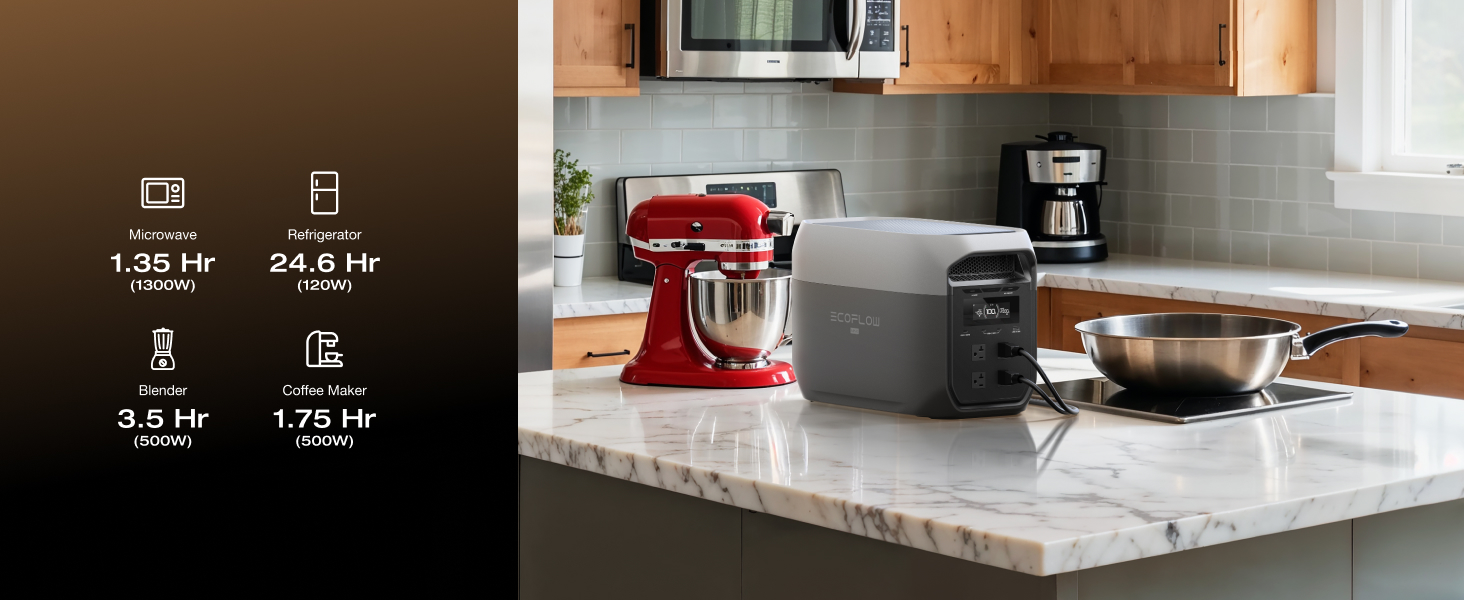
Image: The DELTA 3 Max connected to a wall outlet for fast AC recharging, showing 0-80% in 68 minutes.
4.2. Solar Charging:
Connect compatible solar panels (optional, sold separately) to the solar input port using the provided solar charging cable. Ensure panels are placed in direct sunlight for optimal charging efficiency. With 500W solar input, 0-80% charge can be achieved in approximately 3.43 hours.
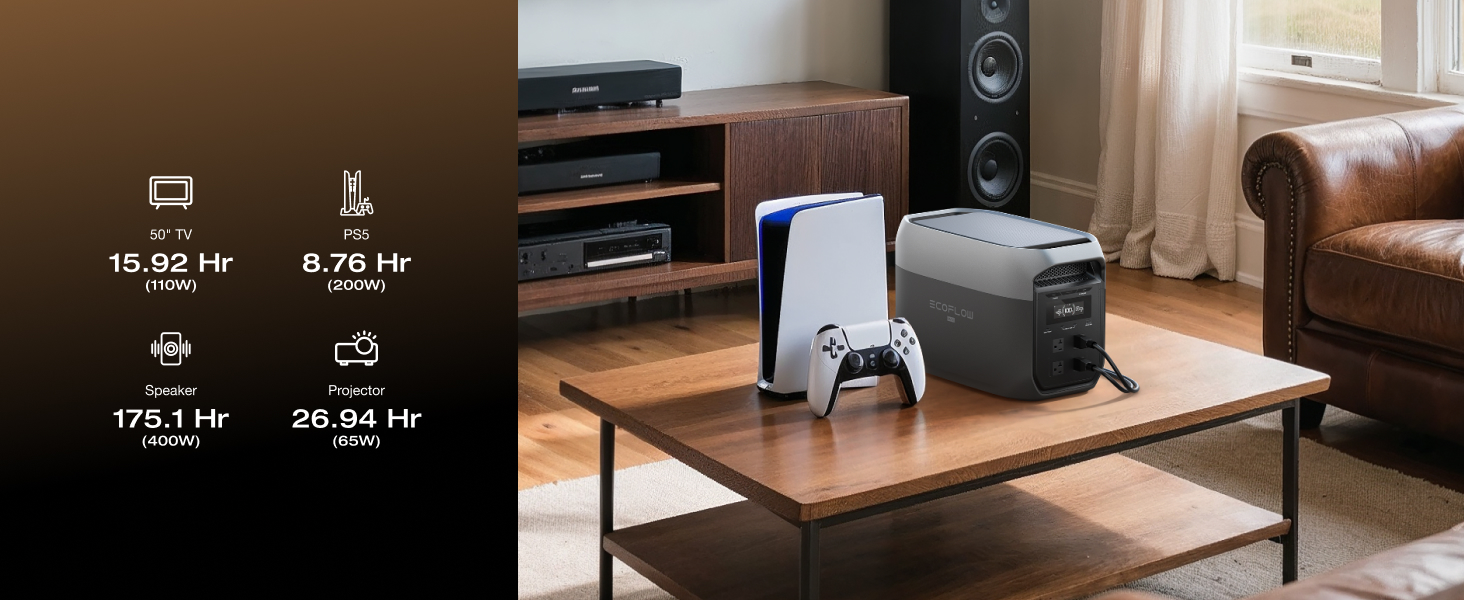
Image: The DELTA 3 Max connected to multiple solar panels in a grassy area for solar charging.
4.3. Car Charging:
Connect the car charging cable to the car charger port on the DELTA 3 Max and then to your vehicle's 12V cigarette lighter socket. This method is suitable for charging while on the move. 0-80% charge can be achieved in approximately 3.41 hours with a 500W alternator charger.
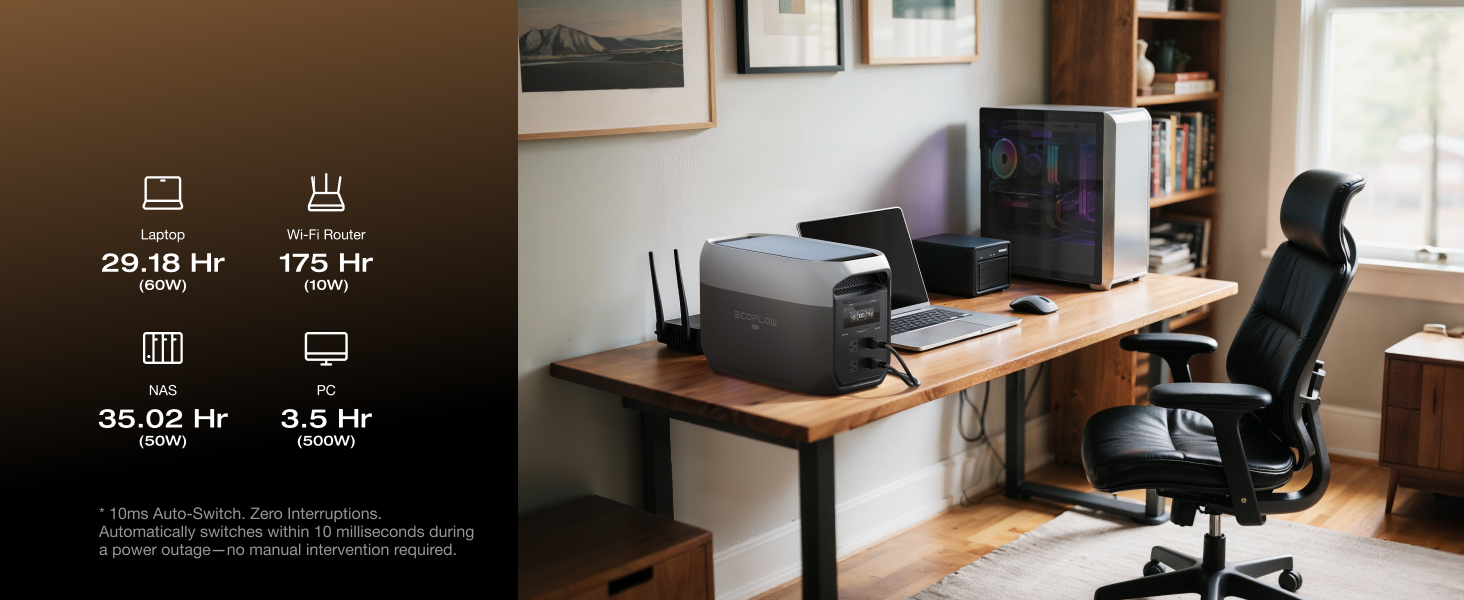
Image: The DELTA 3 Max being charged via an alternator charger in the back of a vehicle.
4.4. Generator Charging:
The DELTA 3 Max can be charged using a compatible generator. With an 1800W input, it can recharge to 80% in approximately 68 minutes. Refer to your generator's manual for specific connection instructions.
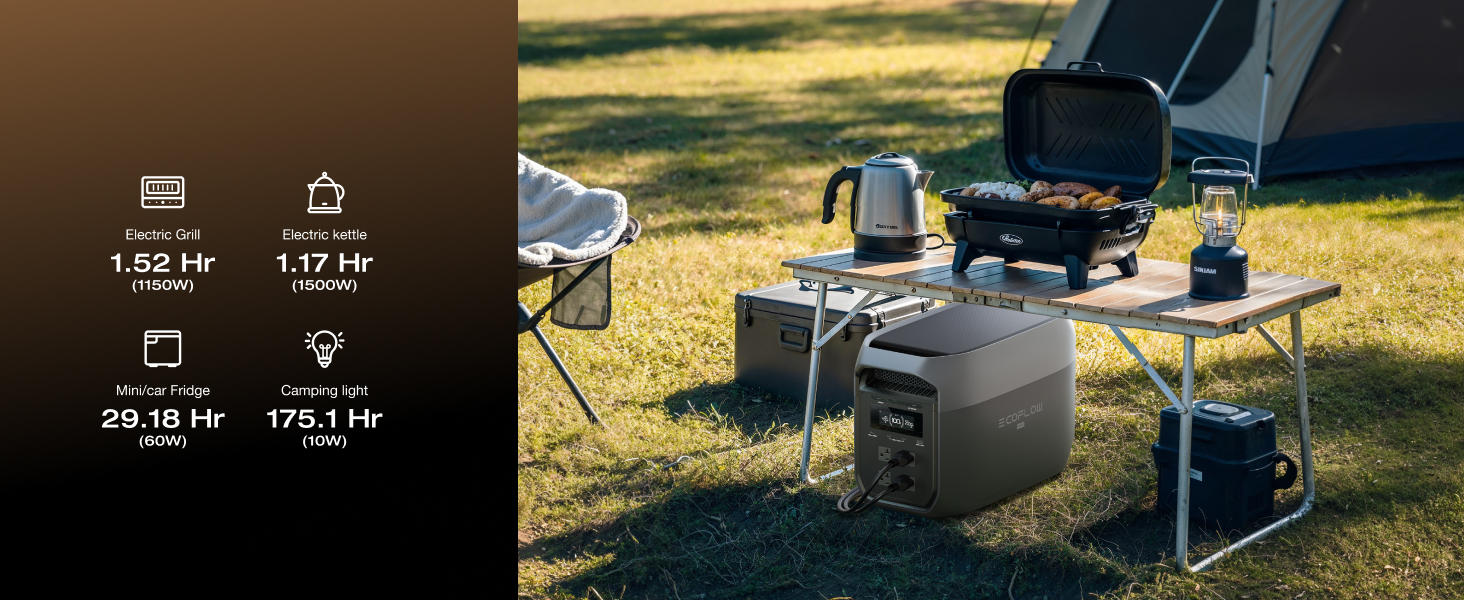
Image: The DELTA 3 Max being charged by a generator outdoors, showing 0-80% in 68 minutes.
5. Operating Instructions
5.1. Powering On/Off:
Press and hold the main power button for a few seconds to turn the unit on or off. The LCD display will illuminate, showing battery level and output status.
5.2. Using AC Outlets:
Press the AC power button to enable the AC outlets. Plug your devices into the appropriate AC ports. The DELTA 3 Max can power devices up to 2400W, with X-Boost supporting up to 3400W for certain appliances.

Image: The DELTA 3 Max powering kitchen appliances like a toaster and kettle, demonstrating its 3400W X-Boost capability.
5.3. Using USB Ports:
The USB-A and USB-C ports are always active when the unit is on. Simply plug in your USB-powered devices for charging.
5.4. X-Boost Mode:
The X-Boost feature allows the DELTA 3 Max to power high-wattage appliances (up to 3400W) that exceed its rated output of 2400W by reducing the voltage. This mode is automatically enabled when the total output power exceeds the rated output power, provided the appliance can operate at a lower voltage. It is not suitable for all high-power appliances, especially those with strict voltage requirements.

Image: The DELTA 3 Max powering a microwave and refrigerator in a kitchen setting.

Image: The DELTA 3 Max powering a TV and gaming console in a living room setting.

Image: The DELTA 3 Max powering a laptop, Wi-Fi router, and desktop PC in an office setting.

Image: The DELTA 3 Max powering an electric grill and kettle in an outdoor camping scenario.

Image: The DELTA 3 Max powering a circular saw and electric drill in a workshop setting.
5.5. Uninterruptible Power Supply (UPS) Function:
When the DELTA 3 Max is connected to an AC wall outlet and devices are plugged into its AC outputs, it can function as an Uninterruptible Power Supply (UPS). In the event of a power outage, the unit automatically switches to battery power within 10 milliseconds, providing continuous power to connected devices.

Image: The DELTA 3 Max providing backup power to a laptop and NAS system in an office, demonstrating its Zero Downtime Built-in UPS feature with less than 10ms auto-switch.
5.6. Smart App Control:
Download the EcoFlow app from your device's app store. Follow the in-app instructions to connect your DELTA 3 Max via Wi-Fi or Bluetooth. The app allows you to:
- Monitor real-time power input/output.
- Check battery status and remaining run time.
- Control AC/DC/USB outputs remotely.
- Set charging limits and schedules.
- Enable AI Mode for optimized charging during off-peak hours.
- Activate Self-Powered mode to use solar energy first.

Image: Screenshots of the EcoFlow app interface showing options for 'Backup reserve', 'AI Mode', and 'Self-Powered' mode for smart energy management.
5.7. Quiet Operation:
The DELTA 3 Max is designed for quiet operation, especially under lower loads. When powering devices under 600W, the noise level is approximately 25dB, comparable to a quiet library.

Image: The DELTA 3 Max operating quietly in a bedroom while a person sleeps, illustrating its 25dB whisper-quiet performance under 600W loads.
6. Maintenance
Proper maintenance ensures the longevity and performance of your DELTA 3 Max.
6.1. Storage:
- Store the unit in a dry, well-ventilated area, away from direct sunlight and extreme temperatures.
- For long-term storage, charge the battery to 30-50% every 3-6 months to maintain battery health.
- Avoid storing in environments with high humidity or corrosive substances.
6.2. Cleaning:
- Use a dry, soft cloth to wipe the exterior of the unit.
- Do not use harsh chemicals or abrasive materials.
- Keep the ventilation openings clear of dust and debris.
6.3. Battery Care:
The DELTA 3 Max uses a LiFePO4 battery, known for its durability and long cycle life (rated for 10 years of daily use). The integrated Battery Management System (BMS) protects against overcharging, over-discharging, and overheating.

Image: An internal view of the DELTA 3 Max's LiFePO4 battery cells and Battery Management System (BMS), highlighting its enduring performance and safety features.
7. Troubleshooting
If you encounter issues with your DELTA 3 Max, refer to the following common problems and solutions:
| Problem | Possible Cause | Solution |
|---|---|---|
| Unit does not turn on | Battery is depleted; Power button not pressed long enough. | Charge the unit; Press and hold the power button for 3-5 seconds. |
| AC outlets not working | AC output is not enabled; Overload protection activated. | Press the AC power button; Reduce the load on AC outlets. |
| Slow charging | Charging source is low power; Environmental temperature is too high/low. | Ensure charging source meets specifications; Charge in recommended temperature range (0-45°C). |
| App connection issues | Bluetooth/Wi-Fi off; Unit not in pairing mode; App outdated. | Ensure Bluetooth/Wi-Fi is on; Follow in-app pairing instructions; Update the EcoFlow app. |
If the problem persists, please contact EF ECOFLOW customer support.
8. Specifications
| Feature | Detail |
|---|---|
| Model Name | DELTA 3 MAX |
| Item Model Number | EF-DL-H02-3M |
| Capacity | 2048Wh |
| Battery Type | LiFePO4 |
| AC Output | 2400W (Surge 4800W), X-Boost 3400W |
| AC Charging Input | Max 1800W |
| Solar Charging Input | Max 500W |
| Car Charging Input | 12V/24V, 8A |
| USB-A Output | 2 ports, 5V/2.4A, 12W Max per port |
| USB-C Output | 2 ports, 5/9/12/15/20V, 5A, 100W Max per port |
| Product Dimensions | 12 x 9.4 x 19.44 inches (9.4"L x 12"W x 19.44"H) |
| Weight | 44.75 Pounds |
| Operating Temperature | Charge: 0-45°C (32-113°F); Discharge: -20-45°C (-4-113°F) |
| UPC | 842783191779 |
9. Warranty and Support
The EF ECOFLOW DELTA 3 Max comes with an extended 5-year service warranty, ensuring peace of mind for your investment. This warranty covers defects in materials and workmanship under normal use.
For technical support, warranty claims, or any questions regarding your product, please contact EF ECOFLOW customer service through their official website or the contact information provided with your purchase.
Online Resources:
- Visit the official EF ECOFLOW Store on Amazon for product information and accessories.
- Check the EcoFlow website for the latest FAQs and support documents.


