
OKD FPSC70LOTC-NO
OKD 70-inch Mid-Century Modern Fluted TV Stand Instruction Manual
Model: FPSC70LOTC-NO
Introduction
This manual provides detailed instructions for the assembly, operation, maintenance, and troubleshooting of your OKD 70-inch Mid-Century Modern Fluted TV Stand. Please read all instructions carefully before beginning assembly and retain this manual for future reference.
Important Safety Information
- Always secure the TV stand to the wall to prevent tip-overs. Use appropriate wall anchoring hardware (not included) for your wall type.
- Do not place heavy items on the top shelf or hang heavy objects from the shelves beyond the specified weight limits.
- Avoid placing the TV stand near heat sources such as radiators, heat registers, stoves, or other heat-producing appliances.
- Always follow the assembly instructions carefully to avoid injury and ensure structural integrity.
- Keep small parts away from children during assembly.
Package Contents
Before assembly, verify that all parts and hardware are present. Refer to the included parts list in your packaging. If any parts are missing or damaged, contact customer support.
Setup and Assembly
Assembly typically requires two adults. Ensure you have a clear, flat surface for assembly. Tools required (not included) may include a Phillips head screwdriver and a hammer.
- Unpack Components: Carefully remove all components from the packaging and lay them out on a soft, clean surface to prevent scratches.
- Identify Parts: Match each part to the corresponding labels in the assembly diagram.
- Assemble Frame: Follow the step-by-step diagrams to connect the main frame components using the provided hardware. Ensure all connections are secure.
- Install Shelves: Insert shelf pins into the desired height holes for adjustable shelves. Place shelves securely on the pins.
- Attach Doors: Mount the soft-close door hinges to the doors and then to the main frame. Adjust hinges as needed for proper door alignment.
- Attach Legs: Securely attach the tapered legs to the base of the TV stand.
- Wall Anchoring: For safety, secure the TV stand to a wall using appropriate wall anchors and straps (not included). This prevents accidental tip-overs.

Image: Fully assembled OKD 70-inch TV Stand in Natural Oak, showcasing its mid-century modern design with fluted doors and tapered legs.

Image: A close-up view of the expansive top surface of the TV stand, designed to accommodate various entertainment components and decorative items.
Operating Instructions
Adjustable Shelving
The TV stand features adjustable shelves within the open compartments and behind the soft-close doors. To adjust a shelf:
- Remove any items from the shelf.
- Carefully lift the shelf to remove it from the support pins.
- Relocate the metal support pins to the desired height holes. Ensure all four pins are at the same level.
- Place the shelf back onto the support pins, ensuring it is stable and level.

Image: An interior view of a cabinet with an adjustable shelf, demonstrating its customizable storage capabilities.
Soft-Close Doors
The cabinet doors are equipped with soft-close hinges to prevent slamming and ensure quiet operation. Simply push the door gently to close, and the mechanism will engage to slow its movement.
Video: This video demonstrates the features of the OKD 70-inch Mid-Century Modern Fluted TV Stand, including its large display surface, closed cabinets, adjustable shelving, flexible shelving system, well-organized storage, soft-close doors, rock-solid base, and fluted texture.
Care and Maintenance
- Cleaning: Wipe surfaces with a soft, damp cloth. Avoid using harsh chemicals or abrasive cleaners, as these can damage the finish.
- Spills: Clean spills immediately with a dry cloth to prevent staining or water damage.
- Sunlight: Avoid prolonged exposure to direct sunlight to prevent fading or discoloration of the wood finish.
- Heat: Do not place hot items directly on the surface. Use coasters or protective pads.
- Hardware: Periodically check all hardware connections and tighten if necessary to maintain stability.
Troubleshooting
| Problem | Possible Cause | Solution |
|---|---|---|
| Doors do not align properly. | Hinges are not adjusted correctly. | Adjust the screws on the soft-close hinges. Refer to the hinge manufacturer's instructions for specific adjustment points (usually two screws for horizontal and vertical alignment). |
| Stand feels wobbly. | Loose hardware or uneven floor. | Ensure all assembly screws are tightened. If the floor is uneven, place shims under the legs to stabilize the stand. |
| Shelf is not level. | Shelf pins are not inserted correctly or are at different heights. | Remove the shelf and re-insert all four shelf pins into the corresponding holes at the same height. |
Specifications
| Feature | Detail |
|---|---|
| Brand | OKD |
| Model Number | FPSC70LOTC-NO |
| Material | Engineered Wood |
| Product Dimensions | 70 x 15.75 x 20 inches (Width x Depth x Height) |
| Item Weight | 86 pounds |
| Color | Natural Oak |
| Style | Mid Century Modern |
| Max TV Size Supported | Up to 75 inches (Ideal for 65-inch TV) |
| Storage | 2 Soft-Close Doors, Adjustable Shelves, Open Media Compartment |
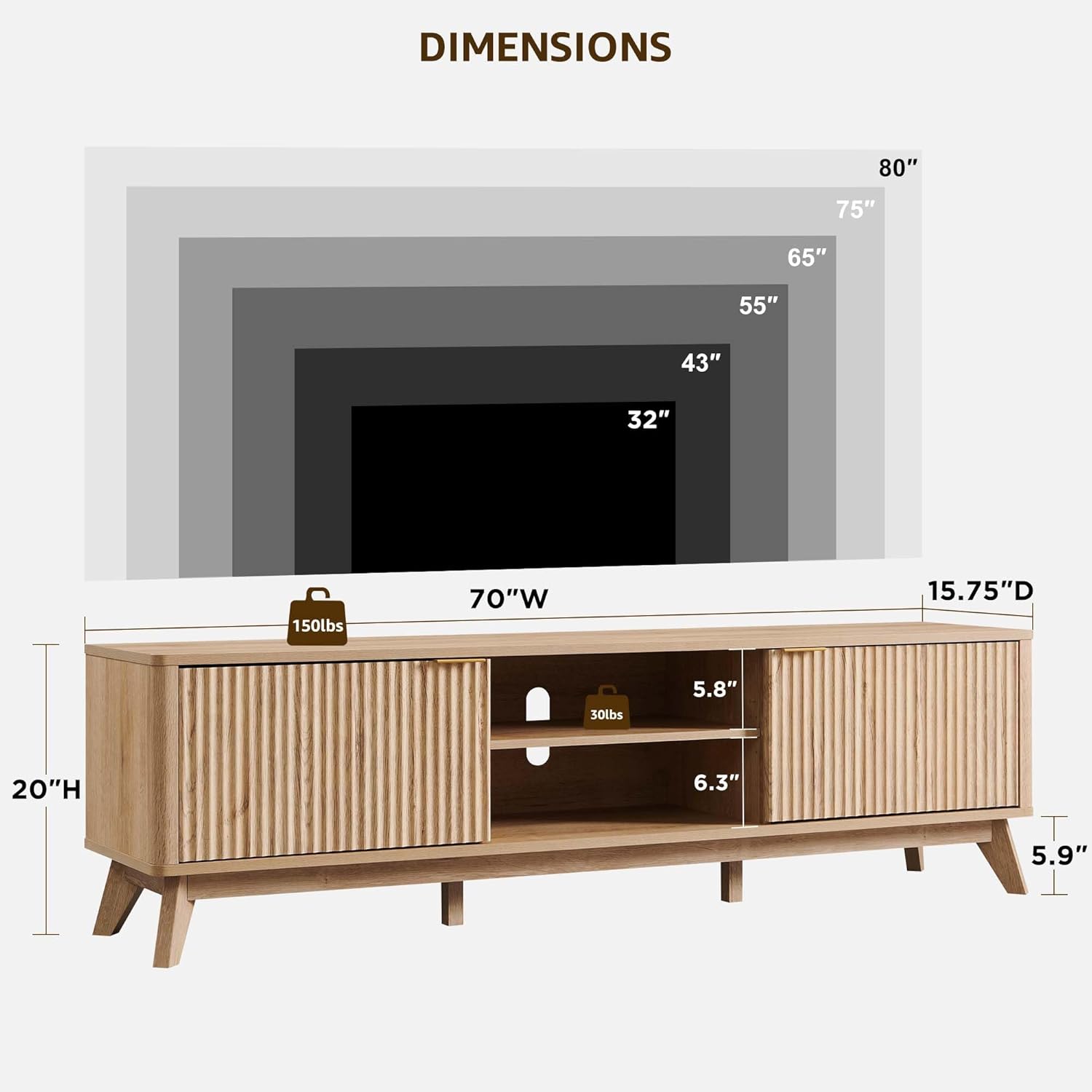
Image: A detailed diagram illustrating the dimensions of the OKD 70-inch TV stand, including width, depth, height, and internal shelf measurements, along with supported TV sizes.
Warranty Information
OKD products are manufactured with quality and care. For specific warranty details regarding your TV stand, please refer to the warranty card included with your product or visit the official OKD website. Keep your purchase receipt as proof of purchase for any warranty claims.
Customer Support
If you have any questions, require assistance with assembly, or need to report missing/damaged parts, please contact OKD customer support:
- Website: Visit the OKD Store on Amazon
- Email: Refer to your product packaging or the OKD website for direct email support.
- Phone: Refer to your product packaging or the OKD website for phone support.
Please have your model number (FPSC70LOTC-NO) and purchase information ready when contacting support.
Ask a question about this manual
Ask about setup, troubleshooting, compatibility, parts, safety, or missing instructions. Manuals+ will review the question and use this page’s manual context to help answer it.