
1. Introduction
This manual provides detailed instructions for the safe and efficient operation of your NBD 5K 64MP Digital Camera, model S110-WM. Please read this manual thoroughly before using the camera and retain it for future reference. This camera features 5K video recording, 64-megapixel still image capture, 16x digital zoom, autofocus, anti-shake functionality, a 3-inch 180-degree rotatable display, Wi-Fi connectivity, and includes wide-angle and macro lenses.
2. Package Contents
Verify that all items listed below are included in your package. If any items are missing or damaged, please contact customer support.
- NBD 5K 64MP Digital Camera Body (S110-WM)
- Wide-angle Lens
- Macro Lens
- Rechargeable Lithium-ion Batteries (x2)
- Battery Charger
- USB Cable
- 64GB TF Card
- Camera Strap
- User Manual

Image: Contents of the NBD 5K 64MP Digital Camera package, including the camera body, lenses, batteries, charger, cables, TF card, and strap.
3. Setup
3.1. Battery Installation and Charging
- Open the battery compartment cover located at the bottom of the camera.
- Insert the lithium-ion battery, ensuring the correct orientation as indicated inside the compartment.
- Close the battery compartment cover securely.
- To charge, connect the camera to a power source using the provided USB cable and charger. The charging indicator light will show the charging status.
The camera comes with two 1500mAh high-capacity lithium-ion batteries, allowing for extended shooting time. The advanced battery charger also functions as a charging station.
3.2. TF Card Installation
- Locate the TF card slot on the side of the camera.
- Insert the 64GB TF card into the slot with the metal contacts facing down, aligning it with the icon.
- Push the card gently until it clicks into place. To remove, push the card again until it springs out.

Image: Visual guide for inserting and removing the TF card. Push until it clicks to lock, push again to release.
3.3. Lens Attachment
The camera includes a wide-angle lens and a macro lens. These 52mm detachable lenses can be screwed onto the front of the main camera lens.
- Wide-angle Lens: Expands the field of view up to 120 degrees, suitable for landscapes and group shots.
- Macro Lens: Allows for close-up photography, capturing fine details of small subjects.

Image: The NBD digital camera shown with its detachable wide-angle and macro lenses, highlighting their use for different photographic needs.
4. Operating Instructions
4.1. Power On/Off
Press and hold the power button (usually marked with a power symbol) to turn the camera on or off.
4.2. Basic Photography Modes
The camera offers various shooting modes accessible via the mode dial or menu. These include:
- Photo Mode: For capturing still images.
- Video Mode: For recording video footage.
- Slow Motion: Records video at a higher frame rate for slow-motion playback.
- Time-Lapse: Captures a series of photos over time and combines them into a video.
- Filter Mode: Applies various creative filters to your photos and videos.
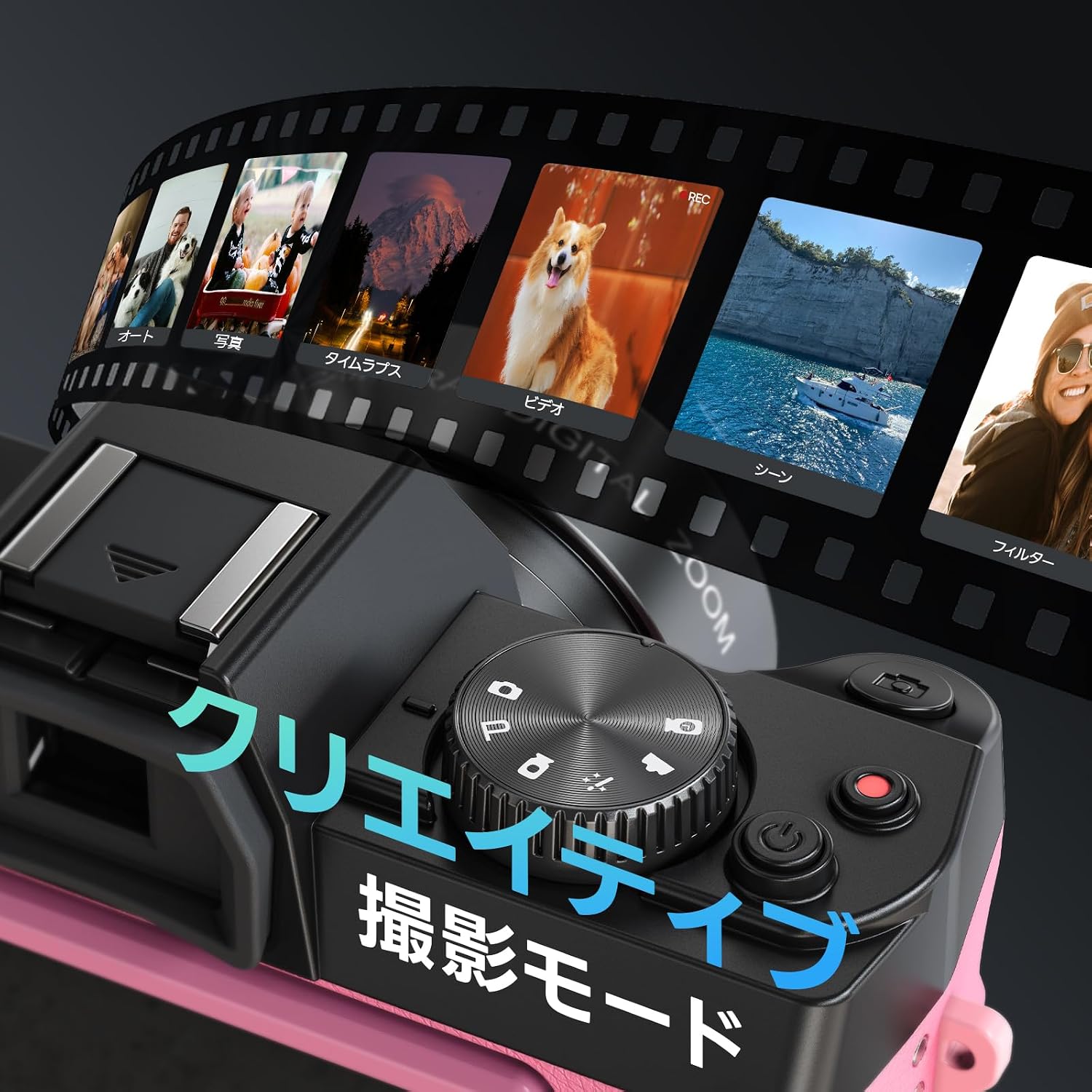
Image: The camera's display showing various creative shooting modes like Photo, Video, Time-Lapse, and Filters.
4.3. Autofocus and Anti-shake
The camera features autofocus and anti-shake functions to ensure clear and stable images.
- Autofocus: Half-press the shutter button to activate autofocus. The camera will focus on the subject, indicated by a green frame on the screen.
- Anti-shake: This feature automatically stabilizes your shots, reducing blur caused by camera movement.

Image: Instructions on how to use autofocus by half-pressing the shutter button to achieve a clear focus.

Image: A comparison showing the effect of the anti-shake feature, with a clear image on the left and a blurred image on the right when anti-shake is off.
4.4. Digital Zoom
The camera supports up to 16x digital zoom. Use the zoom controls (usually marked 'W' for wide and 'T' for telephoto) to adjust the magnification.

Image: Visual representation of the 16x digital zoom capability, showing different levels of magnification from 4x to 16x.
4.5. 180° Flip Screen
The 3-inch LCD screen can be rotated 180 degrees, making it ideal for selfies and vlogging. Adjust the screen to your desired angle for easy framing and monitoring.

Image: The NBD camera with its screen flipped 180 degrees, demonstrating its utility for self-recording or vlogging.
4.6. Wi-Fi Connectivity and App Control
The camera supports Wi-Fi for seamless transfer of photos and videos to your smartphone and remote control via a dedicated app.
- Turn on Wi-Fi in the camera's settings menu.
- Scan the QR code displayed on the camera screen or refer to the manual to download the companion app on your smartphone. Download App
- Connect your smartphone to the camera's Wi-Fi hotspot. The hotspot name and password will be displayed on the camera screen.
- Once connected, you can use the app to remotely control shooting, adjust settings, preview in real-time, and transfer files.

Image: A step-by-step visual guide for connecting the camera to a smartphone via Wi-Fi and using the app for remote control and file transfer.
The camera can also function as a webcam when connected to a computer via USB.
4.7. Adjusting Image and Video Quality
You can adjust the resolution and aspect ratio for both photos and videos through the camera's menu.
- Press the 'Fn' (Function) key to access quick settings.
- Navigate using the arrow keys to select "Image Resolution" or "Video Resolution".
- Press 'OK' to confirm your selection.
Available photo resolutions include up to 64MP. Video resolutions include 5K 25FPS, 4K 30FPS, 2K 30FPS, 1080P 60FPS/30FPS, and 720P 120FPS/60FPS.

Image: A visual guide demonstrating how to access and change image and video quality settings using the 'Fn' button and navigation keys.
4.8. Continuous Shooting and Self-Timer
The camera supports continuous shooting for capturing fast-moving subjects and a self-timer for delayed shots.
- Continuous Shooting: Allows you to capture multiple frames per second.
- Self-Timer: Options typically include 2s, 5s, and 10s delays before taking a photo.

Image: A sequence of images demonstrating the continuous shooting mode, capturing a person jumping with a basketball.

Image: Three images showing the self-timer function with 2-second, 5-second, and 10-second delay options for group photos.
4.9. Built-in Flash
The camera includes a built-in flash for illuminating subjects in low-light conditions. It can be turned on or off as needed.

Image: The NBD camera with its built-in flash activated, illuminating a subject in a dark environment, compared to the same scene without flash.
5. Maintenance
- Keep the camera clean by wiping it with a soft, dry cloth. Avoid using harsh chemicals or abrasive materials.
- Clean the lens gently with a lens cleaning cloth and solution. Do not touch the lens surface with your fingers.
- Store the camera in a dry, cool place away from direct sunlight and extreme temperatures.
- Remove the battery if the camera will not be used for an extended period.
6. Troubleshooting
| Problem | Possible Cause | Solution |
|---|---|---|
| Camera does not power on. | Battery is depleted or incorrectly inserted. | Charge the battery or re-insert it correctly. |
| Images are blurry. | Autofocus not engaged, anti-shake off, or insufficient light. | Half-press shutter to focus, ensure anti-shake is on, or use flash/better lighting. |
| Cannot connect to Wi-Fi. | Incorrect password, Wi-Fi not enabled on camera, or app issue. | Verify Wi-Fi settings and password, restart camera and phone app. |
| TF card error. | Card incorrectly inserted or corrupted. | Re-insert the TF card. If the issue persists, try formatting the card (this will erase all data) or use a different card. |
7. Specifications
| Feature | Detail |
|---|---|
| Model Name | S110-WM |
| Brand | NBD |
| Photo Sensor Technology | CMOS |
| Max Image Resolution | 64 MP |
| Video Capture Resolution | 5K, 4K, 2K, 1080P, 720P |
| Digital Zoom | 16x |
| Screen Size | 3 inches |
| Special Features | 180° Flip Screen, Autofocus, Anti-shake, Wi-Fi, Webcam Function |
| Lens Type | Macro/Wide-angle (52mm detachable lenses included) |
| Minimum Expanded ISO | 100 |
| Maximum Expanded ISO | 6400 |
| File Format | MOV, JPG |
| Exposure Control Type | Auto, Manual |
| Shutter Speed | 1/3 to 1/2000 seconds |
| Battery Type | Lithium-ion (1500mAh x2) |
| Included Memory Card | 64GB TF Card |
| Product Weight | 442 grams |
| Dimensions (D x W x H) | 12.6 x 11 x 8.2 cm |
| Origin | China |
8. Warranty and Support
This product comes with a 1-year warranty from the date of purchase. For warranty claims, technical support, or any inquiries regarding your NBD Digital Camera, please contact NBD customer service through the retailer where you purchased the product or visit the official NBD website for support contact information.
Please retain your proof of purchase for warranty validation.


