
Harman Kardon HKENCHSPKBLKAM
Harman Kardon Enchant-Speaker Compact Wireless Speaker with Dolby Atmos User Manual
Model: HKENCHSPKBLKAM
Introduction
This manual provides essential instructions for setting up, operating, and maintaining your Harman Kardon Enchant-Speaker. Please read this manual thoroughly before using the product to ensure proper operation and to maximize your listening experience. Keep this manual for future reference.
Important Safety Information
Always follow basic safety precautions when using electrical appliances to reduce the risk of fire, electric shock, and injury. This includes, but is not limited to:
- Do not expose this product to rain or moisture.
- Do not block any ventilation openings.
- Do not install near any heat sources such as radiators, heat registers, stoves, or other apparatus (including amplifiers) that produce heat.
- Only use attachments/accessories specified by the manufacturer.
- Refer all servicing to qualified service personnel.
What's in the Box
Verify that all components are present upon unpacking:
- Harman Kardon Enchant-Speaker
- Power Cable
- Quick Start Guide (not included in this manual)
- Safety Sheet (not included in this manual)

Image: The Harman Kardon Enchant-Speaker packaging box, showing the speaker and branding.
Product Overview
Front View

Image: Front view of the Harman Kardon Enchant-Speaker, showcasing its cylindrical shape and black fabric finish with the Harman Kardon logo at the bottom.
Top Panel Controls

Image: Top view of the Harman Kardon Enchant-Speaker, showing the control panel with buttons for Bluetooth pairing, volume down, play/pause, volume up, and a heart-shaped favorite button.
- Bluetooth Button: Initiates Bluetooth pairing mode.
- Volume Down (-): Decreases audio volume.
- Play/Pause Button (Triangle): Plays or pauses audio playback.
- Volume Up (+): Increases audio volume.
- Favorite Button (Heart): Assigns or recalls a favorite preset.
Rear Panel Connections
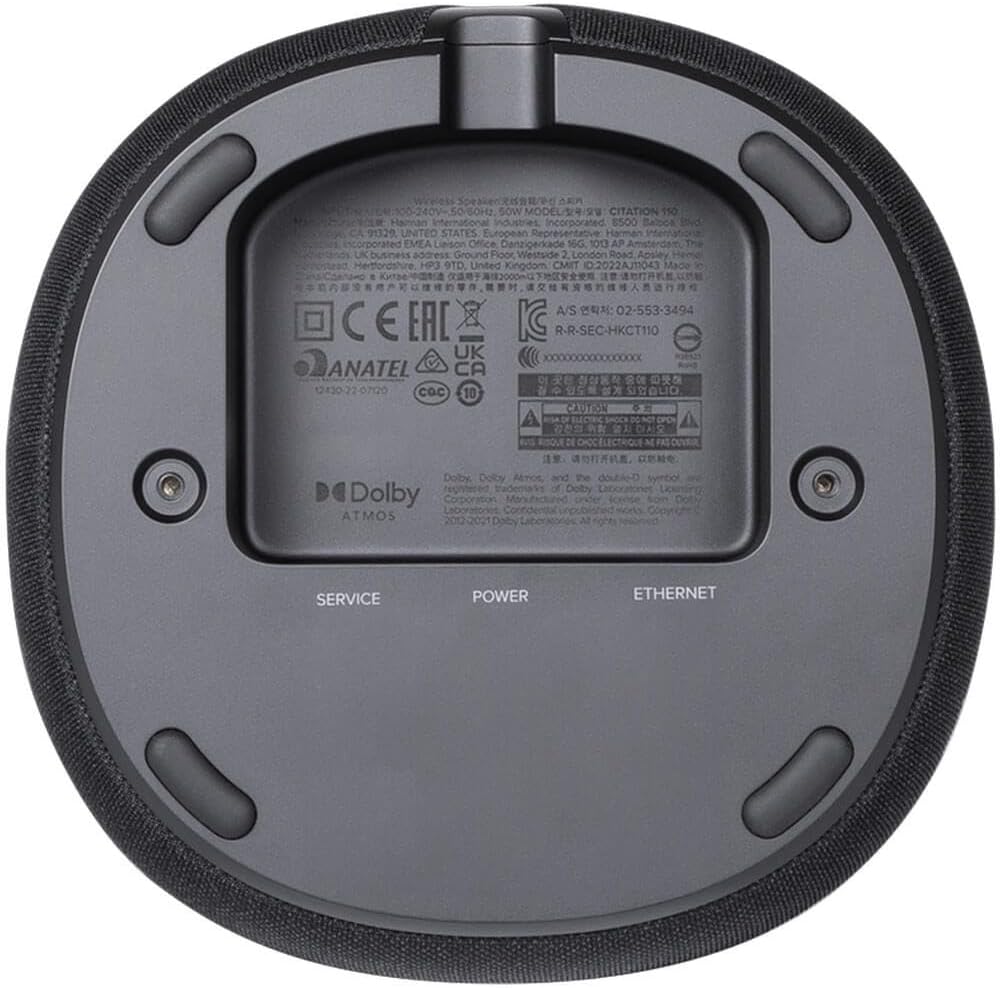
Image: Bottom view of the Harman Kardon Enchant-Speaker, revealing the service port, power input, and Ethernet port, along with regulatory information and Dolby Atmos branding.
- SERVICE Port: For service use only.
- POWER Input: Connects to the included power cable.
- ETHERNET Port: For wired network connection.
Setup
1. Placement
Place the Harman Kardon Enchant-Speaker on a stable, flat surface such as a tabletop. Ensure there is adequate space around the speaker for optimal sound dispersion and ventilation. Avoid placing it in enclosed spaces or directly against walls that might obstruct sound.
2. Power Connection
- Connect the included power cable to the POWER input on the rear panel of the speaker.
- Plug the other end of the power cable into a wall outlet.
- The speaker will automatically power on.
3. Initial Setup and Network Connection
For full functionality, including Wi-Fi, AirPlay, Chromecast built-in, and Spotify Connect, connect your speaker to your home network. This can typically be done via the Harman Kardon One App (if available) or through your device's Wi-Fi settings for AirPlay/Chromecast setup.
- Wi-Fi Setup: Follow the instructions provided by the Harman Kardon One App or your streaming service application (e.g., Google Home for Chromecast, Apple Home for AirPlay).
- Ethernet Connection: Optionally, connect an Ethernet cable from your router to the ETHERNET port on the speaker for a stable wired network connection.
4. Automatic Sound Calibration
The Enchant-Speaker features automatic sound calibration to optimize audio performance for its environment. This process typically occurs automatically upon initial setup or when the speaker's position is significantly changed. Allow the speaker to complete this process for the best sound quality.
Operating Instructions
Bluetooth Connectivity
- Press the Bluetooth button on the top panel of the speaker. The indicator light will flash, indicating pairing mode.
- On your mobile device, enable Bluetooth and search for available devices.
- Select "Harman Kardon Enchant-Speaker" from the list to connect.
- Once connected, the indicator light will become solid.
Wi-Fi Streaming (AirPlay, Chromecast built-in, Spotify Connect)
Once connected to your home Wi-Fi network, you can stream audio using various platforms:
- AirPlay: From an Apple device, select the AirPlay icon in your audio app and choose the Enchant-Speaker.
- Chromecast built-in: From a Chromecast-enabled app, tap the Cast icon and select the Enchant-Speaker.
- Spotify Connect: Within the Spotify app, select the Devices icon and choose the Enchant-Speaker.
Dolby Atmos Music
The Enchant-Speaker supports Dolby Atmos Music for an immersive 3D spatial sound experience. Ensure your audio source and content are compatible with Dolby Atmos for the best results.
Multi-Channel Surround Sound
The speaker is designed to deliver a multi-channel surround sound experience. For optimal effect, ensure proper placement and allow the automatic sound calibration to function effectively.
Volume Control
Use the Volume Up (+) and Volume Down (-) buttons on the top panel to adjust the audio level. You can also control the volume from your connected device.
Play/Pause
Press the Play/Pause button (Triangle) on the top panel to pause or resume audio playback.
Favorite Preset
Press the Favorite button (Heart) to save or recall a preferred audio preset or streaming service. Refer to the Harman Kardon One App for detailed configuration of this feature.
Maintenance
- Cleaning: Gently wipe the speaker's surface with a soft, dry cloth. Do not use liquid cleaners or abrasive materials.
- Storage: If storing the speaker for an extended period, disconnect it from power and store it in a cool, dry place.
- Ventilation: Ensure that the speaker's ventilation openings are not blocked to prevent overheating.
Troubleshooting
| Problem | Possible Solution |
|---|---|
| No power | Ensure the power cable is securely connected to both the speaker and a working power outlet. |
| No sound | Check the volume level on both the speaker and your connected device. Ensure the correct input source is selected (Bluetooth, Wi-Fi). |
| Bluetooth pairing issues | Ensure the speaker is in pairing mode. Disable and re-enable Bluetooth on your device. Move closer to the speaker. |
| Wi-Fi connection unstable | Check your router and internet connection. Ensure the speaker is within Wi-Fi range. Consider using an Ethernet cable for a more stable connection. |
| Poor sound quality | Ensure the speaker is placed optimally and not obstructed. Allow automatic sound calibration to complete. Check the quality of the audio source. |
Specifications
| Feature | Detail |
|---|---|
| Brand | Harman Kardon |
| Model Name | HKENCHSPKBLKAM |
| Speaker Type | Portable Speaker |
| Color | Black |
| Connectivity Technology | AirPlay, Bluetooth, Wi-Fi |
| Speaker Maximum Output Power | 90 Watts |
| Product Dimensions | 6.4"D x 6.4"W x 8"H |
| Item Weight | 4.76 Pounds |
| UPC | 028292291852 |
| Manufacturer | Harman-Kardon |
| Mounting Type | Tabletop Mount |
| Frequency Response | 55 Hz – 20 kHz (-6 dB) (from product description) |
Warranty and Support
Harman Kardon products are designed for reliability and performance. For warranty information, please refer to the warranty card included with your product or visit the official Harman Kardon website. For technical support, product registration, or service inquiries, please visit the Harman Kardon support portal or contact their customer service.
Note: Specific warranty terms and support contact details may vary by region and are subject to change.
Related documentsHKENCHSPKBLKAM


Ask a question about this manual
Ask about setup, troubleshooting, compatibility, parts, safety, or missing instructions. Manuals+ will review the question and use this page’s manual context to help answer it.