
1. Product Overview
The AMD Ryzen 5 3400G is a desktop processor featuring 4 cores and 8 threads, designed for the AM4 socket. It includes integrated Radeon RX Vega 11 graphics, making it suitable for systems without a dedicated graphics card. This processor operates with a 65W Thermal Design Power (TDP) and comes with an AMD Wraith Stealth cooler.
Key Features:
- 4 Cores / 8 Threads for multitasking and productivity.
- Integrated Radeon RX Vega 11 Graphics for display output and light gaming.
- Base Clock Speed: 3.7 GHz, Boost Clock Speed: Up to 4.2 GHz.
- Socket AM4 compatibility.
- Includes AMD Wraith Stealth Cooler.
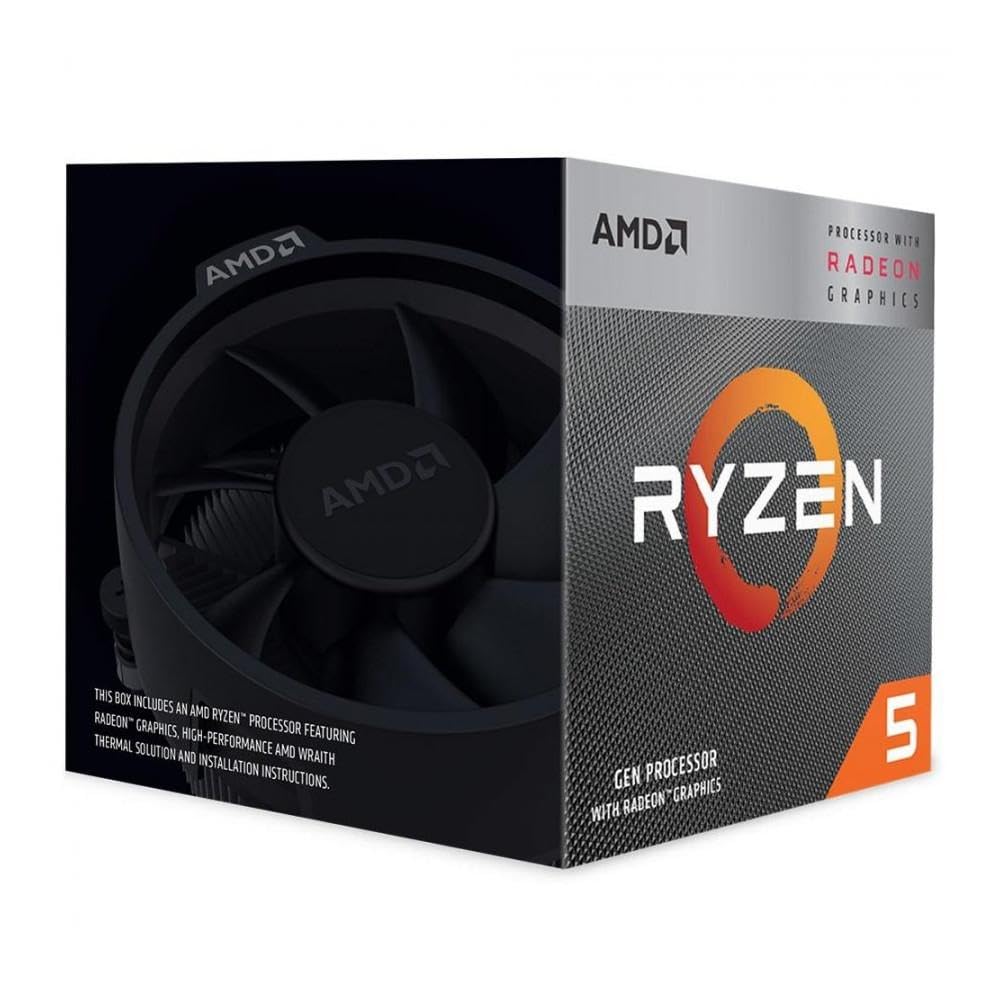
Image 1.1: AMD Ryzen 5 3400G Processor and included Wraith Stealth Cooler.
2. Setup and Installation
2.1 Before You Begin:
- Ensure your motherboard supports the AM4 socket and has a compatible BIOS version for Ryzen 3000 series APUs. Refer to your motherboard manufacturer's website for compatibility.
- Gather necessary tools: Phillips head screwdriver, thermal paste (if not pre-applied on cooler).
- Work in a clean, static-free environment. Use an anti-static wrist strap if available.
2.2 CPU Installation:
- Carefully open the CPU socket retention arm on your motherboard.
- Align the gold triangle on the corner of the Ryzen 5 3400G processor with the corresponding triangle on the AM4 socket.
- Gently lower the processor straight down into the socket. Do not force it; it should drop in easily.
- Once seated, close the socket retention arm to secure the processor.
2.3 Cooler Installation (AMD Wraith Stealth):
- Ensure the CPU surface is clean. If the cooler does not have pre-applied thermal paste, apply a small pea-sized amount to the center of the CPU's Integrated Heat Spreader (IHS).
- Position the Wraith Stealth cooler over the CPU, aligning the four screw holes on the cooler bracket with the corresponding holes on the motherboard's AM4 retention bracket.
- Tighten the four screws in a diagonal pattern (e.g., top-left, bottom-right, top-right, bottom-left) until snug. Do not overtighten.
- Connect the 4-pin CPU fan cable from the cooler to the CPU_FAN header on your motherboard.
3. Operation
3.1 Integrated Graphics (Radeon RX Vega 11):
The AMD Ryzen 5 3400G features integrated Radeon RX Vega 11 graphics. This allows for display output directly from your motherboard's video ports (HDMI, DisplayPort, DVI, VGA, depending on motherboard) without the need for a separate graphics card. Ensure your monitor is connected to the motherboard's video output.
For optimal performance, install the latest AMD Radeon graphics drivers from the official AMD website. These drivers enhance stability, performance, and unlock additional features for the integrated graphics.
3.2 Performance Considerations:
- Memory Speed: Ryzen processors, especially those with integrated graphics, benefit significantly from faster RAM. Dual-channel memory configuration is highly recommended.
- BIOS Settings: Access your motherboard's BIOS/UEFI to ensure memory is running at its rated speed (via XMP/DOCP profiles) and to allocate sufficient system RAM to the integrated graphics (typically 2GB or more for gaming).
- Overclocking: The Ryzen 5 3400G has an unlocked multiplier, allowing for CPU and integrated graphics overclocking. Proceed with caution and ensure adequate cooling and power delivery if attempting to overclock.
4. Maintenance
4.1 Cleaning:
Regular cleaning of the CPU cooler is essential for maintaining optimal thermal performance. Dust accumulation can impede airflow and lead to higher operating temperatures.
- Frequency: Clean the cooler every 3-6 months, or more frequently in dusty environments.
- Procedure: Power off your computer and disconnect it from the power source. Use compressed air to blow dust out of the cooler fins. Hold the fan blades gently to prevent them from spinning rapidly during cleaning, which can damage the fan bearings.
4.2 Thermal Paste:
The thermal paste between the CPU and cooler helps transfer heat efficiently. Over time, thermal paste can dry out and become less effective.
- Replacement: Consider replacing thermal paste every 2-3 years, or if you notice consistently high CPU temperatures.
- Procedure: Carefully remove the CPU cooler. Clean both the CPU's IHS and the cooler's contact plate thoroughly with isopropyl alcohol and a lint-free cloth. Apply new thermal paste according to the manufacturer's instructions (typically a pea-sized dot in the center of the IHS) before reattaching the cooler.
5. Troubleshooting
| Issue | Possible Cause | Solution |
|---|---|---|
| System does not boot / No display | Improper CPU installation, RAM issues, incompatible BIOS, monitor connected to discrete GPU instead of motherboard. |
|
| High CPU temperatures | Improper cooler installation, insufficient thermal paste, dust accumulation, poor case airflow. |
|
| System instability / Crashes | Overheating, unstable overclock, faulty RAM, power supply issues. |
|
6. Technical Specifications
| Feature | Specification |
|---|---|
| Processor Model | Ryzen 5 3400G |
| CPU Cores / Threads | 4 Cores / 8 Threads |
| Base Clock Speed | 3.7 GHz |
| Max Boost Clock Speed | Up to 4.2 GHz |
| Integrated Graphics | Radeon RX Vega 11 Graphics |
| Total L2 Cache | 2 MB |
| Total L3 Cache | 4 MB (Total 6MB L2+L3) |
| Default TDP | 65W |
| CPU Socket | AM4 |
| Included Cooler | AMD Wraith Stealth |
| Platform | Windows |
| Model Number (MPN) | YD3400C5FHSBX |
| UPC | 730143318020 |
7. Warranty and Support
For warranty information, technical support, and driver downloads, please visit the official AMD website. Keep your proof of purchase for warranty claims.
AMD Support Website: https://www.amd.com/support
This manual provides general guidance. Specific system configurations and software may require additional steps or considerations. Always refer to your motherboard manual for detailed system-specific instructions.


