
1. Introduction
Thank you for choosing the FULMINARE HS03-01 Wireless Bluetooth Speaker. This manual provides essential information for the safe and efficient use of your new speaker. Please read it thoroughly before operation and retain it for future reference.
2. Important Safety Information
To ensure safe operation and prevent damage, please observe the following precautions:
- Do not expose the speaker to extreme temperatures, direct sunlight, or high humidity.
- Avoid dropping or subjecting the speaker to strong impacts.
- Keep the speaker away from water and liquids. While it is IPX5 waterproof, prolonged submersion or exposure to high-pressure water jets is not recommended.
- Do not attempt to disassemble, repair, or modify the speaker yourself. Contact qualified service personnel for assistance.
- Use only the provided charging cable and a compatible power adapter (not included) for charging.
- Clean the speaker with a soft, dry cloth. Do not use abrasive cleaners or solvents.
3. Package Contents
Verify that all items are present in your package:
- 1 x FULMINARE HS03-01 Wireless Bluetooth Speaker
- 1 x Type-C Charging Cable
- 1 x 3.5mm AUX Audio Cable
- 1 x User Manual
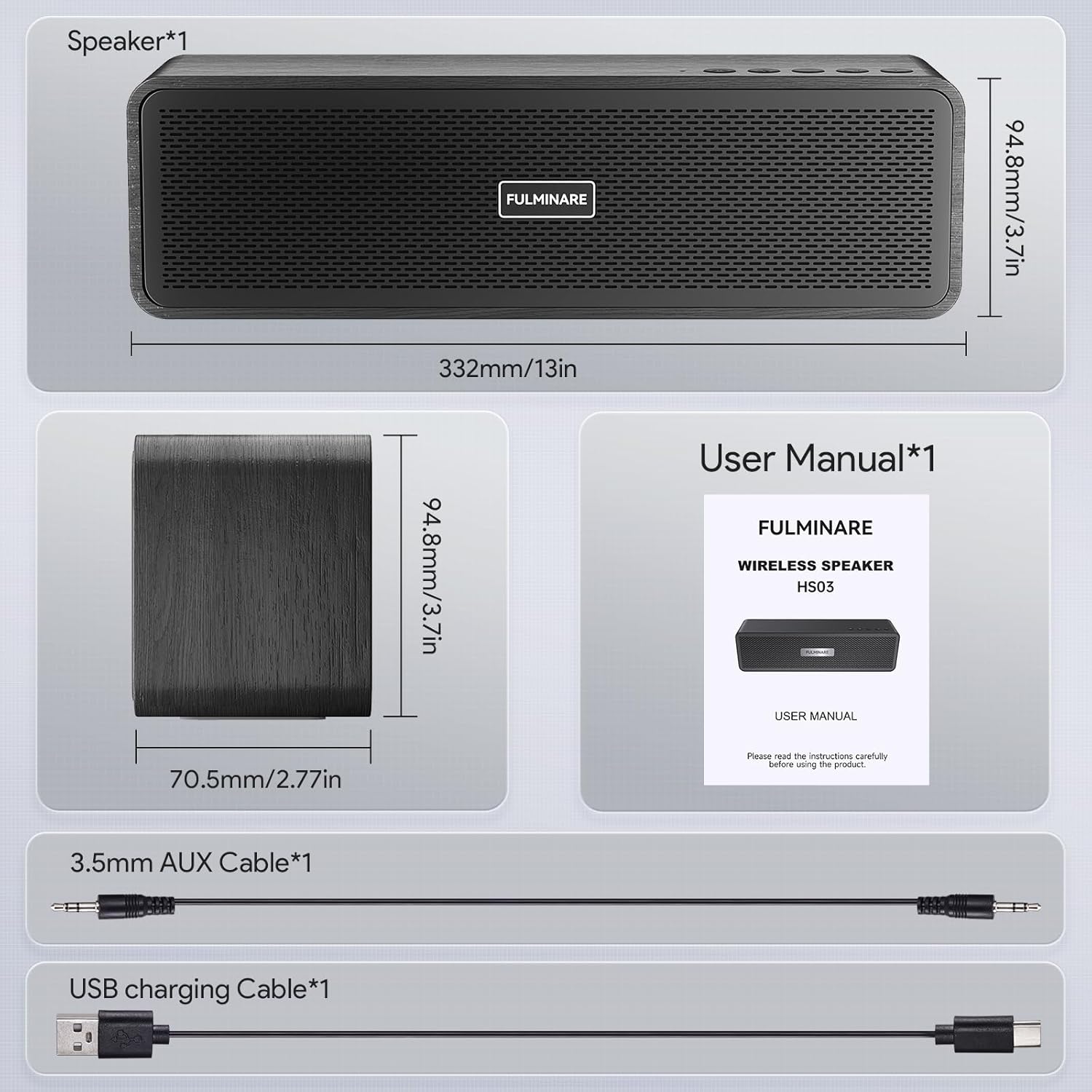
Image: The FULMINARE HS03-01 speaker, a Type-C charging cable, a 3.5mm AUX audio cable, and the user manual are neatly arranged, showcasing the complete package contents.
4. Product Overview
4.1 Controls
The top panel of the speaker features intuitive control buttons:
- Power Button: Press and hold to power on/off. Short press to switch modes.
- Bluetooth Button: Short press to enter Bluetooth pairing mode.
- Play/Pause Button: Play or pause audio. Answer/end calls.
- Volume Down (-): Decrease volume.
- Volume Up (+): Increase volume.
- Previous Track: Short press to go to the previous track.
- Next Track: Short press to go to the next track.
4.2 Ports
The rear panel provides various connectivity options:
- AUX Input: For wired connection to audio devices using the 3.5mm AUX cable.
- TF Card Slot: Insert a TF (MicroSD) card for direct music playback.
- USB-C Charging Port: Connect the Type-C cable for charging the speaker.
- USB-A Port: Insert a USB drive for direct music playback.

Image: The FULMINARE HS03-01 speaker demonstrating its four playback modes: Wireless Bluetooth, TF Card, USB Drive, and AUX Device connectivity.
5. Setup
5.1 Charging the Speaker
Before first use, fully charge the speaker:
- Connect the Type-C charging cable to the speaker's USB-C port.
- Connect the other end of the cable to a compatible USB power adapter (5V/2A recommended).
- The charging indicator light will illuminate. It will turn off or change color once fully charged.
5.2 Bluetooth Pairing
Connect your device wirelessly:
- Power on the speaker by pressing and holding the Power button.
- The speaker will automatically enter Bluetooth pairing mode, indicated by a flashing blue LED.
- On your device (smartphone, tablet, etc.), enable Bluetooth and search for available devices.
- Select "FULMINARE HS03-01" from the list.
- Once connected, the LED indicator will turn solid blue, and you will hear an audible confirmation.
Image: A FULMINARE HS03-01 speaker is shown next to a smartphone displaying its Bluetooth settings, indicating a successful connection to the speaker.
5.3 Other Playback Modes
The speaker supports multiple input sources:
- AUX Mode: Connect your audio device using the 3.5mm AUX cable. The speaker will automatically switch to AUX mode or you can manually select it using the Power button.
- TF Card Mode: Insert a TF card (with MP3 files) into the TF card slot. The speaker will automatically detect and play music from the card.
- USB Mode: Insert a USB drive (with MP3 files) into the USB-A port. The speaker will automatically detect and play music from the drive.
6. Operation
6.1 Power On/Off
- Power On: Press and hold the Power button for 2-3 seconds.
- Power Off: Press and hold the Power button for 2-3 seconds.
6.2 Music Playback
- Play/Pause: Short press the Play/Pause button.
- Next Track: Short press the Next Track button.
- Previous Track: Short press the Previous Track button.
6.3 Volume Control
- Increase Volume: Short press the Volume Up (+) button.
- Decrease Volume: Short press the Volume Down (-) button.
6.4 Call Handling
When connected via Bluetooth, the speaker can manage phone calls:
- Answer Call: Short press the Play/Pause button.
- End Call: Short press the Play/Pause button during a call.
- Reject Call: Press and hold the Play/Pause button.
Video: A FULMINARE HS03-01 speaker is shown in a home setting, demonstrating its use as a home Bluetooth speaker for various audio needs.
7. Maintenance
Proper care ensures the longevity of your speaker:
- Cleaning: Wipe the speaker with a soft, lint-free cloth. For stubborn stains, slightly dampen the cloth with water. Do not use harsh chemicals.
- Storage: Store the speaker in a cool, dry place away from direct sunlight and extreme temperatures when not in use for extended periods.
- Battery Care: To maintain battery health, avoid fully discharging the speaker frequently. Charge it regularly, even if not in constant use.
8. Troubleshooting
If you encounter issues, try these solutions:
| Problem | Solution |
|---|---|
| Speaker does not power on. | Ensure the battery is charged. Connect to a power source and try again. |
| Cannot pair via Bluetooth. | Ensure the speaker is in pairing mode (flashing blue LED). Turn off and on your device's Bluetooth. Move closer to the speaker. |
| No sound or low volume. | Check volume levels on both the speaker and your connected device. Ensure the correct input mode is selected. |
| Sound distortion. | Reduce the volume on both the speaker and your device. Ensure the speaker is not too far from the Bluetooth source. |
9. Specifications
| Feature | Detail |
|---|---|
| Model Name | HS03-01 |
| Brand | FULMINARE |
| Speaker Type | Soundbar |
| Material | Wood |
| Connectivity Technology | Bluetooth 5.3 |
| Speaker Maximum Output Power | 50 Watts |
| Frequency Response | 16 KHz |
| Audio Output Mode | Stereo |
| Water Resistance Level | IPX5 Waterproof |
| Maximum Range | 150 Feet |
| Product Dimensions | 3.27"D x 13.19"W x 3.74"H |
| Item Weight | 4.02 pounds (1.83 Kilograms) |
| Control Method | Touch |
| Compatible Devices | Smartphone, Tablets, Laptops, MP3 players, TVs, Car Audio Systems |
| Special Feature | Hi-Res Audio, LED Light |

Image: An exploded view of the FULMINARE HS03-01 speaker highlights its internal components, emphasizing the 50W output, 85dB sensitivity, and 140Hz-18KHz frequency response.
10. Warranty & Support
FULMINARE is committed to providing high-quality products and excellent customer service. Your FULMINARE HS03-01 Wireless Bluetooth Speaker comes with a standard manufacturer's warranty against defects in materials and workmanship.
For any questions, technical support, or warranty claims, please contact our customer service team. Our team provides 24/7 after-sales service and is always ready to assist you.
Contact information can typically be found on our official website or through your purchase platform.