
1. Introduction
This manual provides detailed instructions for the installation, operation, and maintenance of your EONON 11.8-inch 2K Display Audio 1DIN Car Navigation System, model UX7SKJ-PRO-MAX. Please read this manual thoroughly before using the product to ensure proper functionality and safety.

Image: EONON 11.8-inch 2K Display Audio System, model UX7SKJ-PRO-MAX.
2. Key Features
The EONON UX7SKJ-PRO-MAX system offers advanced features for an enhanced in-car experience:
- Qualcomm Snapdragon 6225 Processor: 6nm processor with improved CPU (25%) and GPU (16%) performance, ensuring efficient operation. Features Android 13, 256GB ROM, 8GB LPDDR4 RAM, 8-core CPU, Adreno 610 GPU, and Hexagon 686 DSP.
- 11.8-inch 2K QLED Display: Large 1200x2000 resolution QLED screen with 2.5D full-touch and 178° viewing angles, supporting up to 2K video playback.
- New UI with Split Screen: Updated user interface allowing 3:7 or 7:3 split-screen display for navigation and other applications simultaneously. Supports media player widgets and light/dark modes.
- Wireless CarPlay & Android Auto: Seamless smartphone integration for navigation, calls, music, and voice control. Supports mirroring for video content.
- Wi-Fi 6 & 4G LTE Module: Built-in Wi-Fi 6 and 4G module (SIM card required, sold separately) for internet access, enabling app downloads (TikTok, YouTube, Google Maps, etc.).
- Superior Audio Quality: Advanced DSP sound processing (RHOM 32107 chip) with 48-band equalizer adjustment, powerful ST TDA7851 amplifier (4x48W output), and coaxial/optical audio outputs.
- AHD Backup Camera Support: Compatible with AHD cameras up to 1920x1080 resolution. Automatically switches to the backup camera view when reversing.
- Bluetooth 5.1 & FM/AM/Wide FM: Qualcomm WCN3988 module for Bluetooth music playback and hands-free calling. ST TDA7708 radio module for stable reception across a wide frequency range, including Wide FM for emergency broadcasts.
- OTA Updates & Steering Wheel Control: Supports Over-The-Air (OTA) software updates for bug fixes and feature enhancements. Compatible with analog steering wheel controls for convenient operation.
- New Embedded Screen Connection & 1DIN Heat Sink: Innovative screen connection design simplifies installation by eliminating complex power cable routing. Features a dedicated 1DIN heat sink for optimal fit and reliable performance.

Image: Overview of the EONON UX7SKJ-PRO-MAX's main features.
3. Setup and Installation
3.1 Package Contents
Before installation, verify that all components are present:
- Main Unit (Display Audio System)
- Power Cable
- AV Cable
- 4G Antenna (2m)
- GPS Antenna (2m)
- Audio Cable
- CarPlay/USB Cable (80mm)
- USB Cable (80mm)
- Backup Camera Input Cable
- Microphone (3m)
- Power Cable (Female Terminal Conversion Cable)
- Mounting Screws
- SIM Card Holder
- Removal Keys
- Spare Fuse
- Instruction Manual

Image: Included accessories for the EONON UX7SKJ-PRO-MAX.
3.2 Wiring Diagram
Refer to the following diagram for proper wiring connections. Ensure all connections are secure before powering on the device.

Image: Detailed wiring diagram for the EONON UX7SKJ-PRO-MAX system.
- Important Note on Steering Wheel Control: This unit supports analog SWC signals. For digital signals, a separate conversion cable is required.
- Camera Cable Connection: Connect the included camera cable. Failure to do so may result in intermittent audio or the inability for the other party to hear your voice during calls.
3.3 Physical Installation
The UX7SKJ-PRO-MAX features a new embedded screen connection and a dedicated 1DIN heat sink design for easy and secure installation.
- The new screen connection structure eliminates the need for cumbersome power cable connections, simplifying mounting and removal.
- The dedicated 1DIN heat sink ensures a perfect fit and reliable use, unlike generic 2DIN heat sinks forced into 1DIN structures which can cause connector issues, difficult installation, and risk of damage.

Image: Comparison of embedded screen connection and 1DIN heat sink design.
3.4 Floating Structure and Adjustments
The floating display structure allows for angle and position adjustments to optimize visibility and usability, adapting to various vehicle types and avoiding glare or air conditioning vents.
- Front/Rear Angle Adjustment: Up to 23 degrees.
- Left/Right Angle Adjustment: Up to 26 degrees.
- Vertical Position Adjustment: Panel can be adjusted 50mm downwards or 65mm upwards.

Image: Floating structure adjustments and panel/mounting dimensions.
4. Operating Instructions
4.1 User Interface and Split Screen
The system features a fully upgraded UI. The home screen supports 3:7 or 7:3 split-screen adjustments, allowing you to view navigation and other applications simultaneously. Media player widgets are also available.

Image: Demonstrates the new UI with split-screen functionality for navigation and media.
4.2 CarPlay, Android Auto, and Mirroring
Connect your smartphone for seamless integration:
- CarPlay (iPhone): Compatible with iPhone 5 and later.
- Wireless Android Auto: Requires a smartphone with 5GHz Wi-Fi support and the latest Android Auto app installed. Examples: All Android 11.0 devices, Google or Samsung smartphones with Android 10.0, Samsung Galaxy S8/S8+/Note 8 with Android 9.0.
- Wired Android Auto: Requires a smartphone with Android 6.0 or higher and the latest Android Auto app installed.
- Mirroring: Sync your smartphone screen to the unit to watch videos from apps like YouTube or Hulu. Note: Due to copyright, some apps like Netflix may not support mirroring.

Image: Illustrates CarPlay and Android Auto interfaces, and screen mirroring for video content.
4.3 Internet Connectivity (Wi-Fi & 4G)
The unit supports Wi-Fi 6 and has a built-in 4G module. You can connect to the internet by creating a Wi-Fi hotspot with your smartphone or by inserting a SIM card directly into the unit.
- Wi-Fi: Supports Wi-Fi 6 (2.4/5 GHz).
- 4G Module: Insert a SIM card (sold separately) to establish a network connection. Supported frequency bands include GSM 850/900/1800, WCDMA B1/B5/B6/B8/B19, TDD-LTE B38/B39/B40/B41, FDD-LTE B1/B3/B5/B7/B8/B9/B18/B19/B20/B26/B28. Compatibility may vary by region and frequency band.

Image: Shows Wi-Fi and 4G SIM card slot for internet access.
4.4 Audio Functions
Experience superior sound quality with the integrated DSP and powerful amplifier.
- DSP (Digital Sound Processor): RHOM 32107 chip for advanced sound processing.
- Equalizer: 48-band equalizer for precise sound customization.
- Amplifier: ST TDA7851 amplifier with 4x48W surround output.
- Audio Outputs: Coaxial and optical outputs for connecting to various external audio devices.

Image: Details on audio quality features, including DSP, equalizer, amplifier, and output options.
4.5 Radio Functions
The unit includes an ST TDA7708 radio module for stable and wide-range FM/AM reception, including Wide FM for emergency broadcasts.
4.6 Steering Wheel Control
Register frequently used operations to your steering wheel buttons for convenient and safe control while driving. This unit supports analog SWC signals. For digital signals, a separate conversion cable is required.

Image: Illustrates steering wheel control functions and OTA update screen.
5. Maintenance
To ensure the longevity and optimal performance of your EONON Display Audio system, follow these maintenance guidelines:
- Cleaning the Screen: Use a soft, lint-free cloth to gently wipe the display. For stubborn smudges, slightly dampen the cloth with water or a screen-safe cleaner. Avoid harsh chemicals or abrasive materials.
- General Cleaning: Keep the unit and surrounding area free of dust and debris. Use a soft brush or compressed air to clean vents and ports.
- Temperature Control: Avoid exposing the unit to extreme temperatures. Prolonged exposure to direct sunlight or very cold conditions can affect performance and lifespan.
- Cable Connections: Periodically check all cable connections to ensure they are secure and free from damage. Loose connections can lead to intermittent issues.
6. Troubleshooting
If you encounter issues with your EONON Display Audio system, refer to the following common problems and solutions:
- No Power:
- Check all power connections.
- Verify the vehicle's fuse box and the unit's inline fuse.
- Ensure the vehicle's ignition is on.
- No Sound:
- Check speaker connections.
- Verify volume settings on the unit and any connected devices.
- Ensure the correct audio source is selected.
- If using Bluetooth, ensure the device is properly paired and connected.
- Touch Screen Unresponsive:
- Restart the unit by pressing the RST button (if available) or by turning off the vehicle's ignition and restarting.
- Ensure the screen is clean and free of debris.
- CarPlay/Android Auto Not Connecting:
- Ensure your smartphone is compatible and has the latest software/app versions.
- For wireless connections, verify 5GHz Wi-Fi is enabled on your phone.
- Try connecting with a different USB cable.
- Restart both the unit and your smartphone.
- Poor Radio Reception:
- Check the antenna connection.
- Ensure the antenna is properly installed and not obstructed.
- Move to an area with better signal strength.
- System Slow or Freezing:
- Close unnecessary applications running in the background.
- Perform a system restart.
- Check for and install any available OTA software updates.
If problems persist after attempting these solutions, please contact EONON customer support.
7. Specifications
Key technical specifications for the EONON UX7SKJ-PRO-MAX:
| Feature | Specification |
|---|---|
| Model Number | UX7SKJ-PRO-MAX |
| Screen Size | 11.8 inches |
| Display Type | QLED |
| Screen Resolution | 1200 x 2000 |
| Operating System | Android 13 |
| Processor | Qualcomm Snapdragon 6225 (6nm, 8-core) |
| RAM | 8GB LPDDR4 |
| ROM | 256GB |
| GPU | Adreno 610 |
| DSP Chip | RHOM 32107 |
| Amplifier Chip | ST TDA7851 |
| Audio Output Power | 4 x 48W |
| Equalizer | 48-band |
| Bluetooth Version | 5.1 (Qualcomm WCN3988 module) |
| Wi-Fi | Wi-Fi 6 ready (2.4/5 GHz) |
| 4G Module | Built-in (SIM card sold separately) |
| Radio Module | ST TDA7708 (FM/AM/Wide FM) |
| Product Dimensions | 11.8 x 17.8 x 5 cm |
| Product Weight | 2.6 kg |

Image: Technical Compliance Certificate for the product.
8. Warranty and Support
EONON products are designed for reliability and performance. For warranty information, please refer to the documentation included with your purchase or visit the official EONON website. If you require technical assistance, have questions about installation, or need troubleshooting support, please contact our customer service team.
You can find support resources and contact information on the EONON brand store page: EONON Store on Amazon.co.jp
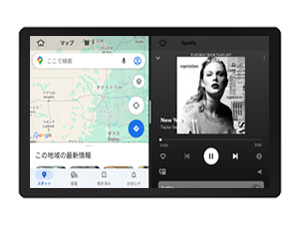
Image: EONON customer support representative.