
1. Introduction
This manual provides detailed instructions for the safe and effective use of your FREDORCH FR2 machine. Please read this manual thoroughly before operating the device and retain it for future reference.
2. Safety Information
Warning: This product is intended for adult use only.
Always read and understand all instructions before use. Failure to do so may result in injury or damage to the product. Keep the device away from water and extreme temperatures. Disconnect from power when not in use or during cleaning. Inspect the device and all attachments for any damage before each use. Do not use if any components are damaged.
3. Package Contents
Verify that all components are present in your package:
- FREDORCH FR2 Machine Unit
- Power Adapter (24V Power Supply)
- Wired Control Unit (if applicable)
- Wireless Remote Control (if applicable)
- Realistic Dildo Attachment
- Vibrator Clamp
- T-Support Rods (for T-type assembly)
- H-Support Rods (for H-type assembly)
- Instruction Manual

Image: Product standard display showing the machine unit, power adapter, remote control, and various components. Below, the product packaging display shows the machine components securely packed in foam within a plain brown box, emphasizing discreet packaging.

Image: Detailed view of accessories including a realistic dildo (7.87 inches / 20 cm length, 1.22 inches / 3.1 cm width) and a vibrator clamp (2.83 inches / 7.2 cm height, 1.88 inches / 4.8 cm width), illustrating their dimensions.
4. Setup and Assembly
The FREDORCH FR2 supports two primary assembly modes: T-type and H-type. Choose the mode that best suits your intended use.
4.1. General Assembly Steps
- Unpack all components and verify against the package contents list.
- Attach the support rods to the main machine unit according to your desired assembly type (T-type or H-type). Ensure all connections are secure.
- Connect the desired attachment (e.g., dildo) to the machine's anti-rotation interface. Ensure it is firmly locked into place.
- Connect the power adapter to the machine and then plug it into a suitable power outlet.

Image: Illustration of the two assembly modes: H-type (vertical stand) and T-type (horizontal stand), demonstrating how the support rods are configured for each setup.
4.2. Attaching Accessories
The machine features a Decagon Anti-Rotation Interface for secure attachment of accessories. To attach an accessory:
- Align the accessory's interface with the machine's interface.
- Push and twist until the accessory locks securely into place.
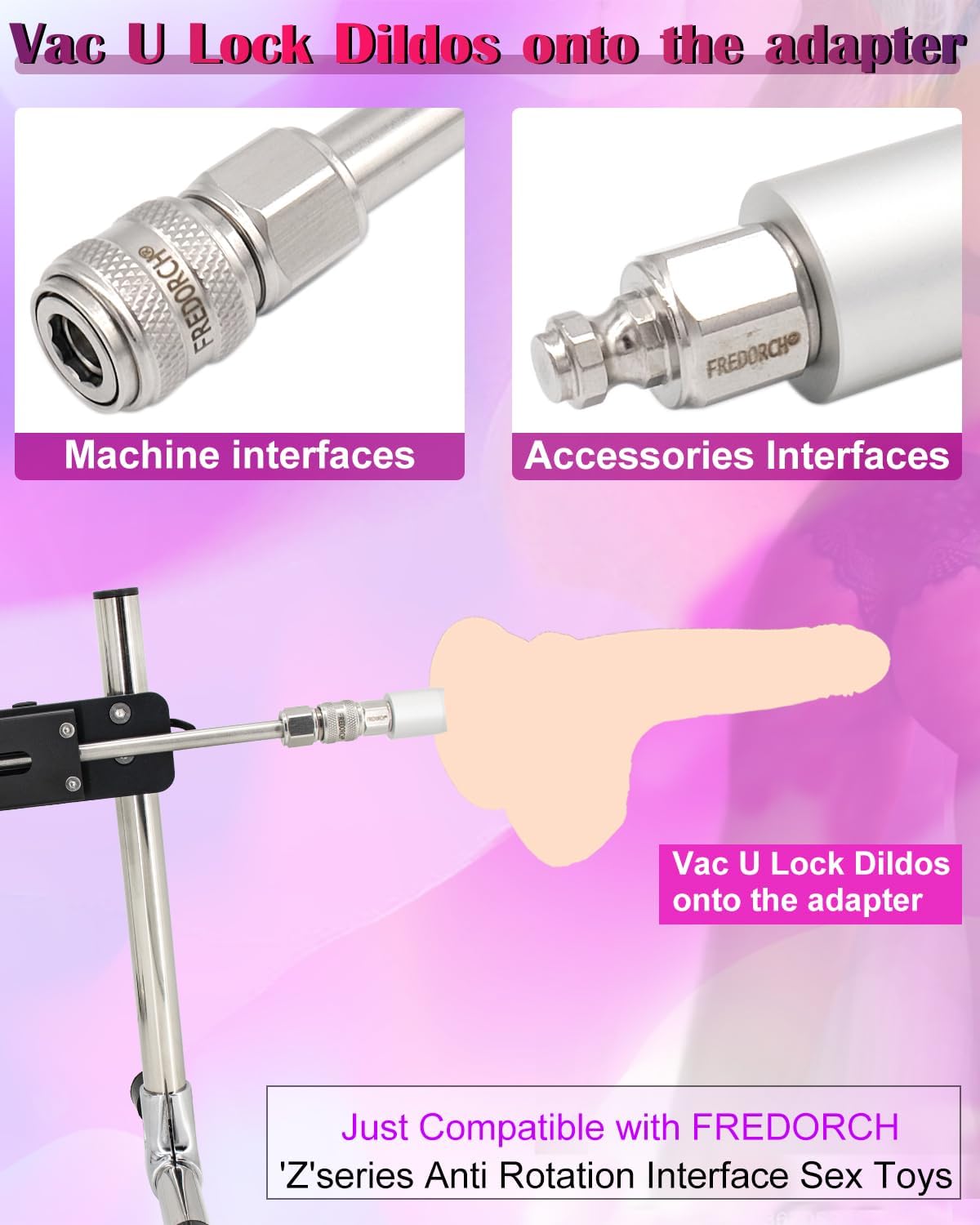
Image: Close-up view demonstrating how to connect a Vac U Lock dildo onto the machine's adapter, highlighting the machine and accessory interfaces.

Image: Detailed view of the Decagon Anti-Rotation Interface, designed for stable and secure attachment of accessories.
5. Operating Instructions
The FREDORCH FR2 machine can be controlled via a wired unit or a wireless remote control, offering 20 different classic modes.
5.1. Basic Controls
The control unit (wired or wireless) typically features the following buttons:
- Speed Key-up (▲): Increases the thrusting speed.
- Pause Key (□): Pauses or resumes operation.
- Speed Key-Slow (▼): Decreases the thrusting speed.
- Modes Key (○): Cycles through the 20 different classic modes.

Image: Depicts the remote control with labeled buttons for speed up, pause, speed down, and mode selection, illustrating how to control the machine's functions.
5.2. Adjusting Speed and Stroke
The machine offers adjustable thrusting speeds ranging from 0 to 300 times per minute. The stroke length is adjustable between 3 cm and 9 cm. Use the Speed Up and Speed Down keys to fine-tune the intensity.

Image: Shows the machine in operation, highlighting its 80W max power and 20 different classic modes. The image also suggests multi-angle adjustability.
5.3. Adjusting Angles and Positions
The FREDORCH FR2 is designed for multi-angle and height adjustments, allowing for various positions. The swing arm can be adjusted to change the angle of thrust. The support rods can also be configured to achieve different heights and orientations.
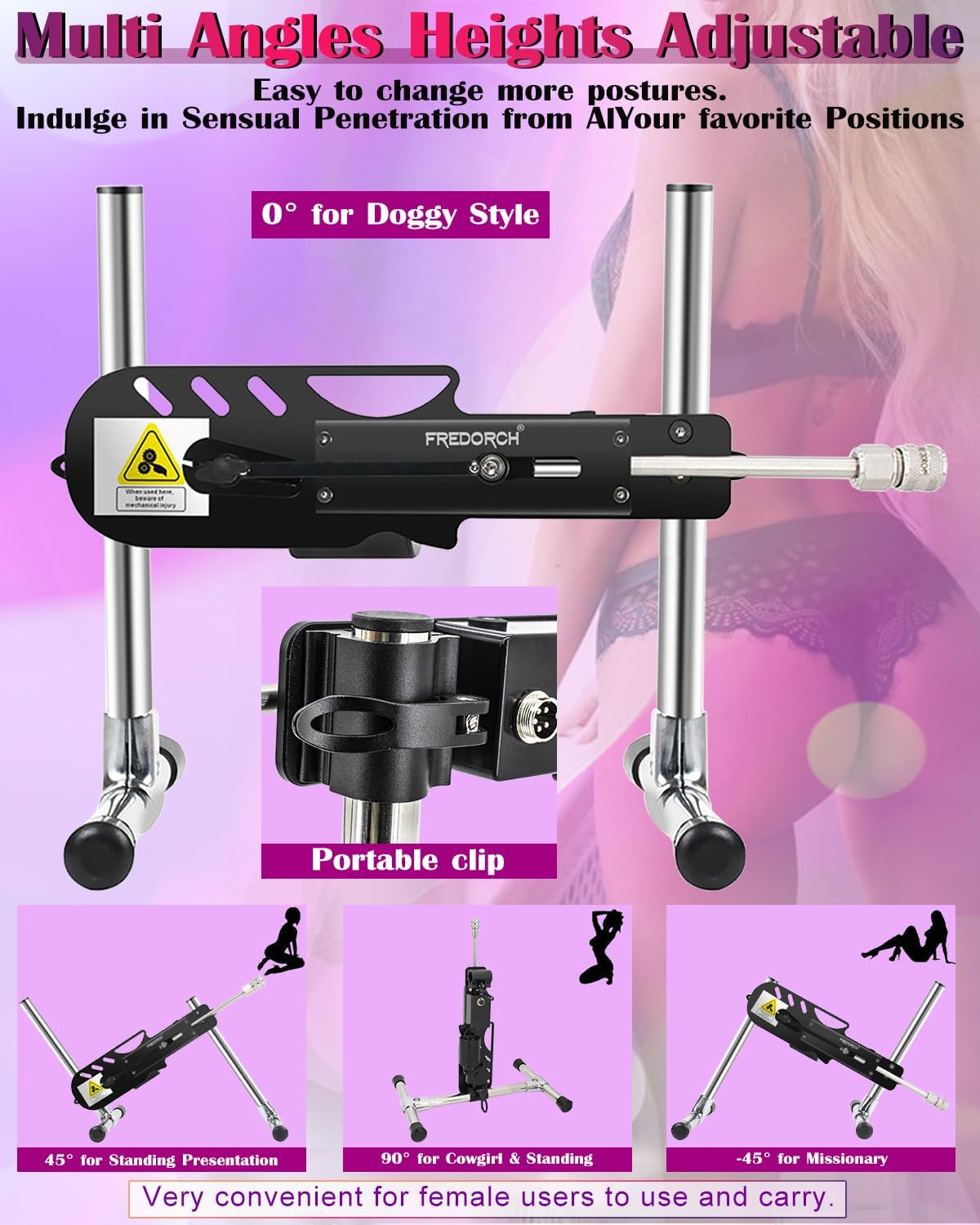
Image: Illustrates various adjustable angles and heights for the machine, including 0° for a horizontal position, 45° for a standing presentation, 90° for a vertical position, and -45° for another angled position, demonstrating its versatility.
6. Maintenance
6.1. Cleaning
Always disconnect the machine from the power source before cleaning. Clean the machine unit with a soft, damp cloth. Do not immerse the main unit in water. Clean attachments thoroughly with warm water and a mild, toy-safe soap, or a specialized toy cleaner. Rinse thoroughly and allow to air dry completely before storage.
6.2. Storage
Store the FREDORCH FR2 machine and its accessories in a clean, dry place, away from direct sunlight and extreme temperatures. Ensure all components are dry before storage. Discreet packaging is provided for privacy.
7. Troubleshooting
If you encounter any issues with your FREDORCH FR2 machine, please refer to the following common solutions:
- Machine not turning on: Ensure the power adapter is securely connected to both the machine and a working power outlet. Check if the power outlet is functional.
- Remote control not responding: If using a wireless remote, ensure batteries are correctly inserted and charged. Try moving closer to the machine.
- Unusual noises or vibrations: Discontinue use immediately. Check all connections and attachments for proper assembly. Ensure no foreign objects are obstructing moving parts.
- Attachments not staying secure: Ensure the accessory is correctly aligned and locked into the Decagon Anti-Rotation Interface. Inspect the interface for any damage or wear.
If problems persist after attempting these solutions, please contact customer support.
8. Specifications
| Feature | Specification |
|---|---|
| Model Number | MHC-FR2 |
| Power | 80W Turbine Motor |
| Thrusting Speed | 0-300 times per minute |
| Stroke Length | 3-9 cm (1.18-3.54 inches) |
| Control | Wired & Wireless Remote Control |
| Modes | 20 Classic Modes |
| Assembly Modes | T-type / H-type |
| Interface | Decagon Anti-Rotation Interface |
| Parcel Dimensions | 42 x 26 x 26 cm |
| Weight | 4 kg (8.4 lbs) |

Image: Displays the machine's dimensions (e.g., 12.99 inches / 33 cm width, 3.74 inches / 95 mm height) and weight (3.8KG / 8.4 lb). It also includes a noise level chart indicating operation between 0-35dB, described as nearly inaudible to a whisper.
9. Warranty and Support
For warranty information or technical support, please refer to the manufacturer's official website or contact their customer service directly. Keep your purchase receipt as proof of purchase.

