
Introduction
The EcoVolt PowerMax 6000 is a high-capacity portable power station designed to provide reliable power for various applications, from home emergencies to outdoor activities. Featuring a 3600Wh capacity and 6000W AC output (9000W surge), it supports both 120V and 240V dual voltage output. This manual provides essential information for the safe and efficient operation of your PowerMax 6000.
Important Safety Instructions
Please read and understand all safety instructions before operating the PowerMax 6000. Failure to follow these instructions may result in electric shock, fire, or serious injury.
- Do not disassemble, repair, or modify the unit.
- Keep the unit away from heat sources, direct sunlight, and flammable materials.
- Ensure proper ventilation during use to prevent overheating.
- Do not expose the unit to water or other liquids.
- Use only approved accessories and charging cables.
- Keep out of reach of children.
Package Contents
Verify that all items listed below are included in your package:
- PowerMax 6000 power station
- 4 × 200W solar panels
- AC charging cable
- Car charging cable
- Solar charging cable
- User manual
- Warranty card
Product Overview
The PowerMax 6000 is designed for versatility and ease of use. It features multiple output ports, a clear display, and a durable construction.
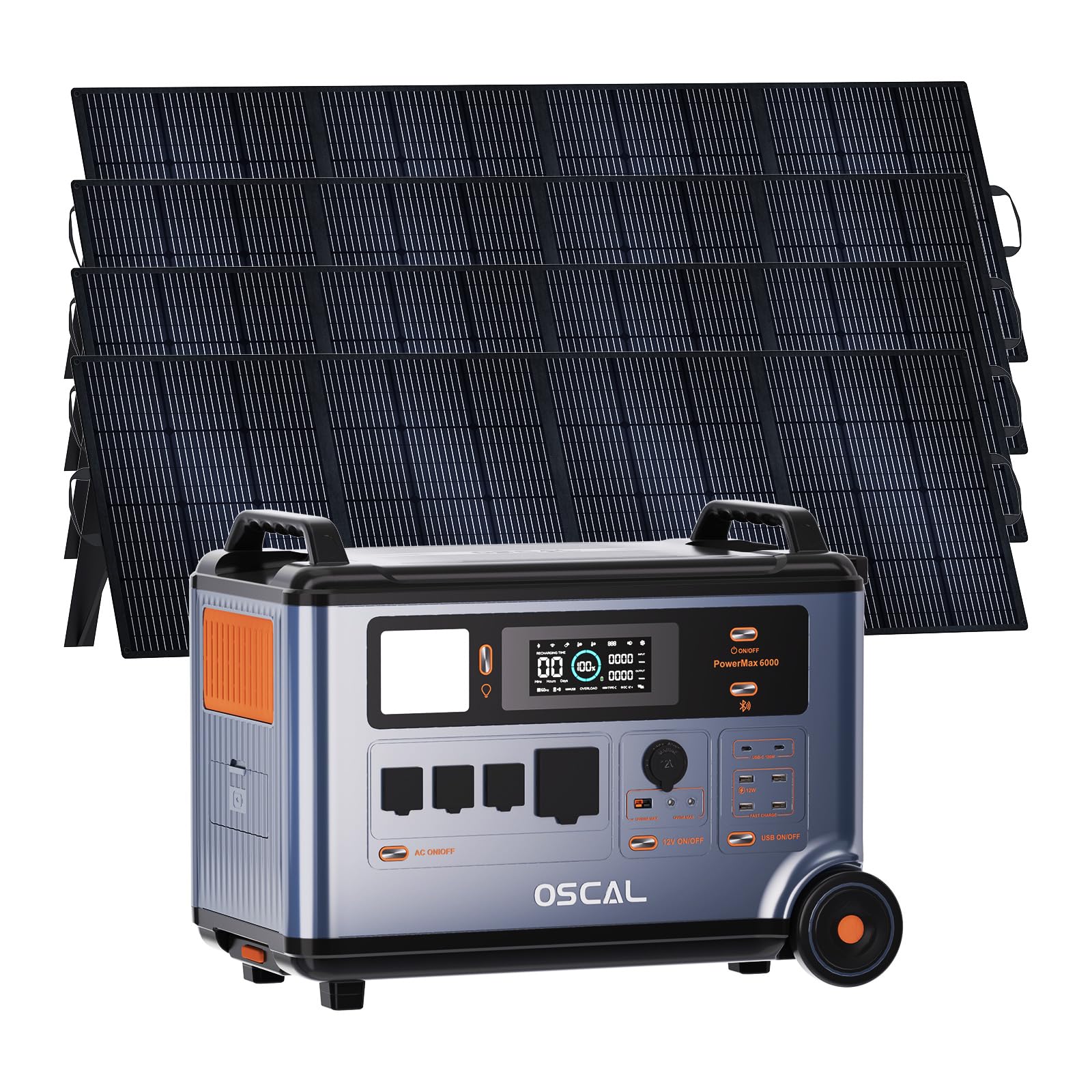
Image: The EcoVolt PowerMax 6000 solar generator shown with four 200W solar panels, highlighting its complete portable power solution.
Key Features:
- High Capacity: 3600Wh LiFePO4 battery for extended power supply.
- Powerful Output: 6000W AC output (9000W surge) with 120V/240V dual voltage support.
- Fast Charging: 2200W AC input and 2400W MPPT solar input for rapid recharging.
- EPS Functionality: 5-8ms fast switchover for uninterruptible power supply during outages.
- Smart Control: Monitor and control via a dedicated smartphone application.
- Durable Battery: LiFePO4 battery with advanced BMS, offering up to 3500 cycles and a 25-year service life.

Image: A detailed view of the PowerMax 6000's control panel, showing the display and various ports.
Setup Guide
1. Unpacking and Inspection:
Carefully remove all components from the packaging. Inspect the PowerMax 6000 and accessories for any signs of damage. If any items are missing or damaged, contact customer support immediately.
2. Initial Charging:
Before first use, fully charge the PowerMax 6000. Connect the AC charging cable to the unit and a standard wall outlet. The display will indicate the charging status. A full charge typically takes approximately 1.96 hours using AC input.
3. Connecting Solar Panels:
For solar charging, connect the provided solar charging cables to the solar panels and then to the PowerMax 6000's solar input port. Ensure the solar panels are placed in direct sunlight for optimal charging efficiency.

Image: Illustration showing the connection of solar panels to the PowerMax 6000 for charging.
Operating Instructions
1. Powering On/Off:
Press and hold the main power button to turn the unit on or off. The display will illuminate upon activation.
2. Using AC Outputs:
The PowerMax 6000 provides 4 AC output ports. Press the AC power button to activate the AC outlets. Plug your appliances into the appropriate 120V or 240V outlets. The unit automatically detects and supports dual voltage output.

Image: The PowerMax 6000 connected to a household, demonstrating its 120V/240V dual voltage output capability to power various home appliances.
3. Using DC and USB Outputs:
Activate the DC or USB power buttons to use the respective ports. The unit includes Anderson output, USB-A, USB-C, Car Power Output, and DC5521 ports for various devices.
4. Charging Methods:
- AC Charging: Connect to a wall outlet using the AC charging cable. Supports up to 2200W input.
- Solar Charging: Connect solar panels to the solar input port. Supports up to 2400W MPPT solar input.
- Car Charging: Use the car charging cable to charge from your vehicle's 12V outlet.
- Other Methods: The PowerMax 6000 can also be recharged via wind turbine, water turbine, diesel generator, or EV charging station (accessories sold separately).
Video: This video demonstrates the various charging methods for the PowerMax 6000, including solar, wind, water, AC, diesel generator, and EV charging station, showcasing its versatility.
5. EPS (Emergency Power Supply) Function:
In the event of a power outage, the PowerMax 6000 automatically switches to battery power within 5-8 milliseconds, ensuring uninterrupted operation for connected devices. This feature is ideal for sensitive electronics and critical equipment.

Image: The PowerMax 6000 illustrating its 5-8ms fast UPS switchover, ensuring continuous power for essential devices like CPAP machines, home office setups, and emergency equipment.
6. App Control:
Download the OSCAL application on your smartphone to monitor and control the PowerMax 6000 remotely. The app allows you to check power usage, battery status, and activate/deactivate outputs.

Image: A smartphone screen showing the OSCAL application interface, used for monitoring and controlling the PowerMax 6000 power station.
Video: This video demonstrates the remote monitoring and control capabilities of the PowerMax 6000 via its smart app, including signal light communication.
Maintenance
1. Cleaning:
Wipe the unit with a dry, soft cloth. Do not use abrasive cleaners or solvents. Ensure all ports are free from dust and debris.
2. Storage:
When not in use for extended periods, store the PowerMax 6000 in a cool, dry place, away from direct sunlight and extreme temperatures. It is recommended to charge the unit to 50-80% every 3-6 months to maintain battery health.
3. Battery Care:
The LiFePO4 battery is designed for longevity. Avoid fully discharging the battery frequently to prolong its lifespan. The integrated Battery Management System (BMS) protects against overcharge, over-discharge, over-voltage, over-current, short-circuit, and temperature fluctuations.
Troubleshooting
| Problem | Possible Cause | Solution |
|---|---|---|
| Unit does not power on. | Battery is completely discharged. | Connect to AC power and charge for at least 30 minutes. |
| AC output not working. | AC output not activated; Overload protection triggered. | Press the AC power button; Reduce the load on the AC outlets. |
| Solar charging is slow or not working. | Insufficient sunlight; Incorrect panel connection; Dirty panels. | Ensure panels are in direct sunlight; Check cable connections; Clean solar panels. |
| App connection issues. | Bluetooth/Wi-Fi disabled; App not updated. | Ensure Bluetooth/Wi-Fi is enabled on your device; Update the OSCAL app to the latest version. |
If you encounter issues not listed here or if the problem persists, please contact EcoVolt customer support.
Technical Specifications
| Feature | Detail |
|---|---|
| Brand | EcoVolt |
| Model Name | PowerMax 6000 |
| Wattage | 6000 Watts (Running) / 9000 Watts (Starting) |
| Fuel Type | Solar |
| Power Source | Corded Electric |
| Voltage | 110V / 120V / 240V Split Phase |
| Battery Type | LiFePO4 |
| Capacity | 3600Wh |
| AC Input | 2200W Max |
| Solar Input | 2400W MPPT Max |
| Total Power Outlets | 14 |
| Material | Metal |
| Special Feature | Fast Charging, EPS Uninterruptible Power Supply, App Control |
Warranty and Support
The EcoVolt PowerMax 6000 comes with a 5-year warranty. For technical support, warranty claims, or any questions regarding your product, please refer to the contact information provided on your warranty card or visit the official EcoVolt website.
You can also find additional support and FAQs within the OSCAL smartphone application.