
1. Introduction
Welcome to the Hieasy 4MP 2.5K Window Security Camera user manual. This guide provides detailed instructions for setting up, operating, and maintaining your new security camera. Designed for indoor use, this camera offers 2.5K Ultra HD resolution, color night vision, and flexible storage options without requiring a subscription. Please read this manual thoroughly before use to ensure proper installation and functionality.
2. Package Contents
Verify that all items listed below are included in your package. If any items are missing or damaged, please contact customer support.
- Camera Body (x2)
- 6.6/Ft Charging Cable (x2)
- Instruction Manual (x1)
- Power Adapter (x2)
- 32GB Micro SD Card (x2)
- Magnetic Sheet (x4)
- Wire Holder (x4)
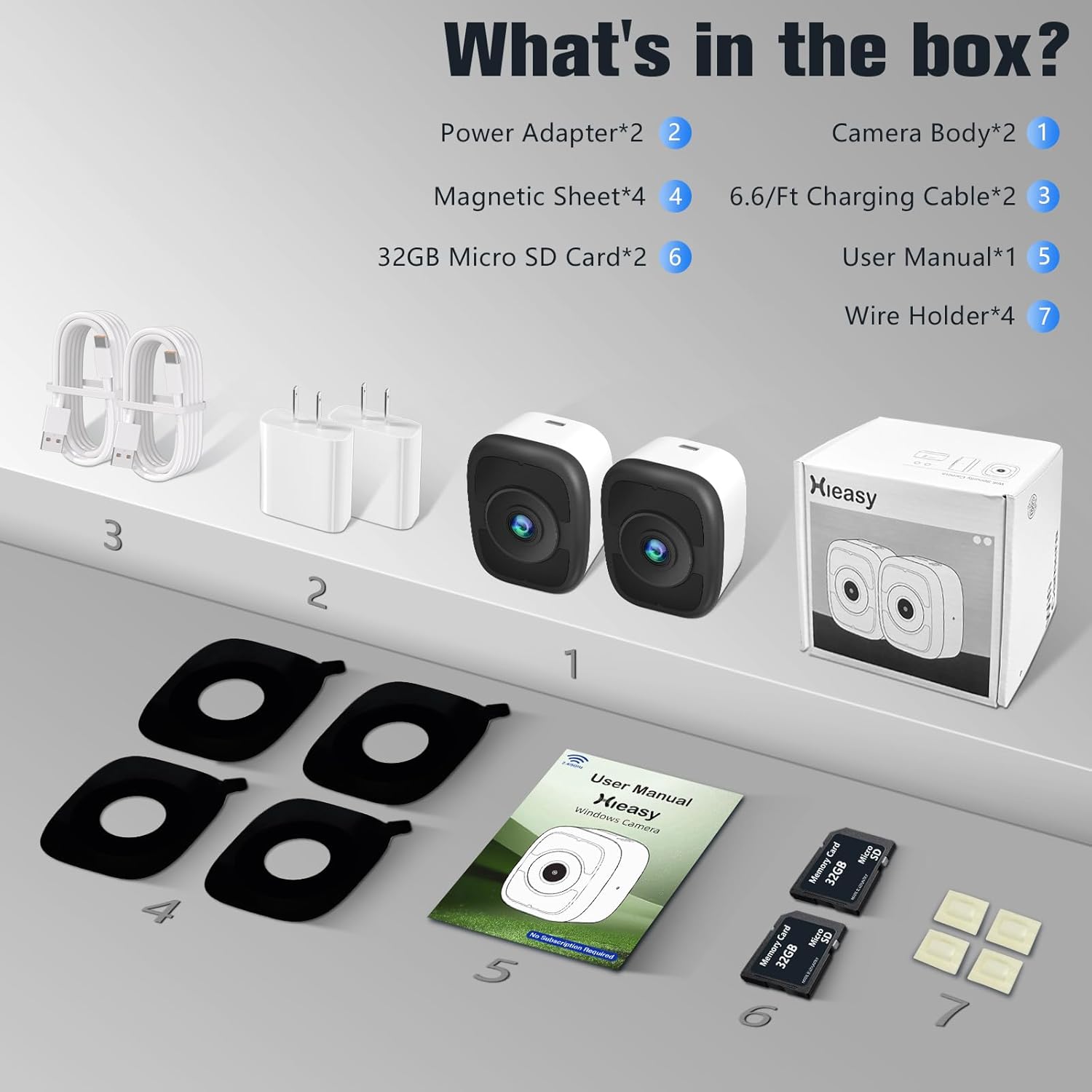
Image: All components included in the Hieasy 4MP 2.5K Window Security Camera 2-pack, including cameras, cables, power adapters, SD cards, magnetic sheets, and wire holders.
3. Product Features
The Hieasy 4MP 2.5K Window Security Camera offers advanced features for reliable indoor surveillance:
- 2.5K Ultra HD Resolution: Captures clear and detailed video at 2560x1440 resolution.
- 4MP Lens & Color Night Vision: Provides full-color images even in low-light conditions, enhancing nighttime security.
- Magnetic Mounting Design: Allows for quick and easy installation on windows without damage.
- Dual-Band Wi-Fi Connectivity: Supports both 2.4G and 5G Wi-Fi for flexible and stable connection.
- No Subscription Fees: All core features are available without recurring costs.
- Customizable Motion Detection: Define specific detection zones and receive timely alerts.
- Local Storage: Supports up to 512GB Micro SD card for 24/7 recording (32GB card included).
- Remote Access & Device Sharing: View live feeds from your smartphone and share access with up to 16 users.

Image: A visual summary of the camera's key features, including 2.5K HD quality, color night vision, 24/7 monitoring, and free subscription for features.

Image: A comparison demonstrating the superior clarity and color reproduction of 2.5K HD color night vision compared to standard 2K color night vision and traditional black and white infrared night vision.
4. Setup and Installation
The Hieasy camera features a magnetic mounting design for quick and easy installation on windows.
4.1 Physical Installation
- Prepare the Window: Ensure the window surface is clean and dry where you intend to mount the camera.
- Attach Magnetic Sheet: Peel off the protective film from one side of a magnetic sheet and firmly press it onto the desired spot on your window.
- Mount the Camera: Align the camera with the magnetic sheet on the window. The camera will magnetically attach, securing it in place.
- Connect Power: Plug the charging cable into the camera and connect the power adapter to an electrical outlet.
- Organize Cables: Use the provided wire holders to secure the charging cable neatly along the window frame or wall.

Image: A visual guide showing the simple three-step installation: sticking the magnetic sheet, pressing the camera onto it, and completing the setup.

Image: A three-panel illustration detailing the peel-and-stick installation: tearing off the sticker and installing the metal piece, attaching the camera to the iron plate, and securing the wire with a cable organizer.
4.2 App Pairing and Wi-Fi Connection
- Download the App: Search for the official Hieasy app on your smartphone's app store (iOS or Android).
- Create Account: Open the app and follow the on-screen instructions to create a new user account or log in.
- Add Device: Select the option to add a new device. The camera supports both Bluetooth and Wi-Fi connectivity for initial pairing.
- Connect to Wi-Fi: Follow the app's prompts to connect the camera to your 2.4G or 5G Wi-Fi network. Ensure your phone is connected to the same Wi-Fi network during setup.
- Complete Setup: Once connected, you can name your camera and adjust initial settings.
5. Operating Instructions
5.1 Live View and Recording
Access the Hieasy app on your smartphone to view the live feed from your camera anytime, anywhere. The camera supports 24/7 continuous recording to the installed Micro SD card.
5.2 Motion Detection and Alerts
The camera features customizable motion detection zones. You can define specific areas within the camera's view to monitor for activity. When motion is detected, the camera will:
- Send push notifications to your smartphone.
- Sound an alarm (if enabled in settings).
- Automatically record video of the event.

Image: The Hieasy camera monitoring an outdoor area, detecting a person, and triggering an alert notification on a smartphone.

Image: A grid illustrating various detection capabilities such as general motion detection, defining warning areas, leave detection, and people counting.

Image: A person delivering a package, demonstrating the camera's custom area detection and 4x digital zoom capabilities to capture details without blind spots.
5.3 Color Night Vision
Equipped with a 4-megapixel lens and advanced low-light algorithms, the camera provides clear, full-color video even in dark environments, ensuring no critical details are missed during nighttime surveillance.

Image: A three-panel comparison showing the clarity of color night vision with 2.5K HD and 4MP resolution against standard 2K and traditional black and white night vision, highlighting visible colors at night.
6. Storage Options
The Hieasy camera supports local storage via a Micro SD card, eliminating the need for cloud subscription fees. A 32GB Micro SD card is included with your purchase, and the camera supports cards up to 512GB.
- 24/7 Recording: The camera can continuously record footage to the SD card.
- Event Recording: Motion-triggered events are automatically saved to the SD card.
- Data Security: Your recorded data is stored locally, ensuring privacy.

Image: The Hieasy camera highlighting its secure local storage option with a Micro SD card, supporting up to 512GB and including a 32GB card.
7. Device Sharing
You can easily share access to your camera's live feed and recorded events with family members, roommates, or team staff. The device supports sharing with up to 16 users, allowing multiple individuals to monitor the premises simultaneously.
- Access Sharing Settings: In the Hieasy app, navigate to the camera settings and find the 'Device Sharing' option.
- Invite Users: You can invite other users by entering their account details or by generating a shareable link/QR code.
- Manage Permissions: Assign appropriate viewing or management permissions to each shared user.

Image: Three smartphones simultaneously displaying the live camera feed, demonstrating the device sharing feature for multiple users.

Image: A map illustrating how family and friends can view the camera feed from various locations, emphasizing remote access and sharing capabilities.
8. Maintenance
To ensure optimal performance and longevity of your Hieasy camera, follow these maintenance guidelines:
- Cleaning: Gently wipe the camera lens and body with a soft, dry cloth. Avoid using harsh chemicals or abrasive materials.
- Firmware Updates: Regularly check the Hieasy app for available firmware updates to ensure your camera has the latest features and security enhancements.
- SD Card Management: Periodically review and back up important footage from your Micro SD card. If the card becomes full, older footage will be overwritten automatically (loop recording). Consider formatting the SD card through the app if you experience recording issues.
- Power Supply: Use only the provided power adapter and charging cable to prevent damage to the camera.
9. Troubleshooting
If you encounter issues with your Hieasy camera, refer to the following common problems and solutions:
| Problem | Possible Solution |
|---|---|
| Camera fails to connect to Wi-Fi. |
|
| Poor image quality or blurry video. |
|
| Camera is not recording. |
|
| No motion detection alerts. |
|
10. Specifications
| Feature | Detail |
|---|---|
| Model Name | 4MP 2.5K Window Camera (X24) |
| Indoor/Outdoor Usage | Indoor |
| Video Capture Resolution | 2.5K (2560x1440p) |
| Effective Still Resolution | 4 MP |
| Connectivity Technology | Wired (Power), Wireless (Data) |
| Wireless Communication | 2.4G & 5G Wi-Fi (Dual-Band) |
| Power Source | Corded Electric (5 Volts) |
| Mounting Type | Window Mount (Magnetic / Self Adhesive) |
| Night Vision Range | 33 Feet (Color Night Vision) |
| Viewing Angle | 100 Degrees |
| Frame Rate | 25 frames per second |
| Storage | Micro SD Card (32GB included, supports up to 512GB) |
| Control Method | App (Android/iOS) |
| Dimensions (L x W x H) | 3.2 x 2 x 1.2 inches |
| Item Weight | 13.7 ounces |
| Material | Plastic |
| Special Features | 2.5K Night Vision, 24/7 Recording, No Subscription Required |
11. Warranty and Support
Hieasy is committed to providing high-quality products and customer satisfaction. For any product-related inquiries, technical support, or warranty claims, please contact Hieasy customer service through the contact information provided on our official website or within the Hieasy app. Please retain your proof of purchase for warranty purposes.