
1. Introduction
Thank you for choosing the AEG AP31CB21TG Cordless Stick Vacuum Cleaner, part of the 3000 Clean Series. This powerful and versatile vacuum is designed for efficient cleaning across all floor types. Featuring a 21.6V Li-Ion battery, it offers up to 40 minutes of cordless operation, providing convenience and flexibility for your cleaning tasks. This manual provides essential information for the safe and effective use, maintenance, and troubleshooting of your new appliance.
2. Safety Information
Please read all safety instructions carefully before using the appliance. Keep this manual for future reference.
- This appliance is intended for domestic use only. Do not use it for commercial or industrial purposes.
- Do not use the vacuum cleaner to pick up water, liquids, or wet materials.
- Do not vacuum hot ashes, cigarette butts, sharp objects, or flammable/explosive substances.
- Keep hair, loose clothing, fingers, and all parts of the body away from openings and moving parts.
- Ensure the voltage indicated on the charger corresponds to your local mains voltage before plugging in.
- Do not use the appliance if the power cord or plug is damaged.
- Always turn off the appliance and disconnect the charger from the power outlet before cleaning or performing maintenance.
- This appliance can be used by children aged 8 years and above and persons with reduced physical, sensory or mental capabilities or lack of experience and knowledge if they have been given supervision or instruction concerning use of the appliance in a safe way and understand the hazards involved.
- Only use the charger supplied with the appliance.
3. Package Contents
Carefully unpack your new AEG AP31CB21TG vacuum cleaner and check that all items are present:
- Main Vacuum Unit (motor and dustbin)
- Detachable Battery (21.6V Li-Ion)
- Charging Adapter
- Extension Tube
- Floor Nozzle
- Crevice Tool
- Dusting Brush
- User Manual
4. Product Overview
Familiarize yourself with the main components of your vacuum cleaner:
- Main Unit: Contains the motor, dustbin, and filter system.
- Battery: Detachable 21.6V Li-Ion battery for cordless operation.
- Power Button: To turn the vacuum on and off.
- Speed Selector: To adjust suction power (2 speeds).
- Extension Tube: Connects the main unit to the floor nozzle or accessories.
- Floor Nozzle: For cleaning various floor types.
- Accessories: Includes a crevice tool for narrow spaces and a dusting brush for delicate surfaces.
5. Setup
5.1 Assembly
- Insert the extension tube into the main vacuum unit until it clicks into place.
- Attach the floor nozzle to the other end of the extension tube, ensuring it clicks securely.
- Alternatively, attach accessories directly to the main unit for handheld use, or to the extension tube for extended reach.
5.2 Charging the Battery
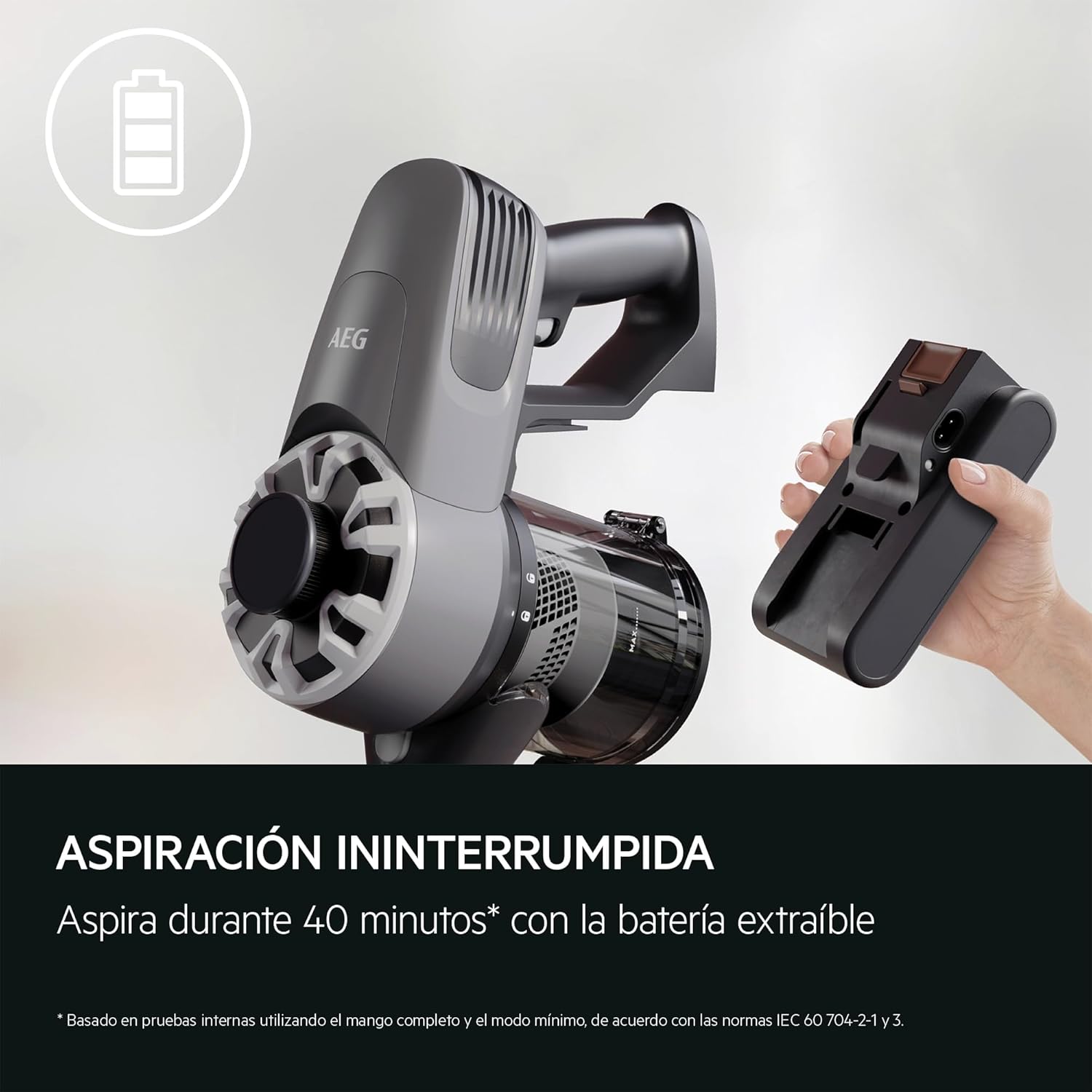
The image displays the main vacuum unit, its detachable battery, and the charging station. Ensure the battery is fully charged before first use by placing it in the charging dock.
Before first use, fully charge the battery. The battery is a 21.6V Li-Ion HD 2.0 Ah / 43 W/h unit.
- Remove the battery from the main unit by pressing the release button (if not already detached).
- Connect the charging adapter to a power outlet.
- Insert the battery into the charging dock or connect the adapter directly to the battery charging port.
- The charging indicator lights will show the charging status. A full charge typically takes several hours.
- Once fully charged, disconnect the charger.
6. Operating Instructions
6.1 Starting and Stopping
- Ensure the battery is fully charged and correctly inserted into the main unit.
- Press the power button to turn the vacuum cleaner on.
- Press the power button again to turn the vacuum cleaner off.
6.2 Adjusting Suction Power
Your vacuum cleaner features 2 speed settings for different cleaning needs.
- Press the speed selector button to cycle between the available power modes.
- Use a lower setting for lighter cleaning tasks and to maximize battery runtime (up to 40 minutes).
- Use a higher setting for stubborn dirt and deeper cleaning.
6.3 Cleaning Different Surfaces

This image shows the AEG AP31CB21TG cordless stick vacuum in operation, highlighting its maneuverability and lightweight design for comfortable cleaning.

The vacuum cleaner head is shown effectively cleaning both carpeted and hard floor surfaces, demonstrating its versatility for all floor types.
The AEG AP31CB21TG is suitable for all floor types.
- Hard Floors: Use the standard floor nozzle. The lower speed setting is often sufficient.
- Carpets and Rugs: Use the standard floor nozzle. The higher speed setting may be required for deeper cleaning.
- Above-Floor Cleaning: Detach the extension tube and use the main unit with the crevice tool for tight corners, or the dusting brush for furniture and delicate surfaces.
7. Maintenance
Regular maintenance ensures optimal performance and extends the life of your vacuum cleaner.
7.1 Emptying the Dustbin
- Ensure the vacuum cleaner is turned off.
- Locate the dustbin release button on the main unit.
- Press the button to detach the dustbin.
- Open the dustbin lid and empty its contents into a waste bin.
- Close the lid and reattach the dustbin to the main unit until it clicks.
7.2 Cleaning the Filter
The vacuum uses a foam filter. Clean the filter regularly to maintain suction power.
- With the dustbin detached, remove the foam filter.
- Tap the filter gently over a waste bin to remove loose dust.
- If heavily soiled, rinse the filter under cold running water. Do not use detergents.
- Allow the filter to air dry completely for at least 24 hours before reinserting it. Do not use a hairdryer or other heating devices.
- Reinsert the dry filter and reattach the dustbin.
7.3 Cleaning the Brush Roll
- Turn off the vacuum cleaner and detach the floor nozzle.
- Locate the brush roll access cover on the bottom of the floor nozzle.
- Open the cover and remove the brush roll.
- Use scissors or a brush to remove any tangled hair, threads, or debris from the brush roll.
- Reinsert the clean brush roll and close the access cover securely.
8. Troubleshooting
If you encounter problems with your vacuum cleaner, refer to the following table for common issues and solutions.
| Problem | Possible Cause | Solution |
|---|---|---|
| Vacuum does not turn on | Battery is not charged or not inserted correctly. | Charge the battery fully. Ensure the battery is securely clicked into place. |
| Reduced suction power | Dustbin is full. Filter is clogged. Nozzle or tube is blocked. | Empty the dustbin. Clean the foam filter. Check and clear any blockages in the nozzle, extension tube, or main unit. |
| Battery not charging | Charger not properly connected. Faulty power outlet. | Ensure the charger is securely plugged into both the battery/dock and the wall outlet. Try a different power outlet. |
| Brush roll not spinning | Brush roll is jammed with debris. | Turn off the vacuum, remove the brush roll, and clear any obstructions. |
9. Specifications
- Brand: AEG
- Model Number: 900 402 399 (AP31CB21TG)
- Battery: 21.6V Li-Ion HD 2.0 Ah / 43 W/h
- Runtime: Up to 40 minutes (on lowest setting)
- Weight: 2.36 kg
- Special Feature: Cordless
- Filter Type: Foam
- Surface Recommendation: All floors
- Color: Black
10. Warranty and Support
Your AEG AP31CB21TG vacuum cleaner comes with a manufacturer's warranty. Please refer to the warranty card included in your package for specific terms and conditions, including the warranty period and coverage details. For technical support, spare parts, or service inquiries, please contact AEG customer service through their official website or the contact information provided in your warranty documentation.
For more information, you may visit the AEG Brand Store on Amazon.


