
1. Introduction
The EASYLONGER ES270 CPAP Battery is a versatile 99.9Wh power bank designed to provide reliable power for CPAP machines during air travel, camping, and power outages. It features multiple charging options, including 100W Power Delivery (PD) for laptops, wireless charging, and comprehensive safety protections. This manual provides essential information for the safe and efficient use of your ES270 CPAP Battery.
2. Package Contents
Verify that all items listed below are included in your package:
- 1 × EASYLONGER ES270 CPAP Battery
- 4 × CPAP Charge Cables (compatible with ResMed AirMini, AirSense 11, AirSense 10, AirCurve 10, AirCurve 11, Luna TravelPAP, Philips DreamStation, Philips DreamStation 2)
- 1 × 65W USB-C Adapter
- 1 × USB-C to C Cable
- 1 × User Manual

Video 2.1: Unboxing the EASYLONGER ES270 CPAP Battery and its contents.
3. Product Overview
The ES270 features a compact design and multiple ports for various charging needs. The smart display provides real-time battery status and voltage information.

Ports and Indicators:
- DC In: For recharging the power bank via a 72W adapter (not included) or solar panel.
- USB-C In/Out (PD 100W): For fast charging the power bank or charging compatible laptops and devices.
- USB Out (USB-A): Standard USB output for charging smartphones, tablets, and other USB-powered devices.
- DC Out: For connecting CPAP machines using the provided DC cables.
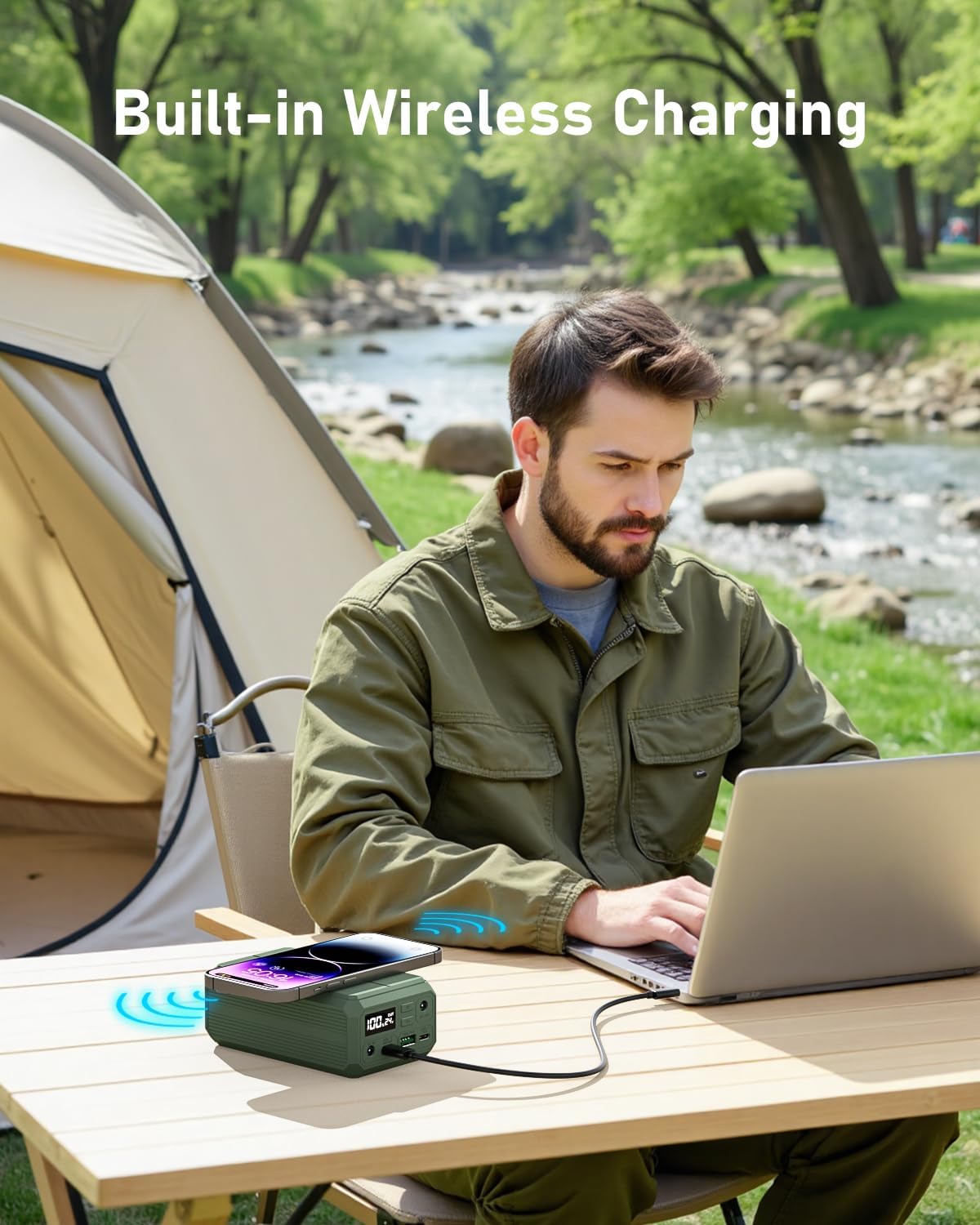
- Wireless Charging Pad: Located on the top surface for Qi-compatible devices.
- Digital Display: Shows battery percentage and selected output voltage.
4. Setup and Initial Use
Before first use, fully charge your ES270 CPAP Battery. The compact size and airline approval make it suitable for various environments.


5. Charging the ES270 Battery
The ES270 offers multiple convenient ways to recharge:
- USB-C Input: Use the included 65W USB-C adapter or a compatible solar panel/car charger. Full recharge in approximately 2 hours.
- DC Input: Use a 72W adapter (not included) for a full recharge in approximately 1.5 hours.
Note: USB-C Input and DC Input cannot be used simultaneously for charging.


6. Operating with CPAP Devices
The ES270 is designed to power various CPAP machines. Ensure you select the correct voltage and use the appropriate CPAP charging cable.
6.1 Connecting to ResMed AirSense 11
Video 6.1: Instructions for connecting the ES270 to a ResMed AirSense 11 CPAP machine.
6.2 Connecting to Luna TravelPAP (BMC M1 Mini)
Video 6.2: Instructions for connecting the ES270 to a Luna TravelPAP (BMC M1 Mini) CPAP machine.
6.3 Connecting to Philips DreamStation
Video 6.3: Instructions for connecting the ES270 to a Philips DreamStation CPAP machine.
6.4 Connecting to ResMed AirMini
Video 6.4: Instructions for connecting the ES270 to a ResMed AirMini CPAP machine.
6.5 Connecting to ResMed AirSense 10
Video 6.5: Instructions for connecting the ES270 to a ResMed AirSense 10 CPAP machine.
6.6 Optimizing CPAP Runtime
For extended runtime, especially with high-power CPAP machines, it is recommended to turn off humidification and heating modes.

6.7 Pass-Through Function
The pass-through function allows the CPAP device to operate continuously during short power outages while the ES270 is connected to a power source, ensuring uninterrupted sleep.

6.8 Factors Affecting Battery Duration
Several factors can influence the duration of the battery pack when powering a CPAP device:
- Humidifier and heated tubing ON/OFF/Level Setting
- Ramp Up Function ON/OFF/Time setting
- Use of any additional features such as Altitude Compensation
- Machine Type
- Pressure Relief
- Patient's breathing pattern
- Mask leaks
- Automatic Leak Compensator
- Bluetooth/APP/Wifi usage
- Smart Start / Smart Stop features
- Therapy Mode
7. Other Charging Functions
7.1 PD 100W Fast Charging for Laptops
The ES270's 100W USB-C port provides rapid charging for compatible laptops, such as charging a MacBook Pro 14 from 0% to 50% within 30 minutes.

7.2 Wireless Charging
Place your Qi-compatible smartphone on the charging pad for convenient wireless charging, eliminating the need for cables.
8. Safety and Maintenance
The ES270 CPAP Battery incorporates an advanced Battery Management System (BMS) for your safety and device longevity.
8.1 BMS Protections
- Overcurrent Protection
- Overheating Protection
- Overcharging Protection
- Short-circuiting Protection
- Over-discharge Protection

8.2 General Maintenance
- Store the battery in a cool, dry place away from direct sunlight and extreme temperatures.
- Avoid dropping or subjecting the device to strong impacts.
- Clean the exterior with a soft, dry cloth. Do not use harsh chemicals or abrasives.
- Do not attempt to disassemble or modify the battery.
9. Troubleshooting
If you encounter issues with your ES270 CPAP Battery, consider the following:
- Device not charging: Ensure the charging cable is securely connected to both the ES270 and the power source. Verify the power source is active.
- CPAP machine not powering on: Check that the correct voltage is selected on the ES270 and that the CPAP cable is properly connected. Ensure the ES270 has sufficient charge.
- Wireless charging not working: Confirm your device is Qi-compatible and properly aligned on the charging pad. Remove any thick cases that may interfere.
- Short runtime: For CPAP machines, ensure humidification and heated tubing are turned off to maximize battery life.
For persistent issues, please contact customer support.
10. Specifications
| Feature | Specification |
|---|---|
| Product Dimensions | 5 x 2.9 x 1.9 inches |
| Item Weight | 1.3 pounds |
| Battery Capacity | 27000 mAh / 99.9 Wh |
| USB-C Output (PD) | Up to 100W |
| DC Output | 12V, 19V, 24V (selectable) |
| Wireless Charging | 10W |
| Recharge Time (65W USB-C) | Approx. 2 hours |
| Recharge Time (72W DC) | Approx. 1.5 hours |
| Safety Features | BMS (Overcurrent, Overheating, Overcharging, Short-circuiting, Over-discharge Protection) |
11. Warranty and Support
EASYLONGER is committed to providing reliable charging solutions. For any questions, technical support, or warranty claims, please refer to the contact information provided in your user guide or visit the official EASYLONGER website.
Manufacturer: Dongguan Yihang Electronic Co., Ltd
For more information, visit: EASYLONGER Store


