
Introduction
This manual provides instructions for the Timex Marlin Quartz GMT Watch, model TW2Y47700. This timepiece features a dual time zone tracking function, a date window, and a sophisticated design with a gold-tone stainless steel band and black dial.
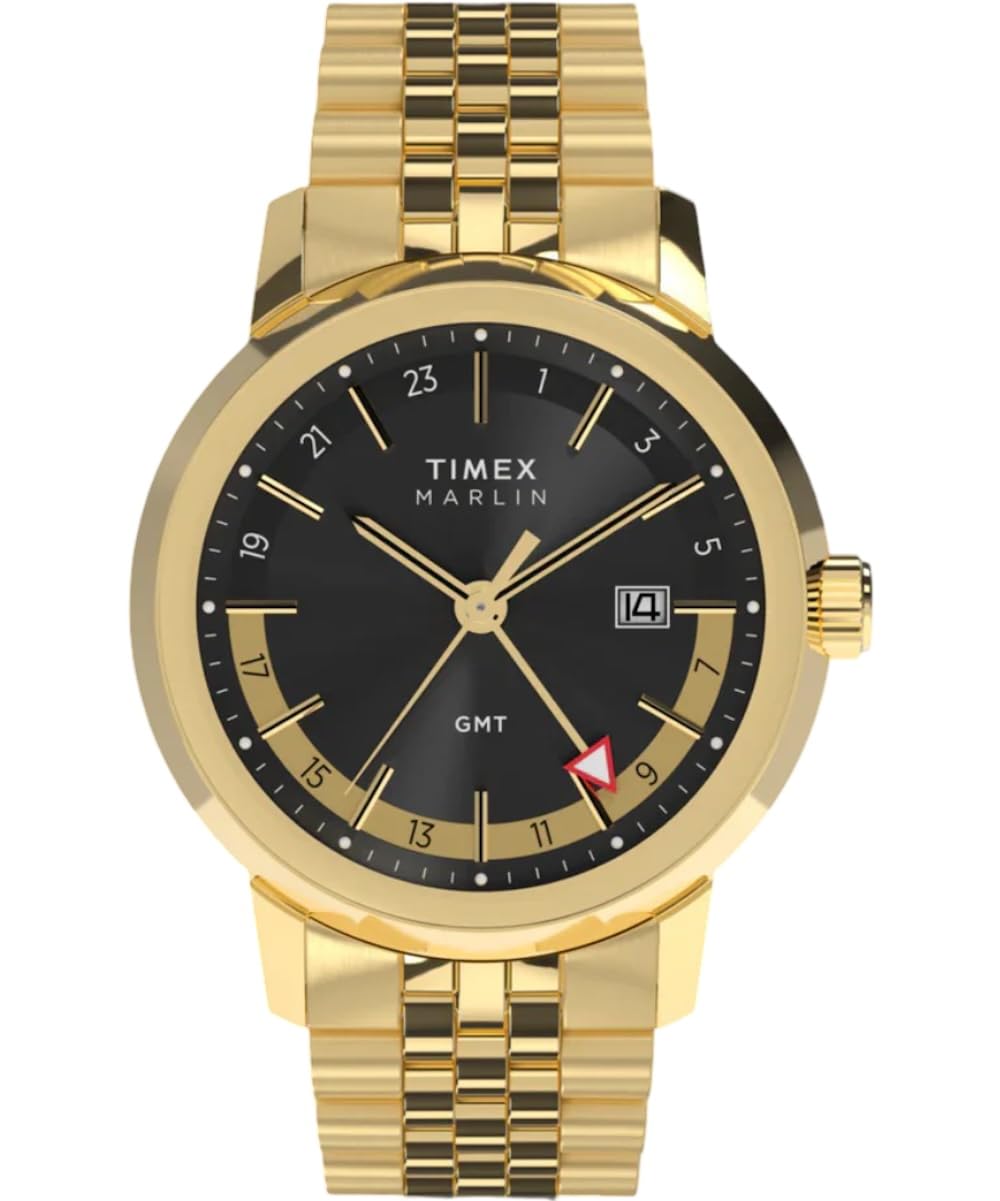
Image 1: Front view of the Timex Marlin Quartz GMT Watch.
Setup
Setting the Time and Date
- Pull the Crown: Gently pull the crown (the knob on the side of the watch) out to position 2. This is typically the first click.
- Set the Date: Rotate the crown clockwise or counter-clockwise to adjust the date. If the date changes around midnight, it indicates the watch is currently set for AM. Adjust the date to the previous day if setting in the morning, or to the current day if setting in the afternoon/evening.
- Pull the Crown Further: Pull the crown out to position 3 (the second click). The second hand will stop.
- Set the Time: Rotate the crown to set the hour and minute hands. To ensure correct AM/PM, advance the hands past 12 o'clock. If the date changes, you are in the PM hours. Continue rotating until the desired time is set.
- Push the Crown In: Once the time and date are set, push the crown back into position 1 (normal operating position).
Adjusting the GMT Hand
The GMT hand (red triangle hand) tracks a second time zone on a 24-hour scale. This watch features an independent GMT hand adjustment.
- Pull the Crown: Pull the crown out to position 2 (first click).
- Adjust GMT Hand: Rotate the crown counter-clockwise. The GMT hand will move independently in one-hour increments. Set it to the desired second time zone.
- Push the Crown In: Push the crown back into position 1.
Adjusting the Bracelet
The stainless steel bracelet can be adjusted by removing or adding links. This procedure typically requires specialized tools and is best performed by a qualified jeweler or watch technician to avoid damage.
Operating the Watch
Reading the Time
The main hour and minute hands indicate the local time. The small second hand provides continuous timekeeping.
Using the GMT Function
The red triangle GMT hand, in conjunction with the 24-hour markers on the inner bezel, displays the time in a second time zone. For example, if the GMT hand points to '18', it indicates 6 PM in the second time zone.

Image 2: Timex Marlin Quartz GMT Watch worn on a wrist.
Maintenance
Cleaning
To maintain the appearance of your watch, wipe the case and bracelet with a soft, dry cloth. For more thorough cleaning, a slightly damp cloth can be used, followed by immediate drying. Avoid using harsh chemicals or abrasive materials.
Water Resistance
This watch is water resistant to 50 meters (5 ATM). This means it is suitable for short periods of recreational swimming, but not for diving or snorkeling. Avoid operating the crown while the watch is wet or submerged.
- 50M (5 ATM): Suitable for showering, bathing, and recreational swimming.
- Not suitable for: Diving, snorkeling, or high-impact water sports.
Battery Replacement
The watch is powered by a quartz movement, which requires a battery. When the watch stops running, the battery needs to be replaced. It is recommended to have the battery replaced by a qualified watch technician to ensure proper sealing and maintain water resistance.
Troubleshooting
Watch Not Running
- Check Crown Position: Ensure the crown is fully pushed in to position 1.
- Battery: If the watch has stopped completely, the battery may need replacement.
Incorrect Time or Date
- Reset Time/Date: Follow the "Setting the Time and Date" instructions in the Setup section.
- GMT Hand Misalignment: If the GMT hand is incorrect, follow the "Adjusting the GMT Hand" instructions.
Condensation Under Crystal
If condensation appears under the crystal, it may indicate a breach in the watch's water resistance. Contact customer support or a qualified watch technician immediately.
Specifications
| Feature | Detail |
|---|---|
| Model Number | TW2Y47700 |
| Movement | Quartz |
| Case Diameter | 40mm |
| Case Material | Recycled Stainless Steel (Gold Tone) |
| Dial Color | Black |
| Crystal | Domed Acrylic |
| Band Material | Stainless Steel (Gold Tone) |
| Clasp Type | Foldover Clasp |
| Water Resistance | 50 meters (5 ATM) |
| Functions | Time (Hour, Minute, Second), Date, GMT (Dual Time Zone) |
Warranty Information
Timex watches are covered by a manufacturer's warranty against defects in materials and workmanship. The specific terms and duration of the warranty may vary by region. Please refer to the warranty card included with your purchase or visit the official Timex website for detailed information.
Note: The warranty typically does not cover normal wear and tear, battery life, accidental damage, or damage resulting from improper use or unauthorized repairs.
Customer Support
For further assistance, technical support, or service inquiries regarding your Timex Marlin Quartz GMT Watch, please contact Timex customer service. Contact information can typically be found on the official Timex website or on the documentation provided with your watch.
When contacting support, please have your watch model number (TW2Y47700) and purchase details readily available.
