
1. Introduction
The EaseZen Air Compression Leg Recovery System is designed to provide targeted compression massage to the feet, calves, and thighs. This system utilizes air pressure to promote blood circulation, reduce muscle fatigue, alleviate pain, and assist in recovery from conditions such as edema and neuropathy. It is suitable for various users seeking leg health and recovery.

The EaseZen Air Compression Leg Recovery System is an FDA Cleared Class II Medical Device, offering professional-grade leg recovery and daily relaxation massage.
2. Safety Information
Please read all instructions carefully before using the device. Retain this manual for future reference.
- Consult a physician before use if you have any pre-existing medical conditions, including but not limited to heart disease, high blood pressure, diabetes, or if you are pregnant.
- Do not use the device on swollen, inflamed, or injured areas of the skin.
- Discontinue use immediately if you experience any discomfort or pain.
- Keep the device away from water and high temperatures.
- Ensure the power cord is not damaged and is properly connected to a suitable power outlet.
- This device is not intended for use by individuals with reduced physical, sensory, or mental capabilities unless supervised or instructed by a responsible person.
3. Product Overview
3.1 Components
- Leg Compression Wraps (Pair)
- Handheld Controller
- Air Hoses
- Power Adapter
- Storage Bag
3.2 Key Features
- Four Precision Air Chambers: Located at the foot, lower calf, upper calf, and thigh for comprehensive compression.
- Intelligent Pressure Sensors: Automatically adjust pressure intensity based on leg size for safe and effective use.
- Memory Function: Stores personalized settings for convenience.
- Multiple Modes and Intensities: 6 adjustable modes and 3 pressure intensity levels (Low/Medium/High).
- Timer Settings: Options for 15, 20, or 25-minute sessions.
- Durable Construction: Made from TPU-coated 210D nylon fabric with double-stitched seams.

The system features dynamic air pressure adjusted by built-in pressure sensors, ensuring optimal compression for various leg sizes.
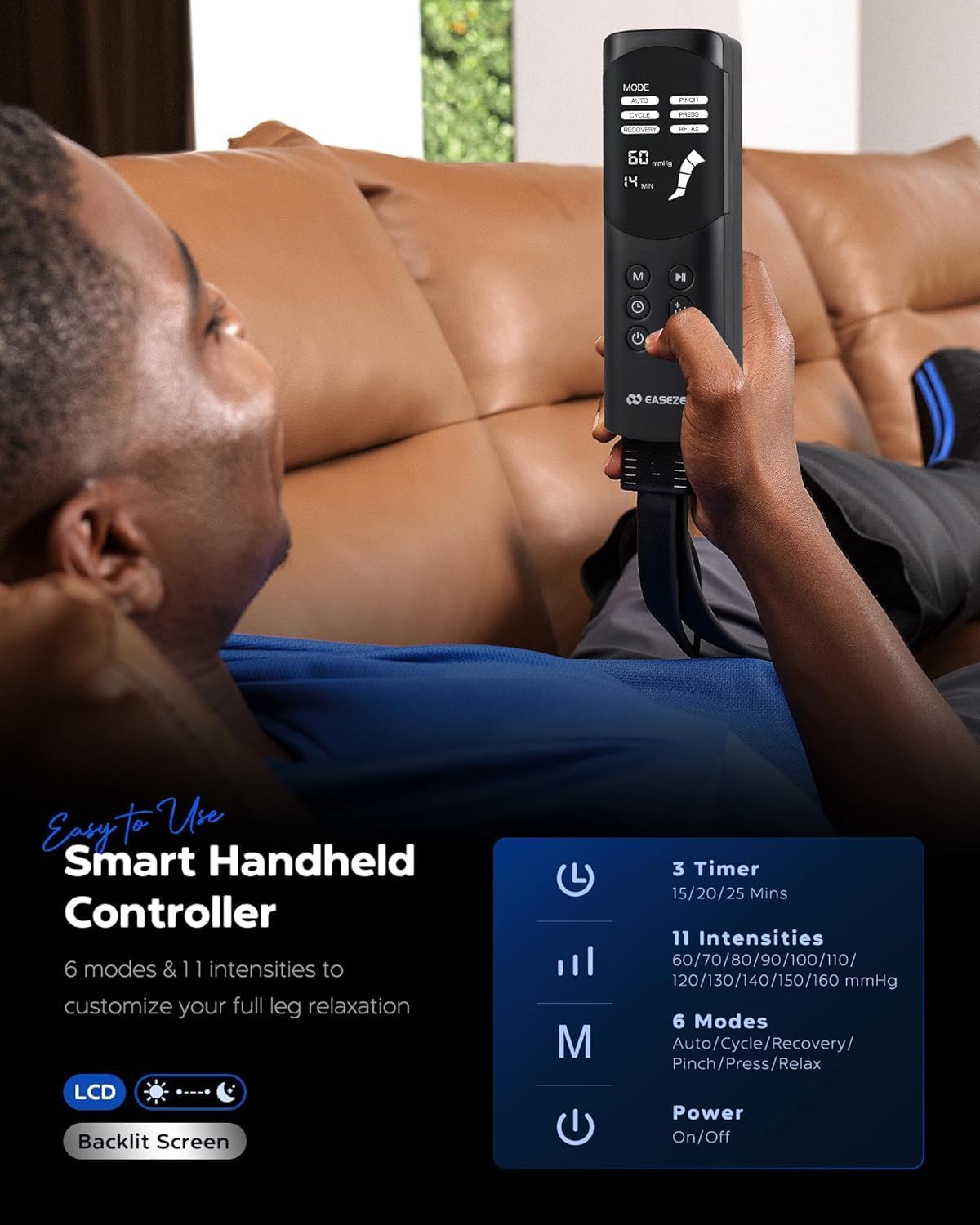
The smart handheld controller provides easy access to 6 modes, 11 intensity levels, and 3 timer settings (15/20/25 minutes).

The leg wraps offer 360-degree full-wrap compression therapy across four distinct zones: thigh, upper calf, lower calf, and foot.
4. Setup
4.1 Unpacking
Carefully remove all components from the packaging. Inspect for any damage. If any components are damaged, do not use the device and contact customer support.
4.2 Connecting Components
- Connect the air hoses from the leg wraps to the corresponding ports on the handheld controller. Ensure a secure connection.
- Plug the power adapter into the handheld controller, then plug the adapter into a standard electrical outlet.
4.3 Fitting the Leg Wraps
Before use, ensure the leg wraps fit correctly. Refer to the size chart below to select the appropriate size based on your inseam measurement (distance from your heel to the top of your inner thigh).

Size chart and measurement guide for the leg compression wraps.
- Sit comfortably and slide your legs into the wraps.
- Adjust the wraps to ensure a snug but comfortable fit around your feet, calves, and thighs. Use the zippers and adjustable straps to secure them.
- Ensure the air hoses are not kinked or obstructed.
5. Operating Instructions
Once the device is set up and the wraps are fitted, you can begin your massage session.
- Power On: Press the power button on the handheld controller to turn on the device. The LCD screen will illuminate.
- Select Mode: Press the 'M' (Mode) button to cycle through the 6 available massage modes. Choose the mode that best suits your preference.
- Adjust Intensity: Use the intensity buttons (up/down arrows) to select one of the 3 pressure intensity levels (Low, Medium, High).
- Set Timer: Press the timer button to select a session duration of 15, 20, or 25 minutes.
- Start Massage: The device will begin the compression massage according to your selected settings.
- Memory Function: The device automatically stores your last used settings for convenience in future sessions.
- Power Off: Press the power button again to turn off the device at any time, or it will automatically shut off after the timer expires.

Using the EaseZen system can help mitigate Restless Leg Syndrome (RLS), reduce leg lymphedema, improve blood circulation, and relax muscles to reduce soreness.
6. Maintenance
6.1 Cleaning
- Always unplug the device from the power outlet before cleaning.
- Wipe the surface of the leg wraps and controller with a soft, damp cloth.
- Do not use abrasive cleaners, solvents, or harsh chemicals.
- Do not immerse the device or any components in water.
6.2 Storage
- After each use, disconnect the air hoses and power adapter.
- Fold the leg wraps neatly and place all components into the provided storage bag.
- Store the device in a cool, dry place, away from direct sunlight and extreme temperatures.

The included portable carry bag allows for convenient storage and transport, making the system suitable for use at home, in the office, or at the gym.
7. Troubleshooting
| Problem | Possible Cause | Solution |
|---|---|---|
| Device does not power on. | Power adapter not connected properly or no power from outlet. | Ensure power adapter is securely connected to both the controller and a working electrical outlet. |
| No compression or weak compression. | Air hoses are loose, kinked, or disconnected. Leg wraps are not properly secured. | Check all air hose connections. Ensure hoses are not bent. Adjust leg wraps for a snug fit. |
| Device stops unexpectedly. | Timer expired. Power interruption. | Check timer setting. Ensure continuous power supply. Restart the device if necessary. |
| Discomfort during use. | Intensity level is too high. Leg wraps are too tight. | Reduce the intensity level. Loosen the leg wraps for a more comfortable fit. Discontinue use if discomfort persists. |
8. Specifications
| Feature | Detail |
|---|---|
| Model | FE-7232 |
| Brand | EaseZen |
| Dimensions (L x W x H) | 36.5 x 18.5 x 22 cm |
| Item Weight | 2.25 Kilograms |
| Material | TPU-coated 210D Nylon |
| Power Source | Mains Powered |
| Massage Technique | Air Compression |
| Number of Modes | 6 |
| Pressure Intensity Levels | 3 (Low, Medium, High) |
| Timer Settings | 15, 20, 25 minutes |
| Specific Uses | Legs, Neuropathy, Blood Circulation, Pain Relief, Edema, Muscle Fatigue |
| UPC | 683404495216 |
9. Warranty and Support
The EaseZen Air Compression Leg Recovery System comes with a one-year warranty from the date of purchase. This warranty covers manufacturing defects and malfunctions under normal use. It does not cover damage caused by misuse, accidents, or unauthorized modifications.
For warranty claims, technical support, or any inquiries regarding your device, please contact EaseZen customer service. Refer to the product packaging or the official EaseZen website for contact details.
