
1. Introduction
The Mecpow P50 Fume Extractor is designed to provide a cleaner and safer working environment by effectively removing smoke, dust, and harmful particles generated during various processes, such as laser engraving and soldering. This manual provides essential information for the proper setup, operation, and maintenance of your P50 Fume Extractor.
2. Safety Instructions
Please read all safety instructions carefully before operating the device. Failure to follow these instructions may result in injury or damage to the product.
- Ensure the power supply matches the specifications listed on the device.
- Do not operate the fume extractor in wet conditions or near flammable liquids or gases.
- Keep the air inlet and outlet clear of obstructions to ensure proper airflow.
- Regularly inspect the power cord for damage. Do not use if the cord is damaged.
- Do not attempt to disassemble or repair the unit yourself. Contact qualified service personnel for assistance.
- Replace filters as recommended to maintain optimal performance and air quality.
- Keep out of reach of children.
3. Product Overview
3.1 Key Features
- Strong Suction: Equipped with a 50W brushless motor, providing 128m³/h airflow for instant smoke and particle capture.
- 3-Layer Filtration System: Includes a pre-filter, medium HEPA filter, and activated carbon filter for 99.97% purification efficiency.
- Sealed Design: Integrated sealed design with precision-fit air inlet and protective foam to prevent smoke leakage.
- 3 Speed Modes: Adjustable low, medium, and high-speed settings for various tasks.
- Quiet Operation: Operates at a noise level under 55 dB.
- Wide Compatibility: Compatible with Mecpow M1, Atomstack P1, and other laser engravers with a Φ50 mm flange.
3.2 Components
The Mecpow P50 Fume Extractor consists of the main unit, a flexible exhaust hose, and a power cable. The internal filtration system comprises three distinct layers.
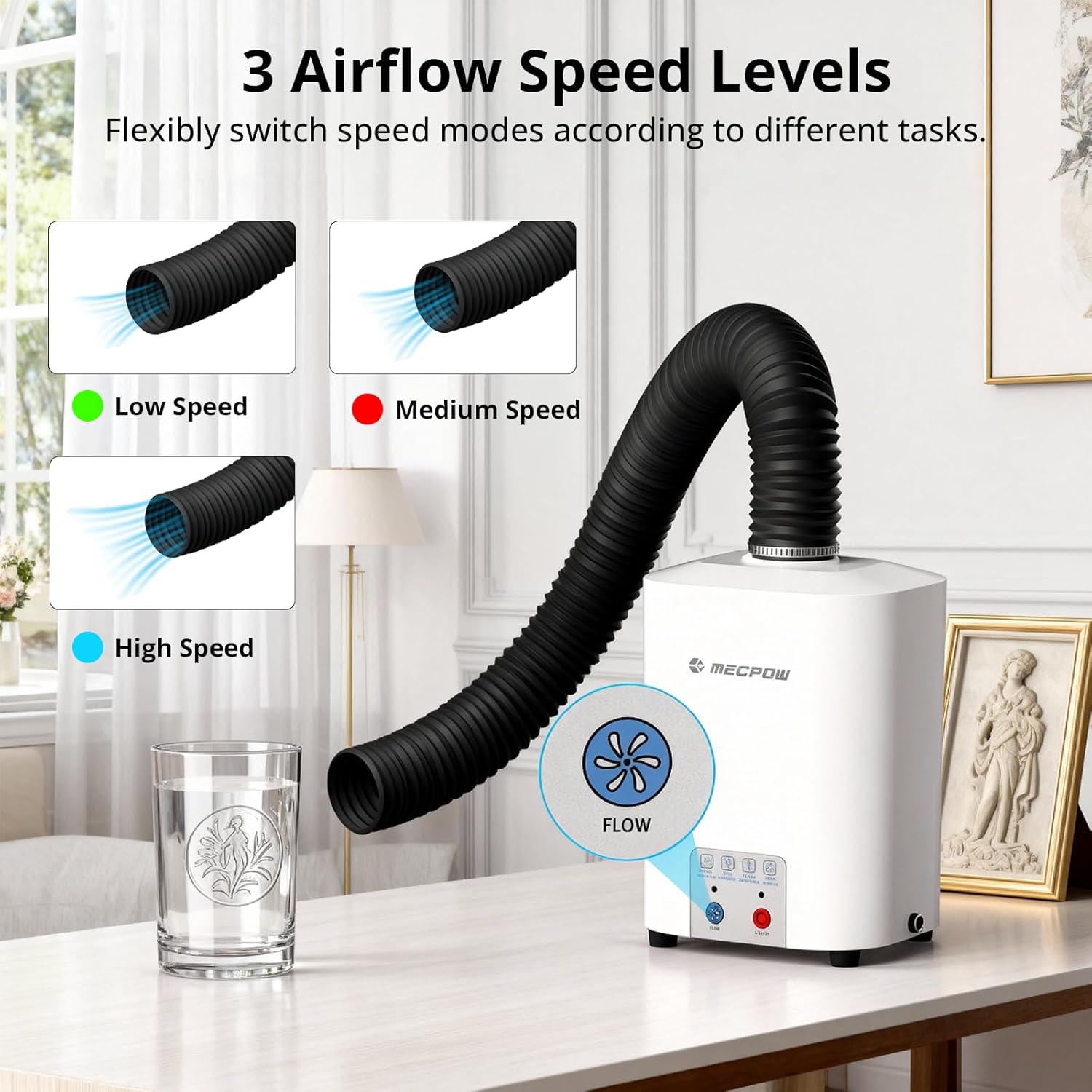
Figure 3.2.1: Mecpow P50 Fume Extractor with exhaust hose. This image shows the complete fume extractor unit, including the main body and the flexible exhaust hose connected to the top.
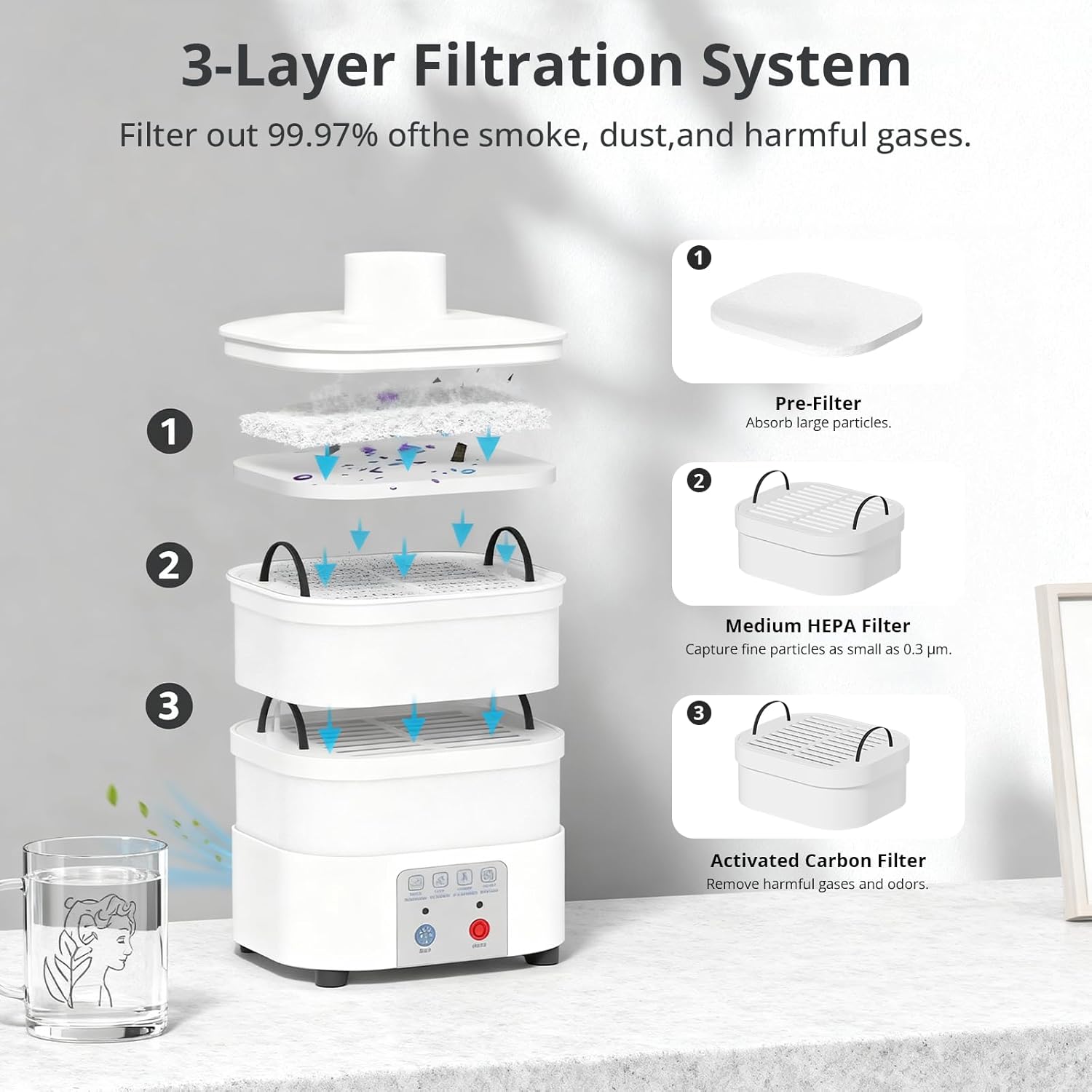
Figure 3.2.2: Detailed view of the 3-Layer Filtration System. This diagram illustrates the three filter layers: (1) Pre-Filter for large particles, (2) Medium HEPA Filter for fine particles, and (3) Activated Carbon Filter for harmful gases and odors.

Figure 3.2.3: Product Dimensions of the Mecpow P50. This image displays the height (240 mm / 9.45 inch) and width (148 mm / 5.83 inch front, 128 mm / 5.04 inch side) of the fume extractor unit.
4. Setup
- Unpacking: Carefully remove all components from the packaging. Verify that all parts listed in the packing list are present.
- Filter Installation:
- Open the top cover of the fume extractor.
- Insert the activated carbon filter at the bottom, followed by the medium HEPA filter, and finally the pre-filter on top. Ensure they are seated correctly.
- Close the top cover securely.
- Hose Connection: Attach one end of the flexible exhaust hose to the outlet on top of the fume extractor. Secure it firmly.
- Placement: Position the fume extractor on a stable, flat surface near your laser engraver or soldering station. Connect the other end of the exhaust hose to the fume outlet of your laser engraver (if applicable) or position it to capture fumes effectively.
- Power Connection: Connect the power cable to the fume extractor and then plug it into a suitable power outlet.

Figure 4.1: Mecpow P50 Fume Extractor set up with a laser engraver. This image demonstrates the fume extractor connected via its hose to a laser engraver, showing a typical setup for fume extraction during operation.
5. Operating Instructions
- Power On: Press the ON/OFF button located on the front panel to turn on the fume extractor. The indicator light will illuminate.
- Adjusting Airflow Speed:
- Press the FLOW button to cycle through the three airflow speed levels: Low, Medium, and High.
- Select the appropriate speed based on the intensity of fumes and your working environment.
- Operation: Begin your laser engraving or soldering task. The fume extractor will continuously draw in smoke and particles, purifying the air.
- Power Off: After completing your task, press the ON/OFF button again to turn off the fume extractor.

Figure 5.1: Control panel and airflow speed levels. This image highlights the control buttons for power and airflow, showing indicators for Low, Medium, and High speed settings.

Figure 5.2: Sealed design for effective fume containment. This image illustrates the fume extractor's sealed design, demonstrating how it prevents smoke leakage and maintains a clean workspace.

Figure 5.3: Quiet operation of the Mecpow P50. This image shows the fume extractor in a home environment, emphasizing its low noise level (under 55 dB) compared to typical traffic noise or normal conversation.
6. Maintenance
Regular maintenance ensures the longevity and optimal performance of your Mecpow P50 Fume Extractor.
6.1 Filter Replacement
The 3-layer filtration system requires periodic replacement to maintain 99.97% purification efficiency. The frequency of replacement depends on usage and the type of materials processed.
- Power Off: Ensure the fume extractor is turned off and unplugged before performing any maintenance.
- Open Unit: Carefully open the top cover of the fume extractor.
- Remove Old Filters: Remove the pre-filter, medium HEPA filter, and activated carbon filter. Dispose of used filters responsibly according to local regulations.
- Install New Filters: Place new filters in the correct order: activated carbon filter at the bottom, then the medium HEPA filter, and finally the pre-filter on top. Ensure a snug fit.
- Close Unit: Securely close the top cover.
Replacement filters can be purchased from authorized Mecpow retailers or the official Mecpow website.
6.2 Cleaning the Unit
- Wipe the exterior of the fume extractor with a soft, damp cloth. Do not use abrasive cleaners or solvents.
- Ensure no liquid enters the internal components.
- Periodically check the exhaust hose for any blockages or damage. Clean if necessary.
7. Troubleshooting
| Problem | Possible Cause | Solution |
|---|---|---|
| Unit does not power on. |
|
|
| Low suction power. |
|
|
| Unusual noise during operation. |
|
|
8. Specifications
- Model: P50
- Motor Power: 50W (Brushless)
- Airflow Rate: 128 m³/h
- Filtration System: 3-Layer (Pre-filter, Medium HEPA filter, Activated Carbon filter)
- Purification Rate: 99.97%
- Noise Level: < 55 dB
- Compatibility: Mecpow M1, Atomstack P1, and other laser engravers with Φ50 mm flange.
- Item Weight: 10.01 pounds (approx. 4.54 kg)
- Dimensions (approx.): 148 mm (W) x 128 mm (D) x 240 mm (H)
9. Warranty and Support
9.1 Warranty Information
Mecpow provides a 1-year warranty for the P50 Fume Extractor from the date of purchase. This warranty covers manufacturing defects and workmanship under normal use. It does not cover damage caused by misuse, accidents, unauthorized modifications, or improper maintenance.
Please retain your proof of purchase for warranty claims.
9.2 Customer Support
For technical assistance, troubleshooting, or warranty inquiries, please contact Mecpow customer support through the official website or your retailer. Our support team is available to help you with any questions or issues you may encounter.
Visit the official Mecpow website for the latest support information and contact details: www.mecpow.com

