
1. Introduction
Thank you for choosing the Jocoevol Twin Bed Frame with LED Storage Headboard and Drawers. This manual provides essential information for the safe assembly, operation, and maintenance of your new bed frame. Please read these instructions carefully before beginning assembly and retain them for future reference.

Image 1.1: The Jocoevol Twin Bed Frame, showcasing its LED storage headboard and pull-out drawer.
2. Important Safety Instructions
To ensure safe use and prevent injury or damage, please adhere to the following safety guidelines:
- Always follow the assembly instructions carefully to prevent instability or collapse.
- Be cautious around the charging station and drawer areas to avoid electrical hazards or injuries.
- Do not overload the drawers to prevent damage or injury.
- Keep the bed frame and its components away from heat sources and liquids to maintain its longevity and safety.
- Ensure all connections for the charging station and LED lights are securely fastened before use.
- Regularly check all bolts and screws to ensure they remain tight. Retighten as necessary.
- This bed frame is designed for a twin-size mattress. Do not use a mattress larger than 12 inches in thickness.
3. Package Contents
Before assembly, verify that all components are present and undamaged. Refer to the included detailed parts list in your physical manual. The package typically includes:
- Headboard with integrated storage and charging station
- Bed frame side rails and footboard
- Wooden slats for mattress support
- Storage drawer(s) with wheels
- Assembly hardware (screws, bolts, washers, hex key)
- LED light strip and remote control
- Installation Manual

Image 3.1: Diagram illustrating the bed frame's dimensions and key components, including the headboard, frame, and drawer.
4. Setup and Assembly
Assembly of this bed frame is designed to be user-friendly. All parts are clearly labeled, and pre-drilled holes ensure proper alignment. A hex key and other essential tools are provided.
- Unpack and Identify Parts: Lay out all components on a clean, soft surface to prevent scratches. Compare with the parts list in your manual.
- Assemble the Headboard: Attach the side panels and back support to the main headboard unit. Secure the upholstered backrest panels.
- Install Charging Station and LED Lights: Carefully insert the charging station into its designated slot on the headboard. Attach the LED light strip along the top edge of the headboard storage area. Connect the power cables.
- Construct the Bed Frame: Attach the side rails to the headboard and footboard using the provided hardware. Ensure all connections are tight and secure.
- Insert Wooden Slats: Place the wooden slats across the bed frame. Many slats feature a Velcro design for quick and secure attachment, and a silent design to eliminate noise.
- Assemble and Insert Drawers: Assemble the storage drawers according to the instructions. Insert the dust-proof pad at the bottom of each drawer. Slide the drawers into their designated space under the footboard.
- Final Checks: Ensure all bolts are tightened, and the frame is stable. Place your mattress on the assembled frame.

Image 4.1: Close-up of the bed frame's structural features, including Velcro slat attachment, noise-reducing design, sturdy construction, and adjustable support legs.
5. Operation Guide
5.1 Smart RGB LED Lighting
The integrated RGB LED lights offer customizable ambiance for your bedroom. They can be controlled via a dedicated remote control or a smartphone application.
- Remote Control: Use the provided remote to power the lights on/off, change colors (16 million options), adjust brightness, select from over 20 lighting effects, and switch dynamic modes.
- Smartphone App Control: Download the compatible app (refer to your physical manual for QR code or app name). Connect your device via Bluetooth. The app allows for advanced control, including music synchronization, DIY modes, scheduling, and fine-tuning color and effects.

Image 5.1: The bed frame illuminated by RGB LED lights, showing both the physical remote control and a smartphone app interface for control.
5.2 Integrated Charging Station
The headboard features a convenient charging station to power your electronic devices.
- Ports: The station includes 2 standard AC power outlets, 2 USB-A ports, and 1 USB-C port.
- Usage: Simply plug in your phones, tablets, laptops, or other small electronic devices directly into the available ports. Ensure the bed frame is connected to a wall power outlet.

Image 5.2: A detailed view of the integrated charging station, highlighting its 2 AC outlets, 2 USB-A ports, and 1 USB-C port.
5.3 Storage Drawers
The bed frame includes spacious, smooth-gliding drawers at the foot of the bed for additional storage.
- Access: Gently pull the drawer handle to open. The smooth scroll wheel design ensures quiet operation.
- Capacity: Ideal for storing off-season clothing, spare bedding, books, or other household items.
- Dust Protection: Each drawer is equipped with a dust-proof pad at the bottom to protect contents.

Image 5.3: An open storage drawer revealing its capacity for items like clothing and books, along with an inset showing the smooth scroll wheel design.
5.4 Headboard Storage Features
The multi-functional headboard offers various storage solutions:
- Open Shelving Display: The top platform and open shelves are suitable for displaying photo frames, books, and decorative items. A raised railing prevents items from slipping.
- Hidden Flip-Top Compartment: A discreet compartment behind the padded headboard provides private storage for personal items.
- Side Phone Pocket: Convenient pockets on the side of the headboard are ideal for storing your phone or small accessories.
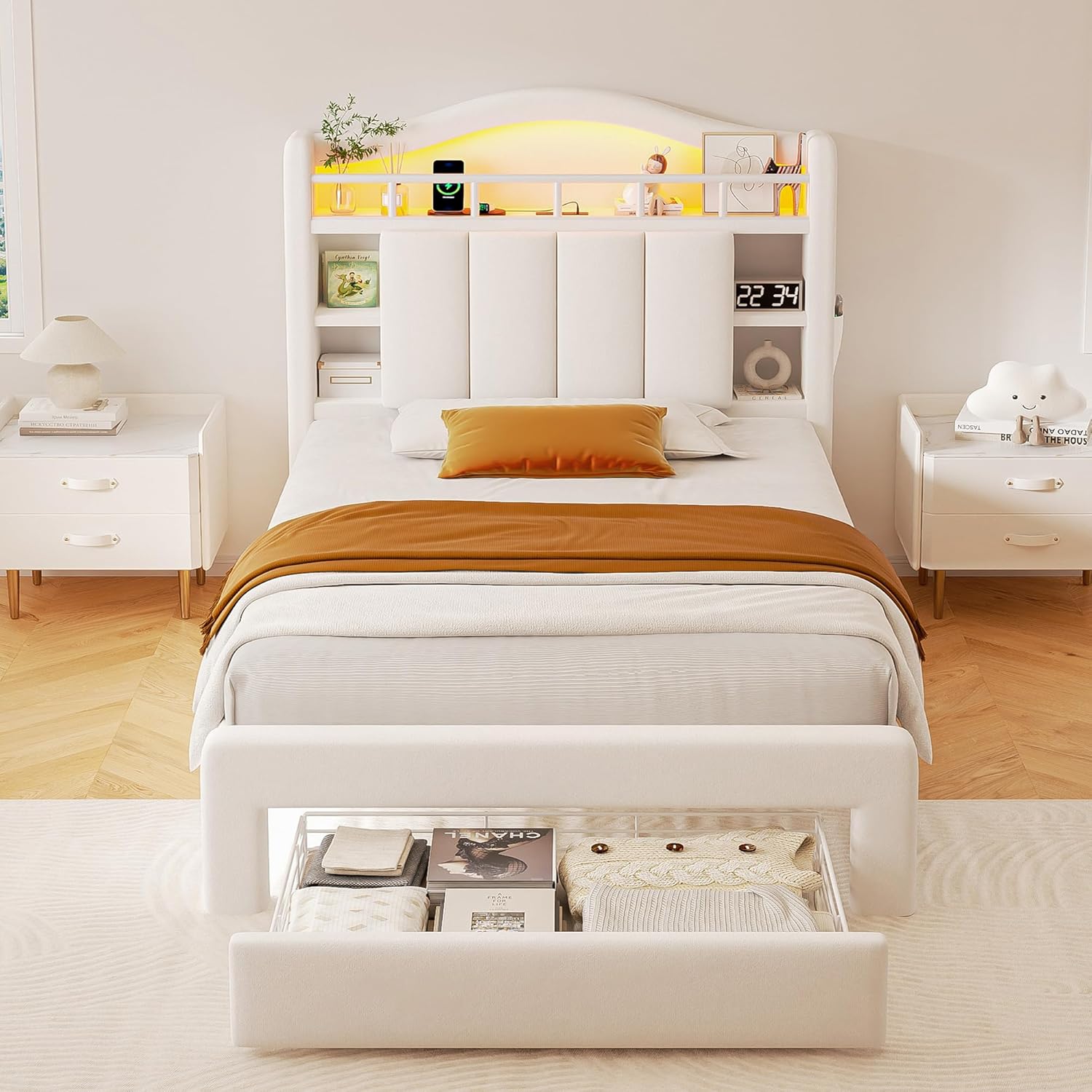
Image 5.4: A close-up of the headboard, detailing its display stand, hidden storage space, open shelves, and side phone pocket.
6. Care and Maintenance
Proper care will extend the life and appearance of your bed frame:
- Cleaning Velvet Upholstery: For general cleaning, gently vacuum the velvet fabric using an upholstery attachment. For spills, blot immediately with a clean, dry cloth. For stubborn stains, consult a professional upholstery cleaner. Avoid harsh chemicals.
- Frame Cleaning: Wipe the wooden and metal parts of the frame with a soft, damp cloth. Avoid abrasive cleaners.
- Hardware Check: Periodically inspect all bolts and screws to ensure they are tight. Retighten as needed to maintain stability and prevent squeaks.
- Charging Station: Keep the charging ports free of dust and debris. Do not expose to liquids.
- LED Lights: The LED lights are designed for long-term use. If issues arise, check connections. Do not attempt to repair the LED strip yourself.
7. Troubleshooting
If you encounter any issues with your bed frame, refer to the following common problems and solutions:
| Problem | Possible Cause | Solution |
|---|---|---|
| Bed frame is squeaking or unstable. | Loose hardware; uneven floor. | Tighten all bolts and screws. Ensure the bed is on a level surface. Adjust the support legs if necessary. |
| Charging station not working. | Not plugged into wall outlet; loose connection; device issue. | Ensure the bed frame's power cord is securely plugged into a functional wall outlet. Check the connection of the charging station to the headboard. Test with a different device. |
| LED lights not turning on or responding. | Loose power connection; remote battery dead; app not connected. | Check all power connections for the LED strip. Replace the remote control battery. Ensure your smartphone app is properly connected via Bluetooth. |
| Drawers are difficult to open/close. | Overloaded; obstruction; wheels dirty. | Reduce the load in the drawer. Check for any obstructions. Clean the wheels and tracks. |
8. Product Specifications
| Feature | Detail |
|---|---|
| Model Number | C-1619-4 |
| Size | Twin |
| Product Dimensions (L x W x H) | 84"L x 39.2"W x 50.5"H |
| Material | Velvet Upholstery, Solid Wood Frame, Metal Slats |
| Color | Beige |
| Weight Capacity | 800 lbs (approximate) |
| Item Weight | 97 Pounds |
| Charging Station | 2 AC Outlets, 2 USB-A Ports, 1 USB-C Port |
| LED Lighting | RGB, 16 Million Colors, 20+ Effects, App/Remote Control |
| Special Features | Charging Station, LED Lighting, No Box Spring Needed, Remote Control, Squeak Resistant, Storage Drawers, Hidden Storage Space |
| Assembly Required | Yes |
| Compatible Mattress Size | Twin (Max 12 inches thickness) |
Image 8.1: Visual representation of the bed frame's key dimensions and material information.
9. Warranty and Customer Support
For warranty information or if you require assistance with your Jocoevol Twin Bed Frame, please refer to the warranty card included in your package or contact Jocoevol customer support directly. Contact details can typically be found on the brand's official website or through your purchase platform.
When contacting support, please have your model number (C-1619-4) and proof of purchase readily available.