
1. Introduction
Thank you for choosing the OSCAL Tiger 8 Smartphone 5G. This manual provides essential information for setting up, operating, and maintaining your device. Please read it carefully to ensure optimal performance and longevity of your smartphone.
What's in the Box
- OSCAL Tiger 8 Smartphone
- USB Charging Cable
- SIM Card Pin Ejector Tool
- Protective Case
- Screen Protector Film

Image: Package contents of the OSCAL Tiger 8 Smartphone.
2. Device Overview
Familiarize yourself with the physical components of your OSCAL Tiger 8 Smartphone.

Image: Physical layout and dimensions of the OSCAL Tiger 8 Smartphone.
- Front Camera: Located at the top center of the display.
- Rear Camera Module: Houses the 16MP main camera and other sensors.
- Volume Buttons: On the right side, for adjusting audio levels.
- Power Button/Fingerprint Sensor: On the right side, used for power control and biometric authentication.
- SIM Card Slot: On the left side, for inserting Nano-SIM and Micro SD cards.
- USB-C Port: At the bottom, for charging and data transfer.
- 3.5mm Headphone Jack: At the bottom, for connecting wired headphones.
3. Initial Setup
3.1 SIM Card and Micro SD Card Installation
- Ensure the phone is powered off.
- Locate the SIM card slot on the left side of the device.
- Insert the provided SIM ejector tool into the small hole next to the tray and push gently until the tray pops out.
- Place your Nano-SIM card(s) and/or Micro SD card into the tray according to the diagram on the tray.
- Carefully push the tray back into the slot until it is flush with the device.
3.2 Powering On/Off
- To Power On: Press and hold the Power button (located on the right side) until the OSCAL logo appears.
- To Power Off: Press and hold the Power button, then select 'Power off' from the options on the screen.
- To Restart: Press and hold the Power button, then select 'Restart' from the options on the screen.
3.3 Initial Configuration
Upon first power-on, follow the on-screen instructions to set up your device. This typically includes:
- Language selection
- Connecting to a Wi-Fi network
- Setting up your Google account
- Setting up screen lock (PIN, pattern, password, fingerprint, face unlock)
4. Operating Your OSCAL Tiger 8
4.1 Display and Interaction
The OSCAL Tiger 8 features a 6.88-inch HD+ display with ultra-thin bezels, providing an immersive visual experience. The 120Hz refresh rate ensures smooth scrolling and immediate touch response, ideal for gaming and video playback. With 450 nits of brightness, colors remain vivid even in sunlight. Eye protection modes are included for comfortable viewing throughout the day.

Image: Immersive 6.88-inch HD+ 120Hz display.

Image: Adaptive display modes for visual comfort.
4.2 Performance and System
Powered by the Unisoc T8100 octa-core 5G processor, the OSCAL Tiger 8 is designed for exceptional performance in gaming, streaming, and multitasking. An advanced cooling system ensures the device remains cool and fluid even during intense use. The device features 12GB RAM (4GB physical + 8GB virtual) and 128GB internal storage, expandable up to 2TB via a Micro SD card, providing ample space and smooth operation for multiple applications.

Image: Unisoc T8100 5G Octa-Core Processor and advanced cooling system.

Image: Memory configuration with 12GB RAM and 128GB ROM, expandable to 2TB.
4.3 Software and AI Features
The OSCAL Tiger 8 runs on Android 15, integrated with DokeOS 4.2, offering advanced features for practical and secure daily use. The interface is optimized with intelligent AI, enhanced notification management, and improved privacy protection. You can personalize themes, wallpapers, and shortcuts. The device integrates three powerful AI models: DeepSeek-R1, ChatGPT-4o mini, and Gemini AI 2.0 Flash Edition, enabling intelligent chat, AI image generation, document analysis, study support, photo/video editing, and music creation.

Image: Android 15 and DokeOS 4.2 interface.

Image: Gemini AI features for enhanced digital efficiency.

Image: Doke AI applications for creative tasks.
4.4 Camera Functions
Capture clear and vivid moments with the OSCAL Tiger 8's 16MP main camera and 8MP front camera. The camera system includes AI scene recognition, smile shutter, and facial unlock. It supports 4K FHD+ video recording. Explore various camera modes such as Night, Beauty, Portrait, and HDR to enhance your photography.

Image: 16MP Main and 8MP Front AI Cameras.

Image: Diverse camera modes for various photographic scenarios.
4.5 Battery Management
The OSCAL Tiger 8 is equipped with a 5000mAh internal battery, supported by an intelligent power management system for stable and long-lasting performance. It supports 18W fast charging, significantly reducing charging times. Expected battery life includes 6 hours of continuous gaming, 8.5 hours of video playback, 26 hours of music, and up to 22 days in standby.
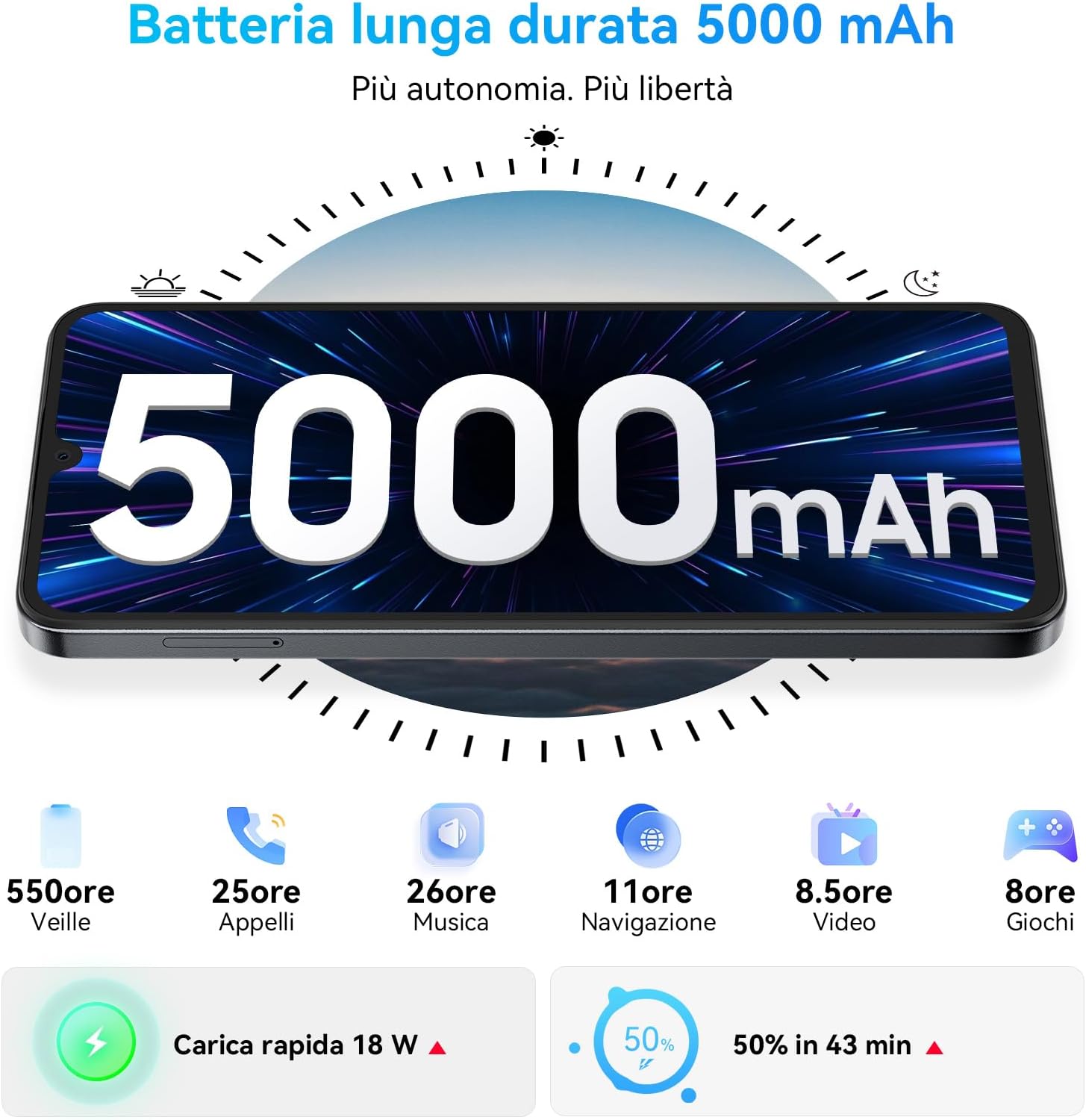
Image: 5000mAh long-lasting battery with 18W fast charging.
4.6 Connectivity and Security
The OSCAL Tiger 8 offers robust connectivity and security features. It supports 5G dual SIM functionality, NFC for convenient contactless payments and data sharing, and OTG for connecting external USB devices. For navigation, it utilizes GPS, GLONASS, Beidou, and Galileo. Security options include a side-mounted fingerprint sensor and facial recognition for quick and secure unlocking.

Image: Connectivity and security features including NFC, Dual SIM, GPS, Fingerprint, and Face Unlock.
5. Maintenance and Care
Proper maintenance ensures the longevity and optimal performance of your OSCAL Tiger 8 Smartphone.
- Cleaning: Use a soft, lint-free cloth to clean the screen and body of the device. Avoid using harsh chemicals or abrasive materials.
- Temperature: Avoid exposing your phone to extreme temperatures (very hot or very cold) as this can affect battery life and internal components.
- Water Exposure: The device is not waterproof. Avoid contact with water or other liquids.
- Software Updates: Regularly check for and install software updates to benefit from the latest features, security patches, and performance improvements.
- Storage: Do not overfill your device's storage. Periodically clear unnecessary files and app caches to maintain smooth operation.
6. Troubleshooting
If you encounter issues with your OSCAL Tiger 8, try the following basic troubleshooting steps:
- Device Not Responding: If the device freezes or becomes unresponsive, press and hold the Power button for approximately 10-15 seconds to force a restart.
- Apps Crashing or Slow: Try clearing the cache of the problematic application via Settings > Apps > [App Name] > Storage > Clear Cache. If the issue persists, consider reinstalling the app or ensuring your device software is up to date.
- Battery Draining Quickly: Check background app usage in Settings > Battery. Reduce screen brightness, disable unnecessary features like GPS, Bluetooth, or Wi-Fi when not in use. Consider using power-saving modes.
- Connectivity Issues (Wi-Fi/Mobile Data): Restart your device. Toggle Wi-Fi or mobile data off and on. If problems persist, try resetting network settings via Settings > System > Reset options > Reset Wi-Fi, mobile & Bluetooth.
- Fingerprint Sensor Not Working: Ensure your finger is clean and dry. Re-register your fingerprints in Settings > Security > Fingerprint.
- Poor Call Quality: Check your network signal strength. Ensure nothing is obstructing the microphone or speaker. Try restarting the device.
7. Specifications
Key technical specifications for the OSCAL Tiger 8 Smartphone 5G.
| Feature | Specification |
|---|---|
| Brand | OSCAL |
| Model Name | OSCAL Smartphone 5G (Tiger 8) |
| Operating System | Android 15 |
| Processor | Unisoc T8100 Octa-Core (2.2 GHz) |
| RAM | 12 GB (4GB physical + 8GB virtual) |
| Internal Storage | 128 GB |
| Expandable Storage | Up to 2 TB (Micro SD) |
| Display Size | 6.88 Inches |
| Display Resolution | 720 x 1640 pixels (HD+) |
| Refresh Rate | 120 Hz |
| Main Camera | 16 MP |
| Front Camera | 8 MP |
| Video Resolution | 4K |
| Battery Capacity | 5000 mAh |
| Charging | 18W Fast Charging |
| Connectivity | 5G, WLAN, Bluetooth, USB, NFC |
| Navigation | GPS, GLONASS, Beidou, Galileo |
| Security | Fingerprint Sensor, Facial Recognition |
| Dimensions | 18 x 7 x 1.3 cm |
| Weight | 100 g |
8. Warranty and Support
OSCAL is committed to providing high-quality products and excellent customer service. Your OSCAL Tiger 8 Smartphone 5G comes with comprehensive support.
- Warranty: Enjoy a 2-year warranty from the date of purchase.
- Technical Support: Lifetime technical support is available for your device.
- Customer Service: Our customer service team is available 24/7 to assist you with any questions or issues.
For assistance, please refer to the contact information provided with your purchase or visit the official OSCAL support website.


Image: OSCAL's commitment to customer service and warranty.


