
Introduction
This manual provides detailed instructions for the installation, operation, maintenance, and troubleshooting of your KEMIMOTO Midnight 90 Golf Cart Stereo System. This all-in-one roof audio system features 800W max power, integrated subwoofer, waterproof design, and RGB lights, compatible with various golf cart models including Club Car and EZGO.
What's in the Box
Upon unpacking, please verify that all components listed below are present:
- Golf Cart Soundbar
- Product Manual
- Installation Kits (includes mounting hardware)

Specifications
| Feature | Detail |
|---|---|
| Brand | KEMIMOTO |
| Model Number | B0117-03018-BKGOLF |
| Speaker Maximum Output Power | 800 watts |
| Frequency Response | 55 Hz – 20 kHz |
| Maximum SPL | 112 dB |
| Connectivity Technology | Auxiliary, Bluetooth 5.3, FM, USB |
| Audio Output Mode | Stereo (2.1 channels) |
| Mounting Type | Flush Mount |
| Enclosure Material | Aluminum alloy |
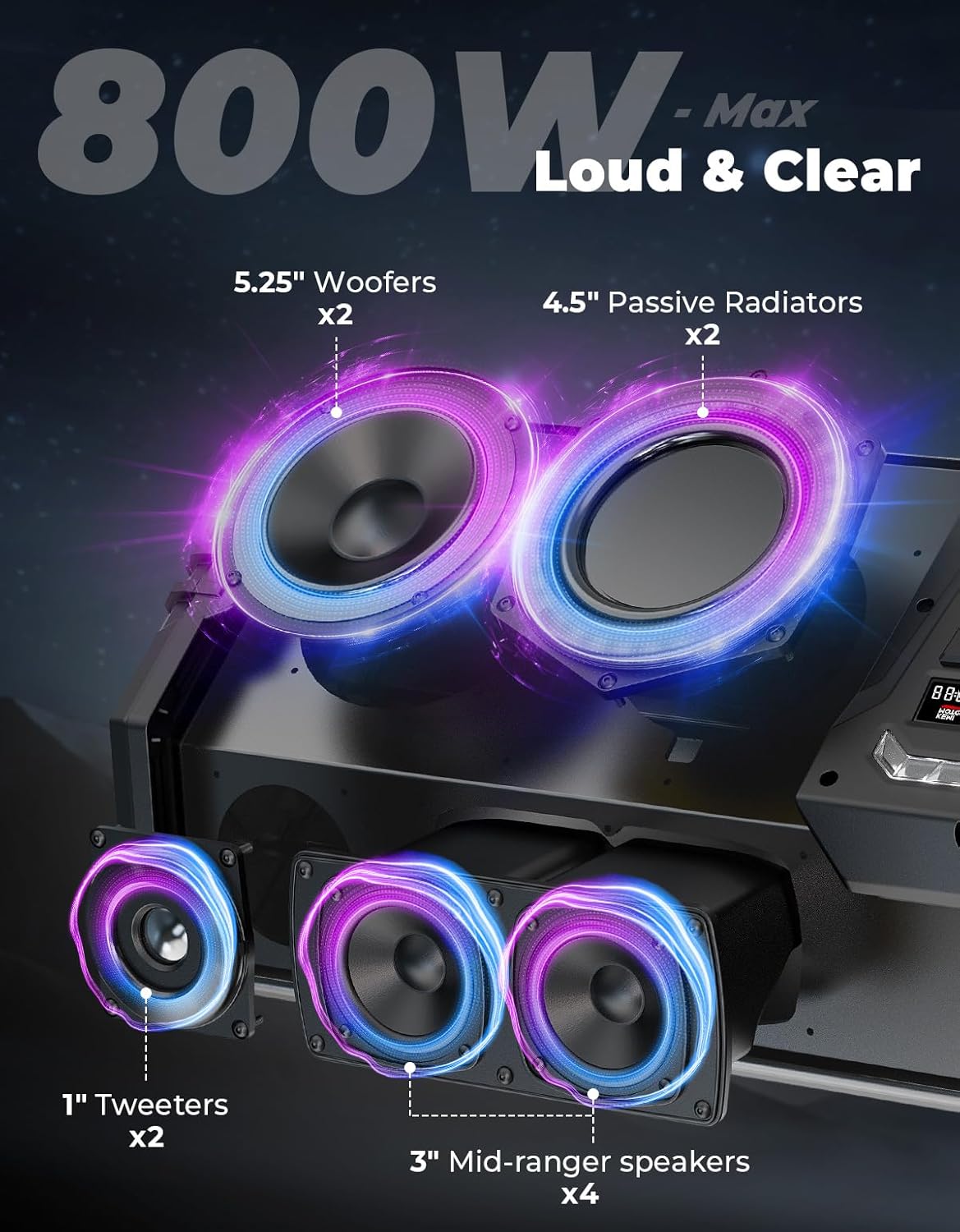
| Speaker Type | Soundbar (2x 5.25" woofers, 2x 4.5" passive radiators, 4 mid-range drivers, 2 tweeters) |
| Additional Features | FM Radio, LED Light (230+ dynamic RGB modes), USB Port, Waterproof |
| Water Resistance Level | IP66 |
| Bluetooth Range | Up to 30 meters |
| Control Method | App, Remote, Front Panel |
| Input Voltage | 12 volts |
| Operating Temperature | -20°C to 60°C |
| Item Dimensions (D x W x H) | 38"D x 9"W x 15"H |

Compatibility
The KEMIMOTO Midnight 90 Golf Cart Stereo System is designed for golf carts with an inner distance of 36" to 47.2" between the two metal frames of the roof structure. It is compatible with:
- Club Car (Most Models)
- EZGO (Most Models)
- Drive and Drive2
- ICON (Most Models)
- Other golf carts meeting the specified inner distance requirements.
Before purchasing and installation, measure the inner distance between your golf cart's roof support frames to ensure proper fitment.

For visual guidance on measuring, refer to the video below:
Installation Guide
The KEMIMOTO Midnight 90 Golf Cart Stereo System offers two primary installation methods: Clamp Mount and Flat Roof Mount. Choose the method that best suits your golf cart's roof design. Always ensure the golf cart is powered off before beginning installation.
General Installation Steps:
- Preparation: Unpack all components and ensure all parts listed in "What's in the Box" are present.
- Measure Compatibility: Confirm your golf cart's inner roof frame distance is between 36" and 47.2".
- Mounting Bracket Selection: Based on your golf cart's roof structure, select either the clamp mount or flat roof mount brackets from the installation kit.
- Secure Brackets: Attach the chosen brackets securely to the golf cart's roof frame using the provided bolts and screws. Ensure all connections are tight to prevent vibration.
- Mount Soundbar: Carefully lift the soundbar and align it with the installed brackets. Secure the soundbar to the brackets using the appropriate hardware.
- Wiring: Connect the power wires to your golf cart's 12V power source. Ensure proper polarity (red to positive, black to negative). It is recommended to connect to a power source that is only active when the golf cart is running to prevent battery drain.
- Final Check: Double-check all connections and mounting points for security and stability.

For a detailed visual guide on installation, please watch the following video:
Operation
Powering On/Off:
Locate the power switch on the side of the soundbar. Flip the switch to the "On" position to power on the unit. The display will illuminate, and the RGB lights will activate. To power off, flip the switch to the "Off" position.
Connectivity Options:
- Bluetooth 5.3: Enable Bluetooth on your smartphone or compatible device. Select "KEMIMOTO Midnight 90" from the available devices to pair. The system supports stable wireless streaming from over 30 meters away.
- USB Port: Insert a USB drive containing audio files into the USB port for direct playback.
- 3.5mm AUX Input: Connect external audio devices using a 3.5mm auxiliary cable.
- FM Radio: The integrated FM radio (87.5-108MHz) allows you to tune into local stations. Use the control panel or remote to scan and save up to 50 preset stations.

Controlling the System:
You can control your music and settings using three methods:
- Included Remote Control: Use the provided remote for convenient control of volume, track selection, source, and RGB lighting modes.
- Intuitive Front Panel: The buttons and knob on the soundbar's front panel allow direct control over all functions.
- Dedicated Smartphone App: Download the KEMIMOTO app to control music playback and customize the RGB lighting effects from your smartphone.
RGB Lighting:
The system features over 230 dynamic RGB lighting modes. Use the remote control or smartphone app to select different modes, colors, and effects. A "DOME" mode is available for a bright white light, useful as a reading or utility light.
Maintenance and Care
The KEMIMOTO Midnight 90 is built with marine-grade IP66 aluminum alloy, designed to withstand harsh outdoor conditions. To ensure longevity and optimal performance:
- Cleaning: The IP66 rating means it is protected against dust and powerful water jets. You can clean the soundbar with a damp cloth. Avoid using harsh chemicals or abrasive cleaners.
- Environmental Conditions: The unit is designed to operate in temperatures ranging from -20°C to 60°C. While it resists dust, moisture, and impacts, extreme prolonged exposure outside this range should be avoided.
- Storage: If storing the golf cart for extended periods, ensure the soundbar is powered off.

Replacing Stereo Panel:
Should the need arise to replace the stereo panel, refer to the following video for guidance:
Troubleshooting
- No Power:
- Ensure the power switch on the side of the soundbar is in the "On" position.
- Check all power connections to the golf cart's 12V battery. Ensure wires are securely connected and polarity is correct.
- Verify the golf cart battery has sufficient charge.
- Sound Distortion:
- Ensure the golf cart engine is running before playing music at high volumes to avoid sound distortion and potential battery drain.
- Reduce the volume level.
- Check audio source quality.
- Excessive Startup Volume:
- If the system starts at an unexpectedly high volume, a software upgrade may be required. Refer to the video below for instructions.
Warranty and Support
The KEMIMOTO Midnight 90 Golf Cart Stereo System comes with a manufacturer's warranty for 12 months from the date of purchase. Please retain your proof of purchase for warranty claims.
For technical support, warranty inquiries, or further assistance, please contact KEMIMOTO customer service. Refer to the contact information provided in your product packaging or visit the official KEMIMOTO website.
