
1. Introduction
This manual provides detailed instructions for the setup, operation, and maintenance of your Woneligo Smart Watch DR06. Please read this manual thoroughly to ensure proper use and to maximize the device's features.
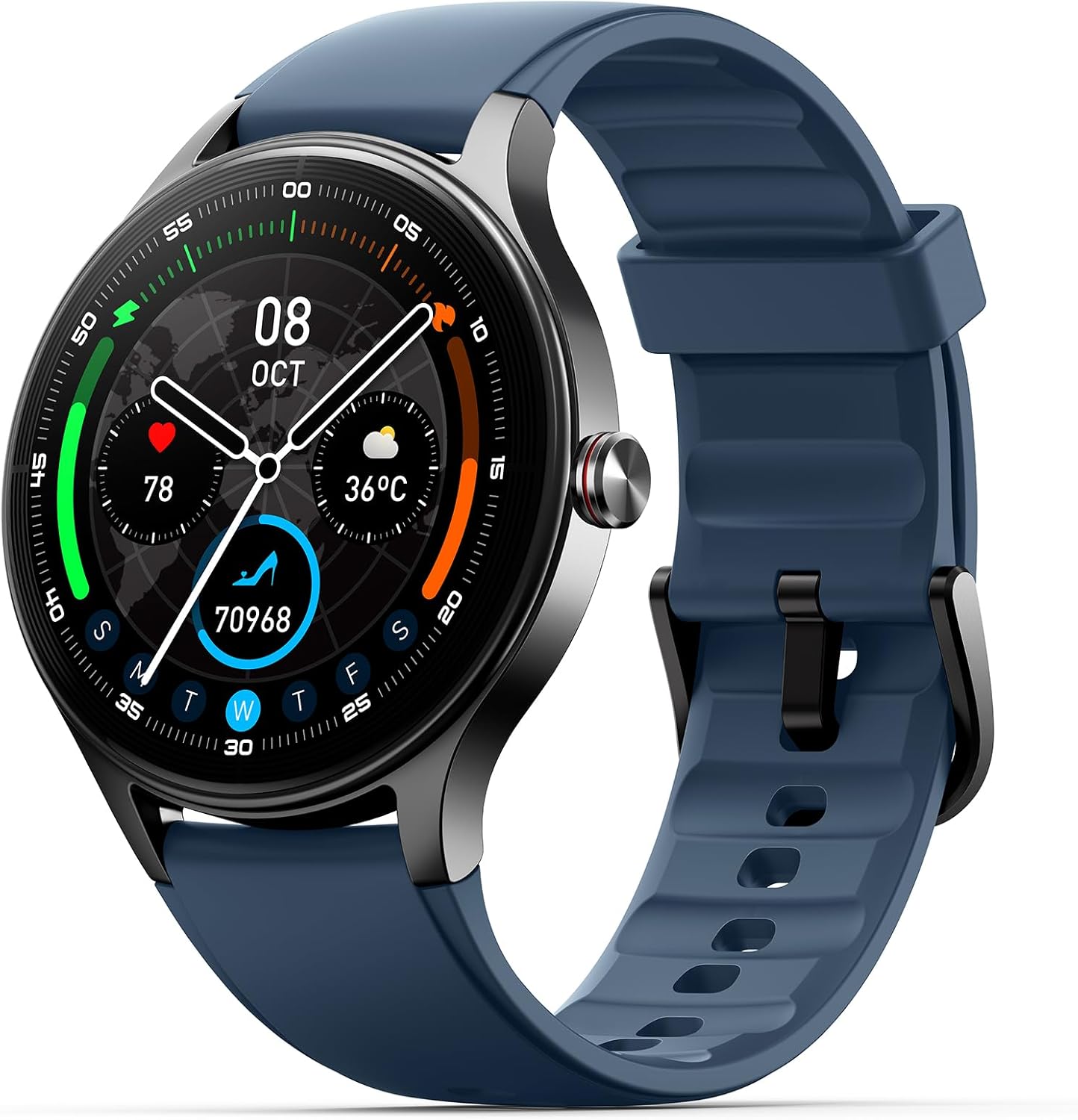
Image: The Woneligo Smart Watch DR06 with a blue silicone strap, displaying time, date, steps, and weather.
2. What's in the Box
Upon opening your Woneligo Smart Watch DR06 package, you should find the following items:
- Woneligo Smart Watch DR06 (main unit)
- Charging Cable
- User Manual (this document)
- Watch Bands (one silicone strap and one leather strap)

Image: An overview of the package contents, showing the smartwatch, two interchangeable straps (silicone and leather), a magnetic charging cable, and the quick function guide.
3. Setup
3.1 Charging the Device
Before first use, fully charge your Woneligo Smart Watch DR06. The watch is equipped with a 290 Milliamp Hours Lithium Polymer battery.
- Connect the magnetic charging cable to the charging points on the back of the watch.
- Plug the USB end of the cable into a standard USB power adapter (not included) or a computer's USB port.
- The watch display will indicate charging status. A full charge typically takes approximately 2 hours.

Image: The back of the smartwatch showing the magnetic charging pins, connected to its charging cable. The watch is placed on a surface.

Image: A graphic illustrating the battery performance: 2 hours for a full charge, 7 days of normal use, and 20-30 days of standby time.
3.2 App Installation and Pairing
To unlock the full potential of your smartwatch, download and install the companion app on your smartphone.
- Scan the QR code provided in the quick function guide or search for "VeryFit" in the Google Play Store (for Android) or Apple App Store (for iOS).
- Install the "VeryFit" app on your smartphone.
- Open the app and follow the on-screen instructions to create an account and set up your profile.
- Ensure Bluetooth is enabled on your smartphone. In the app, navigate to the device section and select to add a new device. The app will search for your Woneligo Smart Watch DR06.
- Select your watch from the list of available devices to pair. Confirm the pairing request on both your phone and the watch if prompted.
The watch is compatible with iOS 10.0+ and Android 6.0+ smartphones.

Image: A smartphone displaying the companion app interface, showing health data, sports records, and options for watch faces and other settings.
3.3 Attaching/Changing Watch Straps
Your Woneligo Smart Watch DR06 comes with two interchangeable straps: a silicone strap for active use and a leather strap for a more classic look.
- To attach a strap, align the spring bar with the lug holes on the watch body.
- Push the spring bar inward and slide the strap into place. Release the spring bar to secure the strap.
- Gently pull on the strap to ensure it is securely attached before wearing.

Image: Two watch straps, one silicone and one leather, demonstrating the interchangeable strap feature.
4. Operating Instructions
4.1 Basic Navigation
The Woneligo Smart Watch DR06 features a 1.57-inch HD touchscreen (360x360 resolution) for intuitive control.
- Swipe Up/Down: Scroll through notifications or menu options.
- Swipe Left/Right: Access quick widgets or different feature screens.
- Tap: Select an item or open an application.
- Press Side Button: Return to the home screen or power on/off the device.

Image: A user navigating through the watch's menu on the HD touchscreen, displaying various application icons.
4.2 Bluetooth Calling and Smart Notifications
Stay connected with Bluetooth 5.3 technology and a built-in DSP noise-reduction chip for clear calls.
- Making/Answering Calls: Once paired with your phone, you can make and receive calls directly from your wrist. Use the dial pad or access frequent contacts via the watch interface.
- Notifications: Receive real-time alerts for messages, emails, and social media apps directly on your watch.

Image: A person on a bicycle demonstrating the Bluetooth 5.3 calling feature, showing call history, contacts, and a dial pad on the watch screen.

Image: A user's wrist with the smartwatch displaying various social media and messaging app icons, indicating smart notification capabilities.
4.3 Watch Faces and Customization
Personalize your watch with over 200 pre-loaded watch faces or upload your own photos.
- Access the watch face market through the "VeryFit" app to browse and select new designs.
- Use the app to upload your favorite images and create custom watch faces.

Image: The smartwatch surrounded by numerous watch face designs, illustrating the wide range of customization options available.
4.4 Health Monitoring
The Woneligo Smart Watch DR06 provides continuous health tracking for general wellness and fitness purposes. Note: This device is not intended for medical use.
- Heart Rate Monitoring: Tracks your heart rate 24/7, with measurements every 5 minutes.
- SpO2 Monitoring: Measures your blood oxygen levels anytime, anywhere.
- Sleep Monitoring: Records deep sleep, light sleep, and REM sleep to help improve sleep quality.
- Stress Level Monitoring: Checks personal stress levels and offers advice on reduction.
- Menstrual Cycle Tracking: Helps track menstrual cycles and ovulation periods, providing timely alerts.

Image: A visual representation of the 24/7 health monitoring features, including heart rate, stress, blood oxygen, and sleep tracking, with corresponding data displayed on the watch face.

Image: A man checking his heart rate on the smartwatch, with a graphic representation of heart rate data on the watch face.

Image: A man checking his blood oxygen (SpO2) level on the smartwatch, showing a percentage reading and historical data.

Image: A man sleeping while wearing the smartwatch, with a graphic showing sleep duration and different sleep stages (deep, light, REM) on the watch face.

Image: A man looking stressed while checking his stress level on the smartwatch, displaying a numerical stress score and a bar graph of stress over time.

Image: A woman tracking her menstrual cycle on the smartwatch, showing a calendar view with highlighted dates for cycle and ovulation periods.
4.5 Sport Modes and Activity Tracking
The watch supports over 120 different activity modes, accurately recording your steps, distance, and calories burned.
- Select your desired sport mode from the watch's menu or the "VeryFit" app to begin tracking.
- The app provides detailed summaries of your workouts and daily activity.
- The watch uses GPS via your smartphone for outdoor activity tracking.

Image: A collage of individuals engaged in various sports, with the smartwatch displaying workout metrics like heart rate, distance, and time, highlighting its 110+ sport modes.

Image: A person playing tennis while wearing the smartwatch, with an overlay showing steps, calories, distance, and heart rate data.
4.6 Other Functions
The Woneligo Smart Watch DR06 offers a variety of additional features:
- AI Voice Assistant: Wake up your phone's smart voice assistant (Siri, Google Assistant) directly from the watch.
- Music Control: Control music playback on your smartphone.
- Remote Camera Control: Use your watch as a remote shutter for your phone's camera.
- Find Phone: Locate your misplaced smartphone by triggering an alarm from your watch.
- Alarm Clock, Stopwatch, Timer: Essential time management tools.
- Weather Forecast: Get real-time weather updates.
- Calculator: Perform basic calculations on your wrist.
- Flashlight: A convenient light source.
- Medication Reminders: Set reminders for taking medication.
- DND Mode: Do Not Disturb mode for uninterrupted focus.

Image: The smartwatch displaying its main interface, surrounded by icons representing various functions such as alarm clock, weather forecast, music control, find phone, calculator, flashlight, unwind time, and breathe exercises.

Image: A man smiling while interacting with the AI Voice Assistant feature on his smartwatch, with speech bubbles showing example commands like "Please timer for 20 minutes" and "Play some relax music."
5. Maintenance
5.1 Water Resistance
The Woneligo Smart Watch DR06 is rated IP68 water resistant, meaning it can withstand sweat, rain, and splashes. It is suitable for daily use and various sports scenarios, including swimming.
Important: While water resistant, avoid prolonged submersion in water, hot water, or exposure to high-pressure water jets. Do not operate the watch buttons underwater.

Image: A man hiking through a stream, wearing the smartwatch, to illustrate its IP68 waterproof capability for various outdoor activities.
5.2 Cleaning and Care
- Regularly clean your watch and straps with a soft, dry cloth.
- If necessary, use a slightly damp cloth with mild soap, then rinse and dry thoroughly.
- Avoid using harsh chemicals or abrasive materials, as these can damage the device.
6. Specifications
| Brand | Woneligo |
| Model | DR06 |
| Screen Size | 1.57 Inches |
| Display Resolution | 360x360 (HD Touchscreen) |
| Connectivity Technology | Bluetooth 5.3 |
| Battery Capacity | 290 Milliamp Hours |
| Battery Type | Lithium Polymer |
| Water Resistance | IP68 |
| Operating System Compatibility | iPhone 10.0+ Series, Android 6.0+ Smartphones |
| Memory Storage Capacity | 258 MB |
| Item Weight | 4.2 ounces |
| Special Features | Activity Tracker, Bluetooth Call Make/Answer, Heart Rate/SpO2/Sleep/Stress Monitor, 120+ Sports Modes, Pedometer/Calories/Distance Record, Alarm Clock/Stop Watch/Timer, Medication Reminders, Cycle Tracking, Music/Camera Control, Screen on Time/Raise to Wake/Adjustable Brightness, DND Mode, AI Voice Assistant |
7. Troubleshooting
If you encounter any issues with your Woneligo Smart Watch DR06, please refer to the following common solutions:
- Watch not turning on: Ensure the watch is fully charged. Connect it to the charging cable and allow it to charge for at least 30 minutes before attempting to power it on again.
- Unable to pair with phone:
- Ensure Bluetooth is enabled on your smartphone.
- Make sure the watch is within range of your phone.
- Restart both your phone and the watch.
- Check if the "VeryFit" app is updated to the latest version.
- Forget the device in your phone's Bluetooth settings and try pairing again through the app.
- Inaccurate health data:
- Ensure the watch is worn snugly on your wrist, about one finger's width above your wrist bone.
- Clean the sensors on the back of the watch.
- Note that environmental factors and individual physiology can affect readings. Data is for reference only.
- Notifications not appearing:
- Check app notification settings on your phone and within the "VeryFit" app.
- Ensure the watch is connected via Bluetooth.
- Disable and re-enable notifications in the app.
For further assistance, please contact Woneligo customer support.
8. Warranty & Support
Your Woneligo Smart Watch DR06 is backed by an industry-leading 5-year warranty against hardware defects. This warranty ensures your investment is protected.
Our dedicated technical support team is available to assist you. We aim to respond to all inquiries within 12 hours and resolve any issues within 24 hours.
For warranty claims or technical support, please refer to the contact information provided in your product packaging or visit the official Woneligo website.
9. Official Product Video
Video: An official product video from Woneligo showcasing the DR06 smartwatch for women, highlighting its features and design.


