
1. Introduction
Thank you for choosing the HOOBRO Gaming Desk BB100UDDN01. This desk is designed to provide a functional and organized workspace for gaming or home office use. It features integrated LED lighting, a convenient charging station, a monitor stand for ergonomic comfort, and ample storage. This manual provides essential information for assembly, operation, maintenance, and safety to ensure optimal use of your new desk.

Image 1.1: The HOOBRO Gaming Desk BB100UDDN01 in a typical gaming environment, showcasing its LED lighting and integrated features.
2. Safety Instructions
Please read and follow these safety instructions carefully to prevent injury or damage to the product:
- Do not climb on or stand on the computer desk.
- Strictly follow the instructions for assembly.
- Ensure the desk is properly assembled and stable before use.
- Do not exceed the maximum weight recommendation of 55 pounds per shelf.
- Keep all electrical components (charging station, LED lights) away from liquids.
- Regularly check all screws and connections to ensure they remain tight.
3. Package Contents
Verify that all components are present before beginning assembly:
- 1 x Computer Desk (main components)
- 1 x Accessory Kit (hardware, screws, etc.)
- 1 x Charging Station
- 1 x Light Strip (LED)
- 1 x Instructions Manual (this document)
If any parts are missing or damaged, please contact customer support.
4. Specifications
| Feature | Detail |
|---|---|
| Brand | HOOBRO |
| Model Number | BB100UDDN01 |
| Product Dimensions (D x W x H) | 19.7" x 39.4" x 57.1" (50cm x 100cm x 145cm) |
| Item Weight | 45.4 Pounds |
| Color | Black |
| Material Type | Engineered Wood, Metal |
| Number of Shelves | 3 (including monitor stand) |
| Maximum Weight Recommendation | 55 Pounds per shelf |
| Special Features | Built-In USB Outlet, LED Lights, Monitor Stand, CPU Stand |
| Charging Station | 2 AC Outlets (120V/12A), 1 USB-A Port (5V/2A), 1 Type-C Port (5V/2A) |
| Power Cord Length | 4.9 Feet (150cm) |
| Assembly Required | Yes (Tools and instructions included) |

Image 4.1: Detailed product dimensions of the HOOBRO Gaming Desk BB100UDDN01.
5. Setup and Assembly
The HOOBRO Gaming Desk BB100UDDN01 is designed for hassle-free assembly. Each part is clearly labeled, and all necessary tools are included in the accessory kit. Follow the step-by-step illustrations provided in the separate schematic instruction manual for detailed guidance.
Key Assembly Tips:
- Identify Parts: Lay out all components and hardware. Match them with the parts list in the schematic manual.
- Follow Order: Assemble the desk in the sequence specified in the schematic manual to ensure structural integrity.
- Do Not Overtighten: Tighten screws firmly but avoid overtightening, which can damage the wood or metal.
- Adjustable Features: The desk includes an adjustable shelf and adjustable feet. Ensure these are set to your desired height and level the desk on uneven floors.
- X-Shaped Back Brace: Install the X-shaped metal back brace as instructed for enhanced stability.
- Anti-Tip Devices: Utilize the provided anti-tip devices if securing the desk to a wall is desired for additional safety.
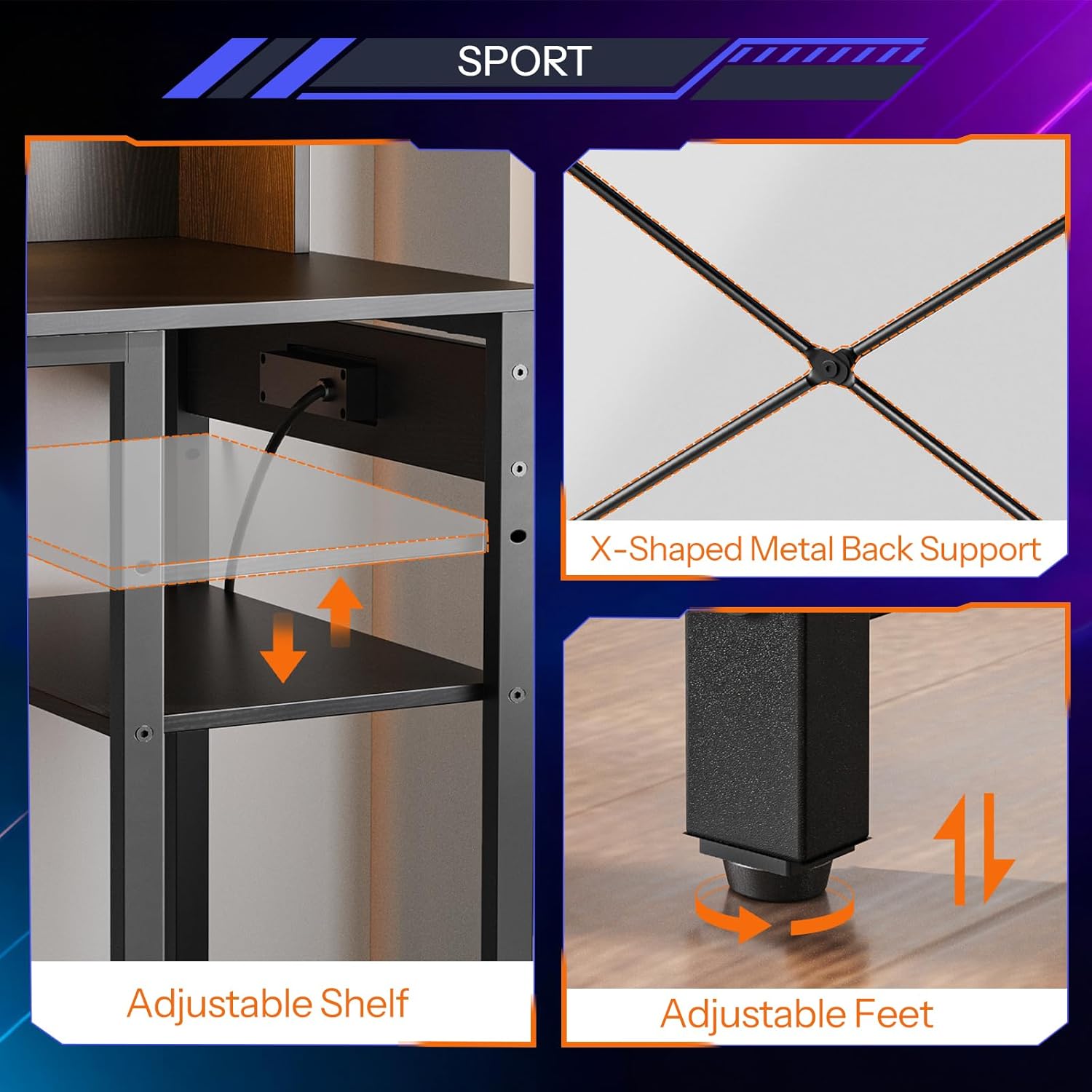
Image 5.1: Close-up view of the adjustable shelf, X-shaped metal back support, and adjustable feet, highlighting key structural and customizable elements.
6. Operating Instructions
6.1. LED Lights
The integrated LED light strip enhances your workspace ambiance. Connect the light strip to a power source as indicated in the assembly instructions. Use the included remote control to:
- Change Colors: Select from 20 available colors to match your mood or setup.
- Dynamic Modes: Choose from 22 dynamic modes for various lighting effects.
- Adjust Brightness: Increase or decrease the light intensity to your preference.

Image 6.1: The HOOBRO Gaming Desk's LED lighting system, demonstrating color options and remote control functionality.
6.2. Charging Station
The built-in charging station provides convenient power access for your electronic devices. It includes:
- 2 x AC Outlets (120V/12A)
- 1 x USB-A Port (5V/2A)
- 1 x Type-C Port (5V/2A)
Ensure the charging station is properly connected to a wall outlet using the provided 4.9-foot power cord. Use appropriate cables for your devices.

Image 6.2: Detailed view of the integrated charging station, showing the AC outlets, USB-A, and Type-C ports.
6.3. Monitor Stand
The elevated monitor stand is designed to improve your posture and reduce strain during long periods of use. By raising your monitor to eye level, it helps maintain proper sitting posture, minimizing discomfort in your neck and back.

Image 6.3: Illustration demonstrating the ergonomic benefits of the monitor stand for maintaining proper posture.
6.4. Storage and CPU Stand
The desk offers generous storage space with two spacious compartments, open horizontal shelves, and a lower adjustable shelf. The dedicated CPU stand area is designed to accommodate your computer tower, keeping it off the floor and easily accessible.

Image 6.4: Example of a computer tower placed in the designated CPU stand area.
7. Maintenance
Proper care will extend the life and appearance of your HOOBRO Gaming Desk:
- Cleaning: Wipe surfaces with a soft, damp cloth. Avoid harsh chemicals or abrasive cleaners, which can damage the finish.
- Spills: Clean up spills immediately to prevent staining or damage to the engineered wood.
- Hardware Check: Periodically check all screws and fasteners to ensure they are tight. Retighten if necessary.
- Avoid Direct Sunlight: Prolonged exposure to direct sunlight can cause fading or warping.
- Heat Protection: Use coasters or pads under hot items to protect the desk surface.
8. Troubleshooting
If you encounter issues with your HOOBRO Gaming Desk, refer to the following common problems and solutions:
| Problem | Possible Cause / Solution |
|---|---|
| Desk is wobbly or unstable. |
|
| LED lights are not turning on. |
|
| Charging station outlets/ports are not working. |
|
9. Warranty Information
The HOOBRO Gaming Desk BB100UDDN01 comes with a Limited Warranty. Please refer to the warranty card included with your purchase or contact HOOBRO customer support for specific terms and conditions regarding coverage, duration, and claims procedures.
10. Customer Support
For further assistance, missing parts, or warranty claims, please contact HOOBRO customer support through the retailer where the product was purchased or visit the official HOOBRO website for contact information.
We are committed to providing quality products and support.