
1. Introduction
Thank you for choosing the Harman-Kardon Enchant-1100 Dolby Atmos Soundbar with Enchant Subwoofer. This system is designed to deliver an immersive audio experience with 3D surround sound, enhanced dialogue clarity, and powerful bass. This manual provides essential information for setting up, operating, and maintaining your new audio system. Please read it thoroughly before use to ensure proper installation and optimal performance.
2. Safety Information
Please observe the following safety precautions to prevent electric shock, fire, or damage to the unit:
- Power Source: Connect the unit only to an AC power source as indicated on the unit.
- Ventilation: Do not block any ventilation openings. Ensure adequate space around the unit for proper airflow.
- Water and Moisture: Do not expose the unit to rain, moisture, dripping, or splashing. Do not place objects filled with liquids, such as vases, on the apparatus.
- Heat: Do not place the unit near heat sources such as radiators, heat registers, stoves, or other apparatus (including amplifiers) that produce heat.
- Cleaning: Clean only with a dry cloth.
- Servicing: Do not attempt to service this product yourself. Refer all servicing to qualified service personnel.
3. What's in the Box
Carefully unpack all components and ensure you have the following items:
- Harman-Kardon Enchant-1100 Soundbar
- Harman-Kardon Enchant Subwoofer
- Remote Control with Batteries
- HDMI Cable
- Power Cords (for Soundbar and Subwoofer)
- Wall-Mount Brackets (with screws)
- Quick Start Guide
4. Product Overview
4.1 Soundbar Front and Top Controls
The soundbar features a sleek design with integrated controls and indicators for easy access.

Image: Front view of the Harman-Kardon Enchant-1100 Soundbar, showcasing its minimalist design and fabric grille.
- Power Button: Turns the soundbar on or off.
- Volume Up/Down: Adjusts the master volume level.
- Source Button: Cycles through available input sources (HDMI, Optical, Bluetooth, Wi-Fi).
- LED Indicators: Display current status, input source, and volume level.
4.2 Soundbar Rear Connections
The rear panel provides all necessary ports for connecting to your television and other devices.

Image: Rear view of the Harman-Kardon Enchant-1100 Soundbar, showing the various input and output ports.
- HDMI eARC/ARC: Connects to your TV's HDMI ARC/eARC port for high-quality audio and control.
- Optical In: Digital audio input for devices without HDMI ARC.
- USB (Type A): For service or firmware updates.
- Ethernet: For wired network connection.
- AC Power: Connects to the power cord.
4.3 Enchant Subwoofer
The wireless subwoofer provides deep, impactful bass to complement the soundbar.
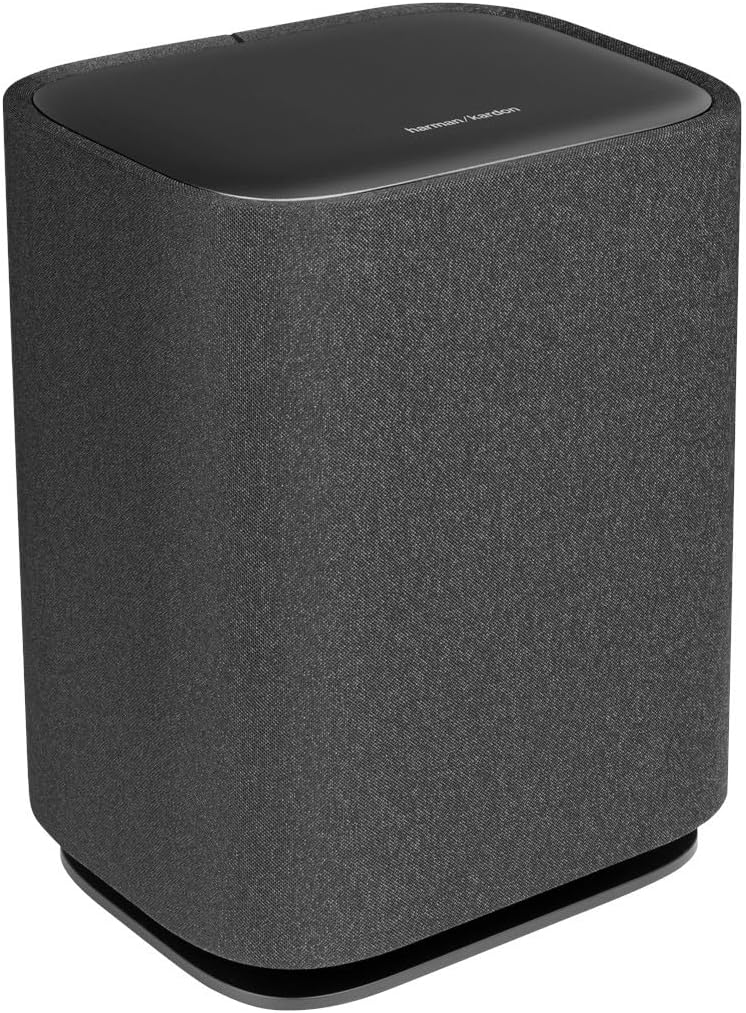
Image: Front and side view of the Harman-Kardon Enchant Subwoofer, featuring its fabric-covered cylindrical design.

Image: Rear view of the Harman-Kardon Enchant Subwoofer, showing the power input and pairing controls.
- Power Input: Connects to the subwoofer's power cord.
- Pairing Button: Used to manually pair the subwoofer with the soundbar if automatic pairing fails.
- Service Port: For technical servicing.
5. Setup
5.1 Placement
Optimal placement is crucial for the best audio experience.

Image: A Harman-Kardon soundbar positioned below a television in a living room setting, demonstrating typical placement.
- Soundbar: Place the soundbar centrally below your TV, ensuring it is not obstructed. For wall mounting, use the provided brackets and follow the wall-mounting guide.
- Subwoofer: Position the subwoofer anywhere in the room. Wireless connectivity allows flexibility. For best bass response, experiment with different locations, typically near a wall or in a corner.
5.2 Connections
- HDMI eARC/ARC Connection (Recommended):
Connect one end of the HDMI cable to the HDMI eARC/ARC port on the soundbar and the other end to the HDMI ARC/eARC port on your TV. This connection supports the highest quality audio formats, including Dolby Atmos, and allows your TV remote to control the soundbar's volume. - Optical Connection (Alternative):
If your TV does not have an HDMI ARC/eARC port, connect an optical cable from the TV's optical digital output to the OPTICAL IN port on the soundbar. Note that this connection does not support Dolby Atmos. - Power Connection:
Connect the power cords to the soundbar and subwoofer, then plug them into a wall outlet.
5.3 Wireless Subwoofer Pairing
The subwoofer should automatically pair with the soundbar upon powering on. If pairing fails:
- Ensure both the soundbar and subwoofer are powered on.
- Press and hold the Pairing button on the rear of the subwoofer until the LED indicator flashes rapidly.
- On the soundbar, press and hold the Source button for 5 seconds. The soundbar display will show "PAIRING".
- Once connected, the LED on the subwoofer will turn solid, and the soundbar will indicate successful pairing.
5.4 Sound Calibration
The Enchant-1100 features easy sound calibration to optimize audio for your room. Follow the on-screen instructions on your TV (if connected via HDMI eARC) or refer to the Harman Kardon One App for detailed calibration steps.
6. Operating Instructions
6.1 Basic Operation
- Power On/Off: Press the Power button on the soundbar or remote control.
- Volume Control: Use the Volume Up/Down buttons on the soundbar or remote.
- Source Selection: Press the Source button on the soundbar or remote to cycle through HDMI, Optical, Bluetooth, and Wi-Fi inputs.
- Mute: Press the Mute button on the remote to temporarily silence the audio.
6.2 Bluetooth Pairing
To connect a Bluetooth device:
- Press the Bluetooth button on the remote or cycle to the Bluetooth source on the soundbar. The soundbar will enter pairing mode, indicated by a flashing LED.
- On your device (smartphone, tablet), enable Bluetooth and select "Harman-Kardon Enchant-1100" from the list of available devices.
- Once connected, the LED on the soundbar will become solid.
6.3 Wi-Fi and Streaming Features
The Enchant-1100 supports various streaming technologies:
- Google Cast: Stream audio from Cast-enabled apps directly to your soundbar.
- AirPlay: Stream audio from Apple devices.
- Spotify Connect: Control music playback directly from the Spotify app.
- Harman Kardon One App: Download the app for advanced control, setup, and access to additional features.
6.4 Immersive Audio Technologies
The soundbar utilizes advanced technologies for a superior listening experience:
- Dolby Atmos & DTS:X: Experience multi-dimensional sound that moves around you. Ensure your content source and TV support these formats for optimal effect.
- MultiBeam™: Creates a wide soundstage by reflecting sound off walls, providing a surround sound experience without additional rear speakers.
- Harman PureVoice™: Enhances dialogue clarity, making sure voices are distinct even during intense action scenes.
6.5 Product Videos
Watch these videos for visual guidance on setup and features:
Video: A general overview of the Harman-Kardon Enchant series, highlighting key features and design elements. (Duration: 0:53)
Video: A short demonstration of the soundbar's audio capabilities and immersive sound. (Duration: 0:31)
7. Maintenance
- Cleaning: Use a soft, dry cloth to clean the surfaces of the soundbar and subwoofer. Do not use liquid cleaners or abrasive materials.
- Software Updates: Periodically check for firmware updates via the Harman Kardon One App or the Harman Kardon support website to ensure optimal performance and access to new features.
- Ventilation: Ensure that the ventilation openings on the soundbar and subwoofer are not blocked to prevent overheating.
8. Troubleshooting
If you encounter issues, refer to the following common problems and solutions:
| Problem | Possible Solution |
|---|---|
| No power | Ensure power cords are securely connected to both the unit and a working power outlet. Try a different outlet. |
| No sound | Check input source selection. Verify volume levels on both the soundbar and TV. Ensure cables (HDMI, Optical) are correctly connected. |
| Subwoofer not connecting | Perform manual pairing as described in Section 5.3. Ensure the subwoofer is powered on and within range of the soundbar. |
| Poor sound quality | Check audio settings on your TV and source device. Ensure the soundbar is not obstructed. Run sound calibration. |
| Remote control not working | Replace batteries. Ensure there are no obstructions between the remote and the soundbar. |
| No Dolby Atmos/DTS:X | Ensure your TV and content source support Dolby Atmos/DTS:X and are connected via HDMI eARC. Check TV audio output settings. |
9. Specifications
| Feature | Detail |
|---|---|
| Model Name | HKENCH1100BLKAM |
| Speaker Type | Soundbar |
| Special Features | 3D Surround Sound, DTS:X, MultiBeam, Bluetooth, Wi-Fi, Airplay, Google Cast, Spotify Connect, Smart Dialogue Enhancement with Harman PureVoice Tech, Easy Sound Calibration, UltraHD 4K Pass-Through with Dolby Vision, HDMI eARC, Harman Kardon One App, Multi-Channel Surround Sound |
| Recommended Uses | For Surround Sound Systems |
| Compatible Devices | Television, Home Theater |
| Surround Sound Channel Configuration | 5.1 |
| Color | Black |
| Product Dimensions (Soundbar) | 5.1"D x 45.2"W x 2.6"H |
| Item Weight | 10.1 Pounds (Soundbar) |
| Number of Items | 2 (Soundbar and Subwoofer) |
| Control Method | Remote, Touch |
| Wireless Communication Technology | Bluetooth, Wi-Fi |
| Woofer Diameter | 6.5 Inches (Subwoofer) |
| Power Source | AC |
| Frequency Response | 52 Hz - 20 kHz (-6dB) |
| Mounting Type | Tabletop Mount |
| UPC | 840377559134 |
10. Warranty Information
This Harman-Kardon product is covered by a limited warranty. The terms and conditions of the warranty may vary by region. Please refer to the warranty card included in your product packaging or visit the official Harman Kardon website for detailed warranty information and registration.
11. Support
For further assistance, technical support, or customer service, please visit the official Harman Kardon support website or contact their customer service team:
- Website: www.harmankardon.com/support
- Online Resources: FAQs, troubleshooting guides, and software downloads are available on the support website.


