
1. Introduction
Thank you for purchasing the PIKOY Excavator Night Light Projector. This device is designed to provide a soothing and engaging environment with its light projections and sound features. Please read this manual carefully before use to ensure proper operation and to maximize your enjoyment of the product.
2. What's in the Box
Please check the contents of your package. If any items are missing or damaged, please contact customer support.
- PIKOY Excavator Night Light Projector (Dinosaur Egg design)
- Remote Control
- USB Power Cable
- 6 Projection Films (Construction Excavator, Stars, Dinosaurs, Oceans, Dino Trucks, Race Cars)
- User Manual (this document)
3. Product Overview
The PIKOY Excavator Night Light Projector features a unique cracked dinosaur egg design. It combines a night light, a projector, and a sound machine to create a multi-sensory experience.
3.1 Key Features
- Projection Modes: 6 HD films including Construction Excavator, Stars, Dinosaurs, Oceans, Dino Trucks, and Race Cars.
- Lighting Effects: 31 vibrant color modes (Blue, Green, Red, Purple, Yellow) and 186 lighting effects.
- Sound Modes: 15 built-in calming tracks including white noise, rain, ocean waves, and lullabies.
- Control: Remote control with 3 timer settings (1/2/4 hours) and 3 brightness levels (10/50/100%).
- Rotation: Slow, quiet 360° rotation for projections.
- Safety: Child-safe design with rounded edges, BPA-free materials, and soft LED lights.
3.2 Product Components
Familiarize yourself with the main components of the projector:
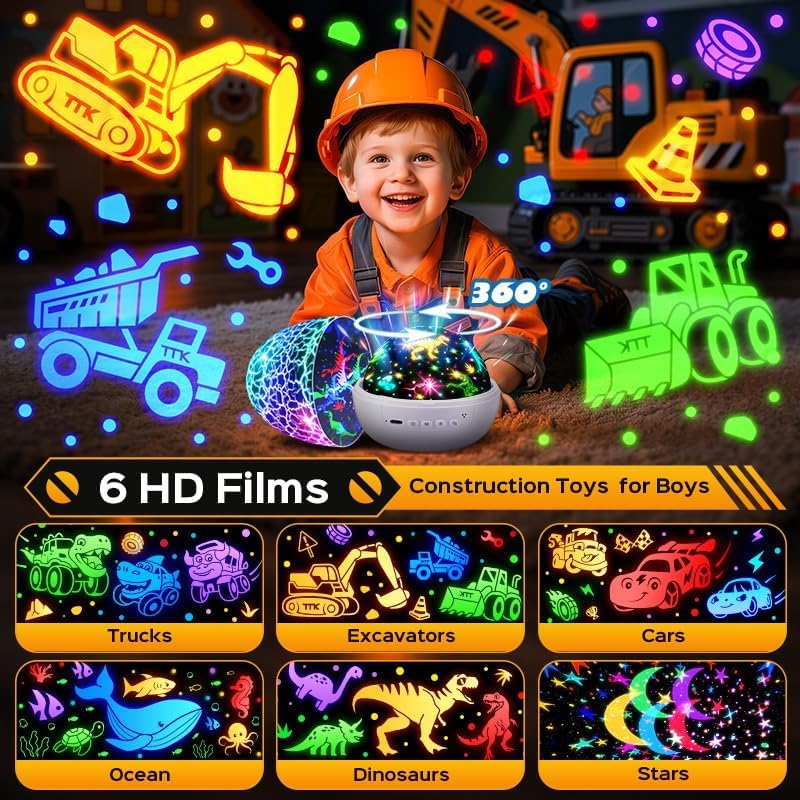
The image above illustrates the projector's design and the variety of projection films available, including trucks, excavators, cars, ocean, dinosaurs, and stars. It also highlights the 360° rotation feature.

This image details the 15 soothing sounds the projector offers, such as rain, white noise, lullaby, meditation, birds singing, summer night, sea wave, fan, and pink noise, all aimed at promoting sleep and calm.
4. Setup Instructions
- Unpack the Projector: Carefully remove all components from the packaging.
- Power Connection: Connect the provided USB power cable to the projector's power input port. Plug the other end into a compatible USB power adapter (not included) or a USB port on a computer/power bank.
- Insert/Change Projection Film:
- Gently twist and lift the top dome of the projector to remove it.
- Place your desired projection film onto the film holder inside the projector. Ensure it is seated correctly.
- Replace the top dome, aligning it properly and twisting gently to secure.
- Remote Control Battery: The remote control requires a CR2025 3V button cell battery. Ensure the battery is inserted correctly, observing polarity. Remove the plastic tab if present before first use.

The image above demonstrates the projector's capability to display 31 RGB colors and 6 different films, offering a wide range of visual experiences.
5. Operating Instructions
5.1 Power On/Off
Press the power button on the projector or the remote control to turn the device on or off.
5.2 Projection Modes
The projector comes with 6 interchangeable films. To change the projection theme, follow the steps in the "Setup" section to replace the film. The projector offers 31 color modes and 186 lighting effects, which can be cycled through using the remote control.

This image shows the remote control, which allows for easy adjustment of the 360° rotation, 3 brightness levels, and 3 timer settings (1H/2H/4H).
5.3 Sound Modes
Select from 15 soothing sounds using the remote control. Adjust the volume from levels 1-10 to suit your preference. The sound machine feature can be used independently or in conjunction with the light projection.
5.4 Remote Control Functions
The remote control provides convenient access to all projector functions:
- Power Button: Turns the projector on/off.
- Music Button: Cycles through the 15 built-in sound tracks.
- Rotation Button: Toggles the 360° rotation of the projection.
- Color Buttons (R, G, B, Y, P): Selects individual colors or mixes them.
- Brightness Buttons: Adjusts light brightness (10%, 50%, 100%).
- Volume Buttons: Increases or decreases sound volume.
- Timer Buttons (1H, 2H, 4H): Sets an automatic shut-off timer for 1, 2, or 4 hours.
5.5 Projection Films
The projector includes 6 distinct films to create various atmospheric effects:
- Construction Excavator: Projects realistic construction vehicles.
- Stars: Creates a starry night sky.
- Dinosaurs: Brings prehistoric creatures to life.
- Oceans: Features marine life and underwater scenes.
- Dino Trucks: Combines dinosaurs with trucks.
- Race Cars: Displays exciting race car patterns.
To ensure clear projection, remove the transparent cover from the projection film before use.
6. Product in Action
See the PIKOY Excavator Night Light Projector in use with these official videos:
6.1 Construction Excavator Toys - 15 Sounds & 6 Films Truck Toy Gift
This video demonstrates the PIKOY Excavator Night Light Projector showcasing its 15 sound options and 6 film projections, including construction excavator themes. It highlights the interactive and engaging features for children.
6.2 PIKOY Excavator Toys for Boys 3-5 years - 15 Sounds & 6 Films
This video provides another view of the PIKOY Excavator Night Light Projector, focusing on its appeal to boys aged 3-5 years, demonstrating the various light and sound combinations.
6.3 Pikoy Kids Construction Toys Excavator Toys - 15 Sounds & 6 Film
A video showcasing the PIKOY projector's construction toy themes, highlighting the 15 sounds and 6 films that create an immersive play and sleep environment.
6.4 Toddler Boys Birthday Gifts, Kids Christmas Gifts 1-8 Years
This video illustrates the PIKOY projector as an ideal gift for toddler boys, suitable for birthdays and Christmas, demonstrating its engaging features for children aged 1-8 years.
6.5 PIKOY Easter Eggs Easter Gifts Easter Toys for Kids Toddler
A video highlighting the PIKOY projector's dinosaur egg design, positioning it as a great Easter gift or toy for toddlers, showcasing its fun and engaging aspects.
7. Maintenance
- Cleaning: Wipe the projector's exterior with a soft, dry cloth. Do not use abrasive cleaners or solvents.
- Film Care: Handle projection films by the edges to avoid fingerprints or scratches. Store them in a clean, dry place when not in use.
- Storage: When not in use for extended periods, store the projector in its original packaging in a cool, dry place.
- Battery Replacement: Replace the remote control battery (CR2025 3V) when its performance diminishes. Ensure proper disposal of old batteries.
8. Troubleshooting
| Problem | Possible Cause | Solution |
|---|---|---|
| Projector does not turn on. | No power, loose connection, or faulty power source. | Check USB cable connection. Ensure power adapter is working. Try a different USB port or adapter. |
| Projection is blurry or unclear. | Protective film on lens, incorrect film placement, or dirty lens/film. | Remove any protective film from the lens. Ensure the projection film is correctly seated. Clean the lens and film gently with a soft cloth. |
| Remote control is not working. | Battery low/dead, plastic tab not removed, or remote not aimed at sensor. | Replace the CR2025 battery. Remove the plastic tab from the battery compartment. Ensure the remote is pointed towards the projector's sensor. |
| No sound or distorted sound. | Volume too low, sound mode not selected, or internal issue. | Increase volume using the remote. Press the music button to select a sound mode. If problem persists, contact support. |
| Projector crashes or freezes. | Temporary software glitch. | Long press the power button for 4 seconds to reboot the device. |
9. Specifications
| Feature | Detail |
|---|---|
| Model Number | WH-E27 |
| Product Dimensions | 4.65"D x 4.65"W x 5.43"H |
| Light Source Type | LED |
| Number of Light Sources | 1 |
| Material Type | Acrylonitrile Butadiene Styrene, Polycarbonate |
| Power Input | USB (5V) |
| Remote Battery | CR2025 3V (button cell) |
| Indoor/Outdoor Usage | Indoor |
10. Warranty & Support
Manufacturer Warranty: Other. For specific warranty details, please refer to the product packaging or contact your retailer.
If you encounter any issues or have questions regarding your PIKOY Excavator Night Light Projector, please contact PIKOY customer support through the retailer where you purchased the product. Please have your model number (WH-E27) and purchase information ready.