
Jocoevol C-1604
Jocoevol Full Upholstered LED Bed Frame with Storage Drawers and 2-Tier Headboard (Model C-1604)
Instruction Manual
Product Overview
The Jocoevol Full Upholstered LED Bed Frame is designed to provide both comfort and functionality. It features a velvet upholstered frame, a 2-tier storage headboard with an integrated charging station, smart RGB LED lighting, and two storage drawers. This bed frame is built with a heavy-duty metal support system for durability and stability.
Key Features:
- Integrated Storage Drawers: Two large, silent-glide drawers for convenient storage, featuring a locking design and bottom dust mats.
- Smart RGB LED Headboard: Built-in LED lights with over 16 million colors, 20+ light effects, and music sync capabilities, controllable via app or remote.
- Charging Station: Headboard includes two AC outlets, two USB ports, and one Type-C port.
- 2-Tier Storage Headboard: 8.5-inch wide double-layer shelf and 11.8-inch deep side cubby for bedside storage.
- Charming Design: Cat-ear shaped, button-tufted velvet headboard and elegant curved footboard.
- Flexible Drawer Positioning: Drawers can be placed in any of the 4 side positions.
- Sturdy Support System: 12 thickened slats, 3 steel support bars, and heavy-duty metal structure supporting up to 1000 lbs. Silent strips prevent shifting and noise.
Setup and Assembly
Before beginning assembly, ensure all parts are present and undamaged. Refer to the included installation manual for detailed diagrams and part identification. Assembly typically requires two people and can take several hours.
1. Unboxing and Component Check
Carefully unpack all components from the boxes. Lay out all parts and hardware. Verify against the parts list in your separate printed manual to ensure nothing is missing or damaged. If any parts are damaged or missing, contact customer support immediately.
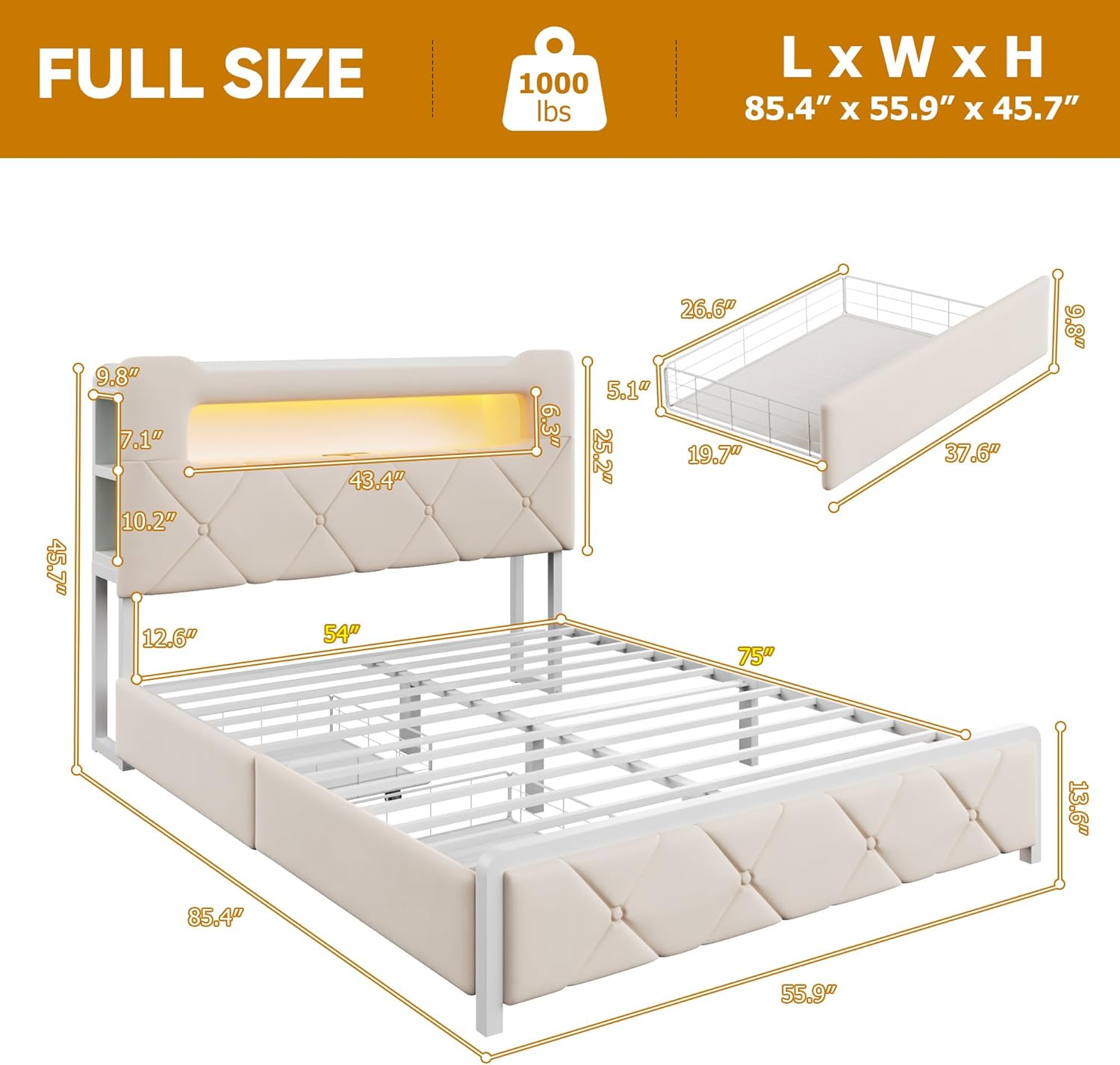
Image: Unpacked bed frame components, including the headboard and various frame pieces, laid out for assembly.
2. Headboard Assembly
Assemble the headboard structure first. This involves attaching the side shelves and the main back panel. Ensure all screws are tightened securely. The headboard contains the integrated LED strip and the charging station components.

Image: Detailed view of the headboard's charging station, featuring AC outlets, USB ports, and a Type-C port.

Image: Close-up of the headboard highlighting the 2-tier side shelves and the tufted button design.
3. Bed Frame Assembly
Connect the side rails and footboard to the assembled headboard. Install the central support beam and the 12 thickened slats. Ensure the silent strips are correctly placed to prevent mattress shifting and noise. The frame is designed for stability and durability.

Image: Illustration of the steel support system with EVA foam for silent operation.

Image: Diagram illustrating the sturdy support legs of the bed frame.

Image: Detail of Velcro straps for quick assembly of frame components.
4. Storage Drawer Assembly and Positioning
Assemble the two storage drawers according to the instructions. These drawers feature silent-glide wheels and bottom dust mats. They can be positioned in any of the four side locations under the bed frame to suit your room layout and storage needs.

Image: View of the two lockable storage drawers under the bed, demonstrating their capacity and features.

Image: Illustration emphasizing the generous storage capacity of the drawers.
Operating Instructions
1. Smart RGB LED Lights
The integrated RGB LED lights can be controlled via a dedicated mobile application (iOS/Android) or the included remote control. Features include:
- Color Selection: Choose from over 16 million colors.
- Light Effects: Select from 20+ dynamic light effects.
- Music Sync Mode: Lights can change rhythmically with music.
- Brightness Adjustment: Customize light intensity.
- Timing Function: Set schedules for lights to turn on/off.
Refer to the LED light specific instructions for pairing the remote or connecting the mobile app.
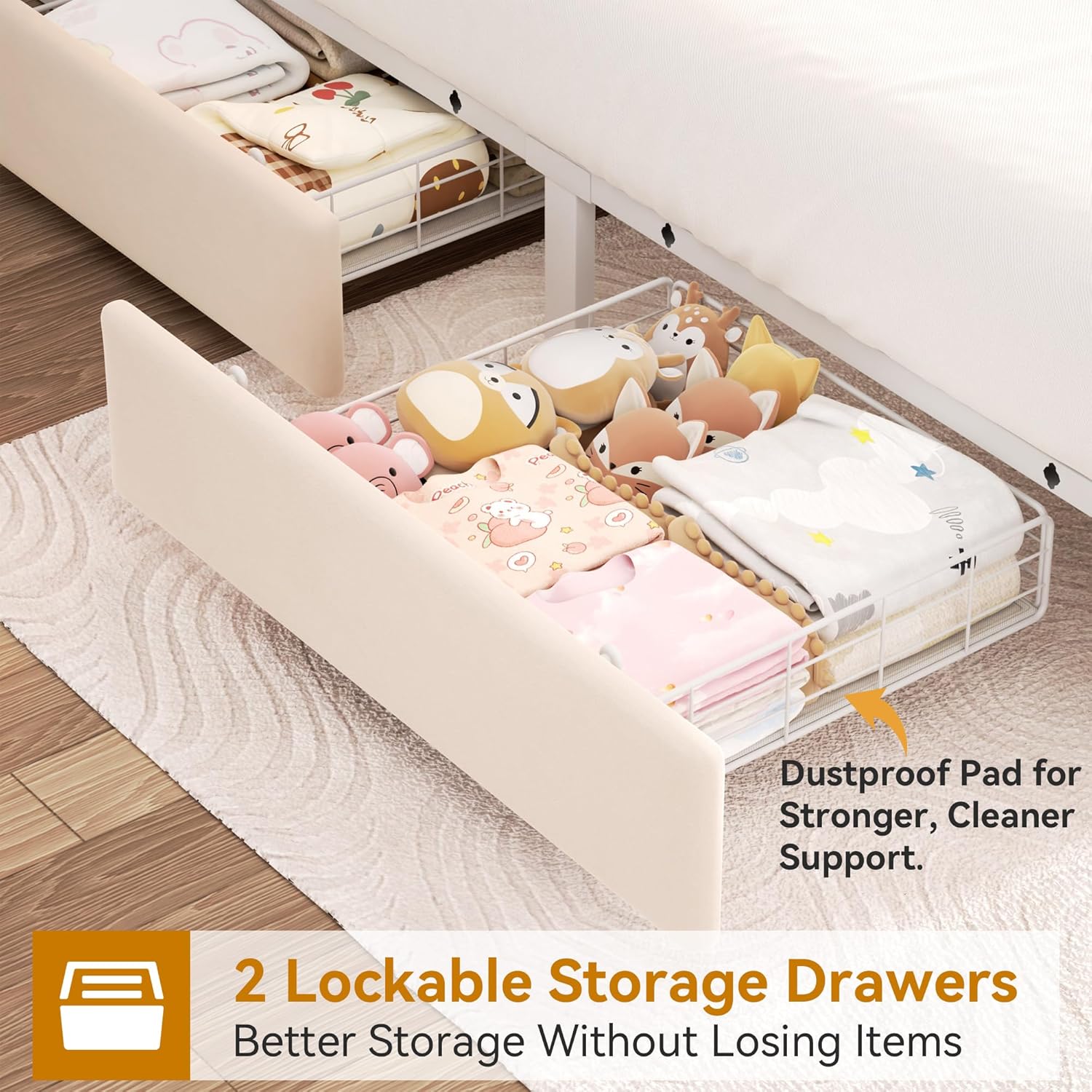
Image: Overview of the smart RGB LED lights with music sync, showing control options via app and remote.
2. Charging Station
The headboard features a convenient charging station. To use, plug the bed frame's power cord into a standard wall outlet. You can then use the two AC outlets (125V/12A), two USB ports (5V/2A), and one Type-C port (5V/3A) to power and charge your electronic devices.
3. Storage Drawers
The storage drawers glide smoothly on wheels. To lock them in place, ensure they are fully pushed in and engage the locking mechanism if present (refer to specific drawer instructions). The bottom dust mats help keep stored items clean.
Maintenance
- Cleaning the Velvet Upholstery: Gently vacuum the velvet fabric regularly using an upholstery attachment to remove dust and debris. For spills, blot immediately with a clean, dry cloth. For stubborn stains, use a mild fabric cleaner specifically designed for velvet, testing on an inconspicuous area first. Avoid excessive moisture.
- Frame Care: Periodically check all screws and connections to ensure they remain tight. Retighten if necessary to maintain stability and prevent squeaking. Wipe metal and wooden surfaces with a soft, damp cloth.
- Drawer Maintenance: Keep the drawer tracks clean and free of obstructions for smooth operation. If drawers become stiff, a small amount of silicone lubricant can be applied to the tracks.
- Electrical Components: Ensure the power cord for the charging station and LED lights is not pinched or damaged. Do not attempt to repair electrical components yourself; contact qualified personnel if issues arise.
Troubleshooting
- Issue: Bed frame is squeaking.
- Solution: Check all frame connections, especially where slats meet the side rails and the main support bars. Tighten any loose screws. Ensure the silent strips are properly installed between the slats and the frame.
- Issue: LED lights are not working.
- Solution: Verify that the bed frame's power cord is securely plugged into a working wall outlet. Check the connection of the LED strip to the power source within the headboard. Ensure the remote control has fresh batteries and is paired correctly. If using the app, confirm Bluetooth connection.
- Issue: Charging station ports are not providing power.
- Solution: Confirm the bed frame is plugged into a live electrical outlet. Test the outlet with another device. Check the power cord for any visible damage. Avoid overloading the charging station with too many high-power devices simultaneously.
- Issue: Storage drawers are difficult to open/close.
- Solution: Check for any obstructions in the drawer tracks. Ensure the drawers are correctly aligned on their wheels. Clean the tracks and apply a small amount of silicone lubricant if needed. Verify that the locking mechanism is disengaged when attempting to open or close.
- Issue: Damaged or missing parts upon arrival.
- Solution: If you receive parts that are damaged or missing, do not proceed with assembly. Contact Jocoevol customer support immediately with your order details and a description of the issue for assistance with replacements.
Product Specifications
| Feature | Detail |
|---|---|
| Model Number | C-1604 |
| Size | Full |
| Material | Velvet (Upholstery), Metal (Frame) |
| Product Dimensions (L x W x H) | 85.4"L x 55.9"W x 45.7"H |
| Item Weight | 106.9 Pounds |
| Maximum Weight Recommendation | 1000 Pounds |
| Headboard Features | 2-Tier Storage, Smart RGB LED, Charging Station (2 AC outlets, 2 USB ports, 1 Type-C port) |
| Storage Drawers | 2, with silent-glide wheels and bottom dust mats |
| Assembly Required | Yes (Instructions Included) |
Safety Note: Do not exceed the maximum weight recommendation of 1000 pounds. Be cautious around sharp edges during assembly and use to prevent injury.
Warranty and Support
For any questions, concerns, or assistance with your Jocoevol bed frame, please contact our dedicated support team. We aim to respond to all inquiries within 24 hours.
Information regarding specific warranty periods or protection plans may be available at the point of purchase or through your retailer. Please retain your proof of purchase for any warranty claims.
For additional support or to report issues, please visit the Jocoevol Store or contact the seller directly.
Ask a question about this manual
Ask about setup, troubleshooting, compatibility, parts, safety, or missing instructions. Manuals+ will review the question and use this page’s manual context to help answer it.