
Introduction
This manual provides detailed instructions for the operation, maintenance, and troubleshooting of your RIX 640x512 35mm Storm S6R (LRF) thermal imaging scope and RIX Pocket K3 thermal imaging monocular. Please read this manual thoroughly before using the devices to ensure proper function and safety.
Key Features
- NETD <20 mK Sensor: Next-generation thermal sensor with 640x512 resolution for reduced image noise and enhanced detail, even in high humidity.
- Compact Laser Rangefinder (LRF): Built-in LRF with a detection range up to 1,312 yards and ±1.09 yards precision. Includes a free ballistic calculator for improved long-range accuracy.
- Lightweight & Dual-Purpose Design: The STORM series weighs approximately 1lb, allowing for comfortable handheld use. Includes a Quick Detach (QD) mount for easy rifle attachment.
- Advanced Clarity Modes: Sunny Mode reduces image noise, while Rain Mode boosts thermal sensitivity in high-humidity conditions.
- Intuitive Operating System: User-friendly interface with enlarged, four-directional buttons for easy operation, even with gloves.
- High-Resolution OLED Display: Both devices feature OLED displays for clear viewing.
- Integrated Lens Cover: For protection and convenience.
- Wi-Fi Connectivity: Connect to your smartphone for live streaming, firmware updates, and photo/video management.
- Durable Construction: Made from hard-anodized aluminum, capable of withstanding recoil from up to .375 H&H Magnum or 12-gauge shotgun. IP67 waterproof rating.
Storm S6R (LRF) Thermal Scope
Components and Controls
The Storm S6R features an intuitive button layout and robust construction for reliable performance.

Image: RIX Storm S6R Thermal Scope showing the eyepiece, focus ring, control buttons, and laser rangefinder.
- Eyepiece: Rubberized for comfort and eye protection, especially during recoil. Features a diopter adjustment ring for fine-tuning to your eyesight.
- Objective Lens: 35mm lens with an integrated flip-open cover for protection.
- Control Buttons: Enlarged, four-directional buttons directly mapped to the user interface for easy navigation and function selection.
- Laser Rangefinder (LRF): Integrated on the side, capable of ranging distances up to 1,312 yards.
- USB-C Port: Located on the side, protected by a cover, for data transfer (video/photos/audio) and charging.
- Picatinny Rail Mount: Quick Detach (QD) mount on the bottom for easy attachment to a rifle.
Battery Installation and Power Supply
The Storm S6R operates on an 18650 rechargeable battery. The battery cavity is located at the rear of the device.
- To access the battery compartment, turn the lever to align with the white dot and pull off the cap.
- Insert the 18650 battery into the compartment, ensuring correct polarity.
- Replace the cap and turn the lever to secure it.
The device offers approximately 5 hours of run time per battery. Two batteries provide 10 hours of run time.
Video: Demonstrates battery installation and removal for the RIX Storm S6R thermal scope.
Operation
- Power On/Off: Press and hold the power button on the side to turn the optic on. To turn off, press and hold the power button for 3 seconds until a prompt appears on the screen.
- Standby Mode: Briefly press and release the power button to enter standby mode. Press again to exit standby.
- Video Recording: The device has a built-in video camera (1024x768 resolution) that records video and photos with audio. A timer appears on the screen during recording.
- Wi-Fi Connectivity: Connect the device to your smartphone via Wi-Fi (SSID: STORM_S6 R) to live stream, manipulate controls, and manage media files using the dedicated app.
- Laser Rangefinder (LRF): The integrated LRF provides precise distance measurements up to 1,312 yards. Ballistics can be programmed via the app for enhanced accuracy.
- Image Modes: The device offers various image modes (e.g., Black Hot, Red Hot, Green Monochrome, Color) to optimize visibility in different conditions. Sunny Mode and Rain Mode enhance clarity in specific environments.

Image: Advanced thermal clarity in extreme conditions, demonstrating Sunny Mode and Rain Mode for enhanced detail.
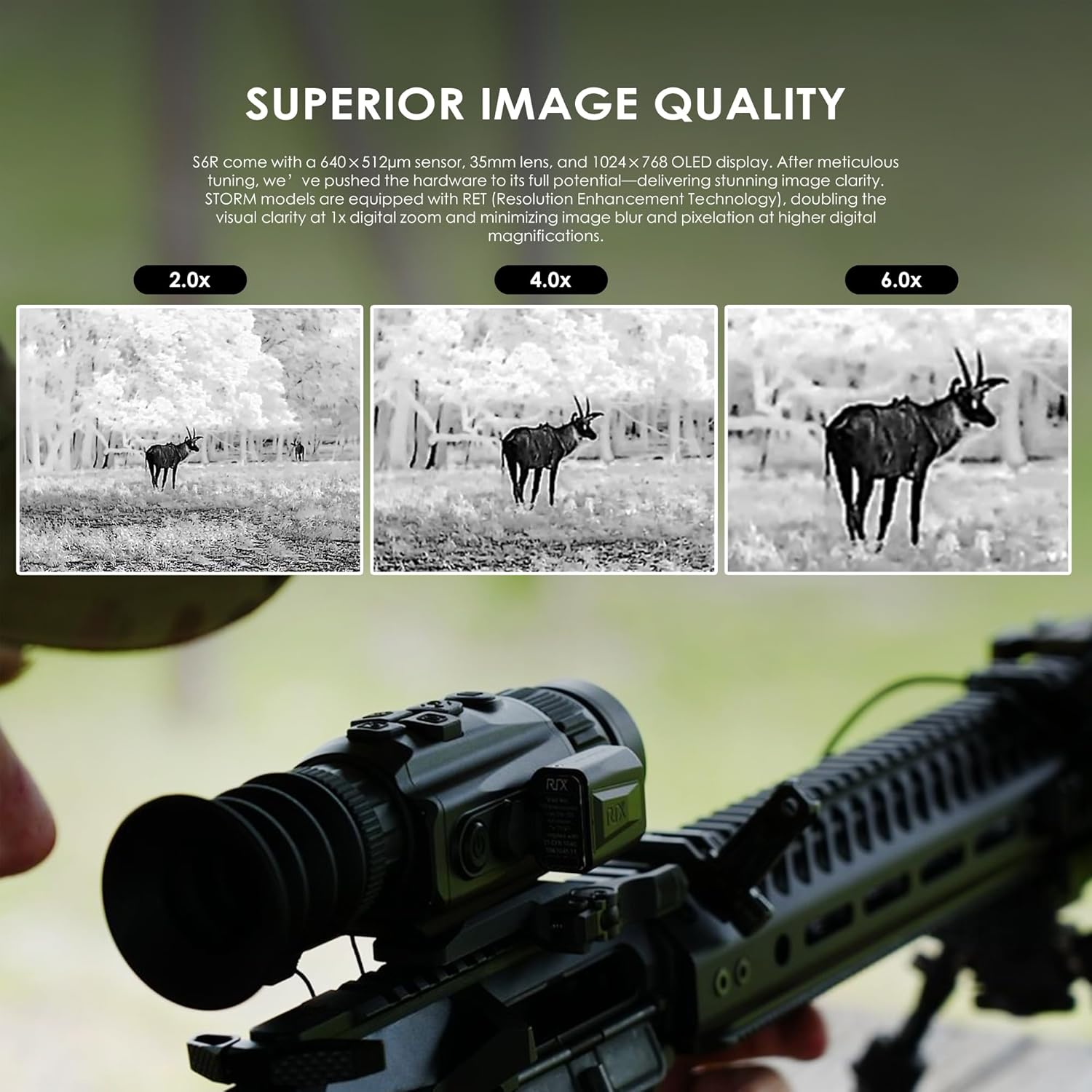
Image: Superior image quality at various digital zoom levels (2.0x, 4.0x, 6.0x) with Resolution Enhancement Technology (RET).

Image: User-friendly interface and Wi-Fi connectivity for app control and live streaming.
Video: Preview of the RIX Storm S6R thermal scope in action, demonstrating various image modes and rangefinding capabilities.
RIX Pocket K3 Thermal Monocular
Overview and Portability
The RIX Pocket K3 is a compact and lightweight thermal imaging monocular, designed for easy portability and handheld use. It complements the Storm S6R for scouting and surveillance.

Image: The Storm S6R is shown to be lightweight at approximately 1lb, highlighting its versatility.

Image: RIX Pocket K3 with its integrated lens cover, demonstrating how it opens and closes.

Image: RIX Pocket K3 highlighting its high-resolution 800x600 OLED display.

Image: RIX Pocket K3 demonstrating its lightweight design (0.47lb) for easy pocket storage.
Battery and Operation
The Pocket K3 is powered by a replaceable 18650 battery. It features built-in 8GB memory for video and photo storage (mp4/jpg format) and Wi-Fi connectivity for app integration.
Video: Preview of the RIX Pocket K2 (similar to K3) thermal monocular, demonstrating its compact size and basic controls.
Specifications
| Feature | Storm S6R (LRF) | Pocket K3 |
|---|---|---|
| Brand | RIX | RIX |
| Sensor Resolution | 640x512 | 256x192 |
| NETD | <20 mK | <25 mK |
| Objective Lens Diameter | 35 mm | 9 mm |
| Display Type | 1024 OLED | 800x600 OLED |
| Laser Rangefinder | Yes (up to 1,312 yards) | No |
| Video/Photo Recording | Yes (1024x768, mp4/jpg) | Yes (800x600, mp4/jpg) |
| Built-in Memory | Not specified (transfer via USB-C) | 8 GB |
| Wi-Fi | Yes | Yes |
| Battery Type | 18650 (rechargeable) | 18650 (rechargeable) |
| Operating Time | Up to 5 hours (per battery) | Up to 7 hours |
| Degree of Protection | IP67 (Waterproof) | IP67 (Waterproof) |
| Material | Lightweight Metal/Alloy | Not specified (compact design) |
Maintenance
- Cleaning: Use a soft, lint-free cloth (provided with Pocket K3) to clean the lenses and device body. Avoid abrasive materials.
- Storage: Store the devices in a cool, dry place when not in use. Remove batteries if storing for extended periods.
- Battery Care: Ensure batteries are charged regularly. Do not use modified or damaged batteries.
- USB-C Port: Always ensure the USB-C port cover is fully secured to maintain waterproofing.
Troubleshooting
- Device Not Powering On: Ensure the battery is correctly installed and fully charged. Long press the power button for 3 seconds.
- Poor Image Quality: Adjust the diopter and focus rings. Check the selected image mode (Sunny/Rain) for optimal clarity in current conditions.
- Wi-Fi Connection Issues: Ensure the device's Wi-Fi is enabled and your smartphone is within range. Restart both devices if necessary.
- Data Transfer Problems: Ensure the USB-C cable is securely connected.
Warranty & Support
RIX offers a comprehensive warranty for its products:
- 5-Year Warranty: Thermal devices with detector resolutions of 384 or higher (e.g., Storm S6R).
- 3-Year Warranty: Thermal devices with detector resolutions of 256 (e.g., Pocket K3).
- 3-Year Warranty: Digital devices.
For customer service, please contact RIX directly:
- Visit: www.rixoptics.com
- Email: support@rix-mx.com
- Call: +1 (800) 580-5281
Please provide your feedback and experience to help RIX improve its products and services.


