
1. Setup
1.1 What's in the Box
Verify that all components are present in the package:
- SQ17 Camera
- Mounting Bracket
- Screw Installation Kit
- Power Cord
- Power Adapter
- Instruction Manual (this document)

Image: Contents of the DZCCTVIPC SQ17 camera package.
1.2 Physical Installation
The DZCCTVIPC SQ17 camera is designed for both indoor and outdoor use. Select a suitable location that provides the desired viewing angle and is within range of your Wi-Fi network. Use the provided mounting bracket and screw installation kit to securely attach the camera to a wall or other stable surface. Ensure the camera is positioned to capture the intended area without obstruction.
Connect the power cord to the camera and then to the power adapter. Plug the power adapter into a standard electrical outlet. The camera will power on automatically.
1.3 App Installation and Connection
To set up your camera, download the recommended mobile application (e.g., AJ Cloud, if specified by manufacturer) from your smartphone's app store. Follow the in-app instructions for adding a new device. The camera supports Bluetooth for easy pairing and connects to both 2.4GHz and 5GHz Wi-Fi networks for flexible connectivity.
- Download the companion app to your smartphone.
- Create an account or log in.
- Select "Add Device" and follow the on-screen prompts.
- Ensure your phone's Bluetooth is enabled for quick pairing.
- Connect the camera to your home's 2.4GHz or 5GHz Wi-Fi network.

Image: Bluetooth Easy Setup process with the camera and smartphone app.
2. Operating Instructions
2.1 Dual-Lens 360° Coverage
The DZCCTVIPC SQ17 features a dual-lens system providing comprehensive surveillance. One lens offers a fixed wide-angle view for key areas, while the other is a rotating lens with 355° pan and 90° tilt capabilities. This allows for a 360° panoramic view, effectively functioning as two cameras in one device. You can control the pan and tilt functions remotely via the mobile application.
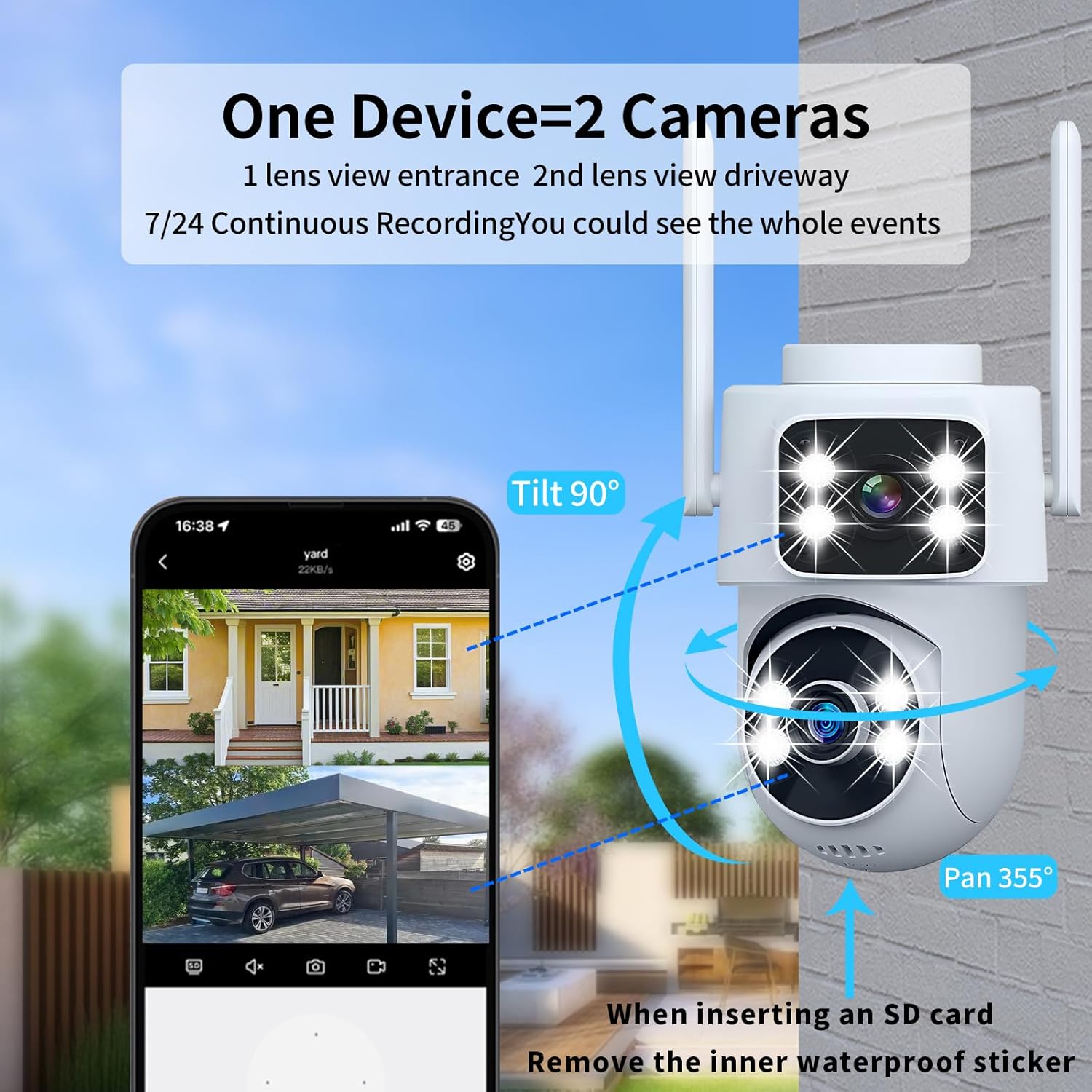
Image: Dual-lens camera providing 360° coverage with pan and tilt functionality.

Image: Dual-lens and dual-screen functionality for comprehensive monitoring.
2.2 2K HD & Color Night Vision
The camera captures video in 2K Ultra HD (2304*1296) resolution, providing clear and detailed images. It is equipped with 8 built-in spotlights for advanced night vision capabilities. You can choose between Smart Color Night Vision, which automatically activates on motion, or an "Always On" mode for full-color footage even in low-light conditions. This ensures clear visibility of details like faces and license plates after dark.

Image: Full Color Night Vision capability of the camera.

Image: Comparison of normal infrared and full-color night vision modes.
2.3 Smart AI Detection & Auto Motion Tracking
The camera utilizes advanced AI recognition to differentiate between people, cars, pets, and packages. This reduces false alarms by sending only relevant alerts with clear event descriptions to your mobile device. The Auto Motion Tracking feature allows the camera to automatically lock onto moving targets and follow them across its field of view, ensuring continuous monitoring of activity.

Image: AI Humanoid Tracking in action, capturing movement.

Image: Human Detection and 355° Auto Motion Tracking features.

Image: Human Detection feature reducing false alarms.
2.4 Two-Way Audio
The integrated noise-canceling microphone and high-volume speaker enable clear two-way communication. You can remotely speak and listen through the camera using your smartphone, allowing you to interact with visitors, delivery personnel, or family members.

Image: Two-Way Audio functionality for remote communication.

Image: Two-way talking feature for easy communication.
2.5 24/7 Recording and Storage
The camera supports 24/7 continuous recording to a microSD card (up to 128GB, not included). This ensures that no moment is missed. Live view and playback of recorded footage are accessible anytime, anywhere through the mobile application. Cloud storage options with bank-level encryption are also available for enhanced data security.
2.6 Smart Home Integration
The DZCCTVIPC SQ17 camera is compatible with Alexa and Google Assistant for convenient voice control. It also supports the ONVIF protocol, allowing for seamless integration with existing Network Video Recorder (NVR) systems.
2.7 Product Videos
Video: Overview of the DZCCTVIPC Dual-Lens Security Camera, highlighting its indoor/outdoor use and waterproof features.
Video: Product display showcasing the Dual-Screen Wireless Indoor & Outdoor Camera's features.
3. Maintenance
3.1 Weatherproof Design
The DZCCTVIPC SQ17 camera has an IP65 waterproof rating, making it suitable for outdoor use in various weather conditions, including rain, snow, and extreme temperatures. Ensure all connections are secure to maintain its weatherproof integrity.

Image: IP65 Weatherproof rating of the camera.
3.2 SD Card Insertion
When inserting a microSD card for local storage, a tool may be required to carefully peel off the waterproof tape covering the SD card slot. After insertion, ensure the waterproof tape is properly re-sealed to maintain the camera's IP65 rating.
3.3 Cleaning
To clean the camera lens and body, use a soft, dry cloth. For stubborn dirt, a slightly damp cloth can be used, but avoid harsh chemicals or abrasive materials that could damage the camera's finish or lens coating.
4. Troubleshooting
| Problem | Possible Cause | Solution |
|---|---|---|
| Camera fails to connect to Wi-Fi. | Incorrect Wi-Fi password, weak signal, or incorrect network band (2.4GHz vs 5GHz). |
|
| Poor image quality or blurry video. | Dirty lens, insufficient lighting, or network bandwidth issues. |
|
| Two-way audio is unclear or too quiet. | Environmental noise, microphone/speaker obstruction, or app volume settings. |
|
| Frequent false motion alerts. | High sensitivity settings, environmental factors (e.g., moving branches, insects), or incorrect AI detection settings. |
|
| SD card not recording or recognized. | Incorrect insertion, unsupported card size, or card corruption. |
|
5. Specifications
| Feature | Detail |
|---|---|
| Model Name | SQ17 Corded Electric Wireless WiFi Smart Indoor-Outdoor Camera |
| Indoor/Outdoor Usage | Indoor, Outdoor |
| Connectivity Technology | Wireless (Bluetooth, Wi-Fi, ONVIF) |
| Frequency Band Class | Dual-Band (2.4GHz & 5GHz) |
| Video Capture Resolution | 2304*1296 (2K Ultra HD) |
| Effective Still Resolution | 3 MP |
| Viewing Angle | 355 Degrees (Pan), 90 Degrees (Tilt) |
| Night Vision Range | 65 Feet |
| Special Features | 2-Way Audio, AI Motion Tracking (People, Cars, Pets, Packages), Color Night Vision, Privacy Protection Mode, Works with Alexa & Google Home, ONVIF Protocol |
| Power Source | Corded Electric (5 Volts DC, 3 watts) |
| Storage | Micro SD (up to 128GB, not included) |
| International Protection Rating | IP65 (Waterproof) |
| Item Dimensions (L x W x H) | 4 x 3 x 7.5 inches |
| Item Weight | 9.6 ounces (0.6 Pounds) |
| Material | Acrylonitrile Butadiene Styrene (ABS), Glass, Plastic |
| Manufacturer | Shenzhen Zhongxin shidai Technology Co.,Ltd. |
6. Warranty & Support
6.1 Warranty Information
Specific warranty details for the DZCCTVIPC SQ17 camera are not provided in this manual. Please refer to the product packaging, the manufacturer's official website, or contact your retailer for comprehensive warranty information.
6.2 Customer Support
For technical assistance, troubleshooting, or any questions regarding your DZCCTVIPC SQ17 camera, please visit the DZCCTVIPC official website or contact their customer support directly. Contact information is typically available on the product packaging or the manufacturer's website.

