
1. Introduction
This manual provides comprehensive instructions for the installation, usage, and maintenance of your GENERICO Privacy Screen Protector, designed specifically for the OPPO A3 PRO. Please read these instructions carefully before proceeding with the installation to ensure optimal performance and longevity of your screen protector.
2. Package Contents
Verify that all items are present in your package:
- 3 x GENERICO Privacy Screen Protectors
- 1 x Cleaning Kit (includes wet wipes, dry cloth, dust absorber, guide stickers)

Image: The package contents, including three screen protectors and a cleaning kit.
3. Key Features
- Privacy Protection: Limits viewing angles to protect your screen content from onlookers.
- Advanced 9H+ Hardness: Provides superior resistance against scratches, bumps, and daily wear.
- Self-Repair Technology: Minor surface scratches on the protector can reduce over time.
- Bubble-Free Installation: Designed for easy application without air bubbles.
- Hydrophobic & Oleophobic Coating: Reduces fingerprints and smudges, making the screen easier to clean.
- Ultra-Thin & Transparent: Maintains original touch sensitivity and display clarity.

Image: Illustration of the privacy feature, showing screen visibility at different angles.

Image: Depiction of the screen protector's ultra-resistant tempered glass protecting against impacts.

Image: Icons illustrating key functions: scratch resistance, fingerprint resistance, bubble-free, eye protection, shock protection, and shatter resistance.
4. Compatibility
This screen protector is only compatible with the OPPO A3 PRO. It is not suitable for phones with curved edges.
5. Important Notes Before Installation
- Ensure your hands are clean and free of dust or oils.
- Perform the installation in a dust-free environment, if possible.
- Do not touch the adhesive side of the screen protector.
- This product is designed for flat screens and will not properly adhere to or protect curved edges.
6. Setup (Installation Guide)
Follow these steps carefully for a bubble-free installation:
- Clean the Screen: Use the provided wet wipe to thoroughly clean your OPPO A3 PRO screen. Remove all dirt, dust, and smudges.
- Dry the Screen: Use the dry cloth to wipe the screen until it is completely dry and lint-free.
- Remove Dust: Use the dust absorber sticker to dab the screen and remove any remaining dust particles. Ensure the screen is perfectly clean.
- Position the Protector: Carefully peel off the protective film from the adhesive side of the screen protector. Align the screen protector with the edges and cutouts of your phone screen.
- Apply the Protector: Once aligned, gently lower the screen protector onto the screen. It will automatically adhere.
- Remove Bubbles: If small bubbles appear, gently push them towards the edges of the screen using the dry cloth or a soft card. The self-adhering nature should minimize bubbles.
7. Operating (Usage)
Once installed, your GENERICO Privacy Screen Protector will function seamlessly with your OPPO A3 PRO. You may notice a slight reduction in screen brightness when viewed from extreme side angles, which is the intended privacy feature. Touch sensitivity should remain unaffected.
8. Maintenance
To keep your screen protector clean and extend its lifespan:
- Cleaning: Use a soft, lint-free cloth (like the one provided in the cleaning kit) to gently wipe the screen. For stubborn smudges, slightly dampen the cloth with water or a screen cleaner.
- Avoid Harsh Chemicals: Do not use abrasive cleaners, alcohol, or ammonia-based solutions, as these can damage the oleophobic coating.
- Self-Repair: The screen protector features self-repairing properties for minor scratches. Allow a few hours for small surface scratches to diminish naturally.
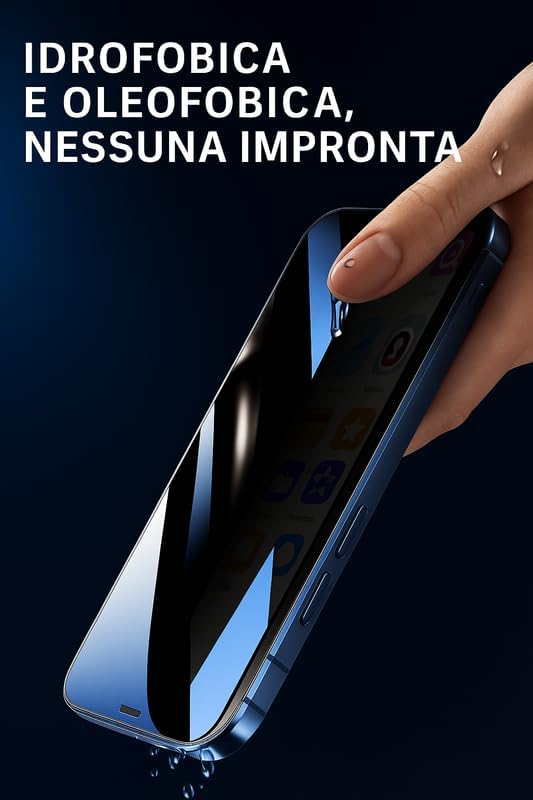
Image: Demonstration of the hydrophobic and oleophobic coating, showing water beading on the screen protector.

Image: Illustration of the screen protector's fingerprint-resistant properties.
9. Troubleshooting
- Bubbles After Installation: Small bubbles often disappear within 24-48 hours. For larger bubbles, try gently lifting the nearest edge of the protector and reapplying, pushing the bubble out with a soft cloth.
- Dust Under Protector: If dust particles are trapped, it's best to remove the protector, clean the screen thoroughly again, and apply a new protector from the pack.
- Reduced Touch Sensitivity: Ensure the screen protector is properly adhered without air gaps. If issues persist, re-installation might be necessary.
- Minor Scratches: The self-repairing feature will reduce minor scratches over time. For deeper scratches, consider replacing the protector.
10. Specifications
| Feature | Detail |
|---|---|
| Model Number | Privacy 9H+ |
| Material | Tempered Glass |
| Item Hardness | 9H |
| Special Features | Anti-Fingerprint, Polished finish, Scratch Resistant, Touch Sensitive |
| Compatible Devices | OPPO A3 PRO (Cellphone, Mobile Phone) |
| Color | Transparent |
| Water Resistance Level | Water Repellent |
| Screen Surface Description | Glossy |
11. Warranty Information
GENERICO products are manufactured to high-quality standards. For specific warranty details, please refer to the product packaging or contact the retailer where the product was purchased. Keep your proof of purchase for any warranty claims.
12. Support
If you encounter any issues or have questions regarding your GENERICO Privacy Screen Protector, please contact your retailer or visit the official GENERICO support website for assistance. Provide your product model number (Privacy 9H+) when seeking support.