
1. Introduction
This manual provides detailed instructions for the installation, use, and maintenance of your GENERICO Privacy Screen Protector for the Motorola G6 Plus. This product is designed to protect your device's screen from scratches, impacts, and prying eyes, while maintaining touch sensitivity and clarity for the user.
Note: This screen protector is specifically designed for the Motorola G6 Plus and is not suitable for phones with curved edges.
2. Product Features
- Advanced 9H+ Hardness: Provides superior resistance against daily scratches, bumps, and marks, keeping your display intact.
- Privacy Protection: Limits viewing angles to prevent others from seeing your screen content from the sides.
- Self-Healing Properties: The material is designed to reduce minor surface scratches over time, maintaining a clear view.
- Hydrophobic and Oleophobic Coating: Effectively repels water, oils, and fingerprints, ensuring a clean and smooth screen surface.
- Ultra-Thin and Transparent: Ensures crystal-clear viewing and maintains original touch sensitivity.
- Bubble-Free Installation: Designed for easy application with automatic adhesion, minimizing air bubbles.

Image: The screen protector offers privacy, making the screen visible only from a direct 90-degree angle and invisible from 35-degree side angles.

Image: Illustration of the ultra-resistant tempered glass providing protection against impacts and scratches.

Image: Icons depicting key functions: scratch resistance, anti-fingerprint, anti-bubble, eye protection, impact protection, and shatter resistance.
3. Package Contents
Your GENERICO Privacy Screen Protector package includes:
- 3 x Privacy Screen Protectors
- 1 x Cleaning Kit (includes wet wipes, dry cloth, dust absorber, guide stickers)

Image: The cleaning kit, including wet wipes, a dry cloth, a dust absorber, and guide stickers, essential for a clean installation.
4. Setup and Installation
Follow these steps carefully for a bubble-free installation:
- Prepare Your Workspace: Choose a clean, dust-free environment. Wash your hands thoroughly to avoid transferring oils or dirt to the screen.
- Clean the Screen: Use the provided wet wipe to thoroughly clean your Motorola G6 Plus screen, removing all dirt, smudges, and fingerprints.
- Dry the Screen: Use the dry cloth to wipe the screen until it is completely dry and streak-free.
- Remove Dust: Use the dust absorber sticker to dab the screen and remove any remaining dust particles. Ensure the screen is perfectly clean before proceeding.
- Align the Protector: Carefully peel off the protective film from the adhesive side of one screen protector. Hold the protector by its edges and align it precisely with your phone's screen, paying attention to the speaker, camera, and button cutouts.
- Apply the Protector: Once aligned, gently lower the screen protector onto the screen. It will automatically begin to adhere.
- Remove Bubbles: If any small bubbles appear, use the dry cloth or a soft card (not included) to gently push them towards the edges of the screen. The self-adhering nature helps minimize bubbles.
- Final Wipe: Give the newly installed screen protector a final wipe with the dry cloth to ensure it is clean and securely in place.
5. Operating Instructions
Once installed, the GENERICO Privacy Screen Protector operates passively to enhance your phone's functionality and security:
- Privacy Function: The screen will appear dark or black to anyone viewing it from an angle, ensuring your personal information remains private.
- Touch Sensitivity: The ultra-thin design ensures that your touch screen's responsiveness is not affected, allowing for smooth navigation and interaction.
- Protection: The 9H+ hardness continuously protects your screen from scratches, scuffs, and minor impacts during daily use.
6. Maintenance
To ensure the longevity and effectiveness of your screen protector:
- Cleaning: Gently wipe the screen protector with a soft, lint-free cloth. For stubborn smudges, slightly dampen the cloth with water or a screen cleaner designed for electronics. Avoid harsh chemicals.
- Avoid Sharp Objects: While highly resistant, avoid direct contact with extremely sharp objects to prevent deep scratches.
- Self-Healing: Small surface scratches may disappear over time due to the self-healing properties of the material.
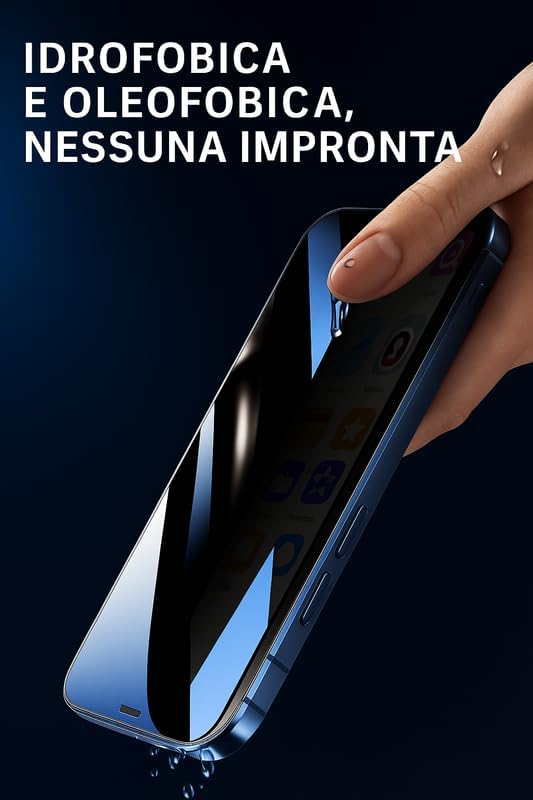
Image: The screen protector's hydrophobic and oleophobic coating repels water and prevents fingerprints, keeping the screen clean.

Image: The anti-fingerprint coating ensures that fingerprints are effectively reduced, maintaining screen clarity.
7. Troubleshooting
- Bubbles After Installation: Small bubbles often disappear within 24-48 hours. For larger bubbles, gently lift the nearest edge of the protector and re-apply, pushing the bubble out with a soft cloth. Ensure the screen is dust-free.
- Misalignment: If the protector is significantly misaligned, carefully peel it off slowly from one corner and attempt re-alignment. If it's too difficult or attracts dust, use a new protector from the pack.
- Reduced Touch Sensitivity: Ensure the screen protector is fully adhered without any gaps or air pockets. If issues persist, ensure your phone's touch settings are optimized (if applicable).
- Dust Under Protector: If dust particles are trapped, carefully lift the nearest edge of the protector and use a dust absorber sticker to remove the particle from both the screen and the protector's adhesive side.
8. Specifications
| Feature | Detail |
|---|---|
| Compatible Device | Motorola G6 Plus |
| Material | Tempered Glass |
| Item Hardness | 9H |
| Special Features | Anti-Fingerprint, Polished finish, Scratch Resistant, Touch Sensitive, Privacy Filter |
| Finish Type | Glossy |
| Water Resistance Level | Water Repellent |
| Color | Transparent |
| Product Dimensions | 12 x 10 x 1.27 cm |
| Item Weight | 15 g |
9. Warranty and Support
For information regarding product warranty or customer support, please refer to the packaging or contact your retailer. Specific warranty details are not provided in this manual.