
1. Introduction
This manual provides essential information for the safe and efficient operation of your SANSUI 65-inch 4K QLED Google TV, model JSW65UG23Q. Please read this manual thoroughly before using the television and retain it for future reference.
2. Safety Information
Always follow basic safety precautions when using this television to reduce the risk of fire, electric shock, and injury.
- Do not expose the TV to rain or moisture.
- Do not open the TV casing; refer all servicing to qualified personnel.
- Ensure proper ventilation around the TV.
- Use only the power cord supplied with the TV.
- Keep the TV away from heat sources and direct sunlight.
- Clean the TV with a soft, dry cloth only.
3. What's in the Box
Verify that all components are present upon unpacking:
- 1 Piece TV
- 1 Piece User Manual (this document)
- 1 Piece Remote Control
- 1 Set Base Stand
- 1 Pair Batteries
- 1 Piece Wall Mounting Set
4. Setup
4.1 Physical Installation
Your SANSUI TV can be installed using the included base stand for table mounting or with the provided wall mounting set.
Table Mount Installation:
- Carefully place the TV screen-down on a soft, flat surface to prevent damage.
- Attach the base stands to the designated slots on the bottom of the TV using the provided screws. Ensure they are securely fastened.
- Place the TV on a stable, level surface, ensuring adequate ventilation.
Wall Mount Installation:
- Consult the separate wall mount installation guide included with the wall mounting set for detailed instructions.
- Ensure the wall can support the weight of the TV (approximately 15.1 kg) and the wall mount. Professional installation is recommended.
4.2 Connecting Peripherals
Connect your external devices to the TV using the appropriate ports.
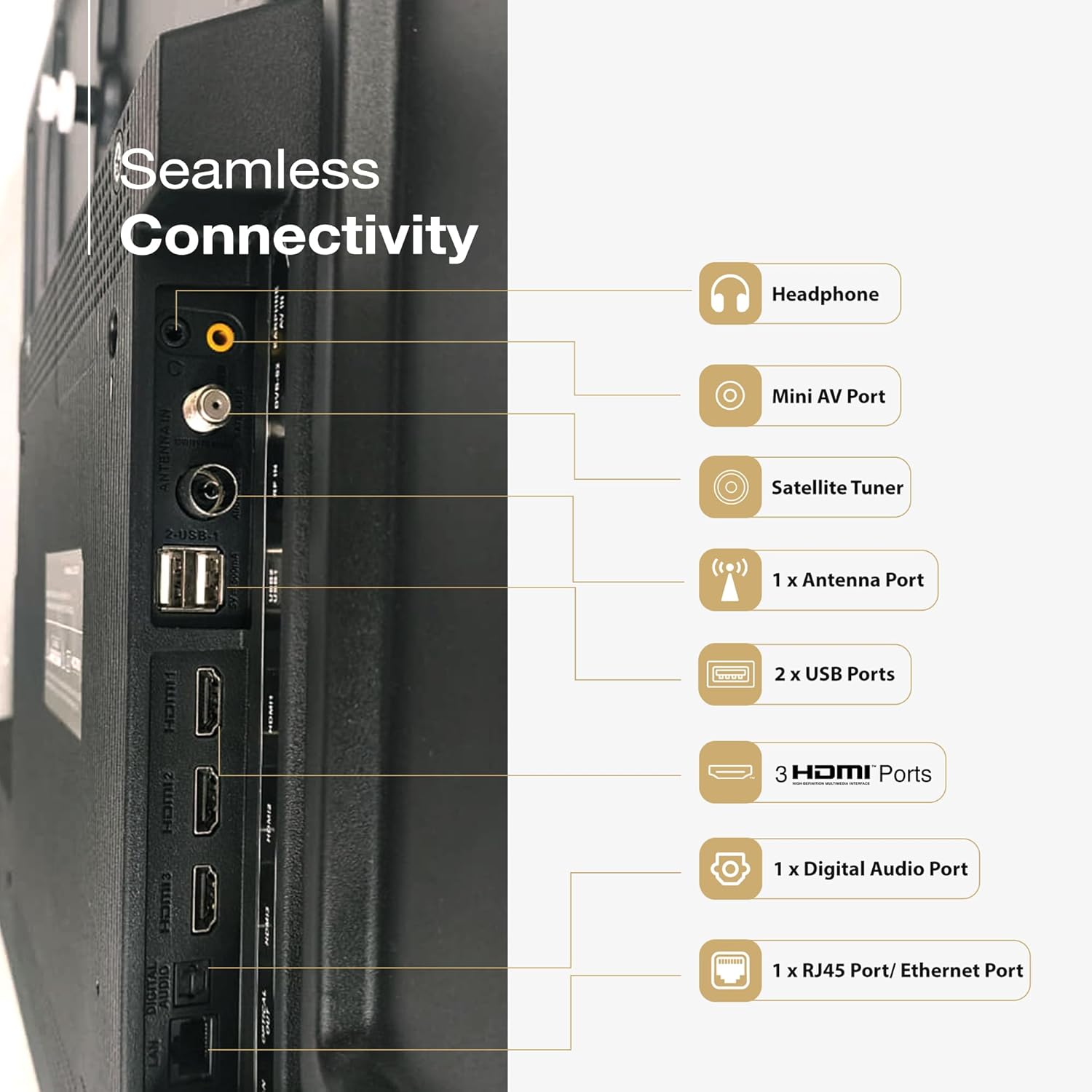
Image: Rear view of the SANSUI TV displaying its various input and output ports, including HDMI, USB, and audio connections.
- HDMI Ports (3): Connect Blu-ray players, gaming consoles, set-top boxes, etc.
- USB Ports (2): Connect USB storage devices for media playback.
- Ethernet (RJ45) Port: For wired internet connection.
- Mini AV Port: For older analog devices.
- Antenna Port: For connecting a terrestrial antenna.
- Digital Audio Port: For connecting to external audio systems.
- Headphone Jack: For private listening.
4.3 Power Connection
After all connections are made, plug the power cord into the TV and then into a wall outlet. The TV will enter standby mode.
5. Operating Your TV
5.1 First-Time Setup
Upon first power-on, the TV will guide you through the initial setup process, including language selection, network connection (Wi-Fi or Ethernet), Google account sign-in, and channel scanning.
5.2 Remote Control
The included remote control features Bluetooth and IR technology, along with dedicated hotkeys for popular streaming services and Google Assistant.

Image: The SANSUI Smart Remote control, highlighting the Google Assistant button and quick access hotkeys for Netflix, Prime Video, and YouTube.
- Power Button: Turns the TV on/off or to standby.
- Google Assistant Button: Activates voice control.
- Navigation Pad: For menu navigation.
- Volume +/-: Adjusts volume.
- Channel +/-: Changes channels.
- Hotkeys: Direct access to Netflix, Prime Video, and YouTube.
5.3 Google TV Interface
Your SANSUI TV runs on Google TV, providing a personalized home screen with content recommendations from your subscriptions and apps. You can browse movies, shows, and apps, and manage your library.

Image: A living room scene with the SANSUI TV displaying the Google TV interface, featuring various streaming app icons and content suggestions.
5.4 Voice Control with Google Assistant
Press the Google Assistant button on your remote and speak commands to search for content, control smart home devices, get answers, and more.
6. Key Features
The SANSUI JSW65UG23Q TV incorporates advanced technologies for an enhanced viewing and audio experience.
6.1 4K QLED Display with Dolby Vision, HDR10+, HLG

Image: A close-up of a reptile eye displayed on the SANSUI 4K QLED TV, illustrating the clarity and color depth of 4K, QLED, and HDR10+ technologies.
- 4K Resolution: Provides four times the detail of Full HD for crisp, clear images.
- QLED Technology: Quantum Dot technology delivers vibrant and accurate colors with improved brightness.
- Dolby Vision, HDR10+, HLG: Support for multiple High Dynamic Range formats ensures superior contrast, brightness, and color reproduction in compatible content.
6.2 FloLED Panel

Image: An exploded view diagram showing the layers of the FloLED panel, including the enriched color display with prism layer, advanced light diffusion, and high-intensity glowing LED structure.
The FloLED Panel technology enhances brightness and color uniformity across the screen, utilizing an advanced light diffusion and dispersal system with a high-intensity glowing LED structure.
6.3 Dolby Atmos Sound with Tweeters

Image: A SANSUI TV displaying a lighthouse during a storm, with text indicating "Explosive Sonic with Dolby Atmos" and details about 30W box speakers with tweeters.
Experience immersive audio with Dolby Atmos, delivering multi-dimensional sound that moves around you. The TV features 30W surround sound output with integrated tweeters for clear highs and rich audio.
6.4 HSR 120Hz and MEMC

Image: A person playing a racing game on the SANSUI TV, illustrating the smooth motion provided by HSR 120Hz refresh rate and MEMC technology for lag-free gaming.
The 120Hz High Speed Refresh (HSR) rate combined with Motion Estimation, Motion Compensation (MEMC) technology ensures smooth, blur-free motion, especially beneficial for fast-paced content and gaming.
6.5 Quadcore Processor

Image: A detailed view of a MediaTek Quadcore Processor chip on a circuit board, representing the TV's processing power.
Powered by a Quadcore Processor, the TV delivers responsive performance for smooth navigation, quick app loading, and efficient multitasking.
6.6 Bezel-Less Design

Image: A SANSUI TV displaying a large elephant, emphasizing the immersive viewing experience provided by its sleek, bezel-less design.
The TV features a bezel-less design, maximizing screen space and providing a more immersive viewing experience.
7. Connectivity
Your SANSUI TV offers various connectivity options:
- Hardware Interface: Bluetooth, Ethernet, HDMI, USB
- Total USB Ports: 2
- Audio Input Compatible: HDMI, USB, mini AV
- Bluetooth Technology: Yes
- Wi-Fi: Supports 2.4GHz and 5GHz bands for wireless internet connection.
- Chromecast built-in / Google Cast: Allows casting content from compatible mobile devices to the TV.
8. Maintenance
Proper maintenance ensures the longevity and optimal performance of your TV.
- Cleaning the Screen: Gently wipe the screen with a soft, lint-free cloth. For stubborn marks, slightly dampen the cloth with water or a specialized screen cleaner (do not spray directly onto the screen).
- Cleaning the Casing: Use a soft, dry cloth to wipe the TV casing. Avoid abrasive cleaners or solvents.
- Ventilation: Ensure the ventilation openings on the back of the TV are not blocked.
- Power Cord: Regularly check the power cord for any damage.
9. Troubleshooting
If you encounter issues, refer to the following common solutions before contacting customer support.
| Problem | Possible Solution |
|---|---|
| No power | Check if the power cord is securely plugged into the TV and the wall outlet. Press the power button on the remote or TV. |
| No picture, but sound is present | Ensure the correct input source is selected. Check cable connections to external devices. |
| No sound, but picture is present | Check volume level and mute status. Verify audio cable connections. If using external audio, ensure TV speakers are not disabled. |
| Remote control not working | Replace batteries. Ensure no obstructions between the remote and the TV's IR sensor. Re-pair Bluetooth remote if necessary. |
| Poor picture quality | Check antenna or cable connections. Adjust picture settings (brightness, contrast, sharpness). Try a different input source. |
| Cannot connect to Wi-Fi | Ensure Wi-Fi is enabled on the TV. Restart your router. Check Wi-Fi password. Try moving the TV closer to the router or using a wired Ethernet connection. |
10. Specifications
Detailed technical specifications for the SANSUI JSW65UG23Q TV:
| Feature | Specification |
|---|---|
| Brand | SANSUI |
| Model Name | JSW65UG23Q |
| Screen Size | 65 Inches (165cm) |
| Display Technology | QLED |
| Resolution | 4K (3840 x 2160 Pixels) |
| Refresh Rate | 120 Hz (HSR) |
| Operating System | Google TV |
| Special Features | Bezel Less Design, Wide Viewing Angle, Chromecast built-in, Google Cast, Dolby Vision, HDR10+, HLG, MEMC |
| Audio Encoding | Dolby Atmos |
| Speakers Maximum Output Power | 30 Watts |
| Speaker Surround Sound Channel Configuration | 2.0 |
| Hardware Interface | Bluetooth, Ethernet, HDMI (3), USB (2) |
| Memory Storage Capacity | 32 GB |
| Response Time | 8 Milliseconds |
| Product Dimensions (LxWxH) | 144.5 x 90.8 x 7.8 cm |
| Item Weight | 15.1 kg |
| Voltage | 240 Volts |
| Wattage | 200 Watts |
| Model Year | 2025 |
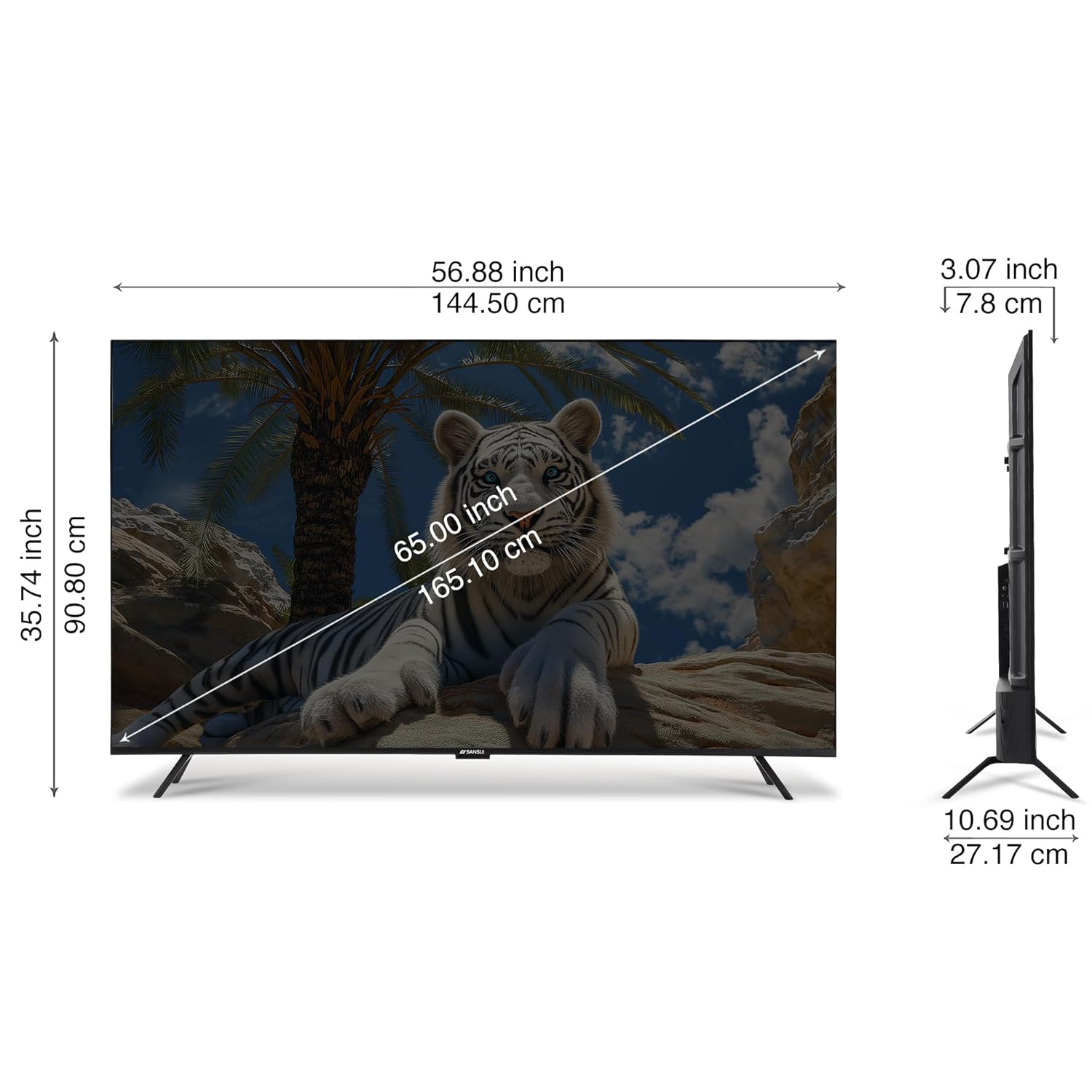
Image: A diagram illustrating the physical dimensions of the SANSUI 65-inch TV, showing measurements in both inches and centimeters for screen size, width, height, and depth.
11. Warranty and Support
Your SANSUI 65-inch 4K QLED Google TV comes with a 1 Year Warranty. For warranty claims, technical support, or service requests, please contact SANSUI customer care.
For further assistance, visit the official SANSUI website or refer to the contact information provided in your warranty card.
12. Product Overview Video
Watch this video for a visual overview of the SANSUI Smart TV features.
Video: A short preview video showcasing various features and design aspects of the SANSUI Smart TV line, including display quality, sound, and smart functionalities.


