1. Introduction
This manual provides essential information for the safe and efficient operation of your Hisense 43Q6Q 4K QLED Smart TV. Please read this manual thoroughly before using your TV and retain it for future reference. This television features a 43-inch 4K UHD QLED display, Dolby Vision & Atmos, AI Upscaling, Game Mode Plus, and built-in Alexa for an enhanced viewing experience.
2. Safety Information
Always observe the following safety precautions to prevent fire, electric shock, or injury:
- Do not expose the TV to rain or moisture.
- Do not open the TV casing; refer all servicing to qualified personnel.
- Ensure proper ventilation around the TV.
- Keep the TV away from direct sunlight, heat sources, and open flames.
- Use only the power cord supplied with the TV.
- Unplug the TV during lightning storms or when unused for long periods.
- Keep small parts and batteries out of reach of children.
3. What's in the Box
Verify that all components are present:
- 1 LED TV (Hisense 43Q6Q)
- 1 Table Top Stand
- 1 User Manual (this document)
- 1 Warranty Card
- 1 Remote Control
- 2 AAA Batteries
4. Setup
4.1. TV Overview
Familiarize yourself with the front, side, and rear views of your Hisense 43Q6Q TV.

Image: Front view of the Hisense 43Q6Q 4K QLED Smart TV, showcasing its slim bezel design.
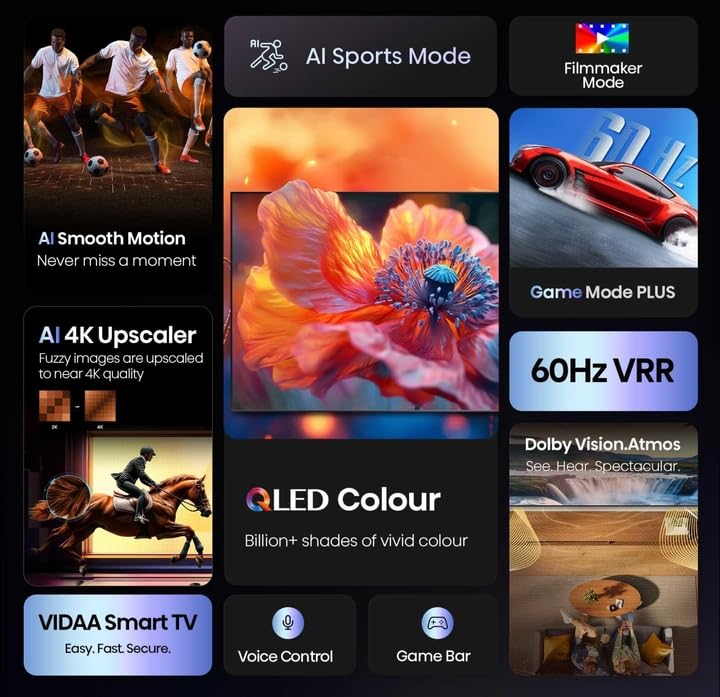
Image: Side view of the Hisense 43Q6Q 4K QLED Smart TV, highlighting its thin profile.

Image: Rear view of the Hisense 43Q6Q 4K QLED Smart TV, showing the input/output ports and mounting points.
4.2. Installing the Table Top Stand
- Carefully place the TV face down on a soft, flat surface to prevent screen damage.
- Align the stand with the screw holes on the bottom of the TV.
- Secure the stand using the provided screws. Ensure the stand is firmly attached.
4.3. Wall Mounting (Optional)
If you choose to wall mount your TV, ensure you use a compatible VESA wall mount kit (not included) and follow the instructions provided with the wall mount. Professional installation is recommended.
4.4. Connecting Power
- Connect the power cord to the AC IN port on the TV.
- Plug the other end of the power cord into a wall outlet.
4.5. Initial Setup
- Press the power button on the remote control or TV to turn it on.
- Follow the on-screen instructions to select your language, country, and connect to your Wi-Fi network.
- Complete the guided setup for the VIDAA U9 operating system.
5. Operating Instructions
5.1. Remote Control
Insert the two AAA batteries into the remote control, observing the correct polarity. The remote allows you to navigate menus, adjust volume, change channels, and access smart features.

Image: The Hisense TV remote control, highlighting its voice control button and smart features.
5.2. Smart TV Features (VIDAA U9 OS)
Your Hisense TV runs on the VIDAA U9 operating system, providing access to a variety of streaming applications and smart functionalities.
- Accessing Apps: Use the remote's home button to access the main smart TV interface, where you can find pre-installed apps like Netflix, Amazon Prime Video, JioCinema, and YouTube.
- Voice Control: Utilize the built-in Alexa by pressing the dedicated voice button on your remote. Speak commands to search for content, control playback, or manage smart home devices.
- Screen Sharing: Share content from your mobile devices using Wi-Fi, Bluetooth, Apple AirPlay, or Apple Home.
Image: The Hisense Smart TV interface displaying various streaming application icons.
5.3. Picture and Sound Enhancements
The TV incorporates advanced technologies for optimal viewing and listening.
- 4K QLED Display: Experience vibrant colors and sharp details with Quantum Dot technology.
- Dolby Vision & HDR10+ Decoding: Enhanced contrast and color accuracy for compatible content.
- AI Upscaling: Converts lower-resolution content to near 4K quality.
- AI Light Sensor: Automatically adjusts screen brightness based on ambient light for comfortable viewing and energy efficiency.
- Filmmaker Mode: Preserves the original aspect ratio, color, frame rate, and dynamic range as intended by the filmmaker.
- Dolby Atmos & DTS Virtual X: Provides immersive, multi-dimensional audio through the TV's dual 10W speakers.

Image: Overview of Hisense TV features including AI Sports Mode, Filmmaker Mode, AI 4K Upscaler, QLED Colour, 60Hz VRR, Dolby Vision Atmos, VIDAA Smart TV, Voice Control, and Game Bar.

Image: Visual representation of QLED Colour technology, emphasizing billions of shades of vivid color.

Image: Illustration of the immersive sound experience provided by Dolby Vision Atmos.

Image: Demonstrates AI 4K Upscaler for clearer images and AI Smooth Motion for fluid action scenes.
Image: Explains Filmmaker Mode for authentic viewing and EzPlay for soundbar integration.
5.4. Gaming Features
The Hisense 43Q6Q is equipped with features to enhance your gaming experience.
- Game Mode Plus: Reduces input lag for a more responsive gaming experience.
- ALLM (Auto Low Latency Mode): Automatically switches to low-latency mode when a game console is detected.
- VRR (Variable Refresh Rate) 48–60 Hz: Synchronizes the TV's refresh rate with the game console's output to eliminate screen tearing and stuttering.
- Game Bar: An integrated control center for managing game settings and monitoring gameplay data.

Image: Illustrates the Game Mode Plus for ultra-smooth gaming and the Game Bar for seamless management.
5.5. Connectivity
Your TV offers multiple connectivity options:
- HDMI: Connect gaming consoles, Blu-ray players, and other HDMI-enabled devices.
- USB: Play media files from USB storage devices.
- Ethernet: For a stable wired internet connection.
- Wi-Fi: For wireless internet access.
- Bluetooth: Connect wireless headphones or other Bluetooth devices.
6. Maintenance
6.1. Cleaning the Screen
- Gently wipe the screen with a soft, dry, lint-free cloth.
- For stubborn marks, lightly dampen the cloth with water or a specialized screen cleaner (ensure it's safe for QLED displays) and wipe gently.
- Never spray liquid directly onto the screen.
6.2. General Care
- Keep the TV free from dust by regularly wiping the casing with a soft, dry cloth.
- Ensure ventilation openings are not blocked.
- Avoid placing heavy objects on top of the TV.
7. Troubleshooting
Refer to the following table for common issues and solutions:
| Problem | Possible Cause | Solution |
|---|---|---|
| No power | Power cord disconnected; Power outlet not working | Check power cord connection; Test outlet with another device. |
| No picture, but sound is present | Incorrect input source; Loose HDMI/AV cable | Press the 'Input' button on the remote to select correct source; Check cable connections. |
| No sound, but picture is present | Volume muted or too low; External audio device issue | Unmute or increase volume; Check connections to external audio systems. |
| Remote control not working | Batteries depleted or incorrectly inserted; Obstruction between remote and TV | Replace batteries; Ensure clear line of sight to TV's IR sensor. |
| Wi-Fi connection issues | Incorrect password; Router issues; TV too far from router | Re-enter Wi-Fi password; Restart router; Move TV closer to router or use Ethernet. |
8. Specifications
| Feature | Detail |
|---|---|
| Brand | Hisense |
| Model | 43Q6Q |
| Screen Size | 108 cm (43 inches) |
| Display Technology | 4K QLED |
| Resolution | 3840 x 2160 Pixels (4K UHD) |
| Refresh Rate | 60 Hz |
| Operating System | VIDAA U |
| Audio Output | 2.0 Channel, Dolby Atmos, DTS Virtual X |
| Connectivity | Wi-Fi, Ethernet, HDMI, USB, Bluetooth |
| Special Features | Netflix, Amazon Prime Video, JioCinema, YouTube, AI Upscaling, Pixel Pro, Bezel-less, Micro Dimming, ALLM, Game Mode Plus, Alexa Built-in |
| Product Dimensions | 7.4D x 96.3W x 56H Centimeters |
| Item Weight | 20 kg |
| Voltage | 230 Volts |
| Wattage | 80 Watts |
9. Warranty and Support
Your Hisense 43Q6Q TV comes with a 1 Year Comprehensive Warranty on the product, provided by Hisense from the date of purchase.
For technical support, service requests, or warranty claims, please refer to the contact information provided on your warranty card or visit the official Hisense India website.


