
1. Overview
The Bushnell Golf Pro X3+Link Laser Rangefinder is a precision instrument designed to provide accurate distance measurements for golfers. It incorporates advanced features such as slope and wind compensation, magnetic mounting, and PinSeeker technology with Visual JOLT. This manual provides instructions for the proper setup, operation, and maintenance of your device.

Image: Bushnell Golf Pro X3+Link Laser Rangefinder, showcasing its compact design and optical components.
2. What's in the Box
- Bushnell Golf Pro X3+Link Laser Rangefinder
- Vice Drive Golf Balls (1 Dozen, Blue)
- Premium Carry Case
- Signature Series Magnetic Golf Towel
- CR2 Battery (pre-installed or included separately)
- User Manual (this document)

Image: A dozen Vice Drive Golf Balls, included in the bundle.

Image: The premium carry case, designed to protect the rangefinder.

Image: The Signature Series Magnetic Golf Towel, also part of the bundle.
3. Features
- Slope with Elements Compensation: Provides precise compensated distances by accounting for temperature, altitude, and incline/decline.
- Locking Slope-Switch: Allows golfers to easily turn Slope mode on/off, making the device USGA-Conforming for tournament play.
- Wind & Home Pressure: Connects with the Bushnell Golf app to display wind speed and direction, and allows input of home elevation for personalized compensated distances.
- PinSeeker with Visual JOLT: Confirms target acquisition with vibrating pulses and a flashing red ring.
- 1300 Yard Range & 7X Magnification: Offers accurate readings up to 1300 yards with clear 7x magnification.
- Enhanced Ultra-Bright Dual-Color Backlight Display: Ensures readability in various lighting conditions.
- Integrated BITE Magnetic Cart Mount: Securely attaches the rangefinder to a golf cart.
- IPX7 Fully Waterproof: Designed to withstand wet conditions.
- Bluetooth Connectivity: Connects to the Bushnell Golf app for additional features and course updates.

Image: Diagram illustrating how distance, temperature, barometric pressure, and slope combine for true 'play as' distance.

Image: The rangefinder attached to a golf cart bar using its integrated BITE magnetic mount.

Image: A golfer using the rangefinder, showing the dual display with PinSeeker and Visual JOLT confirmation.
4. Setup
4.1. Battery Installation
The Bushnell Golf Pro X3+Link uses a CR2 battery. If not pre-installed, locate the battery compartment, insert the battery with the correct polarity, and secure the cover.
4.2. Initial Power-On
Press the power button (usually located on the top or side) to turn on the device. The display should illuminate.
4.3. Connecting to Bushnell Golf App
For full functionality, including wind speed/direction and personalized club recommendations, download the Bushnell Golf app on your smartphone. Enable Bluetooth on your phone and follow the app's instructions to pair with your Pro X3+Link rangefinder.
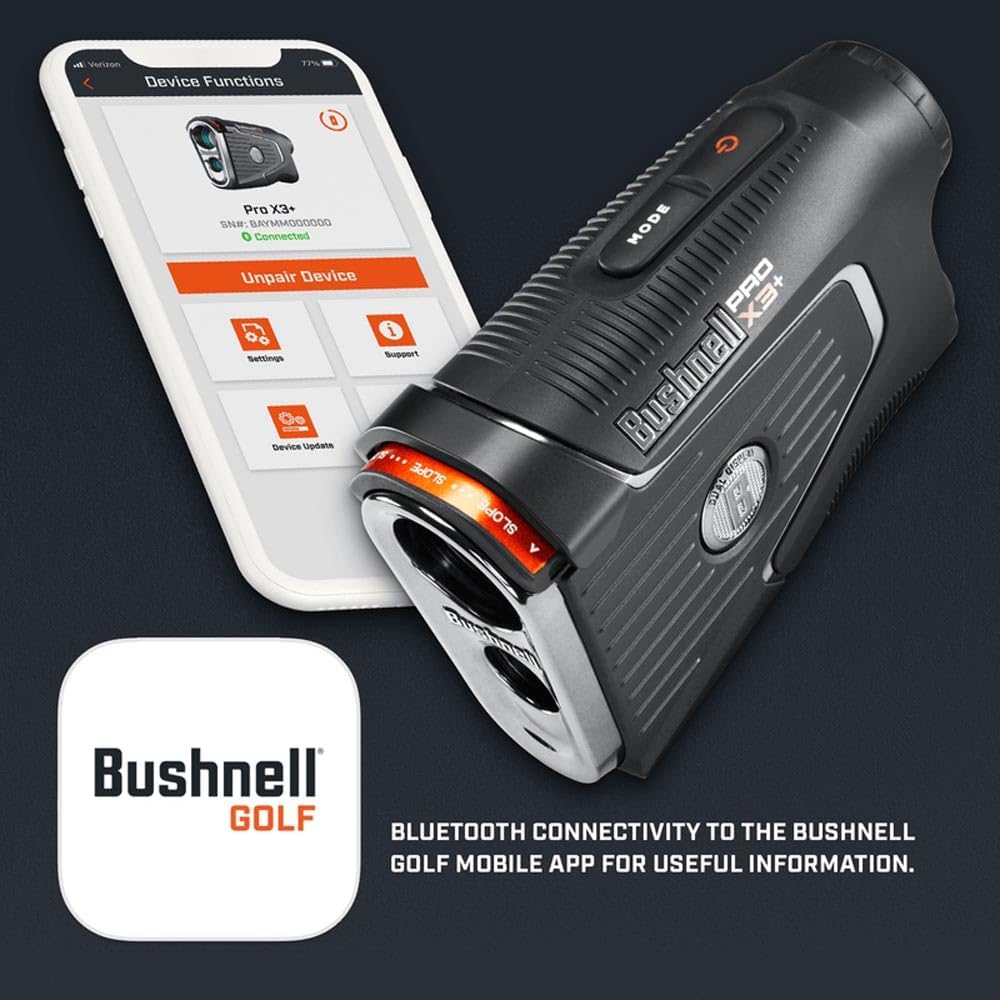
Image: The Bushnell Golf Pro X3+Link rangefinder next to a smartphone displaying the Bushnell Golf app interface, indicating Bluetooth connectivity.
5. Operating Instructions
5.1. Powering On/Off
Press the power button once to turn on the device. The device will automatically power off after a period of inactivity to conserve battery.
5.2. Measuring Distance
- Look through the eyepiece and aim the reticle at your desired target (e.g., flagstick, tree, hazard).
- Press and hold the power button. The distance will be displayed in the viewfinder.
- For PinSeeker with Visual JOLT, continue holding the button while sweeping across the flag. The device will vibrate and a red ring will flash when the flag is locked.
5.3. Using Slope with Elements
The Pro X3+Link automatically calculates compensated distances based on slope, temperature, and barometric pressure. To enable or disable this feature for tournament play, use the Locking Slope-Switch located on the side of the device. When enabled, the compensated distance will be displayed alongside the actual distance.
5.4. Wind and Home Pressure Integration
When connected to the Bushnell Golf app, the rangefinder can display real-time wind speed and direction. You can also set your home course's elevation in the app to further refine slope compensation for your typical playing conditions.
5.5. Magnetic Mount Usage
The integrated BITE magnetic mount allows for convenient attachment to a golf cart frame or other metallic surfaces. Ensure the device is securely attached before moving the cart.
Video: Official product video demonstrating the features and usage of the Bushnell Golf X3+Link Rangefinder.
6. Maintenance
6.1. Cleaning
Gently wipe the lenses with a soft, clean microfiber cloth. Avoid abrasive materials or harsh chemicals. The exterior can be cleaned with a damp cloth.
6.2. Battery Replacement
When the battery indicator appears on the display, replace the CR2 battery. Ensure the device is powered off before opening the battery compartment.
6.3. Storage
Store the rangefinder in its premium carry case when not in use. Keep it in a cool, dry place away from direct sunlight and extreme temperatures.
6.4. Waterproofing
The device is IPX7 fully waterproof. While it can withstand immersion in water up to 1 meter for 30 minutes, it is recommended to avoid prolonged exposure to water and ensure the battery compartment is securely closed.
7. Troubleshooting
- No Display: Check battery level and ensure it is correctly installed. Replace if necessary.
- Inaccurate Readings: Ensure the lens is clean. Confirm PinSeeker is active for flag targets. Check for obstructions between the device and target.
- Bluetooth Connectivity Issues: Ensure the rangefinder is powered on and within range of your smartphone. Restart both devices and try pairing again via the Bushnell Golf app.
- No JOLT/Visual Confirmation: Ensure PinSeeker mode is active and you are sweeping the target correctly.
8. Specifications
| Feature | Specification |
|---|---|
| Brand | Certified Brands |
| Model Name | Pro X3+Link |
| Magnification | 7X |
| Measuring Range | 5-1300 yards |
| Battery Type | CR2 |
| Waterproofing | IPX7 Fully Waterproof |
| Item Weight | 12 Ounces |
| Item Dimensions (LxWxH) | 4.75 x 1.7 x 3.25 inches |
| Material | Plastic |
| Sport | Golf |
| UPC | 840454612455 |
9. Warranty and Support
9.1. Warranty Information
This Bushnell Golf Pro X3+Link Laser Rangefinder is covered by a Limited Warranty provided by Certified Brands. Please refer to the warranty card included with your product for specific terms and conditions.
9.2. Customer Support
For further assistance, product registration, or to access additional resources, please visit the Certified Brands Store or contact their customer service directly.


