
Dripex B0FPWWM3P2
Dripex Elliptical Exercise Machine User Manual
Model: B0FPWWM3P2
Introduction
Thank you for choosing the Dripex Elliptical Exercise Machine. This manual provides essential information for the safe assembly, operation, maintenance, and troubleshooting of your new fitness equipment. Please read this manual thoroughly before use and retain it for future reference.

Image: The Dripex Elliptical Exercise Machine, showcasing its design and compact footprint.
Important Safety Information
To ensure your safety and prolong the life of your elliptical machine, please observe the following precautions:
- Consult a physician before starting any exercise program.
- Keep children and pets away from the machine during operation.
- Place the elliptical on a flat, stable surface with adequate clearance around it.
- Wear appropriate exercise attire and athletic shoes.
- Inspect the machine for loose or worn parts before each use. Do not use if damaged.
- Do not exceed the maximum weight capacity of 265 lbs (120 kg).
- Stop exercising immediately if you feel faint, dizzy, or experience pain.
- Ensure all bolts and nuts are securely tightened after assembly and checked periodically.
Package Contents
Verify that all components are present before beginning assembly:
- 1x Dripex Elliptical Machine (main frame and pre-assembled parts)
- 1x Hardware Pack (bolts, nuts, washers, tools)
- 1x User Manual (this document)
- Additional components such as handlebars, pedals, console, etc. (individual parts may vary)
Assembly Instructions
Assembly typically requires two people. Follow these general steps. Refer to the included hardware pack and diagrams for specific part identification.
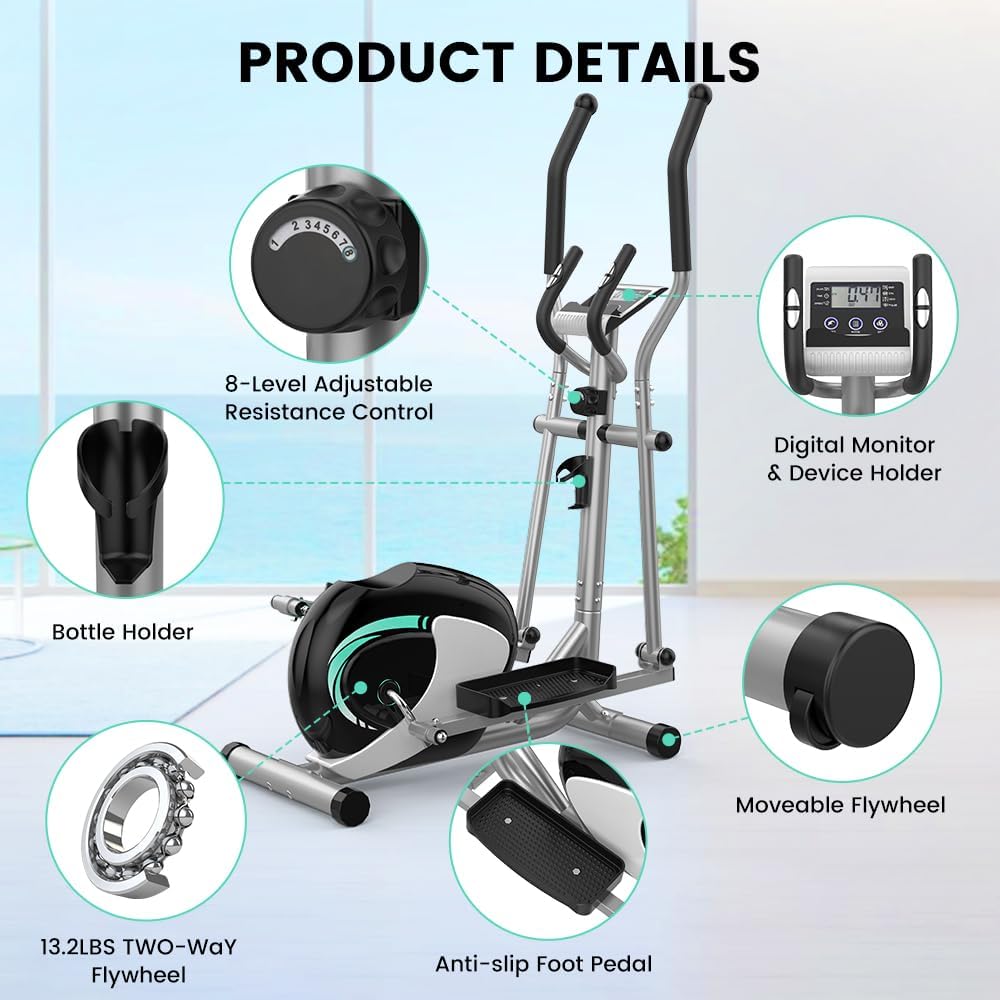
Image: Detailed view of the Dripex Elliptical Machine components, including the resistance knob, digital monitor, bottle holder, flywheel, and anti-slip foot pedal.
- Unpack Components: Carefully remove all parts from the packaging and lay them out on a clean, flat surface.
- Attach Stabilizers: Secure the front and rear stabilizer bars to the main frame using the provided bolts and washers.
- Install Upright Post: Attach the upright post to the main frame, ensuring all cables are routed correctly.
- Connect Pedals and Arms: Assemble the pedal arms and connect them to the flywheel mechanism and the moving handlebars. Pay attention to left and right designations.
- Mount Handlebars: Attach both the fixed and moving handlebars to the upright post.
- Install Console: Connect the LCD monitor cables and mount the console onto the upright post.
- Final Checks: Ensure all bolts are tightened, and the machine is stable before first use.
Operating Instructions
1. Powering On/Off
The LCD monitor typically powers on automatically when you begin exercising or press any button. It will power off after a period of inactivity to conserve battery.
2. Adjusting Resistance
Your Dripex Elliptical features an 8-level magnetic resistance system. To adjust the workout intensity, turn the resistance knob located on the upright post:
- Turn the knob clockwise to increase resistance (levels 1-8).
- Turn the knob counter-clockwise to decrease resistance (levels 8-1).

Image: Close-up of the 8-level adjustable magnetic resistance knob, illustrating how to increase or decrease workout intensity.
3. Using the LCD Monitor and Pulse Sensors
The integrated LCD monitor tracks your workout data. The fixed handlebars include built-in pulse sensors to monitor your heart rate.
- SCAN: Automatically cycles through all display functions.
- TIME: Displays the duration of your current workout.
- SPEED: Shows your current speed.
- DISTANCE: Tracks the distance covered during your workout.
- CALORIES: Estimates the calories burned.
- PULSE: Displays your heart rate when holding the pulse sensors.
- ODOMETER: Records the total accumulated distance.
To measure your pulse, firmly grip the pulse sensors on the fixed handlebars with both hands. Your heart rate will be displayed on the LCD monitor after a few seconds.

Image: The LCD monitor displaying various metrics and the integrated device holder, with pulse rate grips highlighted.
4. Device Holder
A convenient device holder is integrated into the console, allowing you to place your smartphone or tablet for entertainment during your workout.
Maintenance
Regular maintenance ensures optimal performance and longevity of your elliptical machine:
- Cleaning: Wipe down the machine with a damp cloth after each use to remove sweat and dust. Avoid abrasive cleaners.
- Inspection: Periodically check all bolts, nuts, and moving parts for tightness and wear. Tighten any loose fasteners.
- Lubrication: Moving joints may require occasional lubrication with a silicone-based lubricant to maintain smooth operation. Refer to the assembly diagram for specific points.
- Storage: Store the elliptical in a dry, cool place away from direct sunlight and extreme temperatures. The integrated transportation wheels allow for easy relocation.

Image: A user demonstrating the use of transportation wheels to move the elliptical machine, highlighting its convenient and movable design.
Troubleshooting
Refer to the table below for common issues and their solutions:
| Problem | Possible Cause | Solution |
|---|---|---|
| Machine is unstable or wobbles. | Uneven surface; loose bolts. | Place on a level surface. Check and tighten all assembly bolts. |
| Squeaking or grinding noise during use. | Loose parts; lack of lubrication; friction. | Inspect and tighten all bolts. Apply silicone lubricant to moving joints if necessary. |
| LCD monitor not displaying. | Batteries are dead or incorrectly installed; loose cable connection. | Replace batteries (usually AA or AAA). Check that the console cable is securely connected. |
| Pulse sensor not reading accurately. | Hands not firmly gripping sensors; dry hands. | Ensure both hands are firmly and fully gripping the metal sensors. Lightly moisten hands if skin is too dry. |
| Resistance not changing. | Internal mechanism issue; resistance cable dislodged. | Check the connection of the resistance cable to the knob and the flywheel mechanism. If issue persists, contact customer support. |
Product Specifications
| Feature | Detail |
|---|---|
| Model Name | Elliptical machine |
| Brand | Dripex |
| Product Dimensions (LxWxH) | 39.4"D x 20.9"W x 63.8"H (100cm x 53cm x 162cm) |
| Material | Alloy Steel |
| Resistance Mechanism | Magnetic |
| Maximum Weight Recommendation | 265 Pounds (120 kg) |
| Maximum Stride Length | 14 Inches (35.5 cm) |
| Number of Resistance Levels | 8 |
| Flywheel Weight | 13.2 lbs (6 KG) |
| Transmission Mode | Belt Driven System |
| UPC | 840452698291 |
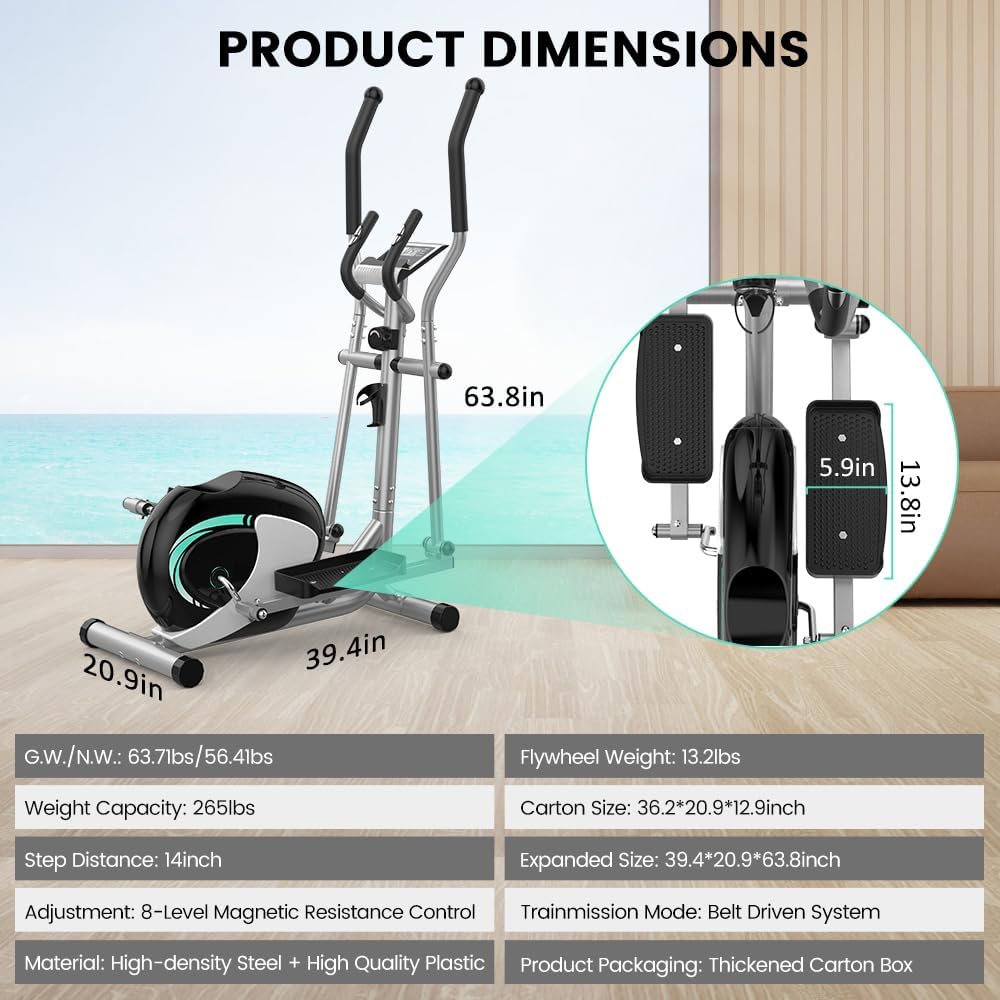
Image: Diagram illustrating the key dimensions and specifications of the Dripex Elliptical Exercise Machine.
Warranty and Customer Support
The Dripex Elliptical Exercise Machine comes with a 1-year warranty from the date of purchase, covering manufacturing defects in materials and workmanship.
For warranty claims, technical assistance, or any questions regarding your product, please contact Dripex customer support. Details for contacting support are typically found on the product packaging or the official Dripex website.
Please have your model number (B0FPWWM3P2) and proof of purchase ready when contacting support.
Related documentsB0FPWWM3P2


Ask a question about this manual
Ask about setup, troubleshooting, compatibility, parts, safety, or missing instructions. Manuals+ will review the question and use this page’s manual context to help answer it.