
1. Introduction
Thank you for choosing the LHKNL Rechargeable Wide Beam LED Headlamp TG-TD16004. This manual provides essential information for the safe and effective operation, maintenance, and troubleshooting of your headlamp. Please read it thoroughly before use and retain it for future reference.
2. Product Overview
2.1 Components
The LHKNL Headlamp TG-TD16004 features a flexible headband with integrated lighting elements and control unit. Key components include:
- COB Wide Beam LED: Provides a 230° wide illumination.
- XPE Spotlights: Two focused LEDs for directional lighting.
- Red XPE Light: For night vision preservation.
- Control Buttons: Separate buttons for Key Lighting Mode and Motion Sensor Mode.
- Motion Sensor Receiver: Detects hand gestures for hands-free operation.
- Battery Indicator: Displays current battery level.
- USB-C Charging Port: For convenient recharging.
- Adjustable Elastic Headband: Ensures a secure and comfortable fit.

Figure 1: LHKNL Rechargeable Wide Beam LED Headlamp TG-TD16004.
2.2 Features
- High-brightness, low-consumption LED technology.
- Dual control buttons for easy operation.
- 5 lighting modes: COB High, COB Low, XPE High, XPE Low, XPE Red Light.
- Motion sensor mode for hands-free light control.
- IPX4 water resistance, suitable for various weather conditions.
- USB-C rechargeable, compatible with standard power adapters.
- Battery level indicator to monitor charge status.
- Comfortable elastic headband, adjustable for secure fit.
3. Setup
3.1 Initial Charge
Before first use, fully charge the headlamp. Connect the supplied USB-C charging cable to the headlamp's charging port and a compatible USB power source. The battery indicator lights will flash during charging and remain solid when fully charged. Charging typically takes 3-4 hours.

Figure 2: Headlamp connected to a USB-C charger, showing battery indicator lights.
3.2 Adjusting the Headband
The elastic headband is adjustable to fit various head sizes. Adjust the strap using the buckle to achieve a snug yet comfortable fit. Ensure the COB wide beam is centered on your forehead for optimal illumination.
4. Operating Instructions
4.1 Key Lighting Mode
Press the Key Lighting Mode button (power button) to cycle through the 5 available lighting modes:
- COB High (Wide Beam, High Brightness)
- COB Low (Wide Beam, Low Brightness)
- XPE High (Spotlight, High Brightness)
- XPE Low (Spotlight, Low Brightness)
- XPE Red Light (Red Spotlight for night vision)
To turn off the light directly from any mode, press and hold the Key Lighting Mode button for 3 seconds.
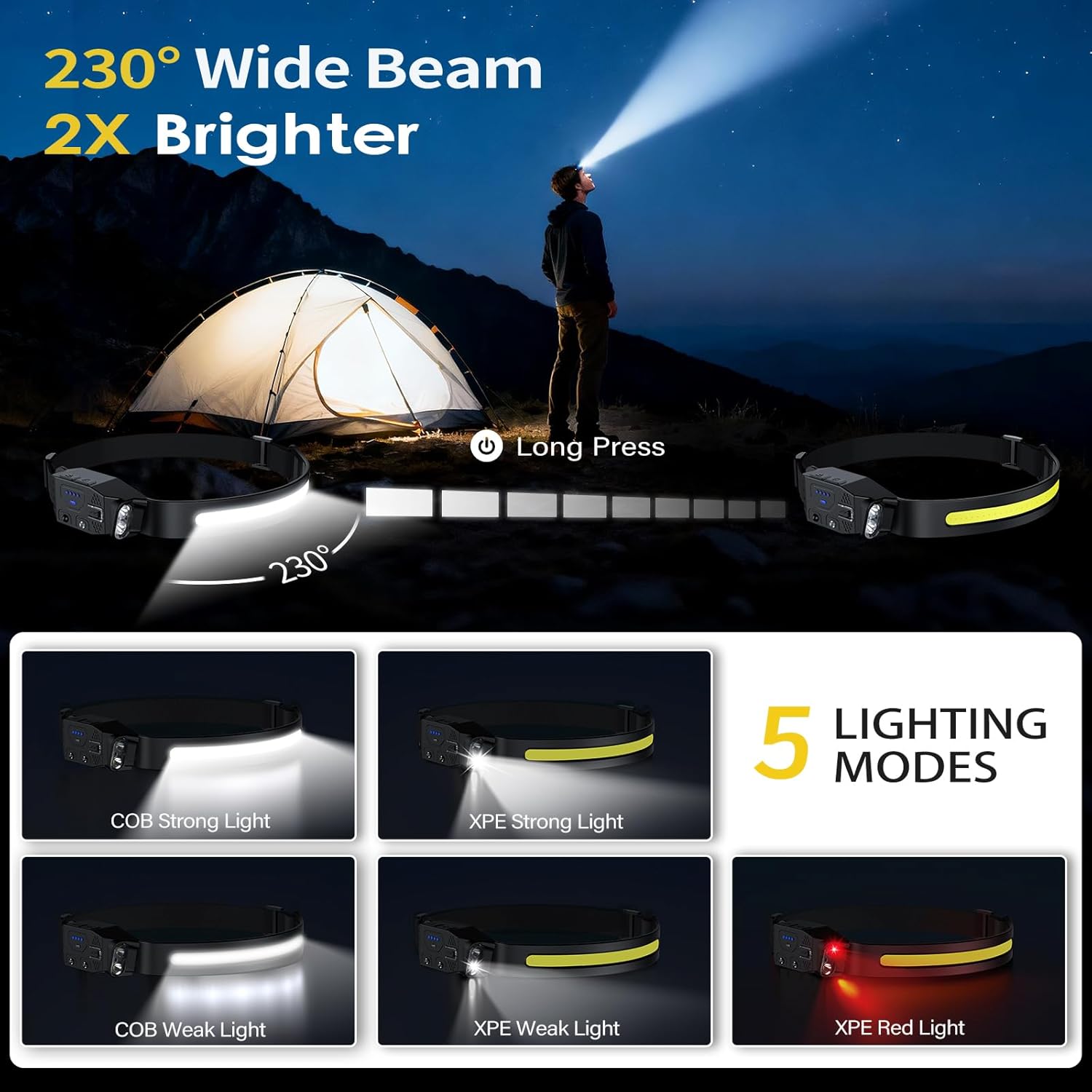
Figure 3: Illustration of the 230° wide beam and the five distinct lighting modes.
4.2 Motion Sensor Mode
The motion sensor allows for hands-free operation, useful when your hands are occupied or dirty.
- Press the Sensor Mode button to activate the motion sensor. The sensor indicator light will turn green.
- Once activated, wave your hand within 5 cm (2 inches) in front of the sensor receiver to toggle the light ON or OFF.
- To deactivate the sensor mode, press the Sensor Mode button again.
Note: You must first select a key lighting mode before activating the motion sensor mode.
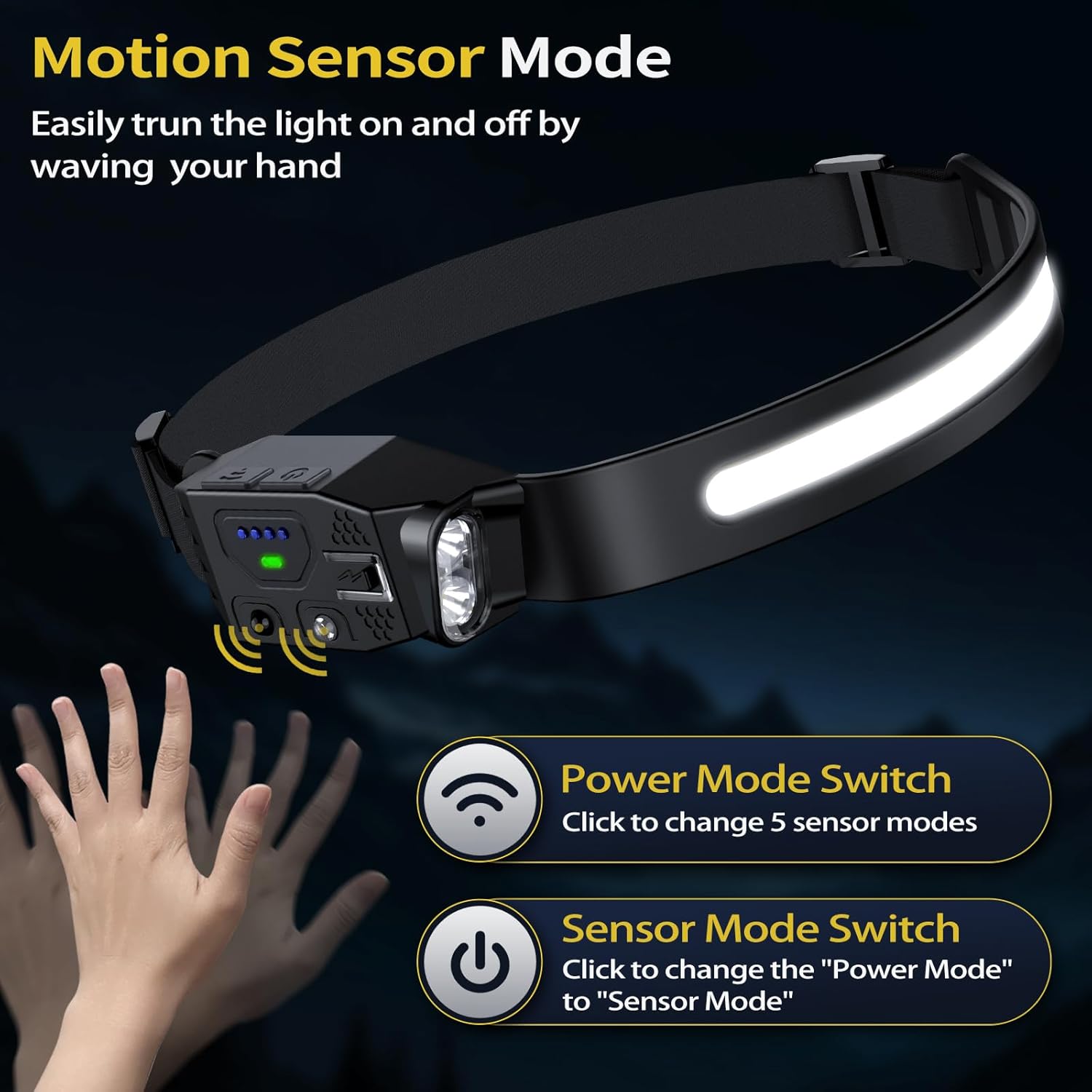
Figure 4: Activating the motion sensor by waving a hand in front of the headlamp.
5. Maintenance
5.1 Cleaning
To clean the headlamp, wipe it with a soft, damp cloth. Do not use harsh chemicals or abrasive cleaners. The headband can be removed and washed if necessary.
5.2 Water Resistance
The headlamp is IPX4 water-resistant, meaning it can withstand splashes and rain. However, it is not designed to be submerged in water. Avoid prolonged exposure to heavy rain or soaking to prevent damage and ensure longevity.

Figure 5: The headlamp is designed to be water-resistant for outdoor use.
5.3 Storage
Store the headlamp in a cool, dry place away from direct sunlight and flammable materials. For long-term storage, ensure the battery is partially charged (around 50%) to maintain battery health.
6. Troubleshooting
- Light Flickers or Turns Off Automatically: This may indicate that the motion sensor mode is active and detecting unintended movements. Try deactivating the motion sensor mode by pressing its dedicated button.
- Headlamp Not Turning On: Ensure the battery is charged. Connect the headlamp to a power source using the USB-C cable and check the battery indicator.
- Motion Sensor Not Responding: Verify that the motion sensor mode is activated (green indicator light). Ensure there are no obstructions between your hand and the sensor receiver.
7. Specifications
| Feature | Detail |
|---|---|
| Product Model | TG-TD16004 |
| Material | Aluminum, Silicone |
| Bulb Type | COB, XPE |
| Light Source Type | LED |
| Charging Port | USB-C |
| Charging Time | 3-4 hours |
| Battery Type | Built-in Lithium Polymer (1500mAh) |
| Run Time | Up to 10 hours |
| Water Resistance Level | IPX4 Water Resistant |
| Item Weight | 2.4 ounces |
| Product Dimensions | 0.8"D x 3"W x 1.25"H |
| Beam Angle | 230 Degrees |
8. Warranty and Support
The LHKNL Headlamp TG-TD16004 comes with an Extended Warranty. For any questions, concerns, or support needs, please contact LHKNL customer service at: lhkml.service@outlook.com.
