
1. Product Overview
The RadioMaster TX15 V5.0 ELRS is a high-performance 16-channel 2.4G remote control transmitter designed for RC drones. It features Hall Gimbals, a 3.5-inch IPS screen, and supports both OPENTX and EDGETX firmware. This manual provides essential information for setting up, operating, and maintaining your TX15 transmitter.
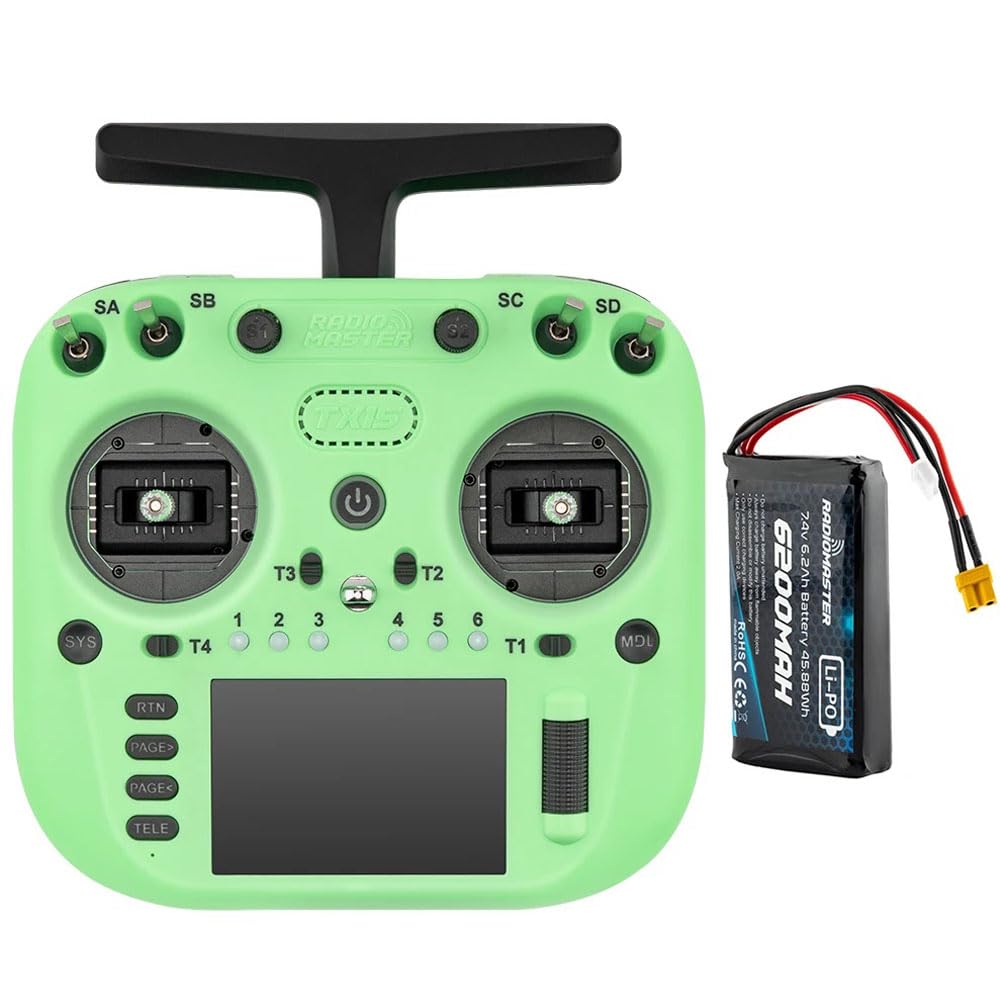
Image: RadioMaster TX15 ELRS Mode 2-Green transmitter shown with an included 6200mAh battery.
Key Features:
- Processor: Powered by a next-generation STM32H750 processor (480 MHz) for fast response and smooth performance.
- Internal RF: Integrated Semtech LR1121 Transceiver supporting 2.4GHz or SUB-G 900MHz ExpressLRS for reliable signal strength.
- Display: 3.5-inch IPS touchscreen with 480 x 320 resolution and 600 nits brightness for clear visibility indoors and outdoors.
- Gimbals: Equipped with V5.0 Hall sensor gimbals as standard, with an option for AG02 CNC Hall Gimbals (all-aluminum, adjustable vertical and horizontal travel) on the Max version.
- Memory: 4GB integrated flash memory for models, scripts, sounds, and themes, with external MicroSD card support (up to 32GB/FAT32).
- Firmware: Runs on EdgeTX (Transmitter) and ExpressLRS (RF module).
- Connectivity: Single USB-C connector for charging, simulator use, connectivity, and firmware updates. Features smart balance battery charging.
- Expansion: Standard JR-compatible module bay for external RF module expansion.
- Customization: 6 programmable RGB buttons and customizable gimbal lighting (on Max version).
- Design: Foldable antenna for easy transport and ergonomic non-slip grips for confident control.
Product Video:
Video: An overview of the RadioMaster TX15 V5.0 ELRS 16CH 2.4G Remote Control Transmitter, highlighting its key features and design.
2. Setup
2.1 Battery Installation
The TX15 transmitter requires a 7.4V 2-cell Lithium-Polymer battery, two 3.7V 18650 Lithium-Ion cells, or a 21700 5000mAh battery (batteries not included). Ensure correct polarity when inserting the battery into the battery compartment located at the rear of the transmitter. Secure the battery cover after installation.
2.2 MicroSD Card Installation
For expanded storage of models, scripts, sounds, and themes, insert a MicroSD card (up to 32GB, formatted as FAT32) into the designated slot. Note that inserting a MicroSD card will disable the onboard 4GB flash memory.
2.3 Antenna Setup
The TX15 features a foldable antenna. Before operation, ensure the antenna is unfolded and positioned vertically for optimal signal transmission. Fold the antenna down for easy transport and storage.
2.4 Initial Power On
Press and hold the power button to turn on the transmitter. The 3.5-inch IPS touchscreen will display the EdgeTX interface. Follow any on-screen prompts for initial setup or calibration.
3. Operating Instructions
3.1 Navigating the Interface
The TX15 utilizes a 3.5-inch IPS touchscreen for intuitive navigation. Use the touchscreen to access menus, adjust settings, and monitor telemetry data. The interface is powered by EdgeTX firmware, requiring version 3.0.0 or later.
3.2 Gimbal Operation
The V5.0 Hall sensor gimbals provide precise control. For advanced users, the AG02 CNC Hall Gimbals (available on the Max version) offer all-metal construction and adjustable vertical and horizontal travel for fine-tuning control feel. Both gimbal types provide ultra-smooth, low-noise operation.

Image: The RadioMaster TX15 highlighting key internal components and features such as the STM32 H7 processor, 4GB flash memory, foldable antenna, 3.5-inch touchscreen, and V5 Hall Gimbal.
3.3 RF Module and Protocols
The internal RF system integrates a Semtech LR1121 Transceiver, supporting ExpressLRS protocols on both 2.4GHz and SUB-G 900MHz frequencies. This ensures robust and reliable communication with your RC drone. The transmitter supports a maximum of 16 channels, depending on the receiver used.
3.4 Programmable Buttons and Switches
The TX15 features 6 programmable RGB buttons for flexible control assignments. Additionally, interchangeable shoulder switches allow for further customization to suit your preferred control layout. Refer to the EdgeTX documentation for detailed programming instructions.
3.5 USB-C Functionality
The single USB-C port serves multiple functions:
- Charging: Connect a USB-C cable for smart balance battery charging.
- Simulator: Use the port to connect the transmitter to a flight simulator on your computer.
- Connectivity: Connect to a computer for file transfer and configuration.
- Firmware Updates: Update the transmitter's firmware via USB.
4. Maintenance
4.1 Cooling System
The TX15 is equipped with a low-noise, high-output fan and an aluminum heat sink to maintain optimal operating temperatures, even during extended use or in hot environments. Ensure the cooling vents are not obstructed.
4.2 Firmware Updates
Regularly check for and install firmware updates to ensure optimal performance and access to new features. Firmware can be updated via USB/SD card using EdgeTX Buddy online or the EdgeTX Companion PC software.
4.3 Battery Care
To prolong battery life, avoid overcharging or completely discharging the battery. Store the transmitter in a cool, dry place when not in use. Use the smart balance charging feature via the USB-C port for safe and efficient charging.
5. Troubleshooting
- Transmitter not powering on: Check battery charge level and ensure it is correctly installed.
- No signal to drone: Verify that the RF module is correctly configured and bound to the receiver. Ensure the antenna is properly extended.
- Screen not responding: Perform a soft reset by holding the power button. If the issue persists, check for firmware updates.
- Gimbal calibration issues: Refer to the EdgeTX manual for detailed gimbal calibration procedures.
- Firmware update failure: Ensure a stable USB connection and sufficient battery charge. Try a different USB port or cable.
6. Specifications
| Feature | Specification |
|---|---|
| Model | TX15 |
| Size | 178*168*81mm |
| Weight | 605g (without battery) |
| Frequency | 2.400GHz OR Sub-G 900MHz |
| Internal RF | ELRS 2.4GHz / Sub-G 900MHz |
| Supported Protocols | Express-LRS |
| Cooling Fan | Yes |
| Transmitter Module | Built-in ELRS |
| Built-in Flash Size | 4GB |
| Built-in Microphone | Yes (Future expansion) |
| Built-in Gyro | Yes (ICM-42607-C) |
| MicroSD card | 32GB/FAT32 (Not included, inserting disables onboard flash) |
| Antenna Gain | 2dB (transmit power adjustable) |
| Current | 875mA at max power output |
| Voltage Range | 6.6 - 8.4V DC |
| Radio Firmware | EdgeTX (Transmitter) (requires version 3.0.0 or later) |
| Module Firmware | ExpressLRS |
| Channels | Max 16 channels (Receiver dependent) |
| Display | 3.5-inch IPS touchscreen (480 x 320 resolution) |
| Battery | 7.4V 2-cell Lithium-Polymer / Two 3.7V 18650 Lithium-Ion cells / 21700 5000mAh Battery (batteries not included) |
| Connectivity | USB-C |
| Gimbals | V5.0 Hall sensor gimbals (standard) |
| Gimbal Sticks | M4 |
| Upgrade Method | USB-C (UF2) |
| Module Bay | JR-compatible module bay for additional modules |
7. Warranty & Support
This product is manufactured by Xiangtat. For specific warranty information, please refer to the documentation provided with your purchase or contact the retailer. For technical support, troubleshooting assistance, or inquiries regarding product functionality, please reach out to the seller or manufacturer's customer service channels.