Introduction
This manual provides detailed instructions for the assembly, operation, and maintenance of your Sweetcrispy 48-Inch Computer Desk with Drawers. Please read all instructions carefully before beginning assembly and retain this manual for future reference.

Figure 1: Sweetcrispy 48-Inch Computer Desk with Drawers
Safety Information
- Always assemble the desk on a soft, clean surface to prevent scratches.
- Ensure all screws and fasteners are securely tightened before use. Periodically check and re-tighten as necessary.
- Do not overload the desk. The table board has a maximum load capacity of 200 lbs. Each drawer can hold up to 22 lbs.
- Keep small parts away from children during assembly.
- Use only the provided hardware or manufacturer-approved replacements.
Package Contents
Before assembly, verify that all components listed below are present and undamaged. If any parts are missing or damaged, please contact customer support.
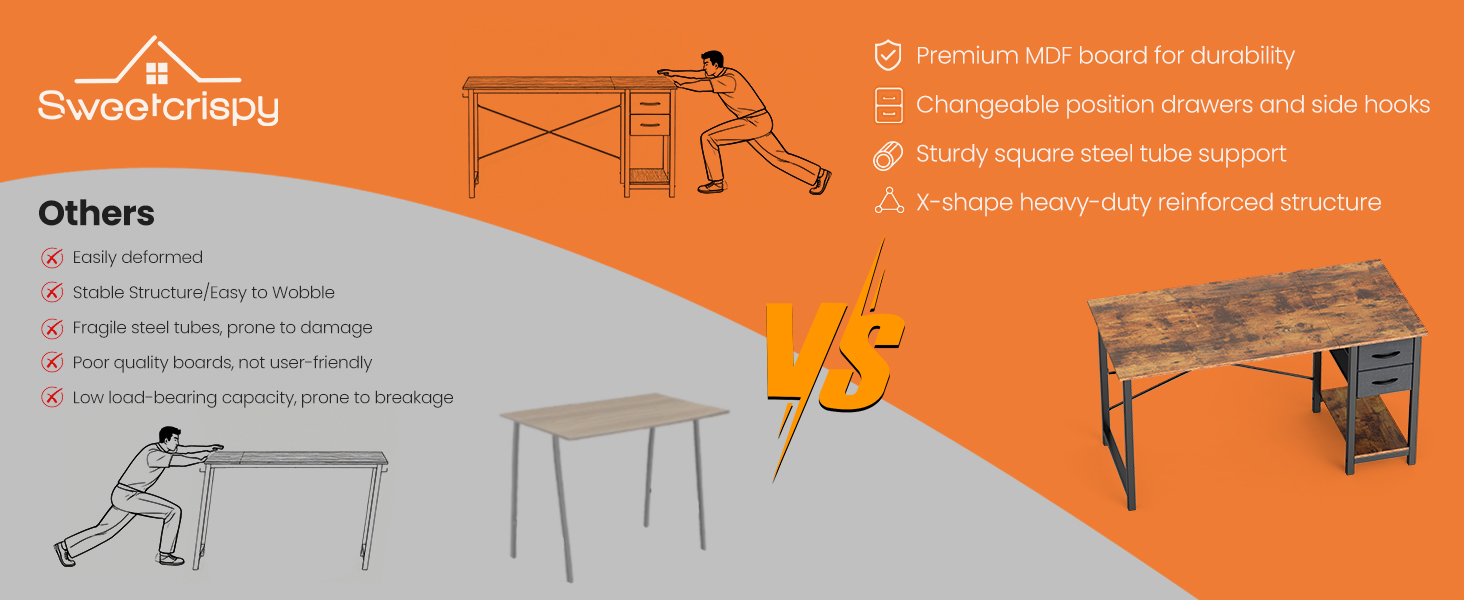
Figure 2: All included parts and hardware
The package includes all necessary parts, tools, and a clear manual for assembly.
Assembly Instructions
Follow these steps carefully to assemble your Sweetcrispy computer desk. An assembly video is also available for visual guidance.
Video: Sweetcrispy Computer Desk Assembly Guide
This video provides a step-by-step visual guide for assembling the desk, demonstrating each connection and component placement.
- Prepare the Desktop: Lay the two desktop pieces (I and J) flat on a soft surface. Align them and secure them together using the provided connectors and screws.
- Assemble the Main Frame: Attach the side frames (A, B, C) to the main desktop using the designated screws. Ensure all connections are firm.
- Install the Drawer Support Frame: Assemble the smaller frame for the drawers (D, E, G1, G2) and attach it to the desktop.
- Attach the X-Shaped Reinforcement: Secure the X-shaped metal bars (F) to the back of the desk frame using the provided screws. This enhances stability.
- Install Side Hooks: Attach the side hooks (H) to the desired side of the desk frame.
- Assemble and Insert Drawers: Fold the fabric drawers (H) into shape, inserting the bottom panel for stability. Place the assembled drawers into their designated slots in the drawer support frame.
Product Features
- Premium Materials: Constructed from high-quality MDF and solid steel tubing for durability and a load capacity of up to 200 lbs.
- Sturdy X-Frame Support: Features a reinforced X-frame base for enhanced stability, preventing wobbling.
- Flexible Drawer Setup: The fabric drawers can be attached on either the left or right side, or removed entirely for customized storage. Each drawer supports up to 22 lbs.
- Handy Side Hooks: Includes convenient side hooks for hanging headphones, bags, or other accessories, helping to keep your workspace organized.

Figure 3: Premium MDF Board and Sturdy Metal Frame

Figure 4: X-Shaped Reinforced Structure

Figure 5: Changeable Position Drawer

Figure 6: Handy Side Hooks
Maintenance
To maintain the appearance and longevity of your desk, follow these simple care instructions:
- Wipe clean with a damp cloth. Avoid harsh chemicals or abrasive cleaners.
- Ensure liquids are promptly wiped off the surface to prevent damage.
- Periodically check all screws and connections to ensure they remain tight.
Troubleshooting
If you encounter any issues with your desk, please refer to the following common solutions:
- Wobbly Desk: Check all assembly screws and ensure they are fully tightened. Verify that the X-shaped reinforcement bars are correctly installed and secured.
- Drawers Not Sliding Smoothly: Ensure the fabric drawers are correctly assembled with the bottom panel inserted. Check for any obstructions in the drawer slots.
- Scratches or Dents: The desk features a scratch-resistant surface. For minor marks, a furniture marker matching the wood tone may be used.
For further assistance, please contact Sweetcrispy customer support.
Specifications

Figure 7: Desk Dimensions
| Attribute | Detail |
|---|---|
| Brand | Sweetcrispy |
| Model Number | GDZ-2BC-47IN |
| Product Dimensions (D x W x H) | 47.24" x 19.69" x 29.57" |
| Color | Black Wood |
| Top Material Type | Wood (MDF) |
| Base Material | Metal |
| Maximum Weight Recommendation (Table) | 200 Pounds |
| Maximum Weight Recommendation (Drawer) | 22 Pounds |
| Number of Drawers | 1 (with 2 compartments) |
| Special Feature | Scratch Resistant, X-Shaped Reinforcement, Adjustable Position Drawers, Side Hook |
| Required Assembly | Yes |
| Item Weight | 26.92 Pounds |
Warranty and Support
For warranty information or customer support, please refer to the documentation included with your purchase or visit the official Sweetcrispy website. If you have any questions or require assistance with your product, do not hesitate to contact our support team.


