
Introduction
Welcome to the QCY HEROAD V200 Gaming Headset user manual. This guide provides detailed instructions for setting up, operating, and maintaining your headset to ensure optimal performance across various platforms including PC, PS5, PS4, and Nintendo Switch.

This image displays the QCY HEROAD V200 Gaming Headset in white, featuring its over-ear design and the accompanying 2.4GHz wireless dongle.
Product Overview and Features
Key Features
- Immersive 7.1 Surround Sound & High-Fidelity Audio: Equipped with 50mm dynamic drivers, providing precise audio positioning and rich sound.
- Detachable Omni-directional Noise-reduction Microphone: Flexible and adjustable microphone with noise-canceling technology for clear communication.
- 3-in-1 Connection Ways & Ultra-Long Battery Life: Supports Bluetooth 6.0, 2.4GHz wireless (with USB-C & USB-A dongle), and USB-C wired connections.
- Dual Device Connection & Wide Compatibility: Connects to two devices simultaneously and is compatible with PC, PS4, PS5, laptops, and Switch.
- Lightweight & Ergonomic Comfort Design: Weighs 286g with memory foam earcups and an adjustable headband for extended comfort.

This image highlights the comfort features of the QCY HEROAD V200 headset, including soft and breathable earcups, an adjustable headband, a glasses-friendly design, and its lightweight build of 276g.
Package Contents
- QCY HEROAD V200 Headset
- 2-in-1 2.4G Dongle (Type-A + Type-C)
- 3.5mm Detachable Microphone
- Type-C Charging Cable
- User Manual
Setup and Connection
1. Charging the Headset
Before first use, fully charge the headset. Connect the provided Type-C charging cable to the headset's USB-C port and a compatible USB power source (e.g., computer USB port, wall adapter).
2. Connecting via 2.4GHz Wireless (for PC, PS4, PS5, Switch)
- Insert the 2-in-1 2.4G dongle into an available USB-A or USB-C port on your gaming device (PC, PS4, PS5, Switch).
- Power on the QCY HEROAD V200 headset. The headset will automatically attempt to connect to the dongle.
- Once connected, the indicator light on the headset will show a stable color, and you can select the headset as your audio output/input device in your system settings.

This image illustrates the headset's versatile connectivity, showcasing the 2.4GHz wireless dongle (Type-A and Type-C options), Bluetooth 6.0, and USB-C wired connection methods.
3. Connecting via Bluetooth 6.0 (for PC, Laptops, Smartphones)
- Power on the QCY HEROAD V200 headset.
- Activate Bluetooth pairing mode on the headset (refer to the headset's control layout for specific button presses, usually a long press on the power/multi-function button). The indicator light will flash to indicate pairing mode.
- On your device (smartphone, laptop, etc.), go to Bluetooth settings and search for available devices. Select "QCY HEROAD V200" from the list to pair.
- Once paired, the indicator light will stabilize.
4. Connecting via USB-C Wired (for PC, Laptops)
For a direct, zero-latency connection, you can connect the headset to your device using a USB-C to USB-C cable (not always included, use the charging cable if compatible for data transfer) or the provided Type-C charging cable if it supports data. This method also charges the headset while in use.
Operating Instructions
1. Power On/Off
To power on the headset, press and hold the power button for approximately 3 seconds until the indicator light illuminates. To power off, press and hold the power button for approximately 5 seconds until the indicator light turns off.
2. Volume Control
Use the dedicated volume up (+) and volume down (-) buttons located on the headset to adjust the audio output level.
3. Microphone Usage
- Attach the detachable microphone to the 3.5mm port on the headset. Ensure it is securely inserted.
- Adjust the flexible microphone arm to position it optimally near your mouth for clear voice pickup.
- The microphone features noise-reduction technology to minimize background distractions during communication.
- To mute/unmute the microphone, use the dedicated microphone mute button on the headset.
This image displays the QCY HEROAD V200 headset with its detachable, omni-directional noise-cancelling microphone, highlighting its flexible adjustment and mute functionality.
4. Dual Device Connection
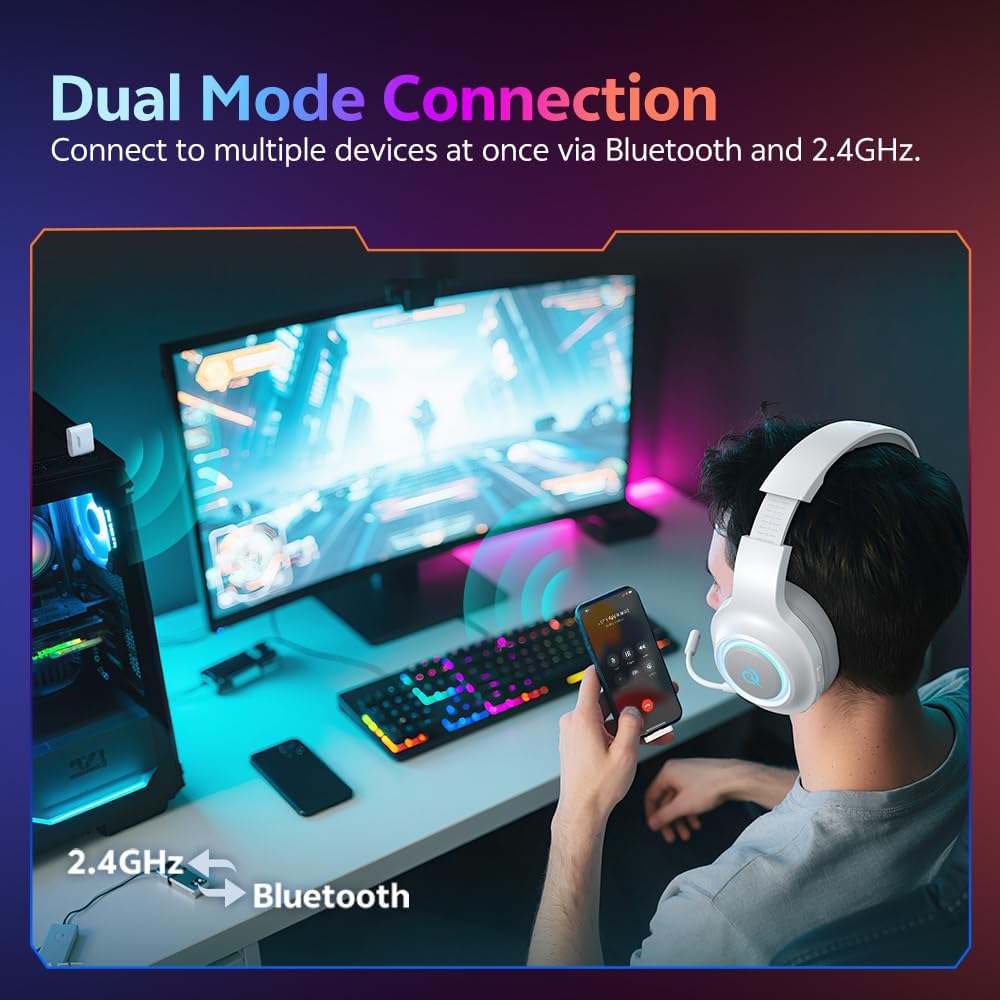
The QCY HEROAD V200 supports simultaneous connection to two devices. For example, you can connect to your PC via 2.4GHz wireless and your smartphone via Bluetooth. This allows you to seamlessly switch between game audio on your PC and answering calls on your phone without disconnecting.

This image shows a user wearing the QCY HEROAD V200 headset, connected to both a computer via 2.4GHz and a smartphone via Bluetooth, illustrating the convenience of dual-device connectivity.
5. 7.1 Surround Sound
The headset features 7.1 virtual surround sound, which creates a three-dimensional soundscape. This allows for enhanced spatial awareness in games, enabling you to perceive the precise direction and location of in-game sounds, such as enemy footsteps or environmental cues.

This image highlights the 7.1 Surround Sound capability of the QCY HEROAD V200 headset, visually representing how it creates a precise, three-dimensional audio environment for gaming.
Battery Information
Battery Life
The QCY HEROAD V200 headset offers extended battery life depending on the connection mode and lighting status:
- Bluetooth Mode: Up to 240 hours (with lights off), 100 hours (with lights on).
- 2.4GHz Wireless Mode: Up to 140 hours (with lights off), 80 hours (with lights on).

This infographic details the impressive battery life of the QCY HEROAD V200 headset, showing durations for Bluetooth and 2.4GHz modes with and without lighting effects.
Maintenance and Care
Cleaning
To clean your headset, gently wipe the surfaces with a soft, dry, lint-free cloth. Do not use harsh chemicals, abrasive cleaners, or solvents, as these can damage the finish and internal components. Avoid getting moisture into any openings.
Storage
When not in use, store the headset in a cool, dry place away from direct sunlight, extreme temperatures, and high humidity. Avoid placing heavy objects on the headset to prevent damage.
Troubleshooting
No Sound
- Ensure the headset is powered on and fully charged.
- Check the volume levels on both the headset and your connected device.
- Verify that the headset is properly connected via Bluetooth, 2.4GHz dongle, or USB-C cable.
- Confirm that the QCY HEROAD V200 is selected as the default audio output device in your computer's or console's sound settings.
- Try restarting both the headset and the connected device.
Microphone Not Working
- Ensure the detachable microphone is securely inserted into its port.
- Check if the microphone mute button on the headset is engaged.
- Verify that the QCY HEROAD V200 microphone is selected as the default input device in your device's sound settings or communication application.
- Test the microphone on another device if possible.
Connection Issues
- For Bluetooth: Ensure the headset is in pairing mode (flashing indicator light) and within the 10-meter operating range. Remove previous pairings from your device and re-attempt pairing.
- For 2.4GHz Wireless: Ensure the dongle is firmly inserted into a working USB port. Try a different USB port. Ensure the headset is powered on and close to the dongle.
- For Wired USB-C: Ensure the cable is securely connected at both ends. Try a different USB-C cable if available.
Specifications
Technical Specifications
| Model Name | HEROAD V200 (Part Number: V200) |
| Item Model Number | H4GM |
| Brand | QCY |
| Colour | White |
| Material | Plastic |
| Ear Placement | Over Ear |
| Form Factor | Over Ear |
| Item Weight | 276 Grams |
| Product Dimensions | 16.7 x 5.8 x 19 cm |
| Connectivity Technology | Wired, Wireless (2.4GHz, Bluetooth 6.0) |
| Hardware Interface | Bluetooth, USB Type C |
| Headphone Jack | 3.5 mm Jack (for microphone) |
| Compatible Devices | Desktops, Gaming Consoles (PS4, PS5, Switch), Laptops, Television |
| Control Type | Button Control |
| Cable Feature | Detachable (microphone, charging cable) |
| Special Features | Adjustable Headband, Ambient Light, Lightweight, Microphone Included, Multipoint Pairing |
| Battery Average Life | Up to 240 Hours (Bluetooth, lights off) |
| Maximum Operating Distance | 10 Metres |
Warranty and Support
Warranty Information
For detailed warranty terms and conditions, please refer to the warranty card included with your QCY HEROAD V200 Gaming Headset purchase. You may also visit the official QCY website for the most up-to-date warranty policy.
Customer Support
Should you require further assistance, technical support, or have any inquiries regarding your QCY HEROAD V200 Gaming Headset, please contact QCY customer service. Contact information can typically be found on the official QCY website or within your product packaging.


