1. Introduction
The ALYNIC Smart Table Lamp N69 is a versatile 5-in-1 device designed to enhance your living space. It integrates an ambient LED atmosphere light, a powerful Bluetooth speaker, a sunrise simulation alarm clock, a night light, and a 15W fast wireless charger. This manual provides detailed instructions for setup, operation, and maintenance to ensure optimal performance and user experience.

Image 1.1: The ALYNIC Smart Table Lamp N69 with its integrated wireless charging pad and digital clock display.
2. Package Contents
Please verify that all items are present in the package:
- 1x ALYNIC Multifunction G Light (Model N69)
- 1x QC3.0 Adapter
- 1x 3.3 ft (1 m) USB-A to USB-C Cable
- 1x User Manual
3. Product Overview and Controls
Familiarize yourself with the lamp's components and control buttons.

Image 3.1: Overview of the lamp's control panel and dimensions.
- Clock & Bluetooth Mode Button: Short press to switch between clock and Bluetooth modes. Long press to enter Bluetooth pairing mode.
- Volume Down / Previous Song Button: Short press to decrease volume. Long press to go to the previous song in Bluetooth mode.
- Volume Up / Next Song Button: Short press to increase volume. Long press to go to the next song in Bluetooth mode.
- Clock Setting Button: Short press to enter clock setting mode.
- Alarm Setting / LED Screen On/Off Button: Short press to set alarms. Long press to turn the LED screen display on or off.
- Brightness Adjustment Button: Short press to cycle through brightness levels. Long press to adjust continuously.
- Light Mode Button: Short press to cycle through different light modes and colors. Long press to turn the light on/off.
4. Setup Guide
4.1 Power Connection
- Connect the provided USB-A to USB-C cable to the lamp's power input port.
- Plug the USB-A end of the cable into the supplied QC3.0 adapter.
- Insert the QC3.0 adapter into a standard wall outlet. The lamp's digital display should illuminate.
4.2 App Download and Connection
For full functionality, download the "Music Light" app.
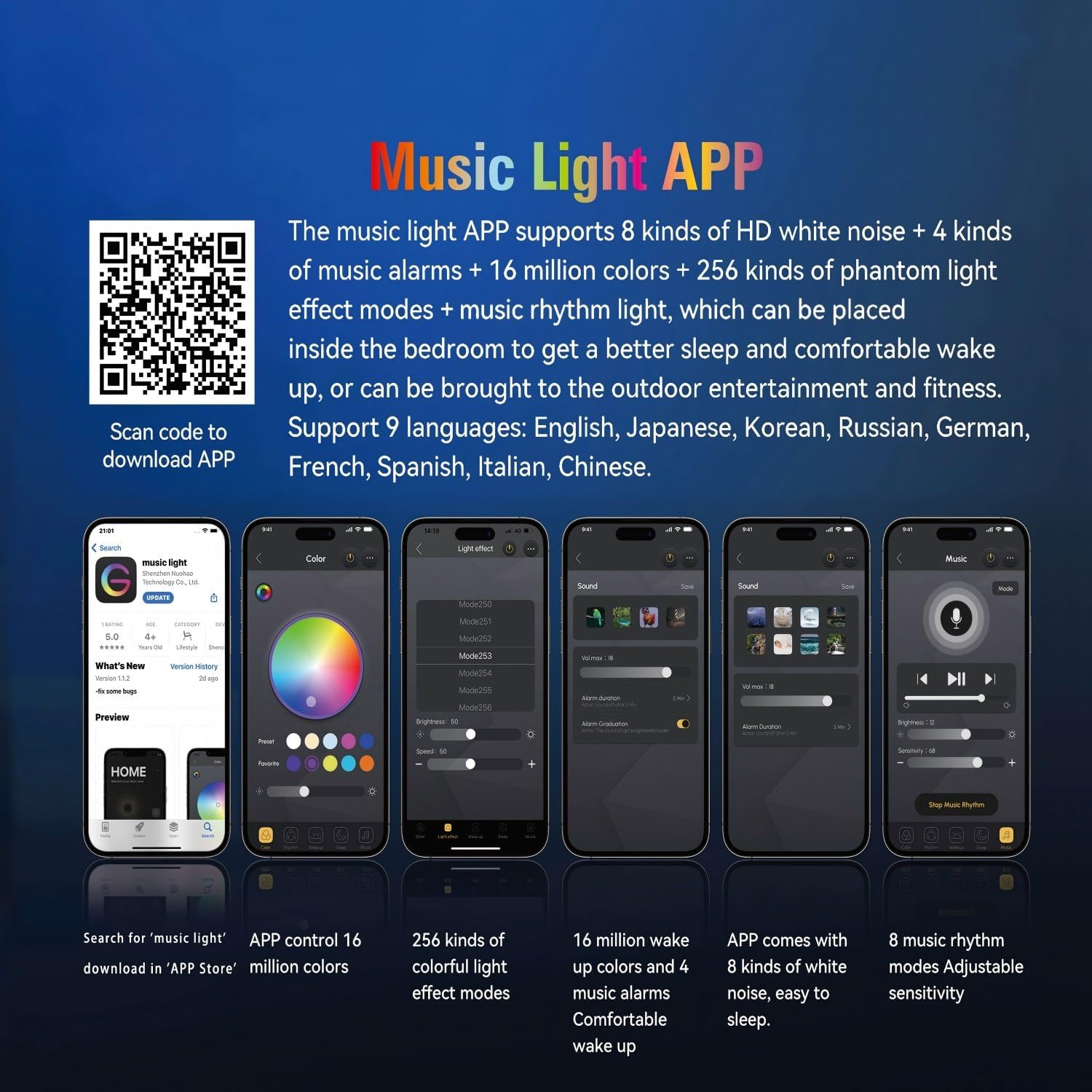
Image 4.1: QR code for downloading the 'Music Light' app and examples of app control interfaces.
- Scan the QR code provided in the manual or on the product packaging, or visit http://www.qrtransfer.com/musiclight.html to download the "Music Light" app.
- Install the app on your smartphone.
- Enable Bluetooth on your smartphone.
- Open the "Music Light" app and follow the on-screen instructions to connect to the ALYNIC Smart Table Lamp N69. The device will typically appear as "NH 69" in your Bluetooth device list.
4.3 Initial Clock Setting
The clock can be set manually or synchronized via the app.
- Manual Setting: Press the Clock Setting Button (4) to enter time adjustment mode. Use the Volume Up/Down buttons (2, 3) to adjust hours and minutes. Press the Clock Setting Button again to confirm.
- App Synchronization: Once connected to the "Music Light" app, the lamp's clock will automatically synchronize with your phone's time.
5. Operating Instructions
5.1 Light Control
The lamp offers various lighting options:
- Turn On/Off: Long press the Light Mode Button (7).
- Change Light Modes/Colors: Short press the Light Mode Button (7) to cycle through 16 million colors and 256 phantom light modes.
- Adjust Brightness: Short press the Brightness Adjustment Button (6) to cycle through preset brightness levels. Long press to continuously adjust brightness.
- App Control: Use the "Music Light" app for precise control over color, brightness, and light effects.

Image 5.1: The lamp showcasing different RGB light modes, controllable via the app.
Video 5.1: Demonstration of the ALYNIC Smart Table Lamp N69's various lighting effects, Bluetooth speaker, and wireless charging capabilities.
5.2 Bluetooth Speaker
The lamp features dual Bluetooth speakers for audio playback.
- Pairing: Short press the Clock & Bluetooth Mode Button (1) until the display shows "BT". Long press the button to enter pairing mode (a sound prompt will indicate this). On your smartphone, search for "NH 69" in your Bluetooth settings and connect.
- Playback Control: Use the Volume Up/Down / Previous/Next Song buttons (2, 3) on the lamp or your connected device to control music playback.
- Hands-free Calling: The built-in microphone supports hands-free calls when connected via Bluetooth.

Image 5.2: Connecting to the lamp's Bluetooth speaker function.
5.3 Wireless Charging
The lamp is equipped with a 15W fast wireless charging pad.
- Place your wireless charging-compatible smartphone on the charging pad located on the lamp's base.
- Ensure the phone is centered on the pad for optimal charging. A charging indicator may appear on your phone's screen.
- For fast charging, use the provided QC3.0 adapter.
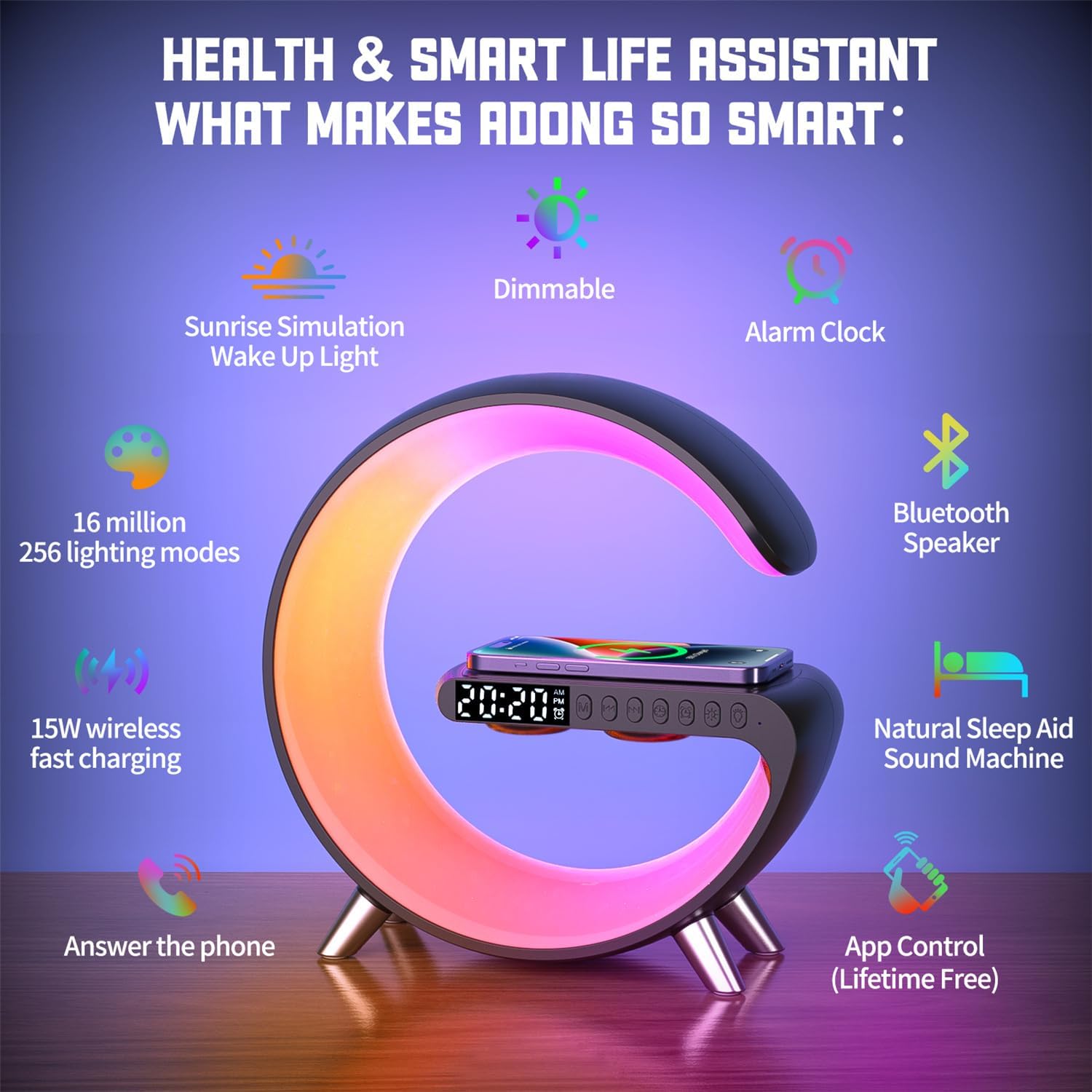
Image 5.3: Wireless charging a smartphone on the lamp's base.
5.4 Alarm Clock and Sunrise Simulation
Set alarms and utilize the sunrise simulation feature for a gentle wake-up.
- Setting Alarms: Short press the Alarm Setting Button (5). Use the Volume Up/Down buttons (2, 3) to set the alarm time. Press the Alarm Setting Button again to confirm. Up to two alarms can be set.
- Sunrise Simulation: Three minutes before the set alarm time, the lamp's light will gradually brighten, mimicking a natural sunrise to gently wake you.
- Alarm Ringtones: Choose from 4 alarm clock ringtone options via the "Music Light" app.

Image 5.4: The sunrise alarm clock feature gently waking a user.
5.5 Sleep Aids (White Noise)
The lamp includes 8 types of white noise to assist with sleep.
- Activating White Noise: Double-click the Clock & Bluetooth Mode Button (1) or use the "Music Light" app to select and play white noise sounds.
- Available Sounds: Lullabies, sounds of bugs and birds chirping, raindrops, ocean waves, and more.

Image 5.5: The lamp providing a calming light for sleep.
6. Maintenance
To ensure the longevity and proper functioning of your ALYNIC Smart Table Lamp N69, follow these maintenance guidelines:
- Cleaning: Use a soft, dry cloth to wipe the lamp's surface. Avoid using abrasive cleaners or solvents, as they may damage the finish.
- Power Disconnection: Always unplug the lamp from the power outlet before cleaning or if it will not be used for an extended period.
- Placement: Place the lamp on a stable, flat surface. Avoid placing it in direct sunlight, near heat sources, or in excessively humid environments.
- Avoid Water: The lamp is not waterproof. Do not expose it to water or other liquids.
7. Troubleshooting
If you encounter issues with your ALYNIC Smart Table Lamp N69, please refer to the following common problems and solutions:
| Problem | Possible Cause | Solution |
|---|---|---|
| Lamp does not turn on. | No power connection. | Ensure the power cable is securely connected to the lamp and the QC3.0 adapter is plugged into a working wall outlet. |
| Wireless charging is not working. | Phone not compatible or not positioned correctly. | Verify your smartphone supports wireless charging. Ensure the phone is centered on the charging pad. Use the provided QC3.0 adapter. |
| Bluetooth speaker not connecting. | Not in pairing mode or device already connected. | Ensure the lamp is in Bluetooth pairing mode (long press button 1). Disconnect from other devices if already paired. Check your phone's Bluetooth settings for "NH 69". |
| Clock time is incorrect after power outage. | No internal battery for time retention. | Manually reset the clock using button 4, or reconnect to the "Music Light" app for automatic synchronization. |
| Cannot access all features (e.g., specific light modes, white noise). | App not installed or connected. | Download and connect to the "Music Light" app as described in Section 4.2. Many advanced features require app control. |
8. Specifications
Technical details of the ALYNIC Smart Table Lamp N69:
| Feature | Detail |
|---|---|
| Model Name | N69 |
| Brand | ALYNIC |
| Product Dimensions | 9.13"D x 3.3"W x 9"H (23.19 cm x 8.38 cm x 22.86 cm) |
| Item Weight | 1 Pound (0.45 kg) |
| Material | Acrylonitrile Butadiene Styrene, Metal |
| Light Source Type | LED |
| Light Colors | 16 Million Colors, 256 Phantom Light Modes |
| Wireless Charging Output | 15W |
| Power Source | Corded Electric (QC3.0 Adapter included) |
| Special Features | Bluetooth Wireless Speaker, Color Changing, APP Controlled, Hands-Free Calling, Sunrise Alarm Clock, Wireless Charging, White Noise Sound Machine |
| Indoor/Outdoor Usage | Indoor |
| UPC | 797457325168 |
9. Warranty and Customer Support
The ALYNIC Smart Table Lamp N69 comes with a comprehensive 2-year warranty. For any questions, concerns, or assistance with your product, please contact ALYNIC customer service. Our dedicated team is available to provide support and ensure a satisfactory experience.
Please refer to the contact information provided on the product packaging or the official ALYNIC website for customer support details.


