
1. Introduction
This manual provides detailed instructions for the installation, operation, and maintenance of your Soundstream PSA1.4000D Monoblock Waterproof Marine Amplifier. Designed for marine and powersports applications, this amplifier delivers high-power audio performance in challenging environments. Please read this manual thoroughly before installation and use to ensure proper function and safety.
2. Safety Information
- Power Connections: Always disconnect the vehicle's battery before making any power connections to prevent electrical shorts and damage.
- Proper Grounding: Ensure the amplifier is properly grounded to the vehicle's chassis. An improper ground connection can cause noise or malfunction.
- Wiring: Use appropriate gauge wiring for power, ground, and speaker connections as specified in this manual to prevent overheating and ensure optimal performance.
- Mounting: Mount the amplifier securely in a location that allows for adequate ventilation and is protected from direct exposure to extreme heat or physical damage.
- Water Resistance: While this amplifier is waterproof (IP66 rated), avoid submerging it or exposing it to high-pressure water jets.
- Professional Installation: If you are unsure about any aspect of the installation, consult a qualified professional audio installer.
3. Package Contents
Verify that all items are present in the package before proceeding with installation:
- Soundstream PSA1.4000D Monoblock Waterproof Marine Amplifier
- Mounting Hardware (screws)
- Instruction Manual
- Bass Control Knob (remote)

Image: The instruction manual and mounting hardware included with the amplifier.
4. Setup and Installation
Proper installation is crucial for optimal performance and longevity of your amplifier. Follow these steps carefully.
4.1. Mounting Location
Choose a mounting location that is:
- Secure and stable.
- Protected from excessive heat and direct sunlight.
- Allows for adequate air circulation around the amplifier.
- Accessible for wiring and adjustments.
4.2. Wiring Connections
Before making any connections, disconnect the negative terminal of the vehicle's battery.

Image: Overview of the Soundstream PSA1.4000D amplifier with power and audio cables connected.
4.2.1. Power and Ground Connections
Connect the power, ground, and remote turn-on wires as follows:
- Ground (GND): Connect a heavy-gauge wire (e.g., 4 AWG) from the amplifier's GND terminal to a clean, unpainted metal surface on the vehicle's chassis. Ensure a solid, low-resistance connection.
- Remote (REM): Connect a 18 AWG wire from the amplifier's REM terminal to the remote turn-on output of your head unit or a switched 12V source.
- Power (+12V): Connect a heavy-gauge wire (e.g., 4 AWG) from the amplifier's +12V terminal directly to the positive terminal of the vehicle's battery. Install an appropriate fuse holder (not included) within 18 inches of the battery.
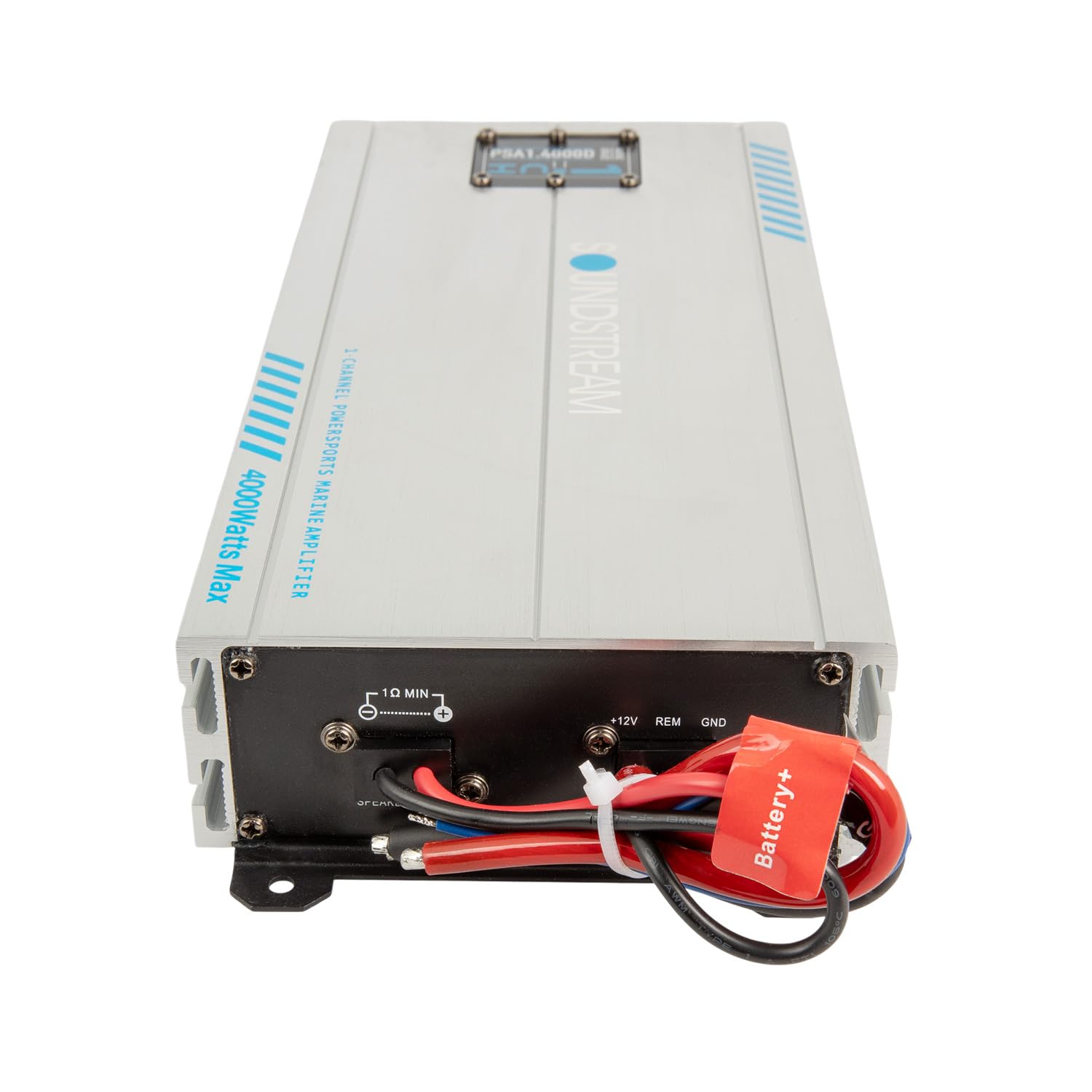
Image: Close-up view of the power (+12V, REM, GND) and speaker output terminals on the amplifier.
4.2.2. Audio Input Connections
Connect the RCA cables from your head unit's pre-amp outputs to the amplifier's RCA input jacks.

Image: Close-up view of the RCA input and output connections on the amplifier.
4.2.3. Speaker Output Connections
Connect your subwoofer(s) to the amplifier's speaker output terminals. Ensure correct polarity (+ to + and - to -) for optimal sound. This is a monoblock amplifier, designed for a single channel output, typically for subwoofers.
5. Operating the Amplifier
Once all connections are made and verified, reconnect the vehicle's battery. Turn on your head unit, and the amplifier should power on automatically via the remote turn-on wire.
5.1. Gain Adjustment
The gain control matches the amplifier's input sensitivity to the output level of your head unit. Start with the gain control at minimum. Play a familiar track at about 75% of your head unit's maximum volume. Slowly increase the amplifier's gain until you hear distortion, then back it off slightly. This ensures maximum clean output.
5.2. Crossover Settings
The PSA1.4000D features variable low-pass and subsonic crossovers:
- Low-Pass Filter (LPF): This filter allows only frequencies below the set point to pass through to the subwoofer. Adjust this to blend the subwoofer's output with your main speakers. A common starting point is 80-100 Hz.
- Subsonic Filter: This filter removes extremely low frequencies that are inaudible and can cause damage to your subwoofer. Set this typically 5-10 Hz below your LPF setting, or around 25-30 Hz.
5.3. Bass Boost
The adjustable bass boost allows you to enhance the low-frequency output. Use this sparingly and adjust to your preference. Excessive bass boost can lead to distortion and potential damage to your subwoofer.
5.4. Remote Bass Control Knob
Connect the included remote bass control knob to the amplifier. This allows for convenient adjustment of the subwoofer level from your listening position.
6. Maintenance
The Soundstream PSA1.4000D is designed for durability in harsh environments. Regular maintenance will ensure its longevity:
- Cleaning: Periodically wipe the amplifier's exterior with a damp cloth to remove dirt, salt, or mud. Avoid using harsh chemicals or abrasive cleaners.
- Connections: Annually inspect all wiring connections for corrosion, looseness, or damage. Tighten any loose connections and replace corroded terminals.
- Ventilation: Ensure that the amplifier's cooling fins are free from obstructions to allow for proper heat dissipation.
7. Troubleshooting
If you experience problems with your amplifier, refer to the following troubleshooting guide:
| Problem | Possible Cause | Solution |
|---|---|---|
| No Power / Amplifier Not Turning On |
|
|
| No Sound Output |
|
|
| Distorted Sound |
|
|
| Amplifier Overheating |
|
|
8. Specifications
Technical specifications for the Soundstream PSA1.4000D Monoblock Waterproof Marine Amplifier:
| Model | PSA1-4000D |
| Output Power (Max) | 4000 Watts |
| Number of Channels | 1 (Monoblock) |
| Voltage | 12.2 Volts |
| Item Dimensions (L x W x H) | 14 x 5.75 x 2.75 inches |
| Item Weight | 6.2 Pounds |
| Material Type | Aluminum |
| Mounting Type | Surface Mount |
| IP Rating | IP66 (Waterproof) |
9. Warranty and Support
For warranty information and technical support, please refer to the official Soundstream website or contact their customer service department. Keep your purchase receipt as proof of purchase for any warranty claims.
Manufacturer: Soundstream


