
1. Introduction
This manual provides essential information for the safe and efficient operation of your LVYUAN 51.2V 100Ah LiFePO4 Lithium Ion Battery. This high-performance battery is designed for various applications, including solar power systems, RVs, and camping vehicles, offering reliable and long-lasting energy storage. Please read this manual thoroughly before installation and use to ensure proper functionality and safety.
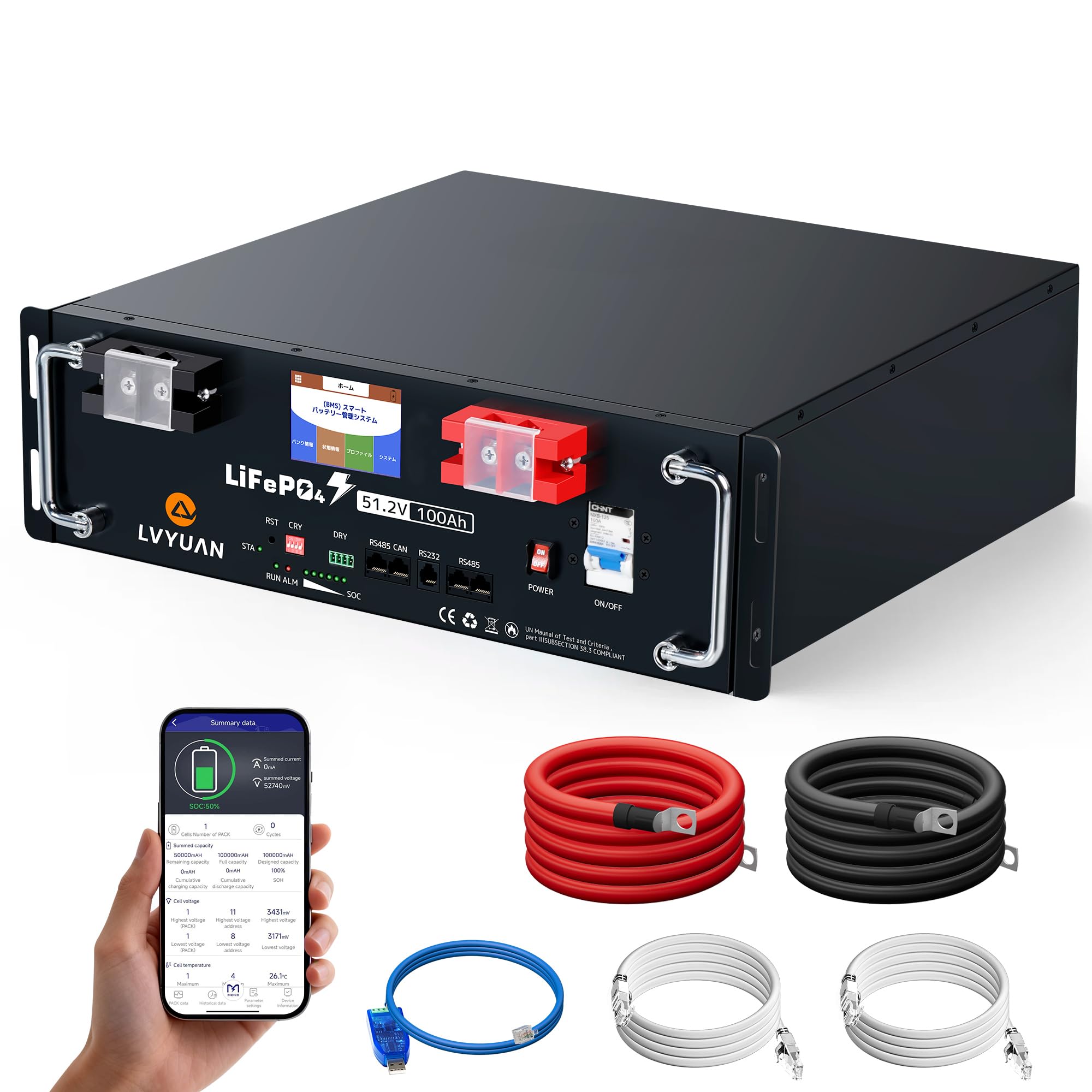
Image 1.1: LVYUAN 51.2V 100Ah LiFePO4 Lithium Ion Battery.
2. Safety Information
Your LVYUAN LiFePO4 battery incorporates advanced safety features. Adherence to the following guidelines is crucial for preventing damage, injury, or fire.
- Installation: Ensure all connections are secure and correctly polarized. Incorrect wiring can cause severe damage.
- Environment: Operate the battery within the specified temperature ranges. Avoid exposure to extreme heat, direct sunlight, or freezing conditions.
- Handling: The battery is heavy (approx. 45.5kg). Use appropriate lifting techniques or equipment during installation.
- Ventilation: While LiFePO4 batteries are generally safe, ensure adequate ventilation around the battery to prevent heat buildup.
- Protection: The integrated Battery Management System (BMS) provides protection against overcharge, over-discharge, overcurrent, short circuits, and high temperatures. Do not attempt to bypass or modify the BMS.
- Certifications: This product complies with international safety standards including IECEE CB, IEC 62619:2022 (TÜV-SÜD), CE, and RoHS.

Image 2.1: Internal and external safety features, including specialized terminals and a protective switch.
3. Product Overview
3.1 Key Features
- High-Quality EVE Grade-A Cells: Utilizes premium EVE battery cells, certified for safety and reliability, ensuring stable output and high energy density.
- Extended Cycle Life: Offers over 6000 charge/discharge cycles (at 0.2C-80%DOD), providing a lifespan of 10 years or more.
- Integrated BMS: Advanced Battery Management System protects against overcharge, over-discharge, overcurrent, short circuits, and temperature extremes.
- LCD Touch Display: Real-time monitoring of battery voltage, current, temperature, and State of Charge (SOC).
- Multiple Communication Interfaces: Equipped with RS485, RS232, and CAN ports for external data communication and management.
- Scalable Design: Supports parallel connection of up to 16 units, allowing for a total energy storage capacity of over 80kWh.
- Compact and Lightweight: Slim, rack-mountable design optimizes space utilization.
- Triple Protection Structure: Beyond electronic control, the product design includes double terminal structure, current equalization during charging, and heat suppression for enhanced safety.

Image 3.1: Overview of key features and components.
3.2 Components
The package includes:
- LVYUAN 51.2V 100Ah LiFePO4 Battery Unit
- Battery Connection Cables (AWG6) x 2
- Communication Cables (3 types)
- User Manual (this document)
4. Setup and Installation
Proper installation is critical for the battery's performance and safety. Follow these steps carefully.
4.1 Unpacking and Inspection
- Carefully remove the battery from its packaging.
- Inspect the battery for any visible damage. If damage is found, do not proceed with installation and contact customer support.
- Verify all included components are present.
4.2 Placement
- Install the battery indoors, in a dry, well-ventilated area.
- Ensure the ambient temperature is within the recommended storage range of -10°C to 30°C.
- The rack-mount design allows for stacking multiple units to save space. Ensure the mounting surface is stable and can support the combined weight.

Image 4.1: Example of stacked battery installation in an RV.
4.3 Electrical Connections
- Single Battery Connection: Connect the positive (+) terminal of the battery to the positive input of your inverter/charger or load, and the negative (-) terminal to the negative input. Use the provided AWG6 battery cables.
- Parallel Connection (up to 16 units): For increased capacity, multiple batteries can be connected in parallel. Ensure all batteries are of the same model and have similar State of Charge (SOC) before connecting. Connect positive terminals together and negative terminals together. Refer to the system diagram for proper parallel wiring.
- Communication Connections: Use the provided communication cables to connect the battery to compatible inverters or monitoring systems via RS485, RS232, or CAN ports.

Image 4.2: Example of a LVYUAN solar power system setup.

Image 4.3: Parallel expansion capability up to 16 units.
4.4 App Connection (PACEEX)
- Download the "PACEEX" app from the Apple App Store or Google Play.
- Ensure the battery is powered on.
- Open the app and select "Local control" (for Bluetooth) or configure Wi-Fi remote control.
- The app will automatically search for and pair with the battery.

Image 4.4: PACEEX app for battery monitoring and control.
5. Operating Instructions
5.1 Powering On/Off
- To power on, press the power button on the front panel. The LCD display will illuminate.
- To power off, press and hold the power button until the display turns off.
5.2 LCD Display Operation
The integrated LCD touch display provides real-time information about the battery's status.
- Main Screen: Displays key information such as State of Charge (SOC), voltage, current, and temperature.
- Battery Information: Access detailed cell voltage and temperature readings.
- BMS Status: View active protection functions (e.g., overvoltage, undervoltage, overcurrent, short circuit, over-temperature).
- Navigate through menus using the touch interface.

Image 5.1: Multi-monitor display for comprehensive battery information.
5.3 Charging and Discharging
- Ensure your charger or inverter is compatible with LiFePO4 batteries and set to the correct voltage (58.4V for charging).
- The BMS will manage charging and discharging within safe limits.
- Optimal operating temperature for charging is 0°C to 45°C, and for discharging is -20°C to 55°C.
6. Maintenance
Regular maintenance ensures the longevity and optimal performance of your battery.
- Cleaning: Keep the battery terminals and casing clean and free from dust or debris. Use a dry cloth for cleaning.
- Connections: Periodically check all electrical connections to ensure they are tight and free from corrosion.
- Temperature Monitoring: While the BMS protects against extreme temperatures, avoid prolonged operation at the edges of the specified temperature range.
- Storage: If storing the battery for an extended period, ensure it is charged to approximately 50% SOC and stored in a cool, dry place within the -10°C to 30°C range.

Image 6.1: Operating temperature ranges for the battery.
7. Troubleshooting
This section addresses common issues you might encounter.
7.1 Common Issues and Solutions
- Battery Not Powering On:
- Check if the power button was pressed correctly.
- Ensure battery terminals are securely connected.
- Verify the battery has sufficient charge.
- No Charge/Discharge:
- Check all cable connections between the battery, charger/inverter, and load.
- Inspect the LCD display or app for any active BMS protection warnings (e.g., overvoltage, undervoltage, overcurrent, over-temperature). Address the cause of the warning.
- Ensure the charger/inverter settings are correct for a 51.2V LiFePO4 battery.
- Communication Error:
- Verify communication cables are correctly connected to the appropriate ports (RS485, RS232, CAN).
- Check the settings on your external monitoring device or inverter for correct communication protocol.
- For app connection, ensure Bluetooth/Wi-Fi is enabled and the app is correctly paired.
- Unusual Noise or Smell:
- Immediately disconnect the battery from all loads and chargers.
- Move the battery to a safe, well-ventilated area.
- Contact customer support immediately. Do not attempt to use or repair the battery.
If you encounter issues not listed here or if the suggested solutions do not resolve the problem, please contact LVYUAN customer support.
8. Specifications
| Parameter | Value |
|---|---|
| Model | LV-51.2V100AH-PX (JHXNY-51.2V100AH-JJ) |
| Battery Type | LiFePO4 (Lithium Iron Phosphate) |
| Rated Voltage | 51.2V |
| Energy Capacity | 5,120Wh (5.12kWh) |
| Rated Capacity | 100Ah |
| Max Continuous Discharge Current | 100A (1C) |
| Rated Charge Current | 50A (0.5C) |
| Rated Charge Voltage | 58.4V ± 0.4V |
| Cycle Life | ≥6000 cycles (0.2C-80%DOD) |
| Operating Temperature (Charging) | 0°C to 45°C |
| Operating Temperature (Discharging) | -20°C to 55°C |
| Storage Temperature | -10°C to 30°C |
| Dimensions (H x W x D) | 140mm x 460mm x 440mm |
| Weight | Approx. 45.5kg ± 2kg |
| Terminal Size | M8 |
| Max Parallel Units | 16 |
| Installation Location | Indoor |
| Certifications | IECEE CB / IEC 62619:2022 (TÜV-SÜD) No.: B 098952 0027 Rev. 00 / CE / RoHS |

Image 8.1: Product specifications and dimensions.
9. Warranty and Support
9.1 Warranty Information
The LVYUAN 51.2V 100Ah LiFePO4 Lithium Ion Battery comes with a 5-year warranty. This warranty covers defects in materials and workmanship under normal use and service. For detailed warranty terms and conditions, please contact LVYUAN customer support.
9.2 Customer Support
For any questions, technical assistance, or warranty claims, please contact LVYUAN customer support. Refer to your purchase documentation or the official LVYUAN website for contact details.