
Introduction
Thank you for choosing the Ajgvq Wireless Meat Thermometer BQ02. This device is designed to help you achieve perfectly cooked meats with precision and convenience, whether grilling, smoking, or baking. This manual provides detailed instructions for setup, operation, maintenance, and troubleshooting to ensure optimal performance and longevity of your thermometer.
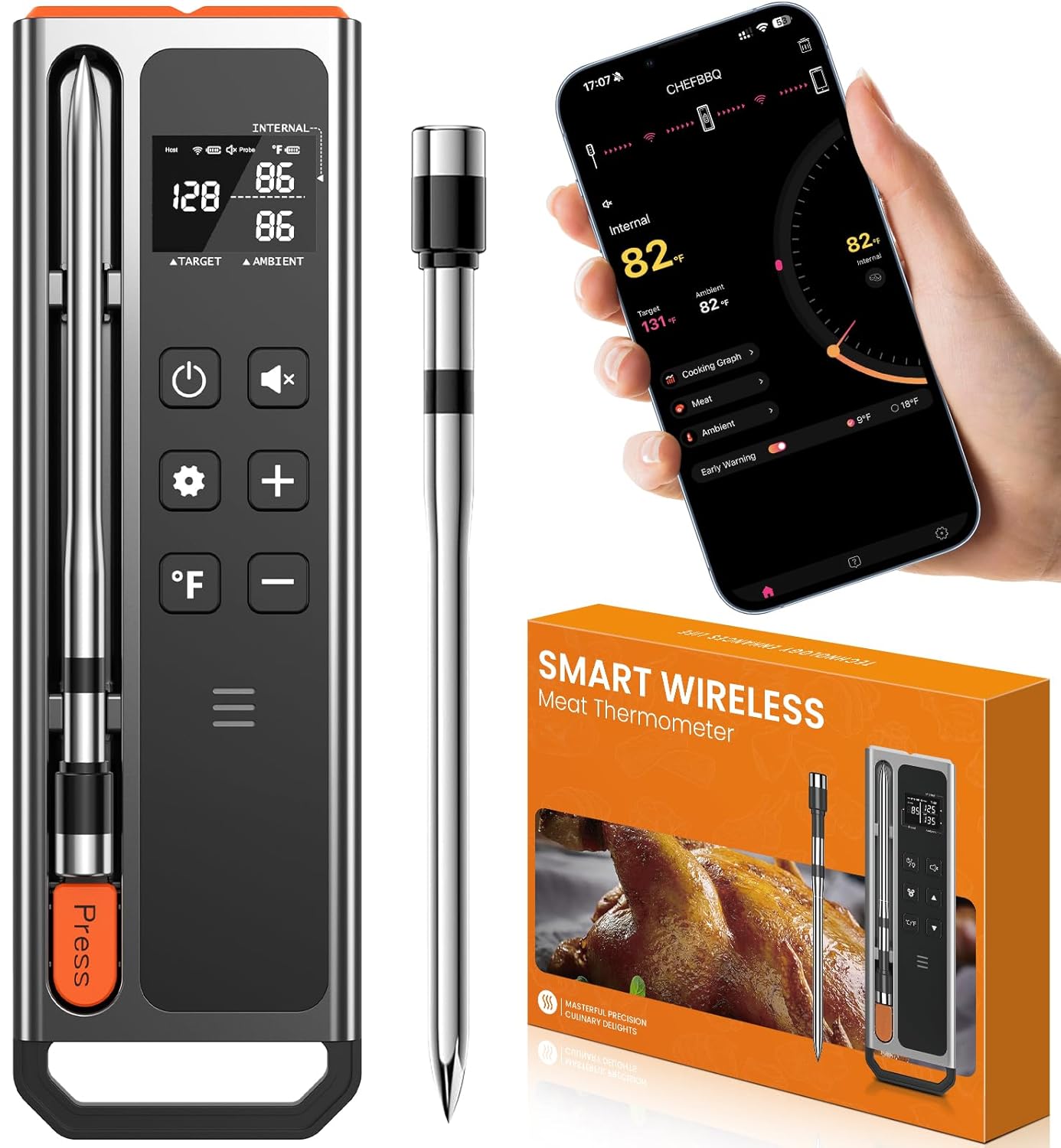
Image: The Ajgvq Wireless Meat Thermometer BQ02, showing the host unit, the probe, and a smartphone displaying the companion app.
Safety Information
- Do not expose the host unit to direct heat or flames.
- The probe is designed for food temperature measurement. Do not use it for other purposes.
- Always handle the probe with care as the tip is sharp.
- Ensure the probe is inserted past the insertion line to protect the ambient temperature sensor.
- Keep the device out of reach of children.
- Do not immerse the host unit in water. The probe is waterproof, but the host is not.
- Use only the provided USB-C cable for charging.
Package Contents
Please check the package for the following items:
- 1 x Wireless Meat Thermometer Probe
- 1 x Host Unit
- 1 x USB-A to USB-C Charging Cable
- 1 x User Manual (this document)
Product Overview
The Ajgvq BQ02 consists of a wireless probe and a multi-functional host unit, designed for precise temperature monitoring during cooking.
Components

Image: Detailed diagram illustrating the various parts of the host unit (display screen, buttons, speaker, charging port) and the probe (ceramic handle, insertion line, internal temp sensor, pointed tip).
- Wireless Probe: Features dual sensors for internal food temperature (14°F to 212°F / -10°C to 100°C) and ambient temperature (14°F to 572°F / -10°C to 300°C). Constructed from surgical-grade 316 stainless steel with a ceramic handle. It is IP67 waterproof and dishwasher safe.
- Host Unit: A multi-functional display base showing real-time food and ambient temperatures, as well as battery levels for both the probe and host. It allows for direct temperature setting and provides audible alerts. The host unit is magnetically attachable.
- CHEFBBQ App: A companion application for iOS and Android devices that provides remote monitoring, customizable temperature settings, USDA meat presets, intelligent alerts, and data graphing.
Setup
1. Charging the Device
Before first use, fully charge both the probe and the host unit.
- Probe: Insert the probe into the host unit. A 10-minute charge provides approximately 24 hours of continuous use.
- Host Unit: Connect the host unit to a USB power source using the provided USB-A to USB-C charging cable. A full charge takes approximately 3 hours and provides over 120 hours of runtime.

Image: The host unit being charged via USB-C, with indicators for fast charging the probe and extended battery life for both components.
2. App Installation
The CHEFBBQ app is available for both iOS and Android devices.
- Scan the QR code provided in the packaging or search for "CHEFBBQ" in your device's app store (Apple App Store for iOS, Google Play Store for Android).
- Download and install the application. No registration is required to use the app.
3. Bluetooth Pairing
Ensure Bluetooth is enabled on your smartphone.
- Power on the host unit.
- Open the CHEFBBQ app on your smartphone.
- The app will automatically search for and connect to the BQ02 host unit. Pairing is typically instant.
Operating Instructions
1. Probe Insertion Guidelines
Proper probe insertion is crucial for accurate temperature readings.
- Insert the probe into the thickest part of the meat, avoiding bones or gristle.
- Ensure the probe is inserted past the 'insertion line' (the notch on the probe shaft) so that both the internal and ambient temperature sensors are correctly positioned.

Image: A raw chicken with the thermometer probe correctly inserted, alongside the app interface for setting target temperatures.
2. Using the Host Unit
The host unit provides standalone operation without the need for the app.
- The display shows real-time internal food temperature, ambient temperature, and battery levels.
- Use the buttons on the host to set your desired target temperature.
- The host will provide audible alerts when the target temperature is reached.
- Press the '°F' button to switch between Celsius and Fahrenheit.
3. Using the CHEFBBQ App
The app offers enhanced control and monitoring features.
- Select Meat Type: Choose from various USDA-recommended presets for different types of meat (e.g., Beef, Chicken, Pork, Lamb, Fish).
- Set Doneness: For each meat type, select your desired doneness level (e.g., Rare, Medium, Well Done). The app will automatically set the corresponding target temperature.
- Custom Temperature: You can also set a custom target temperature if desired.
- Monitor Progress: The app displays real-time internal and ambient temperatures, cooking graphs, and estimated cooking times.
- Alerts: Receive alerts on your phone when the target temperature is reached. Both the host unit and your phone will notify you.

Image: The CHEFBBQ app interface showing different doneness options for meat, such as Rare, Medium-Rare, Medium, Medium-Well, and Well Done, with their respective target temperatures.

Image: The CHEFBBQ app showing a selection of meat types for which temperature presets can be chosen.
4. Bluetooth Range
The BQ02 utilizes Bluetooth 5.3 technology for a stable connection up to 800 feet (244 meters) in open-field conditions without obstructions. Actual range may vary based on environmental factors, such as walls, interference, and the specific phone model used.

Image: A visual representation of the Bluetooth connectivity range between the host unit and connected devices, indicating distances for various cooking setups.
For optimal performance, place the host unit at least 1 foot (30 cm) away from cooking utensils or heat sources to prevent potential damage.

Image: A kitchen setting demonstrating how the host unit and smartphone provide alerts when the cooking process is complete.
Maintenance
1. Cleaning
- Probe: The probe is IP67 waterproof and dishwasher safe. For best results, clean immediately after use. Wipe the ceramic handle with a damp cloth.
- Host Unit: Wipe the host unit with a soft, damp cloth. Do not immerse the host unit in water or place it in a dishwasher.

Image: Demonstrations of the probe's waterproof design and its compatibility with dishwashers for easy cleaning.
2. Storage
Store the probe securely within the host unit when not in use. Store the device in a cool, dry place away from direct sunlight and extreme temperatures.
Troubleshooting
| Problem | Possible Cause | Solution |
|---|---|---|
| Device not powering on | Low battery | Charge the host unit and probe fully. |
| App not connecting to device | Bluetooth off; device out of range; app issue | Ensure Bluetooth is enabled on your phone. Bring device closer. Restart the app and host unit. |
| Inaccurate temperature readings | Probe not inserted correctly; probe damaged | Ensure probe is inserted past the insertion line and not touching bone. If problem persists, contact support. |
| Short battery life | Incomplete charge; aging battery | Ensure full charge cycles. If battery life significantly degrades, contact support. |
Specifications

Image: A close-up of the probe in meat, detailing the internal and ambient temperature sensor locations and their respective measurement ranges.
- Model Number: HK-BQ02
- Internal Temperature Range: 14°F to 212°F (-10°C to 100°C)
- Ambient Temperature Range: 14°F to 572°F (-10°C to 300°C)
- Temperature Accuracy: ±0.5°F (±0.3°C)
- Connectivity: Bluetooth 5.3
- Wireless Range: Up to 800ft (244m) in open-field conditions
- Probe Material: Surgical-grade 316 Stainless Steel, Ceramic Handle
- Waterproof Rating: IP67 (Probe only)
- Probe Charge Time: 10 minutes for 24 hours of use
- Host Charge Time: 3 hours for 120+ hours of runtime
- Power Source: 1 A battery (included)
- Charging Port: USB Type-C
- Product Dimensions: 6.29 x 1.99 x 0.63 inches (Host unit)
- Weight: 3.52 ounces
- Certifications: CE, FCC, NSF
Warranty and Support
Ajgvq provides a standard manufacturer's warranty for this product. For detailed warranty information, product support, or to report any issues, please refer to the contact information provided with your purchase or visit the official Ajgvq website.