
1. Product Overview
The BrickSoul LED RC Light Kit is designed to illuminate your LEGO Neuschwanstein Castle 21063 model, enhancing its visual appeal. This kit includes remote control functionality for adjusting brightness and light modes, providing a dynamic display for your building set. Please note that the LEGO model itself is not included with this lighting kit.
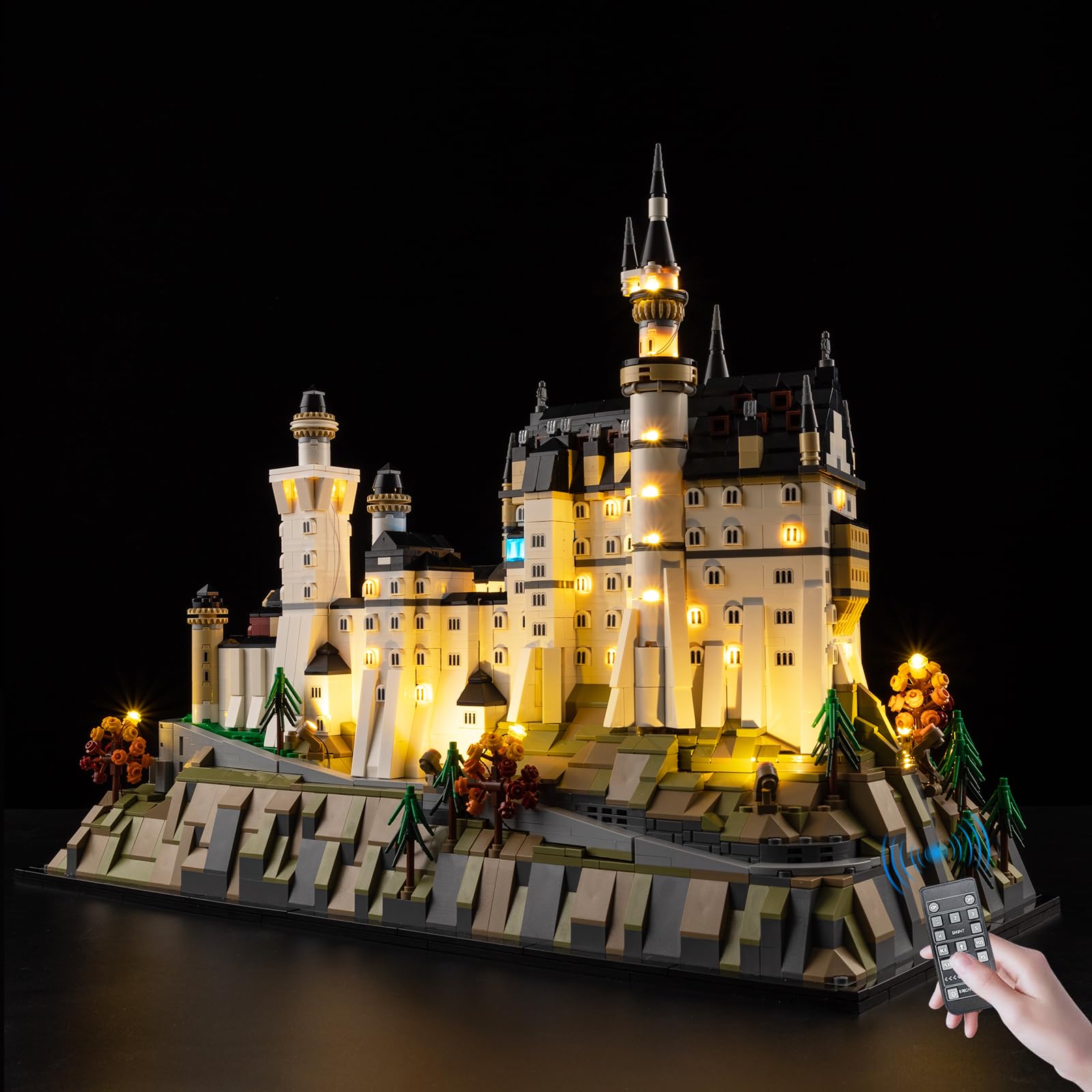
Image 1.1: The BrickSoul LED RC Light Kit packaging alongside an illuminated LEGO Neuschwanstein Castle model.
2. Package Contents
Verify that all components are present in your package:
- LED Light Kits (various light strings and components)
- Remote Control Unit
- Battery Box (requires AAA batteries, not included)
- USB Power Cable
- Tweezers (for precise installation)
- Service Guide / Installation Guide

Image 2.1: Overview of the components included in the BrickSoul LED RC Light Kit package.
3. Setup and Installation
The BrickSoul LED kit is designed for straightforward installation. Follow the numbered step-by-step instructions provided in the included guide. Digital instructions (PDF/video) are also available by scanning the QR code in the manual or visiting the BrickSoul website.
- Prepare Your Model: Ensure your LEGO Neuschwanstein Castle 21063 model is fully assembled. You may need to carefully remove certain bricks to integrate the lighting components.
- Connect Lights: Follow the installation guide to connect the LED light strings and components to the designated areas of your model. The design aims for seamless integration and clean wiring. Use the provided tweezers for precise placement of small components.
- Power Connection: Connect the light kit to the battery box or a USB power source (3-5V input). Ensure AAA batteries are inserted into the battery box if using battery power.
- Test Functionality: Before reassembling all bricks, test the lights using the remote control to ensure all connections are secure and lights are functioning correctly.
The kit is made from durable ABS plastic and copper wire, designed not to damage or loosen your model's bricks.

Image 3.1: Examples of the integrated lighting design, highlighting detailed illumination within the model.
4. Operating Instructions
This upgraded version features a remote control for convenient operation of your light kit.
Remote Control Functions:
- ON/OFF: Press the 'ON' button to turn the lights on, and 'OFF' to turn them off.
- Brightness Adjustment: Use the 'BRIGHTNESS' up and down arrows to increase or decrease the light intensity.
- Light Modes: The remote offers multiple flash modes. Use the 'EFFECT' buttons (e.g., 1, 2, 3, 4, 5, FLK, RS) to cycle through different lighting effects.
- Zoning Control: Specific buttons (e.g., BLK, SHNT, PUS) may control different lighting zones or sections of your model, allowing for customized illumination. Refer to the detailed installation guide for specific zone assignments.

Image 4.1: Illustration of remote control features, including power, brightness, and mode selection.
Video 4.1: Demonstration of the BrickSoul LED RC Light Kit's remote control functions, showcasing various lighting effects and brightness adjustments on the LEGO Neuschwanstein Castle model.
5. Maintenance
To ensure the longevity and optimal performance of your BrickSoul LED Light Kit, follow these maintenance guidelines:
- Cleaning: Gently dust the LED components and wires with a soft, dry cloth. Avoid using liquid cleaners directly on the lights or electrical connections.
- Storage: If disassembling the model or storing the light kit, carefully disconnect wires and store components in a dry, cool place away from direct sunlight.
- Battery Replacement: If using the battery box, replace AAA batteries when lights dim or cease to function. Ensure correct polarity when inserting new batteries.
- Handle with Care: Avoid excessive pulling or bending of wires to prevent damage to the connections.
6. Troubleshooting
If you encounter issues with your light kit, refer to the following common solutions:
- Lights Not Turning On:
- Check power source: Ensure the USB cable is securely connected or that fresh AAA batteries are correctly installed in the battery box.
- Verify connections: Inspect all wire connections to ensure they are firmly seated. Loose connections are a common cause of non-functional lights.
- Remote control: Ensure the remote control has working batteries and is pointed towards the receiver.
- Lights Are Dim or Flickering:
- Low batteries: Replace batteries in the battery box.
- Power supply: Ensure the USB power source provides adequate and stable power.
- Brightness setting: Adjust the brightness using the remote control.
- Specific Lights Not Working:
- Check individual connections: A specific light or section may have a loose or damaged wire. Carefully inspect the connections for that particular light.
- Damaged component: If a component is physically damaged (e.g., bent connector, broken wire), refer to the warranty section for replacement options.
7. Specifications
| Feature | Detail |
|---|---|
| Brand | BrickSoul |
| Model Name | 21063-rc |
| Compatibility | LEGO Neuschwanstein Castle 21063 |
| Control Type | Remote Control (RC) |
| Power Input | USB or AAA Batteries (3-5V) |
| Material | ABS Plastic, Copper Wire |
| Item Dimensions | 6.36 x 4.32 x 1.33 inches (packaging) |
| Item Weight | 4.8 ounces |
| Assembly Required | Yes |
8. Warranty and Support
BrickSoul offers a worry-free warranty to ensure a smooth and stress-free lighting experience.
- Replacements: In case of accidental damage, such as a bent connector or broken wire, BrickSoul provides quick and hassle-free replacements.
- Support Team: For any questions, issues, or to request a replacement, please contact the BrickSoul support team. Refer to the service guide included in your package for contact information or visit the official BrickSoul website.
