
Introduction
This manual provides comprehensive instructions for the installation, operation, and maintenance of your Imou Cell 3C AIO 5MP Solar Surveillance Camera. Please read this manual thoroughly before use and retain it for future reference.
The Imou Cell 3C AIO is a wireless, rechargeable surveillance camera featuring an integrated 2.2W solar panel for continuous power. It offers 5MP (3K) resolution, IP66 weather resistance, smart color night vision, and advanced human detection with smart tracking. Key features include a built-in siren and spotlight for deterrence, flexible storage options via microSD card or Imou Cloud, and a privacy mode for enhanced security.
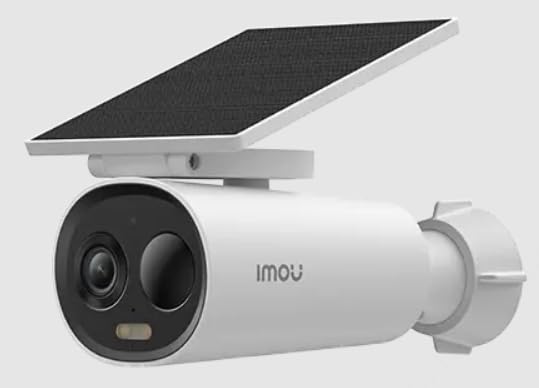
Image of the Imou Cell 3C AIO 5MP Solar Surveillance Camera, showcasing its compact design and integrated solar panel.
Setup
Follow these steps for initial setup of your Imou Cell 3C AIO camera:
- Unpack and Inspect: Carefully remove all components from the packaging and ensure everything is present and undamaged.
- Initial Charge: Although solar-powered, it is recommended to fully charge the camera using a 5V USB adapter (not included) before the first use to ensure optimal performance.
- Download Imou Life App: Download and install the "Imou Life" app from your smartphone's app store (available on iOS and Android).
- Account Creation: Open the Imou Life app and create a new account or log in to an existing one.
- Add Device: Follow the in-app instructions to add your camera. This typically involves scanning a QR code on the camera or its packaging.
- Mounting Location: Select a suitable outdoor location for mounting. Ensure the solar panel receives direct sunlight for several hours daily to maintain battery charge. The camera is IP66 weather-resistant, suitable for various outdoor conditions.
- Secure Mounting: Use the provided mounting hardware to securely attach the camera to the chosen surface. Adjust the camera angle for optimal surveillance coverage.
Operating Instructions
Utilize the Imou Life app to access and control your camera's features:
- Live View: Open the Imou Life app and select your camera from the device list to view the real-time video feed.
- Motion Detection and Tracking: The camera features advanced human detection and smart tracking. Configure detection sensitivity, activity zones, and alert preferences within the app settings.
- Night Vision: The camera supports smart color night vision, which automatically activates in low-light conditions to provide clear, full-color images.
- Siren and Spotlight: The integrated spotlight and siren can be configured to activate automatically upon detection of an intruder, or they can be manually triggered through the Imou Life app to deter potential threats.
- Video Storage:
- MicroSD Card: Insert a microSD card (up to 256GB, not included) into the designated slot for local video storage.
- Imou Cloud: Subscribe to Imou Cloud for secure cloud storage of your video recordings. Refer to the app for subscription details and free trial availability.
- Privacy Mode: Activate the privacy mode within the Imou Life app. This feature physically covers the camera lens, ensuring your privacy when desired.
Maintenance
Proper maintenance ensures the longevity and optimal performance of your camera:
- Cleaning: Regularly clean the camera lens and the surface of the solar panel with a soft, damp cloth. Avoid using abrasive cleaners or harsh chemicals, as these can damage the components.
- Firmware Updates: Periodically check for and install firmware updates through the Imou Life app. Updates often include performance improvements, new features, and security enhancements.
- Environmental Care: While IP66 rated, extreme environmental conditions (e.g., prolonged exposure to direct salt spray, very high humidity, or temperatures outside the specified operating range) should be minimized to prevent potential damage.
- Battery Health: Ensure the solar panel receives adequate sunlight daily to maintain the internal battery's charge. If the camera is in a shaded area, occasional manual charging via USB may be required.
Troubleshooting
Refer to this section for solutions to common issues:
- Camera Not Powering On:
- Check if the solar panel is obstructed or receiving insufficient sunlight.
- Ensure the internal battery has sufficient charge. If necessary, manually charge the camera via USB.
- Cannot Connect to Wi-Fi:
- Verify that the camera is within range of your Wi-Fi router.
- Double-check the Wi-Fi password entered in the Imou Life app.
- Restart both the camera and your Wi-Fi router.
- Poor Image Quality:
- Clean the camera lens to remove any dirt or smudges.
- Ensure there is adequate lighting in the surveillance area, especially for optimal color night vision.
- Check your network connection stability, as a weak signal can affect video streaming quality.
- Motion Detection Not Working:
- Verify that motion detection is enabled and configured correctly in the Imou Life app settings.
- Adjust the detection sensitivity and ensure activity zones are properly defined.
- Ensure there are no physical obstructions blocking the camera's view in the detection area.
Specifications
| Feature | Detail |
|---|---|
| Model Number | IPC-K9DC-5M0WEH-V2 |
| Brand | Imou |
| Resolution | 5 Megapixels (3K) |
| Integrated Solar Panel | 2.2 Watts |
| Weather Resistance | IP66 Certified |
| Dimensions (L x W x H) | 16.8 x 7.2 x 6 cm |
| Weight | 650 grams |
| Power Consumption | 3.5 Watts |
| Voltage | 5 Volts |
| Storage Options | MicroSD card (up to 256GB), Imou Cloud |
| Features | Human Detection, Smart Tracking, Smart Color Night Vision, Siren, Spotlight, Privacy Mode |
Warranty and Support
For detailed warranty information, technical assistance, or customer support, please visit the official Imou website or contact their authorized service centers. Retain your proof of purchase for any warranty claims.


