
Trevi RDA 70 BR
Trevi RDA 70 BR Portable Multiband Radio User Manual
Model: RDA 70 BR | Brand: Trevi
Introduction
The Trevi RDA 70 BR is a compact and versatile portable wireless radio designed to provide a complete audio experience. It combines traditional radio reception with modern digital functions, making it ideal for listening to music or news anywhere. This radio supports FM, AM, and SW bands, offering access to a wide variety of local and international stations. Additionally, it features a wireless audio connection for streaming from smartphones or tablets, and an integrated MP3 player for direct playback from USB drives or Micro SD cards. Powered by a rechargeable lithium battery with convenient USB Type-C charging, the Trevi RDA 70 BR ensures maximum portability and continuous use.
Important Safety Information
- Read all instructions carefully before using the device.
- Keep this manual for future reference.
- Do not expose the device to rain, moisture, or extreme temperatures.
- Avoid placing the device near heat sources such as radiators, heat registers, stoves, or other apparatus (including amplifiers) that produce heat.
- Use only attachments/accessories specified by the manufacturer.
- Protect the power cord from being walked on or pinched, particularly at plugs, convenience receptacles, and the point where they exit from the device.
- Unplug this device during lightning storms or when unused for long periods.
- Refer all servicing to qualified service personnel. Servicing is required when the device has been damaged in any way.
Package Contents
Please check that all items are present and in good condition:
- Trevi RDA 70 BR Portable Multiband Radio
- USB/Type-C Charging Cable
- User Manual (this document)
Product Overview
Front Panel
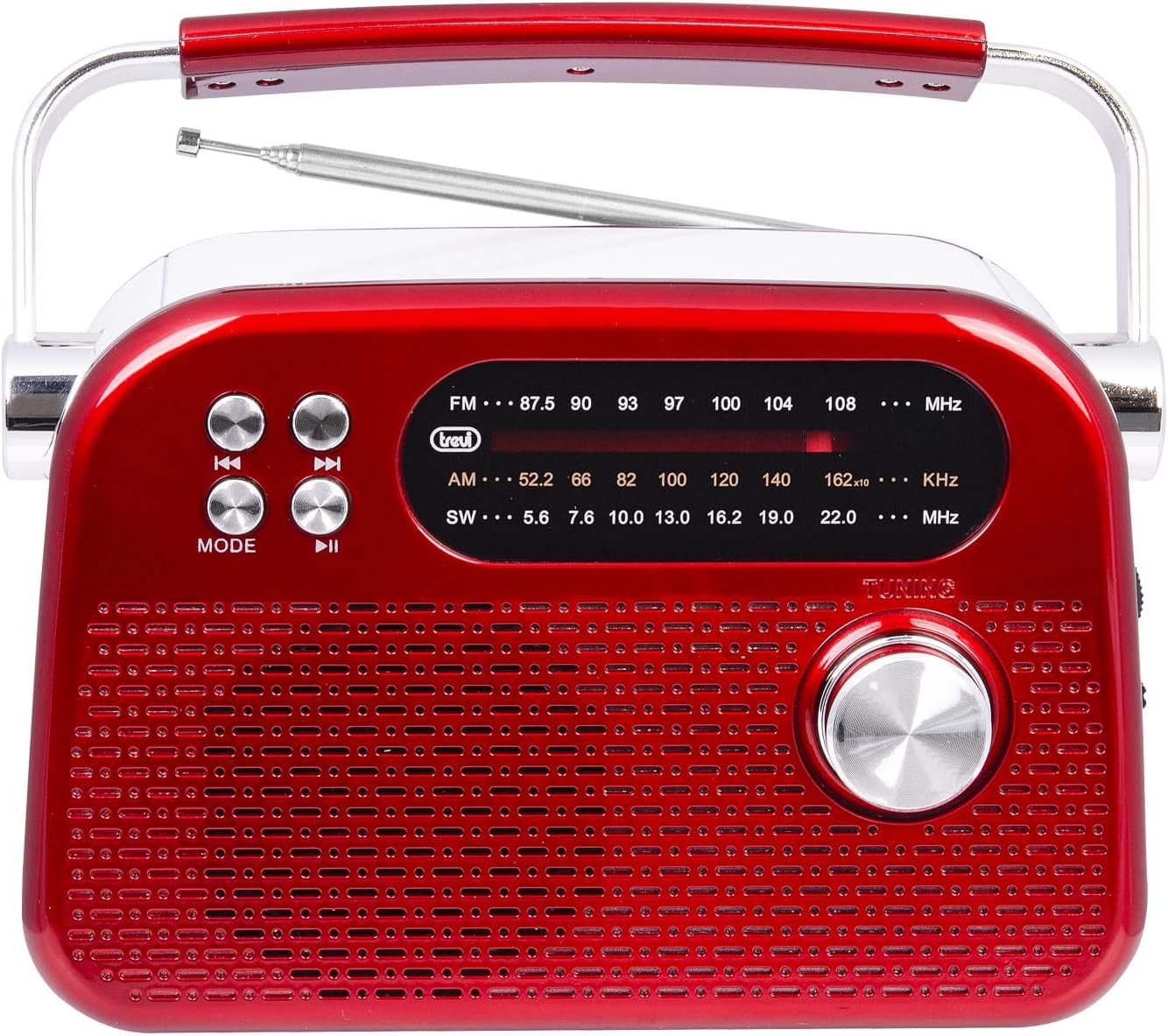
Image 1: Front view of the Trevi RDA 70 BR radio. This image displays the main speaker grille, the frequency display for FM, AM, and SW bands, the tuning knob on the right, and control buttons (Mode, Play/Pause, Skip) on the left.
- Frequency Display: Shows the current radio frequency for FM, AM, and SW bands.
- Mode Button: Switches between radio (FM/AM/SW) and MP3 playback modes.
- Playback Control Buttons: For MP3 mode, these buttons control previous track, play/pause, and next track.
- Tuning Knob: Used to manually tune radio frequencies.
- Speaker Grille: Main audio output.
Side Panel and Ports

Image 2: Side view of the Trevi RDA 70 BR radio. This image highlights the side panel where the volume control, power switch, USB port, Micro SD card slot, and the USB Type-C charging port are located.
- Volume Knob: Adjusts the audio output level.
- Power Switch (OFF/ON): Turns the radio on or off.
- DC 5V IN (Type-C Port): Connect the provided USB Type-C cable for charging the internal battery.
- USB Port: Insert a USB flash drive for MP3 playback.
- Micro SD Card Slot (TF): Insert a Micro SD card for MP3 playback.
Rear Panel

Image 3: Rear view of the Trevi RDA 70 BR radio. This image shows the telescopic antenna, the battery compartment with an "OPEN" indicator, and the product information label.
- Telescopic Antenna: Extend for improved radio reception.
- Battery Compartment: Houses the rechargeable lithium battery.
Setup
1. Charging the Battery
- Locate the USB Type-C charging port on the side of the radio (refer to Image 2).
- Connect one end of the provided USB Type-C cable to the radio's charging port.
- Connect the other end of the USB cable to a standard USB power adapter (not included) or a computer's USB port.
- The charging indicator light (if present) will illuminate to show that the battery is charging.
- Allow the radio to charge fully before first use. A full charge typically takes a few hours.
2. Antenna Adjustment
For optimal radio reception, especially for FM and SW bands, fully extend the telescopic antenna located on the rear panel of the radio (refer to Image 3). You may adjust its angle and direction to improve signal strength.
Operating Instructions
1. Power On/Off
To turn the radio ON, slide the Power switch (located on the side panel, refer to Image 2) to the "ON" position. To turn it OFF, slide the switch to "OFF".
2. Adjusting Volume
Rotate the Volume knob (located on the side panel, refer to Image 2) clockwise to increase the volume and counter-clockwise to decrease it.
3. Radio Tuning (FM/AM/SW)
- Ensure the radio is powered on.
- Press the MODE button (on the front panel) repeatedly until the desired radio band (FM, AM, or SW) is selected. The selected band will be indicated on the frequency display.
- Extend the telescopic antenna for better reception.
- Rotate the TUNING knob (on the front panel) to search for radio stations. The frequency will change on the display.
- Stop tuning when you find a clear signal for your desired station.
4. MP3 Playback (USB/Micro SD)
- Insert a USB flash drive into the USB port or a Micro SD card into the TF slot on the side panel (refer to Image 2).
- Press the MODE button (on the front panel) repeatedly until the MP3 playback mode is activated. The radio will automatically detect and begin playing MP3 files from the inserted media.
- Use the playback control buttons (Previous, Play/Pause, Next) on the front panel to manage your music.
- To remove the USB drive or Micro SD card, first switch to a different mode or power off the radio, then gently pull out the media.
5. Wireless Audio Connection
The Trevi RDA 70 BR features a wireless audio connection, allowing you to stream audio from compatible devices like smartphones or tablets. While in MP3 mode, the radio may automatically enter a pairing state or you may need to press the MODE button to switch to the wireless audio input. Refer to your external device's manual for pairing instructions. Once connected, the radio acts as a wireless speaker for your device.
Maintenance
- Cleaning: Use a soft, dry cloth to clean the exterior of the radio. Do not use abrasive cleaners, waxes, or solvents.
- Battery Care: To prolong battery life, avoid fully discharging the battery frequently. Recharge the radio regularly, especially if it will be stored for an extended period.
- Storage: When not in use, store the radio in a cool, dry place away from direct sunlight and extreme temperatures.
Troubleshooting
| Problem | Possible Cause | Solution |
|---|---|---|
| Radio does not power on. | Battery is discharged. | Connect the radio to a power source using the USB Type-C cable and allow it to charge. |
| Poor radio reception. | Antenna not extended or poor signal area. | Fully extend the telescopic antenna and adjust its position. Try moving the radio to a different location. |
| No sound from USB drive or Micro SD card. | Incorrect mode selected or unsupported file format. | Ensure the radio is in MP3 playback mode. Verify that the audio files are in MP3 format. Check if the USB drive/Micro SD card is properly inserted. |
| Wireless audio connection issues. | Device not paired or out of range. | Ensure the radio is in wireless audio mode. Check your external device's Bluetooth settings and re-pair if necessary. Keep devices within close range. |
Specifications
- Model: RDA 70 BR
- Brand: Trevi
- Radio Bands: FM, AM, SW
- Audio Playback: USB, Micro SD (MP3 format)
- Connectivity: Wireless Audio Connection
- Power Source: Rechargeable Lithium Battery
- Charging Port: USB Type-C (DC 5V)
- Dimensions (L x W x H): Approximately 18.5 cm x 7 cm x 12.5 cm
- Weight: Approximately 600 g
- Included Components: USB/Type-C Charging Cable
- Country of Origin: China
Warranty and Support
For warranty information and technical support, please refer to the warranty card included with your product or visit the official Trevi website. Keep your purchase receipt as proof of purchase for any warranty claims.
Manufacturer: Trevi
Ask a question about this manual
Ask about setup, troubleshooting, compatibility, parts, safety, or missing instructions. Manuals+ will review the question and use this page’s manual context to help answer it.