
Important Safety Information
Please read and understand all instructions before assembling and using this product. Failure to follow these instructions may result in electric shock, fire, property damage, or personal injury.
- Electrical Safety: Ensure the electric fireplace is connected to a properly grounded outlet. Do not overload circuits. Keep power cords away from heated surfaces and foot traffic.
- Placement: Position the TV stand on a firm, level surface. Maintain adequate clearance from combustible materials (curtains, furniture, bedding) to prevent fire hazards. Do not block air vents on the fireplace insert.
- Child Safety: Keep children and pets away from the fireplace insert, especially when it is operating. The fireplace features a child lock function; utilize it for added safety.
- Ventilation: Ensure proper ventilation around the unit. Do not cover the fireplace or its air intake/exhaust vents.
- Weight Capacity: Do not exceed the maximum weight capacity of 150 lbs for the TV stand top.
Package Contents
The Unineo Fireplace TV Stand is shipped in two separate packages, one for the cabinet and one for the electric fireplace. These packages may arrive at different times. Verify all components are present before beginning assembly.
Typical components include:
- Cabinet panels (top, bottom, sides, shelves, back panels)
- Sliding barn doors with windows
- Hardware kit (screws, dowels, cam locks, sliding rails, handles)
- Electric fireplace insert (26 inches)
- Fireplace remote control
- RGB LED light strip and remote/APP controller
- Assembly instruction manual

Image: Illustration of the two-package shipping process for the TV stand and fireplace.
Setup and Assembly
Assembly is required for this TV stand. Each part is independently labeled, and a step-by-step instruction manual is included in the packaging. It is recommended to have two people for assembly due to the weight and size of some components.
- Unpack Components: Carefully unpack all parts from both packages. Lay them out on a clean, soft surface to prevent scratches. Verify all hardware and panels are present against the parts list in the included manual.
- Assemble Cabinet Frame: Follow the detailed instructions provided to assemble the main cabinet frame using the designated hardware. Pay close attention to the orientation of each panel.
- Install Shelves: Insert the adjustable shelves into the desired positions within the side compartments.
- Attach Sliding Rails: Secure the smooth sliding rails for the barn doors according to the instructions.
- Install Sliding Doors: Mount the sliding barn doors onto the rails. Ensure they slide smoothly and the viewable windows are correctly positioned.
- Insert Electric Fireplace: Carefully slide the 26-inch electric fireplace insert into its designated central opening. Ensure it fits securely.
- Apply LED Light Strip: Attach the RGB LED light strip to the interior of the open shelves as per the instructions. Connect it to the controller.
- Final Placement: Position the assembled TV stand on a flat, stable floor surface. Ensure there is sufficient space around the unit for proper air circulation and to accommodate your TV and other media devices.
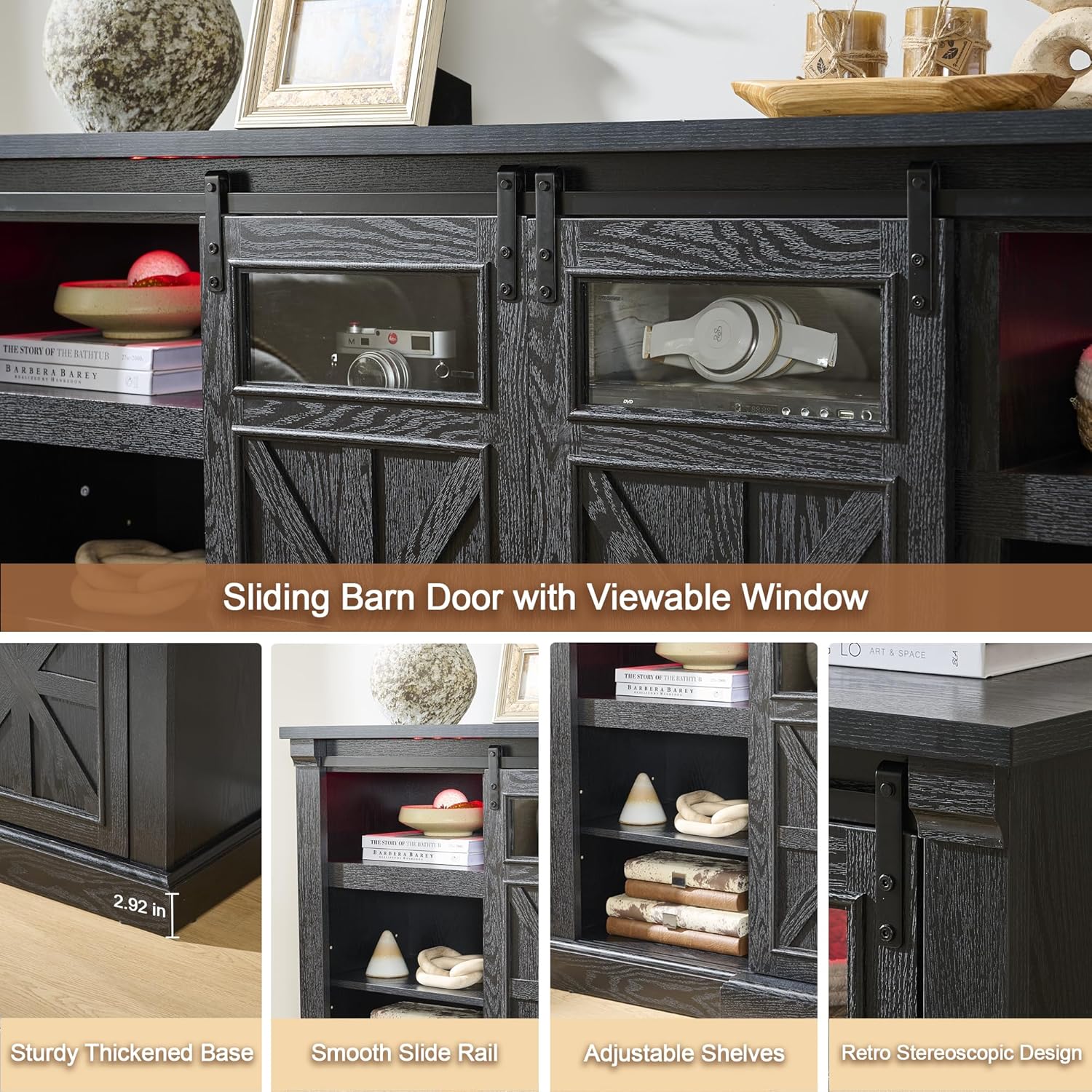
Image: Detailed view of sliding barn door, adjustable shelves, and base construction.

Image: Cable management and adjustable shelf details.
Operating Instructions
Electric Fireplace Operation
The 26-inch electric fireplace insert provides realistic 3D flame effects and a log ember bed. It can function as a decorative element or a supplementary heat source.
- Power On/Off: Use the power button on the fireplace unit or the included remote control to turn the fireplace on or off.
- Flame Settings: Adjust the flame color (8 modes available), ember color (6 modes available), flame brightness, and flame speed using the remote control or control panel on the unit. The flame effect can operate independently of the heat function.
- Heat Function: The 1400W heater can warm rooms up to 450 sq. ft. Use the thermostat to set your desired temperature (62°F-90°F). The heater includes an overheat protection feature for safety.
- Timer: Set the integrated timer for automatic shut-off.
- Child Lock: Activate the child lock feature to prevent unintended operation.

Image: Electric Fireplace features and controls.

Image: Fireplace flame and ember color options.
RGB LED Lighting Control
The integrated RGB LED lights can be customized to create various ambiances.
- Control Methods: The LED lights can be controlled via a dedicated remote control or a smartphone application.
- Color and Brightness: Choose from hundreds of colors and adjust brightness levels to suit your preference.
- Rhythm Modes: Select from various rhythm modes, including music and microphone synchronization, where the lights change automatically with audio input.

Image: RGB LED light strip features and control options.

Image: LED lighting in different colors, controlled by app or remote.
Sliding Barn Doors
The TV stand features sliding barn doors with viewable windows, allowing you to conceal or display items in the side compartments.
- Operation: Gently slide the doors along the top rail to open or close the compartments.
- Versatility: The doors can be positioned to cover the fireplace insert when not in use, offering a different aesthetic.
Video: Overview of Unineo Fireplace TV Stand with Sliding Barn Door, demonstrating its features and functionality.
Maintenance
Regular maintenance will help prolong the life and appearance of your TV stand.
- Cleaning the Cabinet: Wipe surfaces with a soft, damp cloth. Avoid harsh chemicals or abrasive cleaners that could damage the engineered wood with black woodgrain finish.
- Fireplace Care: Ensure the fireplace is unplugged before cleaning. Dust the exterior and clear any obstructions from the air intake/exhaust vents. Do not attempt to clean the interior components.
- Sliding Mechanism: Periodically check the sliding rails for any debris and clean as needed to ensure smooth operation of the barn doors.
- LED Lights: The LED lights are designed for long-term use and generally require no maintenance. If issues arise, refer to the troubleshooting section.

Image: Waterproof wooden grain finish for easy maintenance.
Troubleshooting
| Problem | Possible Cause | Solution |
|---|---|---|
| Fireplace not turning on. | No power, child lock engaged, unit overheated. | Check power connection. Deactivate child lock. Allow unit to cool down if overheat protection activated. |
| No heat output from fireplace. | Heat function off, thermostat set too low. | Ensure heat function is activated. Increase thermostat setting. |
| LED lights not working or unresponsive. | Loose connection, remote battery low, APP issue. | Check LED strip connections. Replace remote battery. Restart APP or re-pair with lights. |
| Sliding doors are stiff or stuck. | Debris in rail, misaligned. | Clean the sliding rails. Gently adjust door alignment if necessary. |
| Assembly difficulties. | Incorrect part orientation, missing hardware. | Review the step-by-step instructions carefully. Contact customer support for missing parts. |
Specifications
- Model Number: 25IN-26-16D
- Brand: Unineo
- Color: Black Woodgrain
- Material: Engineered Wood
- Product Dimensions (D x W x H): 15.62" x 69.6" x 32.11"
- Item Weight: 130 Pounds
- Maximum Weight Capacity: 150 Pounds (Top Surface)
- Recommended TV Size: Up to 80 Inch TVs
- Electric Fireplace Size: 26 Inch
- Heater Wattage: 1400W
- Heating Area: Up to 450 Sq.ft
- Thermostat Range: 62°F - 90°F
- Flame Features: 8 Color Modes, 6 Ember Colors, Adjustable Brightness & Speed
- LED Lighting: RGB, APP/Remote Control, Music/Mic Mode, Over 6000 Colors
- Number of Shelves: 7 (including open and behind doors)
- Door Style: Sliding Barn Door with Window
- Safety Features: Overheat Protection, Child Lock (Fireplace)
- Assembly: Required

Image: Product dimensions and TV compatibility.
Warranty and Support
UnineoHome offers customer support for this product. For any issues, missing parts, or questions regarding assembly and operation, please contact UnineoHome directly.
- Returns: This product is eligible for 30-day easy returns.
- Customer Support: Contact UnineoHome for assistance. Refer to your purchase documentation for specific contact details.