
1. Product Overview
The Typhur Sync Gold Wireless Meat Thermometer (Gen2) is designed to provide precise temperature monitoring for various cooking methods. Featuring advanced Sub-1 GHz technology, it offers an extended wireless range and stable connectivity. The device includes a smart base for direct temperature readings and adjustments, complemented by a mobile application for enhanced control and monitoring.
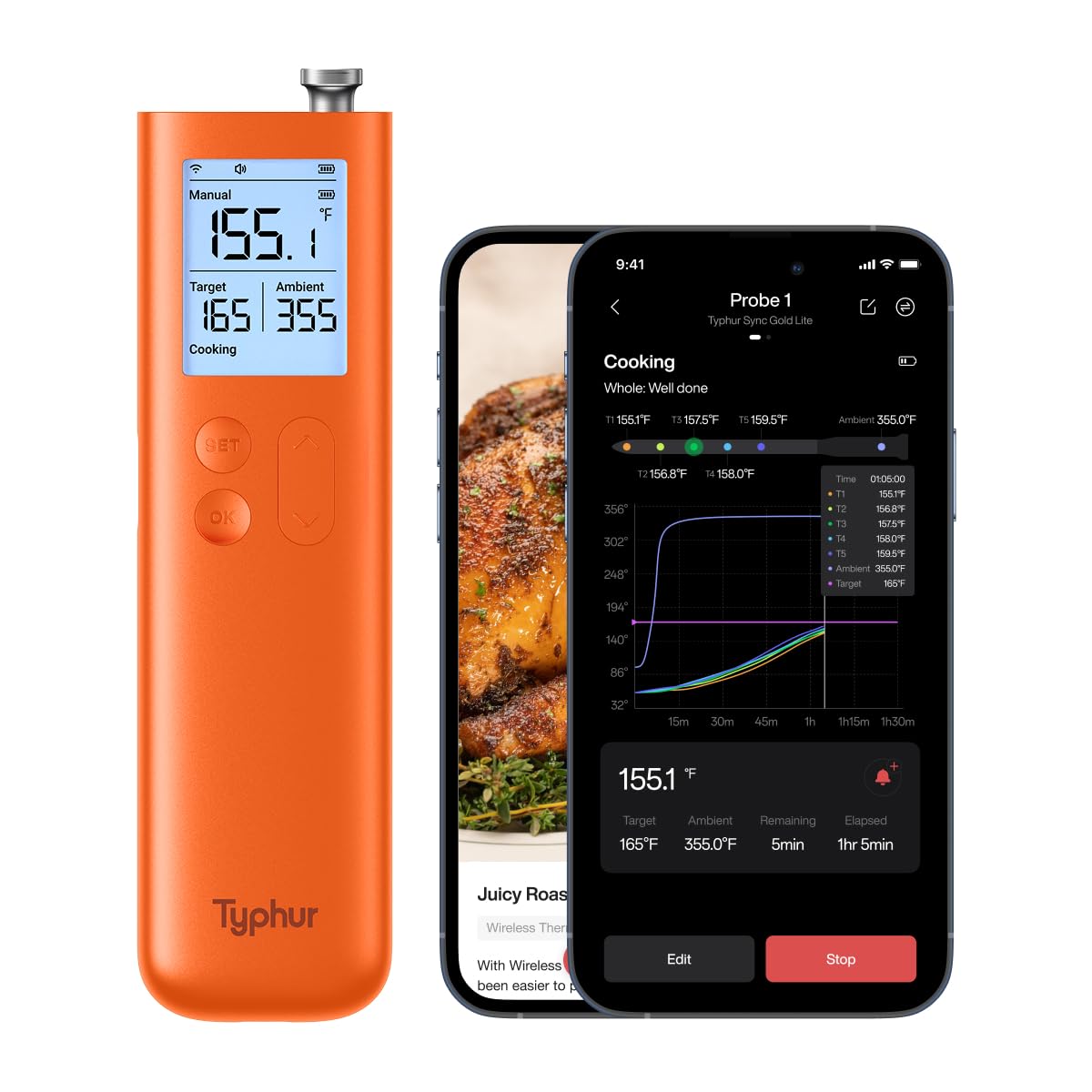
Figure 1.1: Typhur Sync Gold Wireless Meat Thermometer (Gen2) Base Unit and Probe.
Key Features:
- 10x Signal Strength: Utilizes Sub-1 GHz technology for a signal up to ten times stronger than traditional Bluetooth thermometers, ensuring reliable monitoring through various cooking environments.
- Innovative Smart Base: Allows direct viewing of temperature readings and adjustments on the device itself.
- Six Sensors: Each probe is equipped with five internal sensors and one ambient sensor for accurate temperature measurement and cooking time prediction.
- Accurate and Fast: Provides ±0.5℉ accuracy and a 0.5-second response time.
- Extreme Durability: IPX8 waterproof probes designed to withstand temperatures up to 932°F (ambient) and 221°F (internal).
- Versatile Use: Suitable for BBQ, oven, smoker, grill, air fryer, deep frying, and sous vide.
Video 1.1: Introducing the Typhur Sync Gold Lite Gen 2 Thermometer. This video provides a general overview of the product's features and capabilities.
2. Setup Guide
2.1. Unboxing and Initial Charge
Upon opening the package, ensure all components are present:
- Device Base x 1
- Meat Probe x 1
- Charging Cable x 1
- User Manual x 1
Before first use, fully charge the meat probe by inserting it into the device base and connecting the base to a power source using the provided USB-C charging cable. The base unit itself is also battery-powered and rechargeable.

Figure 2.1: The probe charges when inserted into the base unit, which is powered via USB-C.
2.2. App Download and Connection
The Typhur Sync Gold Thermometer can be operated directly from its smart base or via the dedicated mobile application. For advanced features and remote monitoring, download the Typhur app from your smartphone's app store.
- Search for "Typhur" in your device's app store.
- Download and install the official Typhur application.
- Follow the in-app instructions to pair your thermometer with your smartphone via WiFi or Bluetooth.
3. Operating Instructions
3.1. Basic Operation (Using the Smart Base)
The smart base allows for direct control and monitoring without the need for a smartphone.
- Power On: Press the power button on the base unit to turn it on.
- Insert Probe: Carefully insert the meat probe into the thickest part of the food, avoiding bone. Ensure the safety notch on the probe is fully inside the meat.
- Set Target Temperature: Use the 'SET' button and arrow keys on the base to adjust your desired internal target temperature. The display will show the current internal temperature, target temperature, and ambient temperature.
- Monitor Cooking: Place the food with the probe in your cooker. The base will continuously display the temperatures.
- Alerts: The base unit will beep when the target temperature is reached.

Figure 3.1: The smart base displays current, target, and ambient temperatures, allowing for app-free cooking.
3.2. Advanced Operation (Using the Typhur App)
The Typhur app provides comprehensive control and monitoring features.
- Connect to App: Open the Typhur app on your smartphone. Ensure your device is paired.
- Select Cooking Mode: Choose between 'Smart' mode for guided cooking based on protein type and desired doneness, or 'Manual' mode for custom temperature settings.
- Set Doneness: In 'Smart' mode, select your protein and desired doneness (e.g., Rare, Medium-Rare, Medium, Well-Done). The app will suggest a target temperature.
- Custom Alerts: Set custom alerts for time or temperature thresholds.
- Real-time Monitoring: View real-time temperature graphs, estimated remaining cook time, and receive notifications on your phone or smartwatch.
- Typhur Sync Recipes: Access a library of recipes with integrated cooking guidance.
- AI-Powered Guidance: Utilize the AI feature to get cooking recommendations by simply snapping a picture or typing in your dish.

Figure 3.2: The Typhur app offers smart cooking modes, doneness preferences, and customizable alerts for precise cooking.

Figure 3.3: The app provides detailed cooking graphs and real-time updates, allowing you to monitor progress remotely.
3.3. Probe Placement and Compatibility
Proper probe placement is crucial for accurate readings. Insert the probe into the center of the thickest part of the meat, ensuring the safety notch is fully embedded. The thermometer is designed for use in various cooking environments:
- Smoker
- Oven
- Kamado Grill
- Open-flame Grill
- Deep Fryer
- Stovetop (Pan)
- Air Fryer
- Sous Vide

Figure 3.4: The Typhur Sync Gold Thermometer is compatible with a wide range of cooking methods and appliances.

Figure 3.5: The probe features six sensors for precise internal and ambient temperature monitoring.
4. Care and Maintenance
4.1. Cleaning
- Probe: The IPX8 waterproof probe is dishwasher safe for easy cleaning. Alternatively, wash with warm soapy water and rinse thoroughly.
- Base Unit: Wipe the base unit with a damp cloth. Do not submerge the base unit in water.

Figure 4.1: The IPX8 waterproof probe is safe for dishwasher cleaning.
4.2. Storage
Store the probe securely within the base unit when not in use. The base unit features a magnetic design, allowing it to be conveniently attached to metal surfaces like a refrigerator or oven side.

Figure 4.2: The magnetic base allows for convenient storage on metal surfaces.
5. Troubleshooting
5.1. Connection Issues
- Weak Signal: The Sub-1 GHz technology provides a strong signal, but extreme distances or very thick obstructions (e.g., multiple walls, heavy cast iron cookers) can affect range. Try moving the base unit closer to the cooker or ensuring a clear line of sight.
- App Disconnection: Ensure your smartphone's Bluetooth and/or WiFi is enabled and the app is running in the foreground or background. Restarting the app or the base unit may resolve minor connectivity glitches.

Figure 5.1: Sub-1GHz technology offers significantly greater range and stability compared to standard Bluetooth connections.
5.2. Inaccurate Readings
- Improper Probe Placement: Ensure the probe is inserted correctly into the thickest part of the meat, away from bone. The safety notch must be fully inside the food.
- Calibration: Each probe is factory calibrated at three stages during production. If you suspect a significant discrepancy, refer to the full user manual for advanced calibration checks or contact customer support.
5.3. Overheat Warning
The probe is designed for high temperatures (up to 932°F ambient, 221°F internal). If an overheat warning occurs, immediately remove the probe from the heat source and allow it to cool. Ensure the ambient temperature does not exceed the maximum rating for prolonged periods.
6. Product Specifications
| Feature | Detail |
|---|---|
| Brand | Typhur |
| Model Name | Sync Gold Lite (YS-WT10) |
| Color | Orange |
| Special Feature | App Companion |
| Included Components | Device Base x 1, Meat Probe x 1, Charging Cable x 1, User Manual x 1 |
| Outer Material | Plastic |
| Specification Met | FCC, NIST, RoHS |
| Display Type | LCD |
| Connectivity Technology | Sub-1GHz, Wi Fi |
| Product Care Instructions | Machine Wash (Probe) |
| Power Source | Battery Powered |
| Number of Batteries | 2 Nonstandard Battery batteries required (included) |
| Item Length | 6.6 Inches |
| Upper Temperature Rating (Ambient) | 752°F |
| Internal Temperature Rating (Max) | 221°F |
| Response Time | 0.5 seconds |
| Reusability | Rechargeable |
| Lower Temperature Rating | 32°F |
| Indoor/Outdoor Usage | Indoor, Outdoor |
| Item Weight | 7.8 ounces |
| UPC | 850074930471 |
7. Warranty & Support
7.1. Warranty Information
Typhur stands behind the quality of its products. While specific warranty details may vary, some users have reported a lifetime warranty for the probe. Please refer to the warranty card included in your product packaging or visit the official Typhur website for the most current and detailed warranty information.
7.2. Customer Support
For technical assistance, troubleshooting, or any product-related inquiries, please contact Typhur customer support through their official website or the contact information provided in your user manual. Timely support is available to ensure your satisfaction with the Typhur Sync Gold Wireless Meat Thermometer.


